llmspeed: Feel Local LLM Speed Before You Buy Hardware
llmspeed simulates tokens per second and time-to-first-token for local LLMs across 30 GPUs, Macs and CPUs, so you can judge hardware before buying.
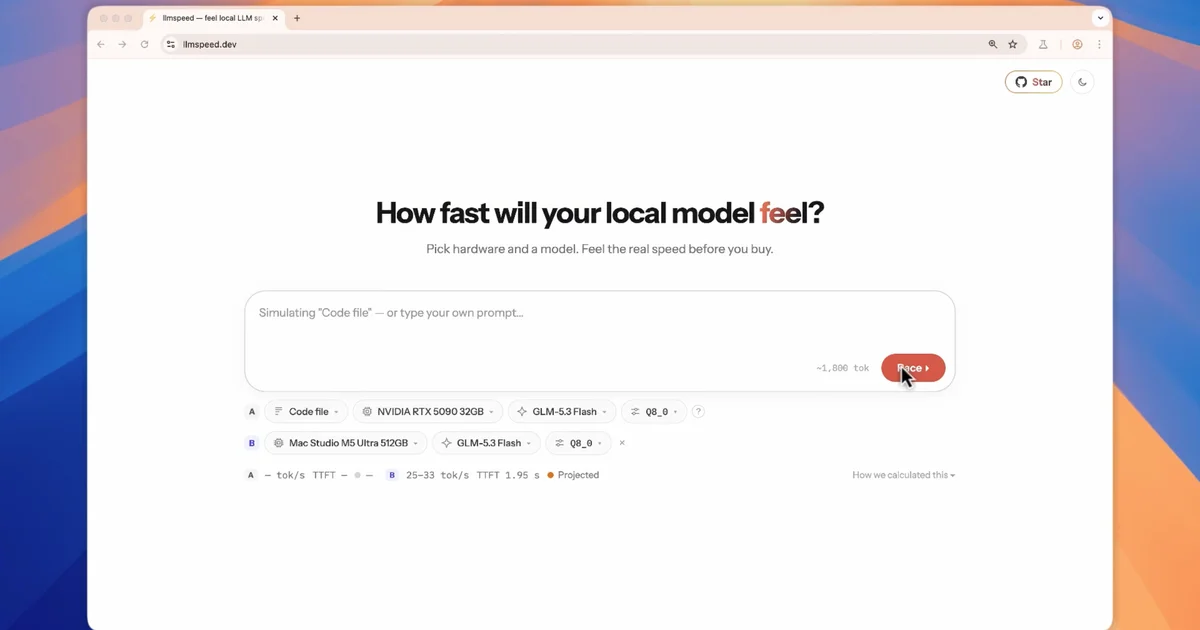
TL;DR: llmspeed turns a hardware and model choice into a speed you can feel before you spend money. Pick one of 30 GPUs, Macs or CPUs plus one of 15 models, and the answer streams at the predicted tokens per second, including the wait before the first token. Every number carries a label, so you can tell a real measurement from a projection.
What it is
llmspeed is a browser simulator for local LLM inference. You choose a device (an RTX 5090, a Mac Studio M5 Ultra, DGX Spark, or a 9950X with 96 GB of DDR5) and a model (Qwen 3.6 27B, GLM-5.3 Flash, GPT-OSS 120B, Llama 3.1 8B), and a sample response types itself out at the rate that combination would actually produce.
The part that matters most is the pause before the first token. Time to first token decides whether a local model feels responsive in an editor or feels broken, and it depends on prompt length and prefill speed rather than generation throughput alone. llmspeed simulates both, which is the difference between reading a tokens-per-second number and understanding why a model feels sluggish.
The site is static, free, and needs no account. It is a simulator, though, not a benchmark runner. Nothing executes on your machine.
Why it matters
Buying local LLM hardware usually means guessing. A product name says little about how fast a given model will run on it, and a 24 GB card may not hold a 27B model at a quantization you would be willing to use. The memory check answers that directly: it reports whether the model fits at each quantization, whether it needs to spill part of the weights into system RAM, or whether it will not run on that device at all.
Then there is the trust problem, because a number without a source is a guess:
| Label | What it means |
|---|---|
| Measured | Benchmarked on this exact hardware, model and quantization |
| Derived | Interpolated from measured benchmarks of similar setups |
| Projected | Calculated from hardware specs, for announced but unreleased hardware |
Benchmark data comes from r/LocalLLaMA, localscore.ai and llama.cpp discussions, and the project accepts new measurements as pull requests.
How the estimates are built
Where no benchmark exists, llmspeed falls back to a physical model of inference rather than a curve fit. Generation speed is bound by memory bandwidth, since every token reads the active weights once, and for mixture-of-experts models only the active parameters count. Prompt processing is bound by compute instead, expressed in FP16 TFLOPS. Each backend carries an efficiency coefficient calibrated against the measured benchmarks, and both numbers slow down as context grows.
Partial offload gets a hybrid treatment. The share of the model that stays on the GPU streams at GPU bandwidth while the spilled share streams at an effective system RAM bandwidth, calibrated from real offload runs. The memory fit calculation counts weights, KV cache and runtime overhead against usable memory, roughly 75 percent of unified memory on Macs and 93 percent of VRAM on discrete GPUs.
Measuring your own machine
The most valuable contribution to llmspeed is a real measurement, and the project documents exactly how to produce one. Run llama.cpp’s benchmark tool:
llama-bench -m your-model.gguf -p 512 -n 128Then open a pull request against benchmarks/submissions.csv with the hardware, model, quantization, backend, engine version, generation tokens per second, prefill tokens per second, prompt length and a link to the raw output. Results from MLX, vLLM or ExLlama are welcome as long as the engine is named in the row.
Getting it running
It is a Vite, Preact and TypeScript project. Every prediction lives in data/app-data.json, generated by the benchmark pipeline:
npm install
npm run dev      # local dev server
npm run build    # production build plus prerendered landing pages and a sitemap
The matrix covers 30 devices across CUDA, Metal, ROCm, Vulkan and CPU, paired with 15 models, and any setup can be turned into a shareable link. Race mode puts two configurations side by side, which is how you would compare an RTX 5090 against a Mac Studio running the same model.
What to watch for
Single device only. Multi-GPU setups, whether split by tensor or by layer, are not simulated, so a machine in the middle of your rack gets no representation here.
Treat the numbers as estimates. The project puts the realistic swing at 10 to 30 percent, driven by drivers, engine versions, flash attention, power limits and thermals. A real run on your exact machine settles the question, and llama-bench gives you that in a few minutes.
Entries for hardware that has been announced but not shipped are marked as projected, and they get replaced once measurements arrive.
Source and Accuracy Notes
- Project page: https://llmspeed.dev — verified via direct visit on 2026-10-22
- Source repository: https://github.com/nicorobinreal/llmspeed (MIT, TypeScript, 148 stars, last push 2026-10-20)
- License: MIT, per the LICENSE file in the repository
- HN launch thread: https://news.ycombinator.com/item?id=50127979 (329 points, 2026-10-17)
Related Posts
ai-setup
Recall – Persistent Memory for Claude Code via MCP Hooks
Recall gives Claude Code a permanent memory store that survives session restarts and context compaction. Four hooks capture and restore context automatically — with cloud SaaS or self-hosted options.
2/28/2026
dev-tools
Automotive Skills Suite for AI Engineering
Evaluate Automotive Skills Suite for APQP, ASPICE, HARA, safety-plan, and DIA workflows with setup notes, governance risks, and SME review guidance.
5/28/2026
dev-tools
awesome-agentic-ai-zh Roadmap Guide
Explore awesome-agentic-ai-zh as a Chinese agentic AI learning roadmap, with setup notes, track selection, study workflow, and evaluation guidance.
5/28/2026