Maxxwell: a control room for parallel coding agents
Maxxwell is a local desktop app and CLI for supervising parallel Claude Code and Codex sessions, with fleet views and a morning report. Free for individuals.
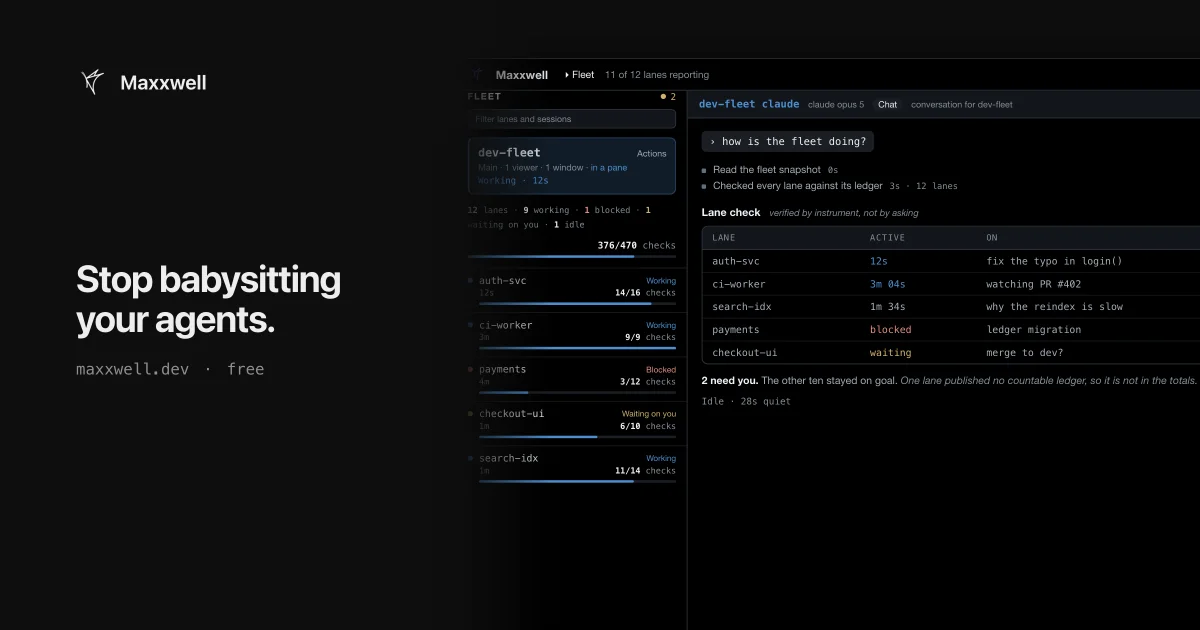
TL;DR: Maxxwell gives every parallel Claude Code or Codex session its own lane, ranks those lanes by what actually landed on disk, and surfaces only the ones waiting on a decision. It runs on your own machine with no Maxxwell account, and it is free for individuals. The catch is that the current release ships a reader and a report, while the automatic supervision shown on the marketing page is still product direction.
What it is
Maxxwell is a local desktop app and CLI built by Rindler, a YC company, that supervises coding agents you already have installed. It brings no model of its own. It drives Claude Code, Codex and other agent CLIs that are signed in on your machine, and it records what those sessions do in a fleet directory on disk.
The unit of work is a lane. A lane is one scoped piece of work, with its own branch, its own set of files and its own prompt. The desktop app groups lanes by workspace, so a repo with nine active agents reads as nine rows instead of nine terminals.
Workers stay ordinary sessions. Maxxwell attaches to a Claude Code or Codex conversation rather than replacing it, so you can open any lane and keep typing in the same thread.
Why it matters
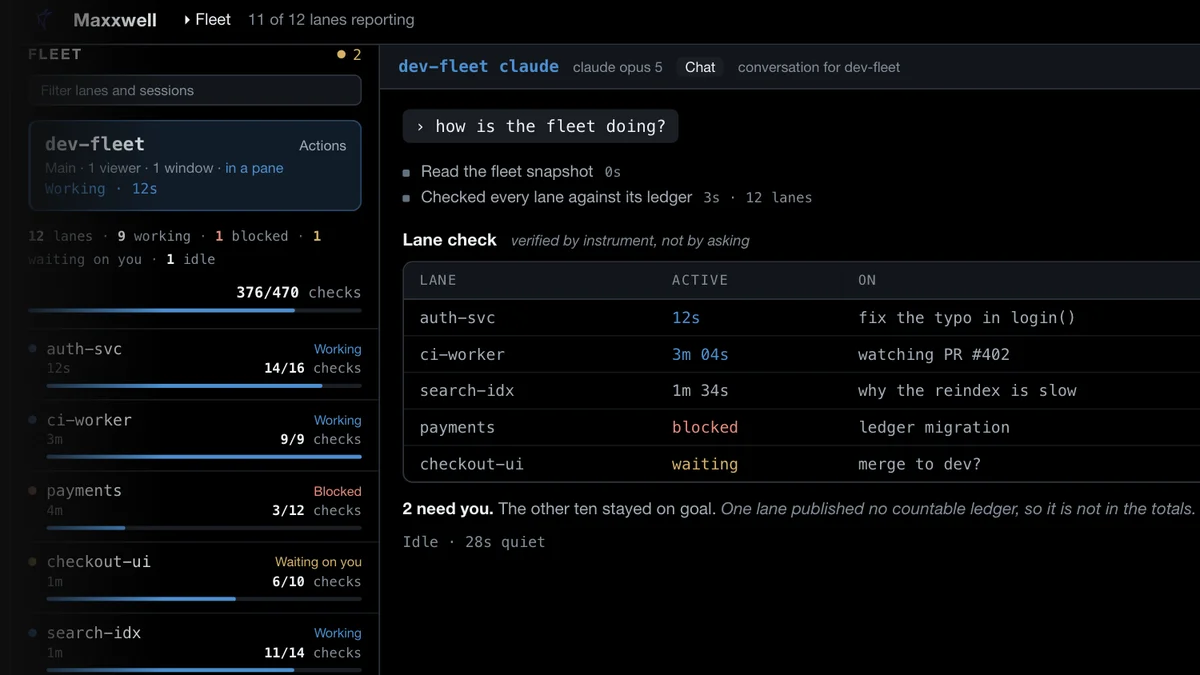
Running three agents at once is manageable. Running twelve is a different job, and the bottleneck is not the agents. It is the supervision. A session blocked on a question looks exactly like a session happily writing tests if all you have is a tab bar.
Maxxwell ranks lanes by evidence instead of by status label. The render above shows a check count next to each lane, 14 of 16 checks for one and 3 of 12 for another, plus a stall detector that calls out a lane that burned 142 tool calls without writing a file. That is what an agent re-reading the same three files looks like from the outside.
Parallel agents also get their own git worktree, so two of them cannot fight over the same checkout. Changes come back through whatever process you already use, most likely pull requests and CI, and the orchestrator only tracks what has landed.
Getting it running
The installer picks the artifact that matches your platform, checks it against a pinned SHA-256 digest, and writes the binary into your local bin directory without sudo.
curl -fsSL https://maxxwell.dev/install.sh | sh
export PATH="$HOME/.local/bin:$PATH"
maxxwell version
That installs the standalone CLI. The desktop app is a separate download in DMG, tarball or ZIP form.
Next, tell Maxxwell which agent runtime to use. This records a runtime name, not a credential. The vendor CLI keeps its own sign-in.
maxxwell runtime
maxxwell runtime claude
# or
maxxwell runtime codex
Run the bare command from the directory you want the agent to work in. It opens one interactive conversation, and help or ? inside the session prints local help without sending a model request.
cd /path/to/your/project
maxxwell
The fleet reader and the morning report are separate surfaces that read records from an existing fleet directory.
export MAXXWELL_FLEET_DIR=/absolute/path/to/fleet
maxxwell fleet --once --json
maxxwell morning --fleet-dir /absolute/path/to/fleet
Both one-shot forms work without a TTY, so they drop into a script or a CI job.
What the release actually ships
This is the part worth reading twice, because the product page and the shipped binary tell different stories.
The documentation is unusually blunt about it. The fleet surface is a reader. It does not create a fleet, launch lanes, or prove that another process is supervising them. The morning report renders what the records contain, and it is designed to lead with missing or unverifiable evidence rather than turn absence into a green result. Automatically auditing goals, correcting drift and restarting bloated sessions are described as product direction, not as what the current release does.
Platform support varies too, and the release notes track build status separately from feature claims.
| Platform | Status in the latest release |
|---|---|
| macOS on Apple silicon | DMG is signed, notarized, stapled and Gatekeeper-verified. Intel builds exist but are CLI only. |
| Linux x86_64 | Native desktop tarball, Debian package and standalone CLI, all built and validated. |
| Windows x86_64 | Desktop and CLI ZIPs, cross-built and unsigned. SmartScreen will warn. |
| Android | Debug-build APK for sideloading. No physical-device install was verified. |
| macOS Intel, Linux arm64 | CLI only, with no bundled tmux, so the host has to supply it. |
The buttons on the product page, Answer, Take over and Kill, belong to the target experience. The build you can download today gives you a session, a reader and a report.
Credentials and where your code goes
Maxxwell’s privacy page is specific in a way that is worth quoting rather than paraphrasing. There is no Maxxwell account and no Maxxwell server. The desktop app carries no analytics and no crash-reporting client. Your source code, prompts and transcripts go to Anthropic or OpenAI under that provider’s own terms, exactly as they would if you ran the tools without Maxxwell, and Rindler states it cannot read them.
Two credential paths exist and they are not interchangeable. You can delegate to a vendor CLI that is already signed in, or you can point Maxxwell at a provider API key directly.
maxxwell run "explain this repository" --provider NAME --model MODELThe docs warn against assuming a working subscription login carries over to another client. Provider and coding-plan terms differ, and a technically valid OAuth token is not evidence that reuse is permitted.
Pricing is free forever for individuals and paid for teams. You bring your own agent subscriptions or API keys.
What to watch for
Early access shows in the details rather than the pitch. The version numbers are still in the zero-one range, each release ships a status receipt instead of a feature list, and the flagship controls on the product page are not the ones you get on day one. The install script is the clearest example: it pins v0.1.62, while the newest published release was v0.1.207 on November 3, 2026.
Two more things to weigh before adopting it. The source is closed. The repository holding it, rindler-ai/maxxwell-ide, is private, while the public rindler-ai/maxxwell-releases repository publishes binaries and a SHA256SUMS.txt file with no license attached. And conversations do not survive a restart, since the docs state that a bare session lives in the running process and is not resumable afterwards.
Concretely:
- Version numbers are pre-1.0 and the release cadence is fast.
- The CLI installer lags behind the desktop builds.
- Team features are planned behind the paid plan.
- macOS Intel and Linux arm64 users get the CLI only, and need tmux on the host.
Source and Accuracy Notes
- Project page: https://maxxwell.dev/ (verified via direct visit)
- Documentation: https://docs.maxxwell.dev
- Source repository: rindler-ai/maxxwell-ide (private). Published builds: rindler-ai/maxxwell-releases
- License: none published on the releases repository, and the source repository is not public
- Release verified: v0.1.207, build global-503, published November 3, 2026
- Privacy page: https://maxxwell.dev/privacy (last updated 26 August 2026)
- HN launch thread: https://news.ycombinator.com/item?id=49625975
Related Posts
ai-setup
Recall – Persistent Memory for Claude Code via MCP Hooks
Recall gives Claude Code a permanent memory store that survives session restarts and context compaction. Four hooks capture and restore context automatically — with cloud SaaS or self-hosted options.
2/28/2026
dev-tools
Automotive Skills Suite for AI Engineering
Evaluate Automotive Skills Suite for APQP, ASPICE, HARA, safety-plan, and DIA workflows with setup notes, governance risks, and SME review guidance.
5/28/2026
dev-tools
awesome-agentic-ai-zh Roadmap Guide
Explore awesome-agentic-ai-zh as a Chinese agentic AI learning roadmap, with setup notes, track selection, study workflow, and evaluation guidance.
5/28/2026