LLMtary - Local LLM-Powered Penetration Testing
Run autonomous penetration tests with local LLMs. LLMtary chains recon, exploitation, and reporting—Ollama, Claude, GPT-4, and Gemini supported.
TL;DR
TL;DR: LLMtary is an open-source Flutter desktop app that runs autonomous penetration tests using local or cloud LLMs—no data leaves your network if you use Ollama.
Source and Accuracy Notes
- Project page: llmtary.com — visited and verified
- Source repository: github.com/chetstriker/LLMtary — README read end-to-end
- License: MIT (verified via GitHub API
license.spdx_id) - HN launch thread: news.ycombinator.com/item?id=47692150
- Latest release: v1.0.9 (verified via GitHub API)
What Is LLMtary?
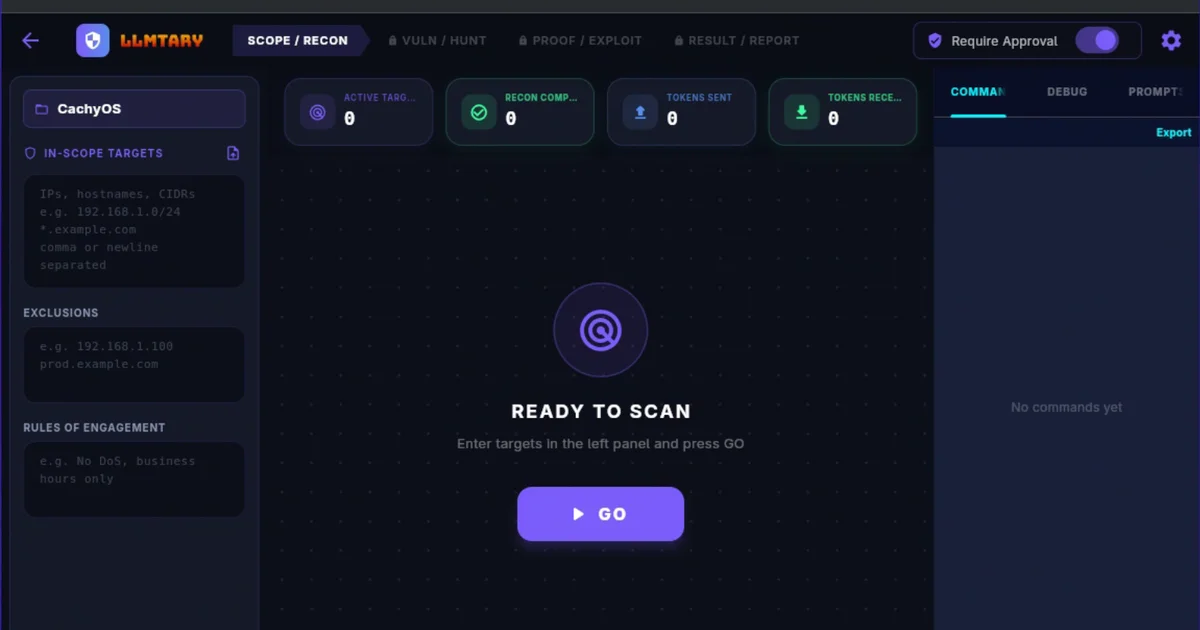
LLMtary is an open-source Flutter desktop application for autonomous penetration testing driven by large language models. You enter a target—an IP, hostname, FQDN, or CIDR range—and LLMtary runs through the full attack chain: passive recon, service fingerprinting, vulnerability discovery, targeted exploitation, post-exploitation enumeration, and professional report generation.
The key differentiator is local-first AI. LLMtary supports Ollama and LM Studio for fully on-premise testing where no data leaves your network. Cloud models—Claude, GPT-4, and Gemini—are also supported for higher accuracy when off-premise data handling is acceptable.
The architecture mirrors a real engagement workflow:
- Recon — LLM-guided port scanning, service banner grabbing, DNS enumeration, WAF detection
- Vulnerability discovery — findings feed into the next phase for sharper, targeted probes
- Exploitation — actual command execution, not just suggestion generation
- Post-exploitation — BloodHound-style Active Directory attack chain documentation
- Reporting — HTML, Markdown, or CSV with CVSS metadata and executive summaries
Setup Workflow
Prerequisites
- Linux, macOS, or Windows
- Flutter SDK (optional, for building from source)
- At least one supported LLM backend: Ollama (local), LM Studio (local), Claude (API), GPT-4 (API), or Gemini (API)
Option 1: Download a Prebuilt Release
The fastest path. Head to github.com/chetstriker/LLMtary/releases/latest and grab the installer for your platform:
| Platform | Package |
|---|---|
| Windows | .exe installer |
| macOS (Apple Silicon) | .dmg installer |
| Linux — Debian / Ubuntu | .deb package |
| Linux — RHEL / Fedora / CentOS / Alma | .rpm package |
| Linux — Arch | .pkg.tar.zst package |
| Linux — openSUSE | .rpm package |
Install and launch. No Flutter or developer toolchain required for prebuilt binaries.
Option 2: Build from Source
git clone https://github.com/chetstriker/LLMtary.git
cd LLMtary
# Flutter build commands — see README for platform-specific instructions
Configure Your LLM Backend
On first launch, LLMtary prompts you to select a backend:
- Ollama — enter your Ollama server URL (default
http://localhost:11434). Pull a model first:ollama pull llama3.2 - LM Studio — enter the local server URL (default
http://localhost:1234) - Claude — provide your Anthropic API key
- GPT-4 — provide your OpenAI API key
- Gemini — provide your Google API key
Run Your First Test
- Enter a target scope (IP, hostname, FQDN, or CIDR range)
- Select the LLM backend to use
- Click Start — LLMtary drives the full recon-to-report loop autonomously
- Review findings and export a report in HTML, Markdown, or CSV
Deeper Analysis
Local vs. Cloud: Which Should You Use?
For sensitive internal networks (financial systems, healthcare infrastructure, SCADA environments), local Ollama or LM Studio backends are the clear choice—no penetration testing data ever leaves your network. The trade-off is model capability; a 7B local model will not match Claude Opus or GPT-4o on complex vulnerability reasoning.
For CTF environments and general red teaming where accuracy matters more than data residency, Claude or GPT-4 via API will produce sharper, more context-aware exploit chains.
The Agentic Loop Matters
Most “AI for pentesting” tools stop at reconnaissance—feeding Nmap output into an LLM and returning suggestions. LLMtary actually executes commands, reads the output, and iterates. This closes the gap between “here is what might work” and “here is what actually worked.”
Reporting Quality
LLMtary generates structured reports with:
- CVSS v3.1 scores and severity ratings per finding
- Business risk assessments
- Attack chain narratives (BloodHound-style AD paths)
- Export as HTML, Markdown, CSV, or encrypted
.penexproject bundles
The HTML reports are the most complete; Markdown is useful for integrating into existing documentation workflows.
Practical Evaluation Checklist
- Runs on Linux, macOS, and Windows (prebuilt binaries available)
- Local AI with Ollama or LM Studio—no cloud data transfer required
- MIT-licensed, 26 GitHub stars at time of writing
- Cross-platform desktop app; not a CLI or web service
- Autonomous recon → exploit → post-exploit → reporting loop
- Prebuilt release binaries available—no Flutter install needed
- Supports both local and cloud LLMs in the same interface
- Active Directory attack chain analysis included
Security Notes
- API key handling — store keys in environment variables or the app’s local config; never commit them to source control
- Scope validation — LLMtary executes exploits against your declared target scope only; verify your scope settings before starting a run
- Local model data residency — when using Ollama or LM Studio, all penetration testing data stays on your machine; no external network calls are made
- Report encryption —
.penexbundles can be encrypted for safe storage and sharing
FAQ
Q: Does LLMtary work offline? A: Yes, if you use a local Ollama or LM Studio backend. No internet connection is required. Cloud model backends (Claude, GPT-4, Gemini) require API access.
Q: What skill level is needed to use LLMtary? A: Intermediate penetration testing knowledge is recommended. You need to understand target scoping, vulnerability severity, and how to interpret LLM-generated attack chains. LLMtary automates the execution loop, not the security expertise required to act on findings.
Q: How does it compare to tools like Navi or GPT-Sec? A: LLMtary covers a broader attack lifecycle (recon through reporting) in a single GUI application, whereas many alternatives are CLI-only or focus on a single phase. The Flutter-based cross-platform desktop app also differentiates it from most open-source AI pentesting projects which are Python scripts.
Q: Can I use my own fine-tuned model? A: Yes, through Ollama or LM Studio. Import any GGUF-formatted model into Ollama and point LLMtary at it.
Conclusion
LLMtary brings an agentic loop to penetration testing—autonomous recon, actual command execution, vulnerability validation, and professional reporting in a single cross-platform desktop app. The local-first approach with Ollama and LM Studio support makes it viable for sensitive environments where data residency is non-negotiable. Prebuilt binaries across six platforms mean zero Flutter setup for most users.
If you want to run structured, LLM-driven pentests on your own hardware, it is worth a look: llmtary.com.
Related Posts
ai-setup
Recall – Persistent Memory for Claude Code via MCP Hooks
Recall gives Claude Code a permanent memory store that survives session restarts and context compaction. Four hooks capture and restore context automatically — with cloud SaaS or self-hosted options.
2/28/2026
ai-setup
Sentrial – Catch AI Agent Failures Before Your Users Do
YC W26-backed AI agent observability platform. Trace sessions, detect silent regressions, and A/B test prompts in production before failures reach users.
5/28/2026
ai-setup
IonRouter – Fast Low-Cost AI Inference API
IonRouter is a YC W26 inference API routing open-source and fine-tuned models via an OpenAI-compatible endpoint, built on a C++ runtime optimized for GH200.
5/28/2026