Langtail – Prompt Management Platform for AI Teams
Langtail is a collaborative prompt management platform that lets teams build, test, and deploy AI prompts with a spreadsheet-like interface, evaluation tools, and an AI firewall.
TL;DR
TL;DR: Langtail is a collaborative prompt management platform that gives product teams a spreadsheet-like interface to build, test, evaluate, and deploy AI prompts across multiple LLM providers — with built-in security via an AI firewall.
Source and Accuracy Notes
This post is based on the Langtail website, the HN Show post (51 points), and the Langtail GitHub organization. Pricing and feature details were verified against the live product in June 2026.
What Is Langtail?
Langtail is a prompt management platform designed for product teams working with large language models. It started as a playground for experimenting with OpenAI function calling and has grown into a full-featured platform covering the entire prompt lifecycle — from ideation and testing to deployment and monitoring.
The core idea is simple: managing AI prompts should be as easy as using a spreadsheet. You do not need to write code to create, version, or test prompts. Product managers, engineers, and business teams can all collaborate in the same workspace.
The problem Langtail solves is real and well-documented. LLM outputs are inherently unpredictable. Without proper prompt management, teams ship prompts that produce unsafe outputs, break silently after model updates, or behave differently across environments. High-profile incidents — like a supermarket AI suggesting chlorine gas as a recipe ingredient, or an airline being held liable for chatbot misinformation — show what happens when prompt management is an afterthought.
Key Features
Spreadsheet-Like Prompt Interface
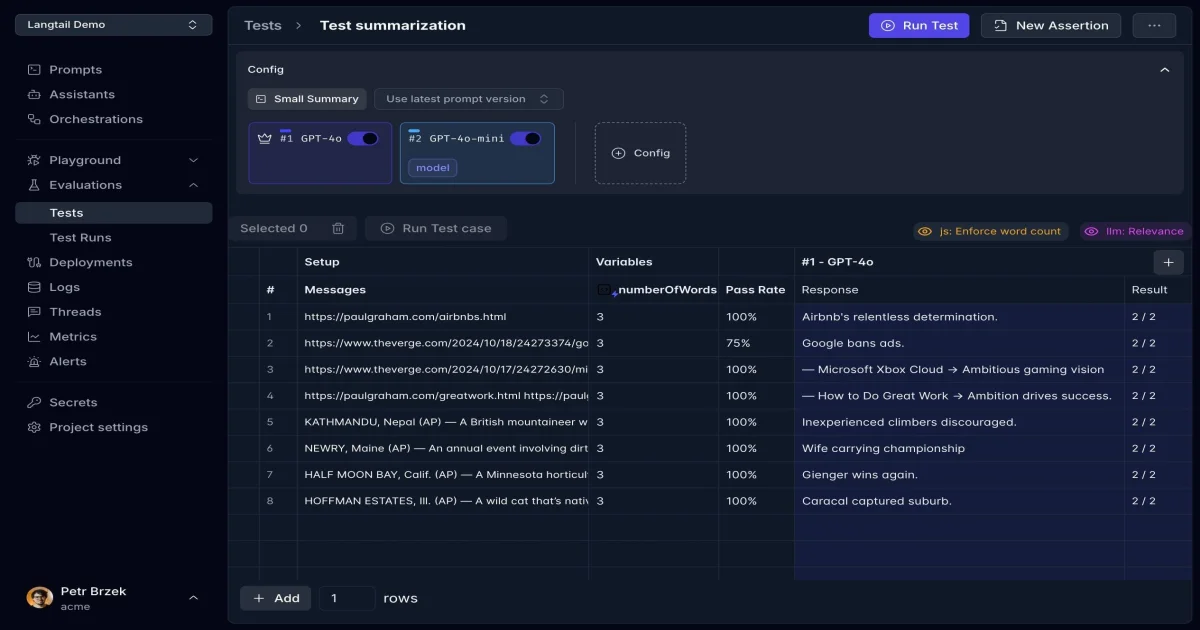
Langtail’s primary interface looks like a spreadsheet. Each row represents a test case with input variables, expected outputs, and actual model responses. This design choice is intentional — if your team can use Google Sheets, they can manage prompts in Langtail. No coding required.
Multi-Model Testing and Comparison
You can run the same prompt against multiple models simultaneously. The test interface shows side-by-side responses from GPT-4o, GPT-4o-mini, Claude, Gemini, or any other supported provider. This makes it easy to compare quality, latency, and cost before committing to a model in production.
Evaluation and Assertions
Langtail supports multiple evaluation methods:
- Natural language evaluation — describe what a good response looks like in plain English
- Pattern matching — use regex or string matching for deterministic checks
- Custom code assertions — write JavaScript or Python for complex validation logic
Each test case tracks pass rates, so you can see at a glance whether a prompt change improved or degraded output quality.
AI Firewall
Beyond prompt management, Langtail includes an AI firewall that runs as a proxy between your application and the LLM. It provides:
- Prompt injection detection — catches attempts to manipulate the model via user input
- DoS protection — prevents abuse through rate limiting and cost controls
- Information leak prevention — filters sensitive data from model inputs and outputs
- Custom content filtering — fine-tune safety checks for your specific use case
The firewall integrates with one click and works with all major LLM providers.
TypeScript SDK and OpenAPI
For developers, Langtail provides a fully typed TypeScript SDK with built-in code completion:
import { Langtail } from 'langtail';

const lt = new Langtail({ apiKey: process.env.LANGTAIL_API_KEY });

const result = await lt.prompts.invoke({
  prompt: 'email-classification',
  variables: {
    email: 'This is a test email about a product return.',
  },
});

const classification = result.choices[0].message.content;
An OpenAPI specification is also available for teams that prefer to integrate via REST.
Self-Hosting
Langtail can be self-hosted for teams that need maximum data control and security. This is particularly important for regulated industries or companies handling sensitive customer data through LLMs.
Setup Workflow
Step 1: Create an Account and Project
Sign up at langtail.com and create a new project. The free tier includes unlimited users, 2 prompts or assistants, and 1,000 logs per month — enough to evaluate the platform before committing.
Step 2: Import or Create Prompts
You can create prompts directly in the spreadsheet interface or import them from your existing codebase. Each prompt has a name, a template with variable placeholders, and a default model configuration.
Step 3: Add Test Cases
For each prompt, add test cases with input variables and expected behavior. Use natural language descriptions for subjective evaluations (“the response should be professional and under 100 words”) or pattern matching for deterministic checks (“the response must contain a JSON object”).
Step 4: Run Tests and Compare Models
Run your test suite against multiple models simultaneously. Langtail shows pass rates, response quality scores, and cost estimates side by side. Use this data to choose the best model for each prompt.
Step 5: Deploy and Monitor
Once a prompt passes your tests, deploy it to production via the Langtail API. Monitor logs and metrics from the dashboard. Set up alerts for unusual activity or degradation in output quality.
Step 6: Enable the AI Firewall
Add the Langtail firewall as a proxy in your application’s LLM calls. Configure detection rules for prompt injections, content filtering, and rate limits. The firewall works with OpenAI, Anthropic, Gemini, Mistral, and other providers.
Deeper Analysis
Why Prompt Management Matters Now
The AI application landscape has shifted dramatically. Two years ago, most teams were experimenting with single prompts in notebooks. Today, production AI applications may have dozens or hundreds of prompts, each requiring version control, testing, and monitoring. The spreadsheet metaphor works because it maps to how teams already manage structured data.
Langtail’s approach of treating prompts as first-class citizens — with their own versioning, testing, and deployment pipeline — mirrors how engineering teams treat code. This is the right abstraction for teams scaling AI features.
The AI Firewall as a Differentiator
Most prompt management tools focus on the development workflow. Langtail’s inclusion of a runtime AI firewall is a meaningful differentiator. Prompt injection attacks are a real threat — OWASP lists them as the number one risk for LLM applications. Having both development-time testing and runtime protection in one platform reduces the number of vendors teams need to manage.
Pricing and Value
Langtail’s pricing is competitive for the feature set:
- Free tier: Unlimited users, 2 prompts, 1,000 logs/month — good for evaluation
- Pro: 1 user, 20 prompts, unlimited logs — suitable for individual developers
- Team: 10 users, unlimited prompts and logs, 1-year data retention — the sweet spot for most teams
- Enterprise: Custom pricing with unlimited everything
The free tier is generous enough to test the core workflow. The Team plan is where the platform becomes valuable for collaborative prompt engineering.
Practical Evaluation Checklist
Use this checklist when evaluating Langtail for your team:
- Does your team have more than 2 active prompts in production?
- Do you need to test prompts against multiple LLM providers?
- Is prompt versioning and rollback important for your workflow?
- Do non-engineering team members (PMs, designers) need to edit prompts?
- Do you need runtime protection against prompt injections?
- Is self-hosting a requirement for your security policy?
- Does your team prefer a visual interface over CLI-based prompt management?
If you answered yes to three or more of these, Langtail is worth a trial.
Security Notes
Langtail’s security model has several layers worth understanding:
- Data handling: Prompts and test data are stored in Langtail’s infrastructure. For sensitive use cases, self-hosting keeps all data within your own environment.
- API key management: The platform stores LLM provider API keys. Ensure you use environment-scoped keys with appropriate permissions.
- AI firewall: The firewall proxy inspects all traffic between your application and the LLM. Review the filtering rules carefully — overly aggressive content filtering can block legitimate user inputs.
- Audit trail: Langtail maintains logs of prompt changes and test runs. This is useful for compliance and debugging but means prompt history is retained per your plan’s data retention policy.
FAQ
Q: Is Langtail free to use?
A: Yes, Langtail has a free tier with unlimited users, 2 prompts or assistants, and 1,000 logs per month. This is enough to evaluate the platform for small projects.
Q: Which LLM providers does Langtail support?
A: Langtail works with OpenAI, Anthropic, Google Gemini, Mistral, and other major providers. The AI firewall is provider-agnostic and works as a proxy layer.
Q: Can I self-host Langtail?
A: Yes, Langtail offers self-hosting for teams that need maximum data control. This is available on the Team and Enterprise plans.
Q: Do I need to code to use Langtail?
A: No. The spreadsheet-like interface is designed for non-technical users. However, developers can use the TypeScript SDK or OpenAPI for programmatic access.
Q: How does the AI firewall work?
A: The AI firewall acts as a proxy between your application and the LLM provider. It inspects requests and responses for prompt injections, sensitive data leaks, and abuse patterns. Setup takes one click with minimal configuration.
Q: What happens if I exceed my plan’s log limit?
A: On the free tier, logging stops when you hit 1,000 logs per month. Paid plans include unlimited logs. You can upgrade at any time.
Conclusion
Langtail fills a real gap in the AI development workflow. As teams move from experimental prompts to production AI features, they need tooling that treats prompts with the same rigor as code — versioning, testing, deployment, and monitoring. The spreadsheet interface lowers the barrier for non-engineering team members, while the TypeScript SDK and AI firewall give developers the controls they need.
The platform is particularly strong for teams that need collaborative prompt engineering across product, engineering, and business functions. If your team is shipping AI features and still managing prompts in code comments or shared documents, Langtail is worth a serious look.
Start with the free tier at langtail.com and see if the spreadsheet workflow fits your team’s needs.
Related Posts
ai-setup
Recall – Persistent Memory for Claude Code via MCP Hooks
Recall gives Claude Code a permanent memory store that survives session restarts and context compaction. Four hooks capture and restore context automatically — with cloud SaaS or self-hosted options.
2/28/2026
dev-tools
Automotive Skills Suite for AI Engineering
Evaluate Automotive Skills Suite for APQP, ASPICE, HARA, safety-plan, and DIA workflows with setup notes, governance risks, and SME review guidance.
5/28/2026
dev-tools
awesome-agentic-ai-zh Roadmap Guide
Explore awesome-agentic-ai-zh as a Chinese agentic AI learning roadmap, with setup notes, track selection, study workflow, and evaluation guidance.
5/28/2026