Agent MCP Studio - Browser-Based MCP Tool Builder
A browser-based studio for building MCP agent systems. Design multi-agent workflows visually, run them in Pyodide WASM, then export as production Python servers.
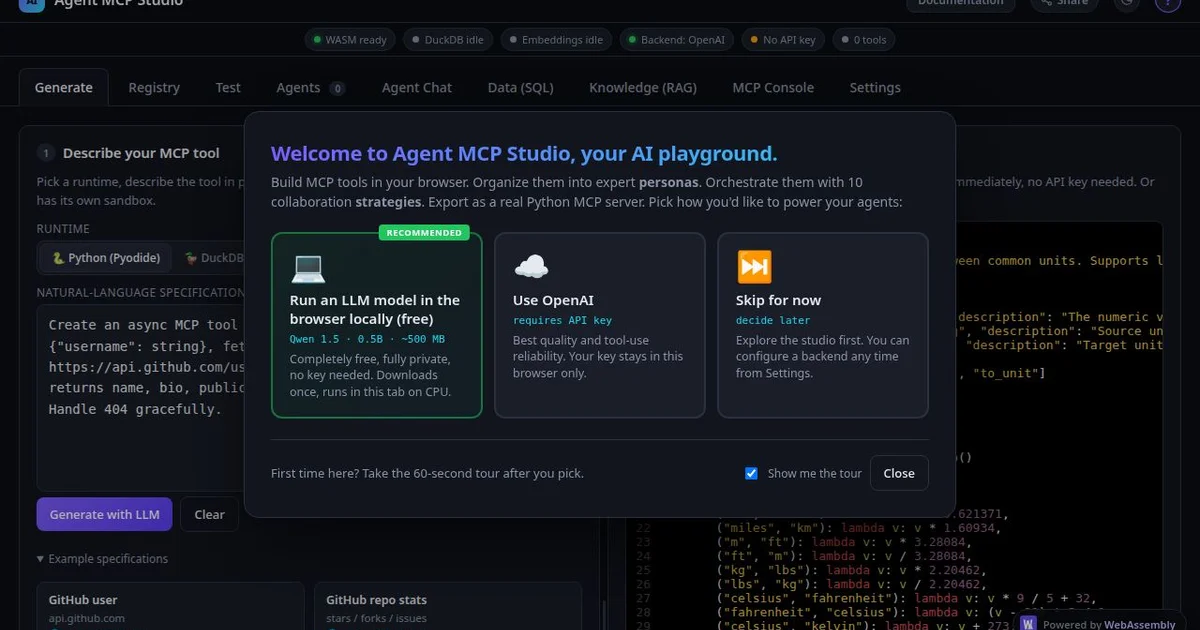
TL;DR
TL;DR: AgentMCP Studio is a browser-based environment for designing, running, and exporting MCP agent systems — no backend, no install, entirely in Pyodide WASM and DuckDB-WASM.
Source and Accuracy Notes
- Project page: agentmcp.studio
- HN launch thread: news.ycombinator.com/item?id=47899375 (Show HN, April 2026, 11 points, 6 comments)
- Source:HN author post and product page verified directly
What Is Agent MCP Studio?
Agent MCP Studio is a browser-only environment for building and orchestrating MCP (Model Context Protocol) agent systems. The entire stack runs from a single static HTML file via WebAssembly. There is no backend and no server required.
The core bet made by the author: WASM is a free, hard sandbox for running LLM-generated code locally. When you create tools with an LLM (or write them by hand), the studio AST-validates the source, registers it lazily, and JIT-compiles it into Pyodide on first call. SQL tools run in DuckDB-WASM inside a Web Worker. The built-in RAG uses Xenova/all-MiniLM-L6-v2 via Transformers.js for on-device embeddings. Nothing leaves your browser.
How It Works
The WASM Stack
The studio runs three runtimes entirely in-browser:
- Pyodide — JIT-compiles and executes Python tool code. Pyodide’s WASM sandbox is the security boundary that makes running LLM-generated code locally safe without Docker or per-tenant containers.
- DuckDB-WASM — Runs SQL-based tools in a Web Worker. Used for any tool that needs structured data processing.
- Transformers.js (Xenova/all-MiniLM-L6-v2) — Generates embeddings on-device for the RAG pipeline. No API call, no data leaves the browser.
Building MCP Tools
Tools are authored in the studio’s code editor with AST validation on save. The visual service graph lets you drag tool chips onto persona nodes and pick an orchestration strategy. Each persona auto-registers as an MCP tool (ask_<persona>), plus an agent_chat(query, strategy?) meta-tool.
The studio ships 10 orchestration strategies:
- Supervisor — Router picks one expert for a given task
- Hierarchical — Manager delegates via
ask_<persona>tools - Map-Reduce — Splitter distributes work to parallel agents, aggregator collects results
- Plus 7 others (Debate, Mixture of Experts, etc.)
Browser as MCP Server
A bundled Node bridge (bridge.js) speaks stdio to Claude Desktop and WebSocket back to the browser tab — turning your browser into an MCP server. You can prototype agent workflows and connect them to a real Claude Desktop session without deploying anything.
Export to Production
When you are satisfied with the prototype, Export generates a real Python MCP server:
server.py       # MCP server bootstrap
agentic.py      # Python port of orchestration logic
tools/*.py      # Your tools
Dockerfile
requirements.txt
.env.example
The exported agentic.py is a faithful Python port of the orchestration logic running in the browser, so the deployed artifact behaves identically to the prototype.
Project Packs
Export the whole project as a single .agentpack.json. The pack:
- Auto-detects required external services (OpenAI, GitHub, Stripe, Anthropic, Slack, Notion, Linear, etc.) by scanning tool source for
os.environ.get(...)and cross-referencing against the network allowlist - Recipients get an import wizard that prompts for credentials
- Manifests are reviewable and shareable — secrets never travel with the pack
Practical Evaluation Checklist
Strengths:
- Zero infrastructure: open the URL and start building
- WASM sandbox eliminates the need for Docker when running LLM-generated tool code
- Export produces a production-ready Python MCP server, not a prototype-only artifact
- Project Packs make sharing team workflows straightforward with no secret leakage
- Claude Desktop integration provides a real LLM backend without a hosted service
Caveats:
- The 10 orchestration strategies may be over-engineered for most use cases; Supervisor, Mixture of Experts, and Debate are the most practical
bridge.js(the Node bridge) is the only non-browser component — a hosted bridge variant is planned- The studio targets development and experimentation; verify exported tool code before production deployment
- All state is in-browser; closing the tab wipes the project unless exported as a pack
Security note: Pyodide’s WASM sandbox makes it safe to execute LLM-generated Python code locally. When deploying exported Python servers, treat them as arbitrary code — apply standard Python security practices (sandboxing, dependency auditing, least-privilege execution).
FAQ
Q: What is MCP? A: The Model Context Protocol is a standard for connecting AI assistants to external tools and data sources. MCP defines how agents call tools, what inputs they accept, and how results are returned. Think of it as USB for AI integrations — a shared plug standard so tools built for one AI host work across all hosts.
Q: Is this a hosted service? A: No. Everything runs in your browser. There are no servers, no accounts, no API calls to an agentmcp.studio backend. When you close the tab, your project is gone unless you exported it.
Q: Does it work offline? A: Yes, with a caveat. The WASM runtimes require a one-time download on first load. After that, the studio works offline. For the LLM backend, you can use a local model (e.g. Qwen 1.5 0.5B) running in-browser via Transformers.js for fully offline mode.
Q: What models does it support? A: The studio connects to OpenAI Chat Completions by default. It also ships a mode where a small local model (Qwen 1.5 0.5B) runs entirely in-browser via Transformers.js — no external API needed.
Q: Which AI clients can consume the exported MCP server? A: The exported Python server communicates over stdio. It currently ships with a bridge to Claude Desktop. Other MCP clients (Cursor, VS Code Copilot, etc.) can connect via the standard MCP stdio protocol with minor bridge configuration.
Q: Is this production-ready? A: The exported Python MCP server is production-ready Python code. The in-browser prototype is a development tool. Review exported tool code before deploying to production, as you would any AI-generated code.
Conclusion
Agent MCP Studio tackles one of the real friction points in the MCP ecosystem: the gap between “I want to prototype an agent workflow” and “I have a deployed MCP server my AI assistant can use.” By building the prototype entirely in-browser with WASM, it removes the entire DevOps layer from that loop.
The export-to-Python feature is the key insight — the deployed artifact is a faithful port of the prototype, not a manual rewrite. That means less drift between what you tested and what runs in production.
If you are evaluating MCP for your team or building multi-agent prototypes, it is worth opening agentmcp.studio and spending 10 minutes with the service graph editor. No account, no backend, no Docker.
Source and Accuracy Notes
- Project page: agentmcp.studio — verified OG image and description
- HN launch: news.ycombinator.com/item?id=47899375 — verified viaHN thread content
- License: not explicitly stated on the site; no open-source repo found at time of writing
- Last checked: 2026-07-26
Related Posts
ai-setup
Recall – Persistent Memory for Claude Code via MCP Hooks
Recall gives Claude Code a permanent memory store that survives session restarts and context compaction. Four hooks capture and restore context automatically — with cloud SaaS or self-hosted options.
2/28/2026
dev-tools
awesome-agentic-ai-zh Roadmap Guide
Explore awesome-agentic-ai-zh as a Chinese agentic AI learning roadmap, with setup notes, track selection, study workflow, and evaluation guidance.
5/28/2026
dev-tools
Dulus Terminal Agent Setup Guide
Set up Dulus as a terminal AI agent with native and Docker paths, installer profiles, WebChat ports, repo safety checks, and shell-access risks.
5/28/2026