Agent MCP Studio – Browser MCP Tool Builder & Agent Runtime
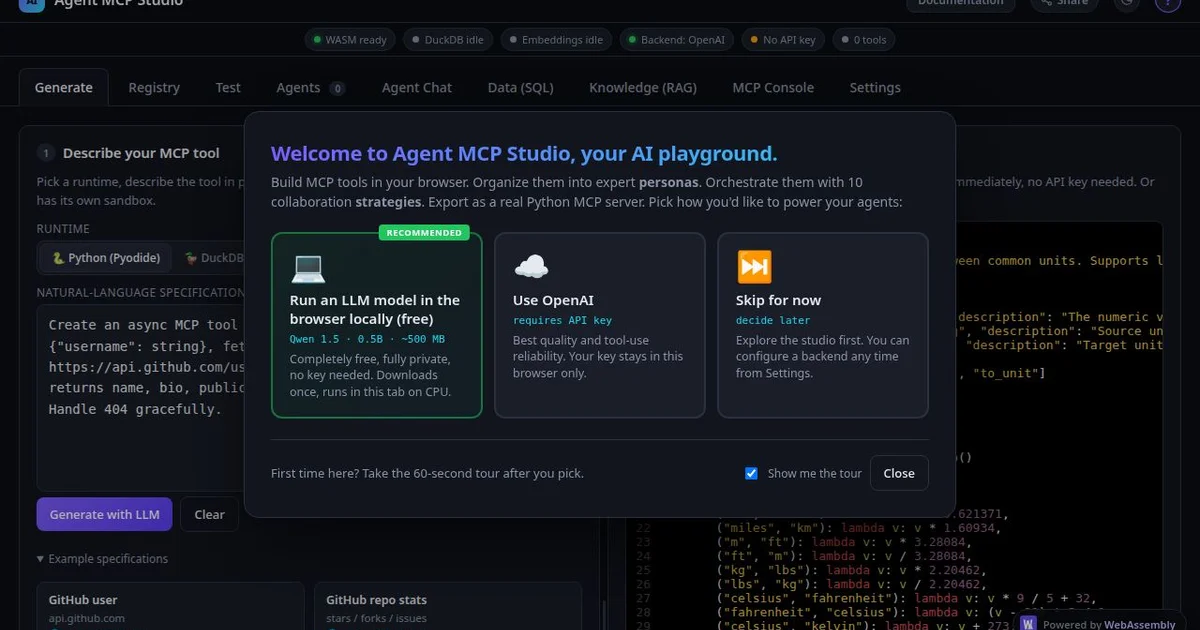
Build, run, and export MCP tools and AI agents entirely in your browser. No install, no server, no backend. Powered by Pyodide WASM and DuckDB-WASM for free.
TL;DR
TL;DR: Agent MCP Studio lets you build MCP tools and AI agents in a browser tab — no backend, no install, no server required. It runs entirely in the browser via Pyodide WASM and persists data with DuckDB-WASM.
What Is Agent MCP Studio?
Agent MCP Studio is a browser-based development environment for building and running MCP (Model Context Protocol) tools and AI agents. It targets developers who want to prototype agentic workflows without setting up infrastructure.
Key capabilities:
- Browser-native MCP runtime — build and execute MCP tools entirely in the browser
- AI agent builder — compose multi-step agentic pipelines using MCP tools as building blocks
- DuckDB-WASM for local data — run SQL queries on local datasets without a database server
- Pyodide WASM execution — run Python directly in the browser for data processing and tool logic
- Export and deploy — package your agent configs and deploy them to external runtimes
- Free forever — no pricing tier, no account required to start
Setup Workflow
Step 1: Open the Studio
Navigate to agentmcp.studio in any modern browser. The editor loads instantly — no sign-up, no CLI.
Step 2: Create an MCP Tool
- Click New Tool in the sidebar
- Define the tool schema (name, description, input parameters)
- Write the tool logic in Python (Pyodide) or JavaScript
- Save — the tool is immediately available in the agent builder
# Example: a weather lookup tool in Pyodide
def get_weather(city: str) -> str:
    # Pyodide-compatible Python — no external HTTP calls in this env
    conditions = {"nyc": "sunny 72F", "london": "cloudy 18C", "tokyo": "rainy 24C"}
    return conditions.get(city.lower(), "unknown city")
Step 3: Build an Agent Pipeline
- Drag MCP tools from the registry into the agent canvas
- Connect tool outputs as inputs to subsequent tools
- Set the agent goal and iteration limits
- Click Run to execute the pipeline in-browser
Step 4: Inspect Results
Each tool step shows its input, output, and execution time. The DuckDB-WASM panel lets you run SQL against any data the agent produced or loaded.
Step 5: Export
Click Export to download your agent config as JSON, ready to run in any MCP-compatible runtime (Claude Desktop, Cursor, etc.).
Deeper Analysis
Architecture
The stack is two WASM runtimes running side by side:
- Pyodide — CPython compiled to WebAssembly, giving you real Python 3.x in the browser with full stdlib access
- DuckDB-WASM — columnar OLAP database compiled to WASM, enabling SQL on in-browser datasets
The MCP protocol layer handles tool discovery, schema validation, and streaming responses. The agent runtime manages state across tool calls, loops until the goal is satisfied or iteration limit is reached.
Trade-offs vs. Server-Based Agents
| Factor | Agent MCP Studio | Traditional server agent |
|---|---|---|
| Setup | Zero (browser only) | Requires hosting + env config |
| Runtime limits | Browser memory (WASM sandbox) | Full server resources |
| External calls | Limited (CORS, browser sandbox) | Full outbound access |
| Persistence | DuckDB-WASM (ephemeral per session) | Full database + file storage |
| Privacy | All data stays in browser | Depends on hosting |
Realistic Use Cases
Good fits:
- Rapid prototyping of MCP tool ideas before committing to a backend
- Learning MCP concepts and agentic patterns
- Running ad-hoc data transformation pipelines on local CSVs
- Sharing agent configs with teammates (export JSON, import in their studio)
Not a fit:
- Production agent workloads requiring external API access or file I/O
- Long-running agents that need persistent state across sessions
- Teams needing collaboration features (the studio is single-user per browser session)
Practical Evaluation Checklist
- Browser-based editor loads in under 3 seconds on a standard connection
- Pyodide Python execution works for common stdlib tasks (json, datetime, re)
- DuckDB-WASM can query a 10MB CSV loaded in-browser without lag
- MCP tool schema validation catches missing required fields
- Agent canvas correctly chains tool outputs to subsequent tool inputs
- Export produces valid MCP JSON compatible with at least one external runtime
- No data leaves the browser without explicit user action (check network tab)
Security Notes
- All code executes in the browser sandbox — no server-side code execution
- No authentication by default — anyone with the URL can access the studio
- DuckDB-WASM data is ephemeral and cleared on page reload unless explicitly persisted
- For production use, export and run agent configs in a properly isolated environment
FAQ
Q: Is this officially affiliated with the MCP specification? A: No. Agent MCP Studio implements the MCP protocol but is not an official Anthropic project.
Q: Can I connect to external APIs from tools? A: Browser sandbox restrictions limit outbound HTTP calls. For production integrations, export your tool schema and implement the runtime logic in a proper server environment.
Q: How does it compare to building MCP tools with the official SDK? A: The official MCP SDK (Python/JS) targets server deployments. Agent MCP Studio is a visual prototyping layer — useful for experimentation, less so for production-grade tool authoring.
Q: Is there a limit on tool or agent complexity? A: Browser memory constrains Pyodide and DuckDB. Large datasets or compute-heavy Python will hit sandbox limits. The studio warns when approaching memory thresholds.
Q: Can I share my agent with someone else? A: Yes — export as JSON and share the file. Recipients can import it into their own Agent MCP Studio instance.
Conclusion
Agent MCP Studio fills a specific niche: frictionless, zero-setup MCP prototyping in a browser tab. The Pyodide + DuckDB-WASM combo is genuinely clever — real Python and real SQL without any install. For learning MCP concepts, sketching agentic workflows, or quickly testing a tool idea, it is one of the lowest-friction options available.
The trade-off is clear: browser sandbox constraints mean it is not a production runtime. But as a stepping stone between “I have an idea” and “I have a working MCP tool deployed somewhere”, it earns its place. Worth bookmarking if you work with MCP or AI agent architectures.
Related Posts
ai-setup
Recall – Persistent Memory for Claude Code via MCP Hooks
Recall gives Claude Code a permanent memory store that survives session restarts and context compaction. Four hooks capture and restore context automatically — with cloud SaaS or self-hosted options.
2/28/2026
dev-tools
Automotive Skills Suite for AI Engineering
Evaluate Automotive Skills Suite for APQP, ASPICE, HARA, safety-plan, and DIA workflows with setup notes, governance risks, and SME review guidance.
5/28/2026
dev-tools
awesome-agentic-ai-zh Roadmap Guide
Explore awesome-agentic-ai-zh as a Chinese agentic AI learning roadmap, with setup notes, track selection, study workflow, and evaluation guidance.
5/28/2026