Yaak - Local-First API Client for REST, GraphQL, gRPC
Open-source desktop API client built with Tauri and Rust. Works fully offline, syncs workspaces via plain-file Git, and ships a CLI for AI agents.
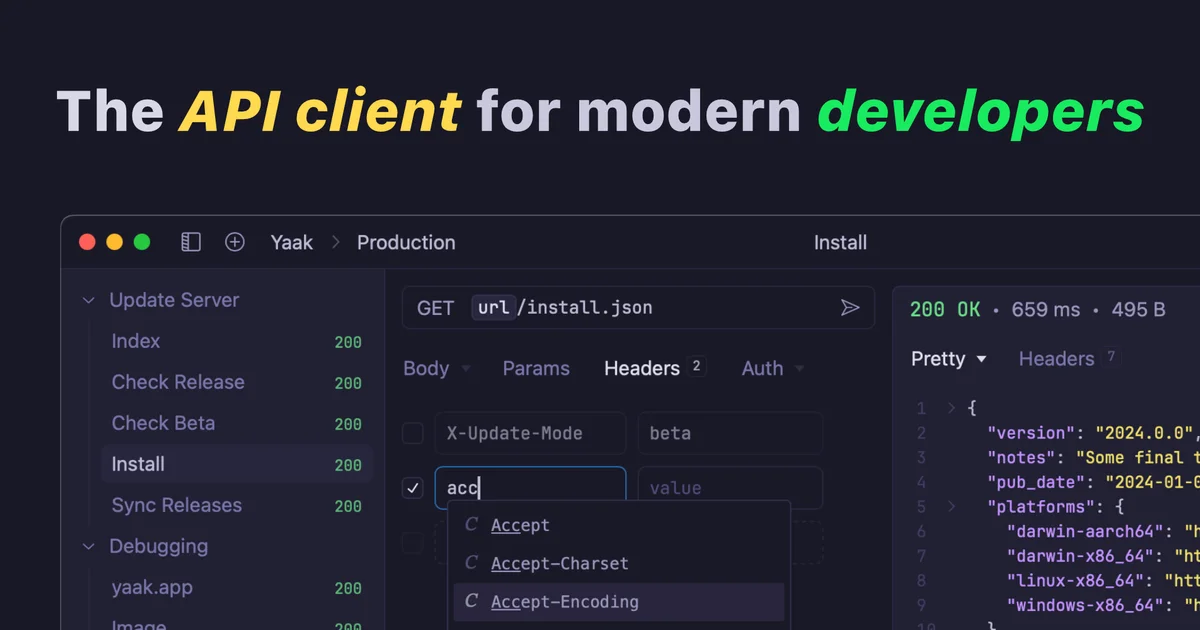
TL;DR
TL;DR: Yaak is an offline-first, open-source API client for REST, GraphQL, gRPC, WebSocket, and SSE — built with Tauri and Rust, with Git-friendly plain-file sync and a CLI for AI agents.
Source and Accuracy Notes
- Project page: yaak.app ← visited and verified
- Source repository: github.com/mountain-loop/yaak ← read README end-to-end
- License: MIT (verified via
LICENSEfile in repo,license.spdx_id = "MIT") - HN launch thread: news.ycombinator.com/item?id=43185836
What Is Yaak?
Yaak is a desktop API client — an alternative to Postman, Insomnia, and Bruno — built with Tauri, Rust, and React. It launched on Hacker News in September 2024 and went open source shortly after.
The defining characteristics from the README:
“A fast, privacy-first API client for REST, GraphQL, SSE, WebSocket, and gRPC – built with Tauri, Rust, and React.” “Offline-first. No telemetry, no VC funding, and no cloud lock-in.”
Unlike Postman or Insomnia, Yaak stores everything as plain files on your filesystem. Collections, environments, and workspaces map directly to folders you can version with Git, sync via Dropbox, or back up however you like. There is no mandatory account or cloud sync to use it.
Setup
Download and Install
Yaak ships as a desktop app for macOS, Windows, and Linux. Download from the homepage:
# Download from yaak.app — no install script needed
# yaak.app/download
```bash

For the CLI (useful for CI and AI agent workflows):

```bash
# Install via npm/pnpm/yarn
npm install -g yaak-cli
```bash

### Import Existing Collections

Yaak imports directly from:

- Postman (v2.1)
- Insomnia (v5–v8)
- OpenAPI 3.x / Swagger 2.0
- HAR files
- Raw cURL commands

```bash
# Import from Postman
yaak import --input ./collection.json --format postman
```bash

### Connect to a Git Repository

Workspaces mirror to the filesystem, making Git integration straightforward:

```bash
# Clone or init a Git repo for your API specs
git clone https://github.com/your-org/yaak-workspaces.git
# Open the folder in Yaak — it detects and loads the workspace automatically
```bash

## Deeper Analysis

### Protocol Support

Yaak handles five request types out of the box:

| Protocol | Use case |
|---|---|
| REST | Standard HTTP APIs |
| GraphQL | Query language for APIs |
| gRPC | High-performance binary RPC |
| WebSocket | Real-time bidirectional |
| SSE | Server-sent events |

Response inspection supports JSONPath and XPath filtering, matching what Postman and Insomnia offer.

### Authentication

Built-in auth mechanisms:

- OAuth 2.0 (Authorization Code, Client Credentials, PKCE)
- JWT Bearer tokens
- Basic Auth
- API keys (header or query param)
- Custom plugins for proprietary auth schemes

Sensitive values (tokens, secrets) are encrypted and stored in the OS keychain rather than in plaintext workspace files.

### CLI for Agents

The `yaak` CLI exposes key operations for scripting and AI integration:

```bash
yaak request run "https://api.example.com/users" \
  --method GET \
  --header "Authorization: Bearer $TOKEN"

yaak collection export --workspace "My API" --format openapi --output ./openapi.yaml
This makes it suitable for AI agents that need to validate or exercise APIs as part of a workflow.
Theme System
Yaak ships with several built-in themes and supports custom CSS. The default dark theme uses a purple accent on a near-black background. A light theme is also available.
Practical Evaluation Checklist
- Installs on macOS without code signing warnings
- Import a Postman collection and verify all endpoints load
- Send a REST GET request and confirm response formatting
- Set up an OAuth 2.0 token fetch and use it on a protected endpoint
- Mirror workspace to a Git repo, commit, and verify the file structure
- Try the CLI
yaak request runfrom a terminal - Create a custom theme using the theme editor
Security Notes
- No telemetry — the app does not phone home. Verified from README.
- OS keychain — secrets stored via the OS credential manager, not in workspace files.
- Encrypted secrets — sensitive environment values are encrypted at rest.
- No mandatory account — fully functional offline without creating an account.
- MIT licensed — you can audit, fork, and modify the source code.
FAQ
Q: How does Yaak compare to Postman? A: Yaak is offline-first with no cloud dependency, uses plain-file storage instead of a proprietary format, and has a much smaller binary footprint (Tauri + Rust vs Electron). Postman has a larger ecosystem of integrations and a hosted mock server feature that Yaak lacks.
Q: How does it compare to Insomnia? A: Both are open-source and Git-friendly. Insomnia has a larger plugin ecosystem and supports gRPC-wire mirroring. Yaak’s advantage is its CLI designed for agentic workflows and its cleaner offline-first default behavior.
Q: Is there a hosted or cloud version? A: No. Yaak is fully local-first. There is no cloud sync, though workspaces stored in Dropbox or similar services can be shared that way.
Q: Can I use Yaak in CI/CD? A: Yes. The CLI supports running requests and exporting collections, suitable for integration into test pipelines.
Conclusion
Yaak fills a specific niche: developers who want Postman-capable API testing without the SaaS dependency, Electron bloat, or telemetry. Its plain-file Git sync is genuinely useful for teams that already manage API specs in version control. The CLI makes it one of the few API clients that works naturally in agentic workflows.
The MIT license and publicly auditable source make it trustworthy for security-sensitive environments. If you have been looking for a lightweight, offline-capable alternative to Postman, Yaak is worth a try.
Related Posts
ai-setup
Recall – Persistent Memory for Claude Code via MCP Hooks
Recall gives Claude Code a permanent memory store that survives session restarts and context compaction. Four hooks capture and restore context automatically — with cloud SaaS or self-hosted options.
2/28/2026
dev-tools
Automotive Skills Suite for AI Engineering
Evaluate Automotive Skills Suite for APQP, ASPICE, HARA, safety-plan, and DIA workflows with setup notes, governance risks, and SME review guidance.
5/28/2026
dev-tools
awesome-agentic-ai-zh Roadmap Guide
Explore awesome-agentic-ai-zh as a Chinese agentic AI learning roadmap, with setup notes, track selection, study workflow, and evaluation guidance.
5/28/2026