Voker - Analytics Platform for AI Agents
Voker is a YC S24-backed analytics platform that gives AI agent builders full visibility into sessions, corrections, and resolution rates via a drop-in SDK.
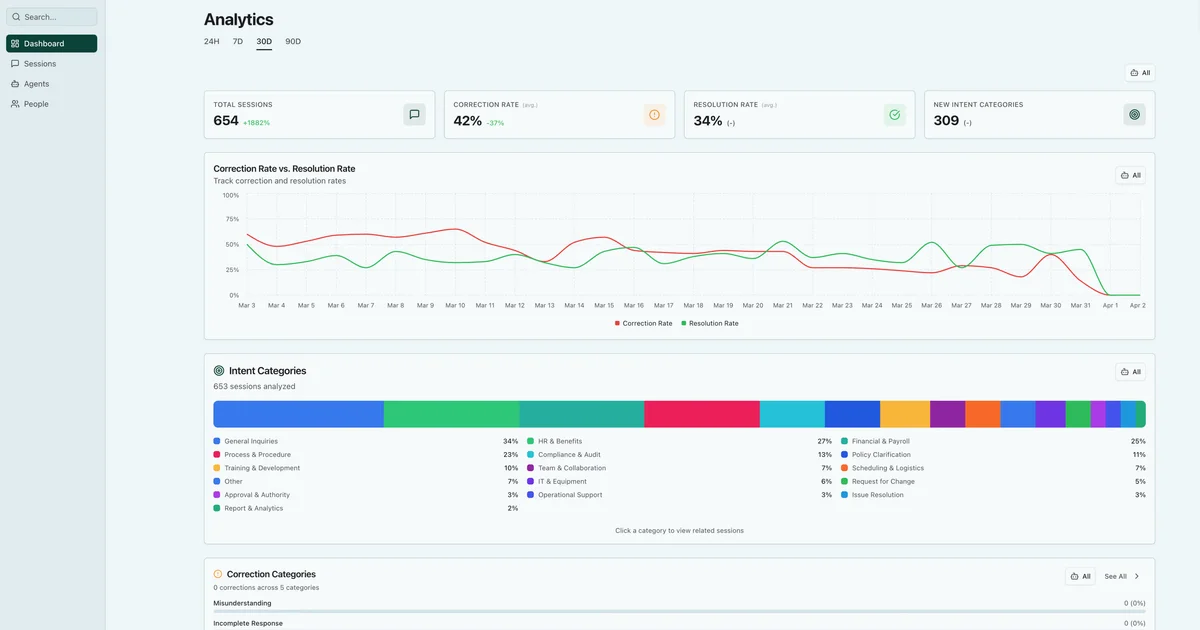
TL;DR
TL;DR: Voker instruments your AI agent LLM calls with a drop-in SDK swap, surfacing sessions, correction rates, resolution metrics, and intent categories so teams can debug and improve agents without drowning in raw traces.
Source and Accuracy Notes
- Project page: voker.ai — verified product description and feature list
- Documentation: docs.voker.ai — verified SDK setup, supported providers, and API reference
- HN launch thread: news.ycombinator.com/item?id=48109962 — YC S24 batch
What Is Voker?
Voker is an analytics platform built specifically for AI agents — the kind that handle multi-turn conversations, execute tool calls, and field real user traffic. Where traditional API monitoring gives you token counts and latency histograms, Voker tracks the agent-native metrics that actually matter: session volume, correction frequency, resolution rates, and intent categories.
The founding insight is straightforward: agents fail differently than stateless API calls. A user may get a helpful response on turn three that corrects a mistake from turn two — events that never surface in conventional LLM monitoring. Voker captures these interaction patterns and structures them into dashboards non-technical stakeholders can actually use.
The product targets teams shipping agents as a core product experience — post-launch, when usage data becomes critical for iteration but hardest to instrument from scratch.
SDK Setup
Voker supports JavaScript/TypeScript and Python with provider-specific SDK wrappers for OpenAI, Anthropic, Gemini, and the Vercel AI SDK. Installation is a standard package manager command.
JavaScript / TypeScript:
npm i @voker/voker
# or: pnpm i @voker/voker
# or: yarn add @voker/voker
# or: bun add @voker/voker
```bash

**Python:**

```bash
pip install voker
# or: uv add voker
# or: poetry add voker
```bash

After installing, add your API key to the environment:

```bash
VOKER_API_KEY=vo_your_api_key_here
```bash

Then swap your LLM imports with the Voker-wrapped equivalents.

**OpenAI (JavaScript):**

```javascript
// Before
import { OpenAI } from 'openai';

// After
import { OpenAI } from '@voker/voker/ai/provider-openai';
```bash

**Anthropic (JavaScript):**

```javascript
// Before
import { Anthropic } from '@anthropic-ai/sdk';

// After
import { Anthropic } from '@voker/voker/ai/provider-anthropic';
```bash

**Python OpenAI:**

```python
# Before
from openai import AsyncOpenAI

# After
from voker.ai.provider_openai import AsyncOpenAI
```bash

Each LLM call takes two required parameters — `vokerAgent` (agent name) and `vokerSession` (conversation ID) — which tie events to a structured session:

```javascript
await client.chat.completions.create({
  vokerAgent: 'support_agent',
  vokerSession: sessionId,
  model: 'gpt-4o',
  messages: [{ role: 'user', content: 'Help me return an order' }],
});
Key Metrics
The Voker dashboard surfaces four primary metrics:
- Total Sessions — raw volume of agent conversations, with growth percentage relative to the prior period
- Correction Rate — how often the agent self-corrects mid-session, expressed as a percentage; a high correction rate signals the agent is encountering knowledge gaps or ambiguous inputs
- Resolution Rate — whether the agent successfully resolves the user’s intent before the session ends
- Intent Categories — AI-categorized buckets of what users are asking about, surfaced as tagged events in the session feed
A session-level feed shows individual interactions tagged with these categories, so you can filter by “cancellation” or “refund” and see exactly which turns caused a correction or abandonment.
Smart Skills
A newer feature called Smart Skills lets the agent learn from corrections automatically. When a correction event fires, the agent can incorporate that signal into its next invocation — the analytics layer feeds back into the agent’s behavior without a manual retraining cycle.
Practical Evaluation Checklist
- SDK scope: JS (OpenAI, Anthropic, Gemini, Vercel AI SDK) and Python (OpenAI, Anthropic, Gemini) — REST API available for other languages
- No agent framework lock-in: Works with any code that wraps an LLM; not tied to a specific orchestration framework
- Self-service dashboards: Metrics accessible to PMs and analysts without requiring an engineer to run queries
- Pricing: Free tier available; no public per-seat or per-event pricing page at the time of writing — contact sales for larger volumes
- Setup time: The vendor claims approximately two minutes for basic instrumentation with the AI-assisted install prompt
Security Notes
- API key is environment-variable based — never hardcoded or committed to source
- Voker processes conversation content (inputs and outputs) — ensure your data handling complies with your privacy policy before instrumenting production traffic with sensitive user data
- No mention of SOC 2 or GDPR compliance on the marketing site as of July 2026; enterprise inquiries should ask directly
FAQ
Q: Does Voker work with self-hosted models? A: Yes — the HTTP-based SDK client works with any OpenAI-compatible endpoint, including locally hosted models and custom inference servers.
Q: Can I track custom events beyond corrections?
A: Yes. The base VokerClient.events.create() API accepts arbitrary event names and property dictionaries, so you can track tool call success rates, handoffs between agents, or any domain-specific milestone.
Q: What happens if I don’t use one of the supported provider SDKs? A: You can use the REST API directly to submit events from any language or runtime that speaks HTTP — no native SDK required.
Conclusion
Voker fills the observability gap that opens up the moment you ship an agent — when you need to know whether the thing is actually working, not just whether the API responded. The SDK swap approach keeps instrumentation low-friction, and the session-level correction and resolution metrics are genuinely useful signal that raw token-count dashboards miss.
If you are building with AI agents and flying blind on whether they are helping or just responding, Voker is worth the 10-minute setup.
Source: voker.ai | docs.voker.ai
Related Posts
ai-setup
Recall – Persistent Memory for Claude Code via MCP Hooks
Recall gives Claude Code a permanent memory store that survives session restarts and context compaction. Four hooks capture and restore context automatically — with cloud SaaS or self-hosted options.
2/28/2026
dev-tools
Automotive Skills Suite for AI Engineering
Evaluate Automotive Skills Suite for APQP, ASPICE, HARA, safety-plan, and DIA workflows with setup notes, governance risks, and SME review guidance.
5/28/2026
dev-tools
awesome-agentic-ai-zh Roadmap Guide
Explore awesome-agentic-ai-zh as a Chinese agentic AI learning roadmap, with setup notes, track selection, study workflow, and evaluation guidance.
5/28/2026