VelocityNote – Local AI Markdown Notebook for macOS and
A cross-platform, local-first Markdown notebook with built-in local AI models for text, voice, OCR, and image understanding — no cloud required.
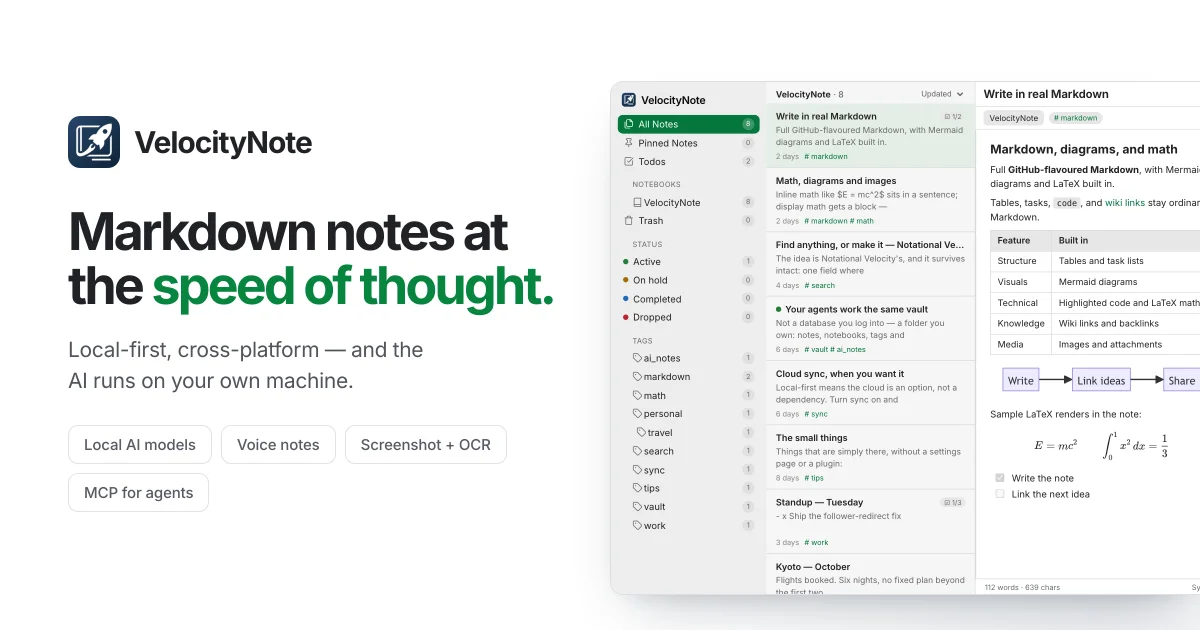
TL;DR
TL;DR: VelocityNote is a native Markdown notebook for macOS and Windows that runs local AI models — Qwen3 for text, Parakeet/SenseVoice for voice, PP-OCRv5 for screenshots, and Florence-2 for images — keeping everything on-device with optional cross-device sync.
What Is VelocityNote?
VelocityNote is a desktop Markdown notebook built around local AI. Rather than sending notes to a third-party AI service, it runs models directly on your machine: a local language model helps format and summarize notes, speech transcription converts voice to text, OCR pulls searchable text from screenshots, and image understanding describes visuals. Everything stays on your device unless you explicitly enable cloud sync.
The product description from the project reads:
A fast, native, local-first notebook born in the age of agentic AI.
Setup Workflow
Download and Install
Download the current macOS (.dmg) or Windows (.exe/.msi) installer from velocitynote.app/download.
Linux support is in development — follow GitHub issue #5 and add a thumbs-up if you want it.
Configure Local AI Models
On first launch, VelocityNote prompts you to download the model artifacts you want. Models are verified with SHA-256 before installation.
The built-in model manager supports:
| Capability | Model | Format | Recommended RAM |
|---|---|---|---|
| Text generation | Qwen3-4B (GGUF Q4_K_M) | llama.cpp | 16 GB |
| Text generation | Qwen3-1.7B (GGUF Q8_0) | llama.cpp | 8 GB |
| English transcription | Parakeet TDT 0.6B V3 (INT8) | ONNX | — |
| English transcription HQ | Parakeet TDT 0.6B V3 (FP32) | ONNX | — |
| Multilingual transcription | SenseVoice (INT8) | ONNX | — |
| Screenshot OCR | PP-OCRv5 mobile (FP32) | ONNX | — |
| Image understanding | Florence-2-base-ft (INT8) | ONNX | — |
| Voice activity detection | Silero VAD v6.2.1 | ONNX | — |
All runtimes (llama.cpp for GGUF, ONNX for vision/speech) are bundled — no separate install needed.
Connect AI Agents via MCP
VelocityNote includes a built-in MCP server so AI coding tools can read and write the same notebook. This lets you maintain a shared context — plans, research, tasks, decisions — that both you and your agent can search without dumping a folder of plain text into every conversation.
Configure the MCP connection in Settings → Agent Integration.
Optional Cloud Sync
Cloud sync is disabled by default. Enable it in Settings → Sync if you want the same vault across multiple devices. The sync plane is end-to-end encrypted and opt-in per device.
Feature Overview
The feature list below is copied directly from the VelocityNote README:
- Native performance — lightweight desktop app, low memory pressure, instant local search
- Rich Markdown — tables, task lists, footnotes, LaTeX, Mermaid diagrams, code highlighting, wiki links, images, attachments
- SQLite FTS5 full-text search — works for both you and connected AI agents
- Local AI — language models, voice transcription, screenshot OCR, image description, all on-device
- MCP server — agents can search, read, and write the same structured notebook
- Open migration — import from Notion, Evernote, Obsidian, Word, PDF, Markdown folders; export to standard Markdown
- Optional sync — work fully offline or add cloud sync across devices
Pricing
From the product website, pricing is rendered server-side from a billing API and is not hardcoded in the marketing page. The three tiers visible on the site are:
- Free — core notebook, local AI, MCP server
- Lifetime — one-time purchase for advanced features
- Cloud Sync — hosted sync across devices (waitlist currently open)
Exact prices are fetched from GET /billing/plans at page load.
Source and Accuracy Notes
- Project page: velocitynote.app
- Source repository: github.com/VelocityNote/velocitynote
- License: No license file in the repository — copyright appears to be reserved; confirm with the maintainers before redistributing
- HN launch thread: news.ycombinator.com/item?id=49496137
FAQ
Q: Does VelocityNote work offline? A: Yes. The entire notebook and all AI features run locally without an internet connection. Cloud sync is optional.
Q: What models does it ship with? A: Qwen3-4B or Qwen3-1.7B for text, Parakeet TDT 0.6B V3 or SenseVoice for speech, PP-OCRv5 for OCR, Florence-2-base-ft for image understanding, and Silero VAD for voice activity detection. All models are optional downloads.
Q: Can AI agents access my notes? A: Yes, through the built-in MCP server. Agents can search across notes, retrieve focused context, and write updates without loading an entire folder of plain text into each conversation.
Q: Is there a Linux version? A: Not yet. Linux is tracked in GitHub issue #5.
Q: How does it compare to Obsidian with local AI plugins? A: VelocityNote is a native app (not Electron) with first-party local AI baked into the core workflow rather than layered on top. It also includes first-party MCP support and speech-to-text without third-party plugin configuration.
Conclusion
VelocityNote targets a specific gap: notes apps that embrace local AI as a first-class feature rather than an add-on. With Qwen3, Parakeet, SenseVoice, PP-OCRv5, and Florence-2 all running on-device, it covers the main AI-assisted knowledge work scenarios — writing, transcribing, extracting text from images, and giving agents structured access to your notes — without sending data to a third-party API. The MCP integration is the differentiating piece for agentic workflows: your plans and context stay in one searchable place that both you and your tools can query.
If you want a notebook where local AI and agent integration are core rather than optional, it is worth a look.
Related Posts
ai-setup
Recall – Persistent Memory for Claude Code via MCP Hooks
Recall gives Claude Code a permanent memory store that survives session restarts and context compaction. Four hooks capture and restore context automatically — with cloud SaaS or self-hosted options.
2/28/2026
dev-tools
Automotive Skills Suite for AI Engineering
Evaluate Automotive Skills Suite for APQP, ASPICE, HARA, safety-plan, and DIA workflows with setup notes, governance risks, and SME review guidance.
5/28/2026
dev-tools
awesome-agentic-ai-zh Roadmap Guide
Explore awesome-agentic-ai-zh as a Chinese agentic AI learning roadmap, with setup notes, track selection, study workflow, and evaluation guidance.
5/28/2026