VaultSQL - Zero-Trust SQL Workbench for Teams
Open-source SQL workbench with end-to-end encrypted credentials, access requests, and audit logs. Free hosted or self-hosted deployment for secure database access.
TL;DR
TL;DR: VaultSQL is an open-source SQL workbench that encrypts database credentials on your device before they reach the server, giving teams secure, audited access to production data without sharing passwords.
Source and Accuracy Notes
This post is based on the VaultSQL GitHub repository and the official documentation. The tool was featured on Show HN on June 6, 2026.
What Is VaultSQL?
VaultSQL is a zero-trust SQL workbench designed for teams that need secure database access. Instead of sharing database passwords via Slack or password managers, VaultSQL encrypts credentials on your device before they ever reach the server. The service never sees your decryption keys, ensuring only authorized users can access the databases.
The platform combines a modern SQL workbench with enterprise-grade security features: vault mode for client-side encryption, access requests with expiration times, and detailed audit logs for compliance. It is available as a free hosted service or self-hosted deployment.
Architecture
VaultSQL is a full-stack application with a clear separation of concerns:
Frontend: React + TypeScript + Vite
API: Django + Django Ninja REST API
Query Service: Go microservice for SQL execution
Databases: PostgreSQL (app data) + Redis (sessions/cache)
Proxy: Caddy for single-domain routing
```bash

All backend services run in Docker Compose, making self-hosting straightforward. Only the frontend Vite dev server runs on the host for hot-reload during development.

## Setup Workflow

### Step 1: Clone and Start Services

```bash
git clone https://github.com/vaultsql/vaultsql.git
cd vaultsql

# Start all backend services (API, Query Service, Redis, Databases)
task dev:up:d

# In a separate terminal, start the frontend
cd frontend
npm install
npm run dev

# Access the app at http://localhost:5173
```bash

### Step 2: Dev Login

```bash
# Auto-login as the configured dev user
http://localhost:8400/auth/devlogin
```bash

### Step 3: Run Migrations and Seed Data

```bash
# Run Django migrations
task migrate

# Seed demo data for testing
task seed:demo

# Seed dev account
task seed:dev
Step 4: Self-Hosted Deployment
For production self-hosting, use Docker Compose with your own domain and SSL certificates. The Caddy reverse proxy handles automatic HTTPS. Configure your database connections in the workspace settings, and credentials will be encrypted client-side before storage.
Key Features
Vault Mode
Credentials are encrypted on your device using keys that never leave your browser. VaultSQL stores only the encrypted blob, making it impossible for the service to decrypt your database passwords even if compelled.
Access Requests
Grant temporary database access to on-call engineers, contractors, or teammates without sharing credentials. Set expiration times, approve requests with one click, and revoke access instantly when the job is done.
Audit Logs
Track queries, connections, and access changes with detailed audit logs. Filter by user, database, or time range, and export logs for compliance reviews. This is essential for SOC 2 and other security frameworks.
Modern SQL Workbench
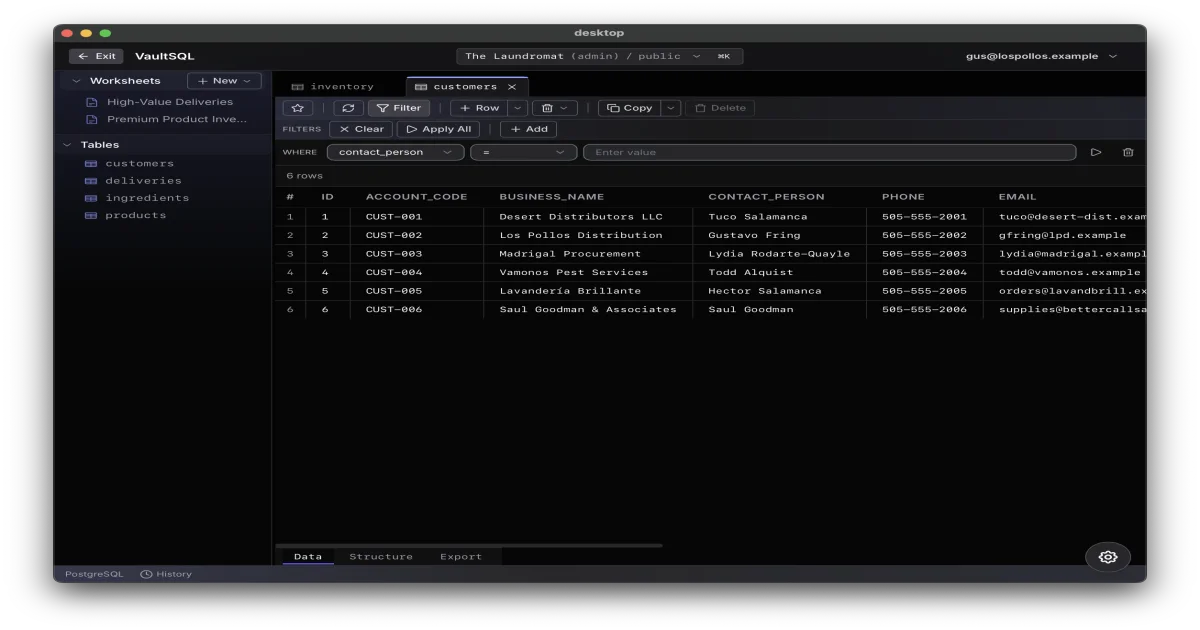
A full-featured SQL workbench in your browser. Browse data, filter results, and update rows directly. Preview foreign key relationships and export data with ease. The interface supports multiple worksheets per connection.
Deeper Analysis
VaultSQL addresses a real pain point in database security: the tension between developer productivity and credential management. Traditional approaches either share passwords insecurely (Slack, email, sticky notes) or use heavy enterprise tools that slow down development.
The zero-trust model is the key differentiator. By encrypting credentials client-side, VaultSQL eliminates the service as a trust boundary. Even if the VaultSQL servers are compromised, the attacker gets only encrypted blobs without the decryption keys.
The access request workflow is particularly useful for on-call scenarios. Instead of giving a contractor permanent access to production, you can grant time-limited access that automatically expires. The audit trail provides accountability without requiring manual logging.
The self-hosted option is important for teams with strict data residency requirements. Since all services run in Docker Compose, deployment is straightforward on any infrastructure.
Practical Evaluation Checklist
- Can you connect to your PostgreSQL, MySQL, or other database?
- Does vault mode encrypt credentials before they leave your browser?
- Can you create and approve access requests with expiration times?
- Are audit logs detailed enough for your compliance requirements?
- Does the SQL workbench support your workflow (filtering, exporting, foreign keys)?
- Is self-hosting feasible with your infrastructure?
- How does the free hosted tier compare to paid alternatives like DataGrip or TablePlus?
Security Notes
VaultSQL’s security model relies on client-side encryption. The decryption keys never leave your device, so the service cannot access your database credentials. This is a strong guarantee, but it means you must back up your keys securely. If you lose your device and your key backup, you lose access to your saved connections.
The audit logs are append-only and cannot be modified by users. This is important for compliance but means you cannot clean up test queries from the log. Plan your testing accordingly.
Access requests should be reviewed carefully. Approving a request grants full database access as defined by the connection permissions. There is no row-level or column-level access control within VaultSQL itself.
FAQ
Q: Is VaultSQL free to use? A: Yes, VaultSQL offers a free hosted tier and is open-source for self-hosting. The hosted version includes core features like vault mode, access requests, and audit logs.
Q: What databases does VaultSQL support? A: VaultSQL supports PostgreSQL and MySQL. Additional database drivers can be added to the Go query service.
Q: Can I use VaultSQL without self-hosting? A: Yes, the free hosted version at vaultsql.com provides all core features. Self-hosting is optional for teams with data residency requirements or custom infrastructure.
Q: How does vault mode differ from standard encryption? A: In vault mode, encryption happens on your device before credentials are sent to the server. The service never sees your decryption keys, so even a server breach cannot expose your database passwords.
Q: Can I export audit logs for compliance? A: Yes, audit logs can be filtered by user, database, or time range and exported in standard formats for compliance reviews.
Conclusion
VaultSQL fills a gap between insecure password sharing and heavy enterprise database tools. The zero-trust encryption model provides strong security guarantees without sacrificing developer experience. The access request workflow and audit logs make it suitable for teams that need compliance without bureaucracy.
The open-source nature and Docker Compose deployment make self-hosting accessible. The free hosted tier is generous enough for small teams to get started without commitment.
For teams that share database access across multiple engineers or contractors, VaultSQL is worth evaluating as a secure alternative to password managers and shared credentials.
Related Posts
ai-setup
Recall – Persistent Memory for Claude Code via MCP Hooks
Recall gives Claude Code a permanent memory store that survives session restarts and context compaction. Four hooks capture and restore context automatically — with cloud SaaS or self-hosted options.
2/28/2026
dev-tools
Automotive Skills Suite for AI Engineering
Evaluate Automotive Skills Suite for APQP, ASPICE, HARA, safety-plan, and DIA workflows with setup notes, governance risks, and SME review guidance.
5/28/2026
dev-tools
awesome-agentic-ai-zh Roadmap Guide
Explore awesome-agentic-ai-zh as a Chinese agentic AI learning roadmap, with setup notes, track selection, study workflow, and evaluation guidance.
5/28/2026