Unlayer – Embeddable email and page builders
Embed drag-and-drop email, page, and document builders into your SaaS product via React SDK, JavaScript embed, or REST export API.
TL;DR
TL;DR: Unlayer is a developer platform for embedding drag-and-drop email, page, and document builders into SaaS products via React SDK, JavaScript embed, or REST export API.
Source and Accuracy Notes
- Project page: unlayer.com
- HN launch thread: news.ycombinator.com/item?id=49008901 (Launch HN — YC W22)
- License: Proprietary (free tier available; commercial license required for production embedding)
What Is Unlayer?
Unlayer describes itself as a developer platform for embedding visual builders into products. Rather than building a drag-and-drop editor from scratch, you embed Unlayer’s builder component and control it through an SDK or REST API.
The platform covers three content types:
- Email builder — drag-and-drop email composition
- Page builder — landing pages with the same interface paradigm
- Document builder — structured document output
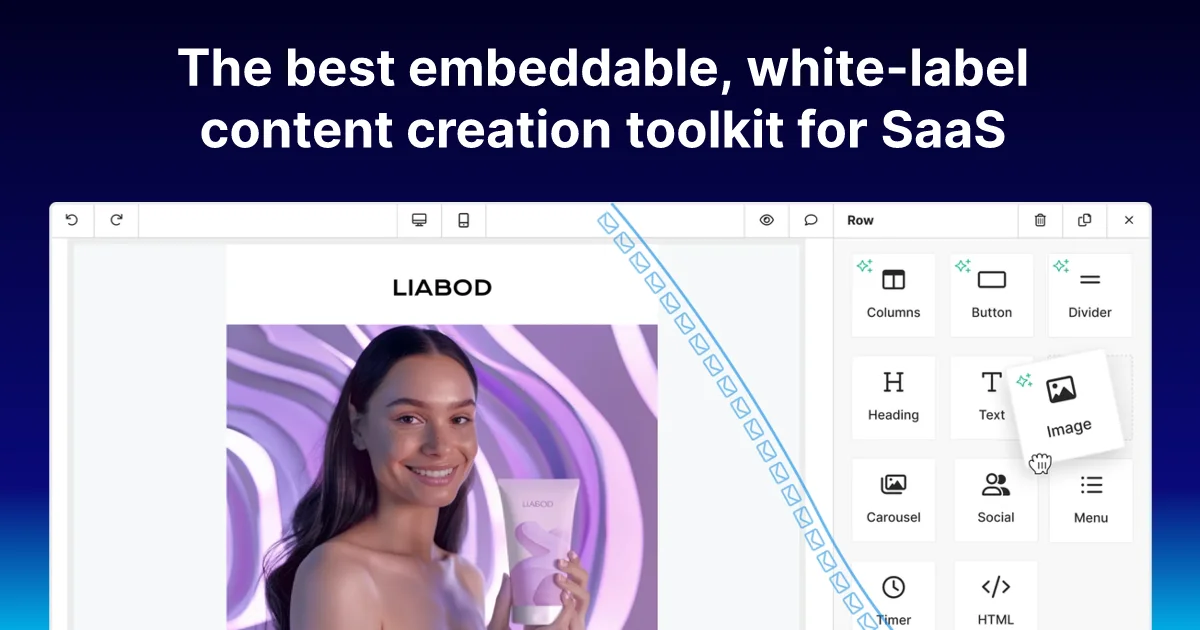
Each builder ships with a template gallery, a block library (columns, buttons, images, social, timer, HTML), and an export system that generates HTML, ZIP, or JSON representations of the design.
The AI layer sits on top: users can prompt the builder to rewrite sections (“make this punchier”), regenerate copy, or auto-populate blocks from a brief. On the developer side, Unlayer exposes a code-first “Elements” layer — you define custom block types as React components and register them with the builder, giving design teams full control over what blocks are available without forking the core editor.
Setup Workflow
Step 1: Create an Unlayer account
Sign up at accounts.unlayer.com to get an API key. The free tier includes a sandbox environment suitable for local development.
Step 2: Install the SDK
npm install @unlayer/sdk
```bash

### Step 3: Initialize Unlayer with your public key

```javascript
import { init } from '@unlayer/sdk';

init({
  publicKey: 'YOUR_PUBLIC_KEY',
});
```bash

### Step 4: Mount the builder into your app

```jsx
import { Editor } from '@unlayer/sdk';

function MyEmailBuilder() {
  return (
    <Editor
      editorPath="email-editor"
      onDesignSubmit={(design) => {
        console.log('Design submitted:', design);
      }}
    />
  );
}
```bash

### Step 5: Export the design

```javascript
unlayer.exportHtml({
  design: designObject,
  success: (data) => {
    // data.html contains the rendered email HTML
    console.log(data.html);
  },
});
```bash

The `success` callback pattern uses a plain callback, not promises or async/await. This is the canonical Unlayer SDK export API — confirm the current SDK version matches this signature before integrating.

## Deeper Analysis

### Code-first Elements

The Elements API lets you register custom React components as builder blocks. This matters for product teams that want strict control over brand guidelines — instead of letting users drop arbitrary HTML, you define a curated set of approved components.

```jsx
unlayer.register({
  name: 'my-product-card',
  category: 'Product',
  template: `
    <div data-block="my-product-card">
      <img src="{{ imageUrl }}" />
      <h3>{{ title }}</h3>
      <p>{{ description }}</p>
    </div>
  `,
});
Users see a branded block in the panel but cannot insert raw HTML or <script> tags.
Template library
Unlayer maintains a template gallery that ships with the builder. Teams can also publish private templates scoped to their account — useful for enforcing brand consistency across customer-facing emails without training users on the builder directly.
AI assistant
The AI features are accessible via the builder UI (prompt-driven) and via an API layer for programmatic content generation. The exact scope of the AI API depends on your plan — the free tier includes basic prompts; advanced generation may require a commercial tier.
Export options
Unlayer supports multiple export formats:
| Format | Use case |
|---|---|
| HTML | Raw email HTML, ready to send |
| ZIP | Images bundled with HTML for full fidelity |
| JSON | Store the design object, render server-side |
| URL | Generates a shareable preview link |
The data.html output in the example above is the most common integration path for transactional email systems.
Practical Evaluation Checklist
- Drag-and-drop email, page, and document editors embedded via SDK
- Template gallery (shared + private per account)
- Custom block registration via code-first Elements API
- AI-assisted copy generation and block suggestion
- Export to HTML, ZIP, JSON, or shareable URL
- REST API for managing designs server-side
- JavaScript SDK (primary) and REST-only integration options
Security Notes
When embedding Unlayer in a multi-tenant product, review the content filtering options for user-generated email content. The code-first Elements layer is the primary tool for restricting what users can insert — it replaces the raw HTML block with pre-approved component patterns.
The export API returns rendered HTML, which should be treated as user-generated content before sending — apply standard email security controls (DKIM, SPF, content scanning) on your side.
FAQ
Q: Is there a self-hosted option? A: Unlayer is a hosted SaaS product. The SDK communicates with Unlayer’s servers for state management and export. There is no documented on-premises deployment option as of 2026-08-15.
Q: What is the free tier limit? A: The free tier includes a sandbox environment for development and testing. Production embedding requires a commercial plan. Check unlayer.com/pricing for current tiers.
Q: Can I use Unlayer without React? A: Yes. The JavaScript SDK works in any environment. There are also community-maintained SDKs for other frameworks. The core embed is a DOM-based integration.
Q: Does Unlayer support AMP email? A: AMP for Email is not listed among Unlayer’s supported output formats. The primary export is standard HTML email compatible with mainstream email clients.
Conclusion
Unlayer solves the “build a drag-and-drop email/page editor” problem by providing a mature, embeddable alternative. The code-first Elements API and per-account template system make it suitable for SaaS products where brand control matters, while the base SDK covers the common case of dropping a builder into a React app in a few lines of code.
If you need to add visual content creation to a product without building an editor from scratch, Unlayer is worth evaluating. The YC W22 launch thread is the best place to read the original product announcement and community discussion.
Related Posts
ai-setup
Recall – Persistent Memory for Claude Code via MCP Hooks
Recall gives Claude Code a permanent memory store that survives session restarts and context compaction. Four hooks capture and restore context automatically — with cloud SaaS or self-hosted options.
2/28/2026
dev-tools
Automotive Skills Suite for AI Engineering
Evaluate Automotive Skills Suite for APQP, ASPICE, HARA, safety-plan, and DIA workflows with setup notes, governance risks, and SME review guidance.
5/28/2026
dev-tools
awesome-agentic-ai-zh Roadmap Guide
Explore awesome-agentic-ai-zh as a Chinese agentic AI learning roadmap, with setup notes, track selection, study workflow, and evaluation guidance.
5/28/2026