UniDeck – No-Code Developer Dashboard Layer
Build live developer dashboards from GitHub PRs, Jira sprints, Linear issues, and CI runs without writing code. UniDeck connects to Google Workspace, Slack, Stripe, and any HTTP API.
TL;DR
TL;DR: UniDeck is a no-code dashboard builder that aggregates live data from GitHub, Linear, Jira, GitLab, Slack, Stripe, and any HTTP API into shareable, embeddable widgets — no credit card required on the free tier.
What Is UniDeck?
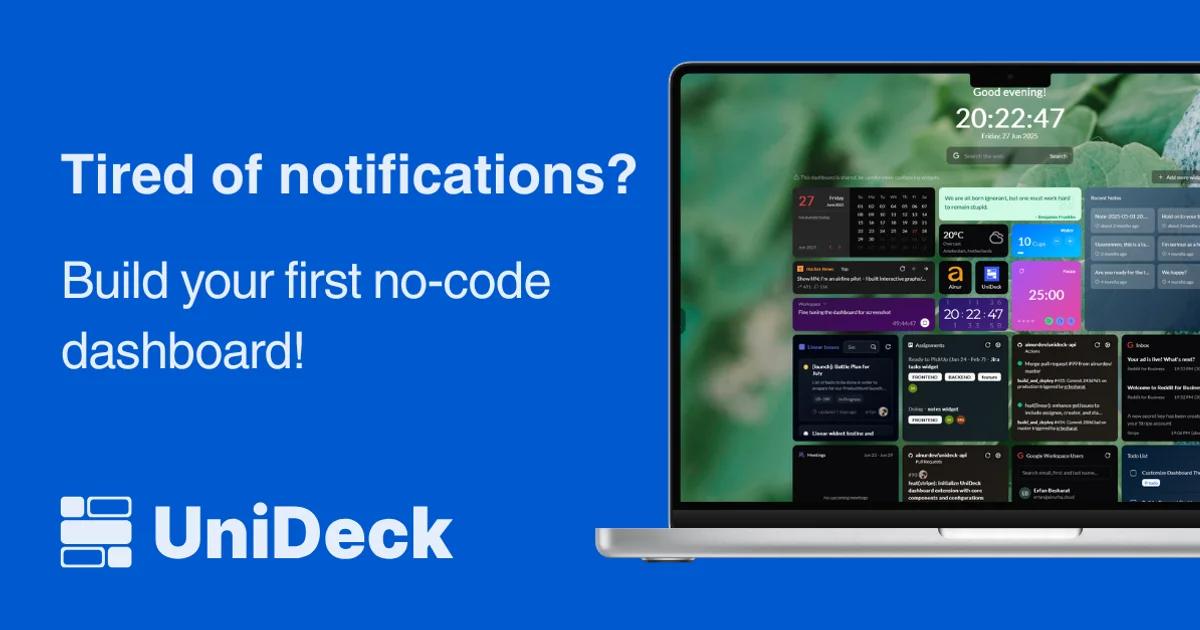
UniDeck is a web-based dashboard tool that pulls data from the SaaS tools your team already pays for and surfaces it in a single, shareable view. Instead of juggling 47 browser tabs, developers can build a unified dashboard with widgets for pull requests, sprint boards, CI pipelines, and custom API data.
From the HN launch thread:
“For the past few months we have improved upon our product called UniDeck, an app that allows you to connect different services and monitor their data. From everyday services like Google and GitHub to your in-house API and tools, everything can be connected to a single dashboard and shared with your team for easy access, monitoring and collaboration.”
UniDeck is built by UniDeck B.V., a Netherlands company (part of Besharat Enterprises group).
Key Features
15+ first-class integrations, including:
- GitHub — Pull requests, issues, Actions runs
- Linear — Issues and team activity
- Jira — Active sprints and issue queues
- GitLab — Pull requests and CI status
- Google Workspace — Calendar, Gmail
- Slack — Notification aggregation
- Stripe — Billing and payment data
- Custom HTTP widget — Any internal API or GraphQL endpoint
All integrations are read-only by design. UniDeck never writes to GitHub, Linear, or Jira.
Widget types include tables, charts, and real-time data tiles. Dashboards can be:
- Shared via a link
- Embedded in Notion or Confluence
- Used as a browser new-tab page
Setup Workflow
Step 1: Create a Free Account
Visit unideck.app and click Start for Free. No credit card is required.
Step 2: Connect an Integration
From the dashboard, click Add Widget and select an integration:
- OAuth-based connect for GitHub, Linear, Jira, GitLab, Google Workspace
- API key or webhook setup for Slack, Stripe
- Custom HTTP widget for any REST or GraphQL endpoint
Step 3: Choose a Template
UniDeck provides pre-built templates. The Developer template combines:
- GitHub Pull Requests widget
- GitHub Actions widget
- GitHub Issues widget
- Linear Issues widget
- Jira Active Sprint widget
- Custom HTTP widget for internal APIs
Step 4: Arrange and Share
Drag widgets to arrange your layout. Click Share to generate a public or team-only link. Or embed directly into Notion/Confluence via iframe.
Deeper Analysis
Strengths
- Truly no-code — non-technical team members can build and maintain dashboards without developer help
- Read-only integrations — security-conscious teams can adopt without granting write access
- Custom HTTP widget — bridges the gap when no first-class integration exists; works with any REST or GraphQL API
- Embed support — dashboards slot into Notion and Confluence, meeting teams where they already work
- Free tier — covers every standard widget; no credit card required
Limitations
- No write-back actions (cannot merge PRs, close issues, or trigger workflows)
- Advanced analytics and custom charting require paid tiers
- No on-premises/self-hosted option — all data flows through UniDeck’s cloud
Pricing
UniDeck offers free, team, and business tiers. From the pricing page: “Simple, transparent pricing. Start for free, upgrade when you need more power. No hidden fees, no surprise charges.” Specific plan prices are displayed on the pricing page and vary by seat count.
Practical Evaluation Checklist
- Connect GitHub via OAuth in under 2 minutes
- Add Linear and Jira widgets to same dashboard
- Use the custom HTTP widget to call an internal API
- Share dashboard via link and embed in Notion
- Verify read-only behavior (no write-back to integrations)
Security Notes
- All integrations use OAuth for read-only access
- UniDeck does not store credentials — tokens are managed per-session through each service’s OAuth flow
- The custom HTTP widget sends requests directly from your browser to your API; UniDeck acts as the widget renderer, not a proxy
- Data is processed in UniDeck’s cloud; review their privacy policy before connecting sensitive services
FAQ
Q: Can UniDeck write back to GitHub or Jira? A: No. All integrations are strictly read-only. UniDeck surfaces data but never modifies issues, PRs, or other records.
Q: Does UniDeck support self-hosting? A: No. UniDeck is a cloud-only SaaS product. There is no self-hosted or on-premises edition.
Q: What happens to my data if I cancel? A: Disconnecting an integration removes all cached data. UniDeck’s privacy policy covers data retention details.
Q: Can I use UniDeck as my browser new-tab page? A: Yes. UniDeck supports new-tab deployment, making it a live “command center” every time you open a browser tab.
Q: How does the Notion/Confluence embedding work? A: Each dashboard has a shareable iframe URL. Paste it into any Notion page or Confluence page as an embed block.
Conclusion
UniDeck solves the “notification hell” problem for developers who live across GitHub, Linear, Jira, and Slack simultaneously. Its no-code widget builder means any team member can compose a real-time dashboard without filing a Jira ticket for a dashboard. The read-only integration model makes it an easy security sell, and the custom HTTP widget future-proofs it against tools that don’t yet have first-class support. If you are tired of tab-switching to monitor your sprint and CI health, UniDeck is worth 10 minutes of setup.
Source and Accuracy Notes
- Project page: unideck.app
- HN launch thread: news.ycombinator.com/item?id=44441780
- Integrations page: unideck.app/integrations
- Pricing page: unideck.app/pricing
- License: proprietary SaaS (no open-source license)
Related Posts
ai-setup
Recall – Persistent Memory for Claude Code via MCP Hooks
Recall gives Claude Code a permanent memory store that survives session restarts and context compaction. Four hooks capture and restore context automatically — with cloud SaaS or self-hosted options.
2/28/2026
dev-tools
Automotive Skills Suite for AI Engineering
Evaluate Automotive Skills Suite for APQP, ASPICE, HARA, safety-plan, and DIA workflows with setup notes, governance risks, and SME review guidance.
5/28/2026
dev-tools
awesome-agentic-ai-zh Roadmap Guide
Explore awesome-agentic-ai-zh as a Chinese agentic AI learning roadmap, with setup notes, track selection, study workflow, and evaluation guidance.
5/28/2026