TL;DR
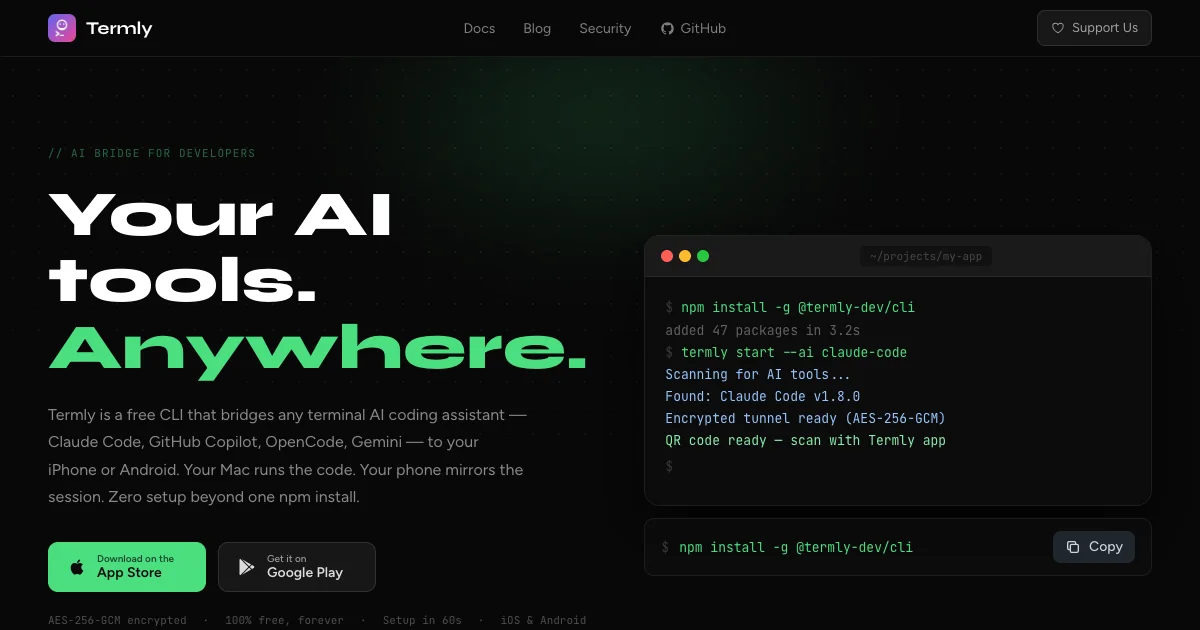
TL;DR: Termly is a free CLI that bridges any terminal-based AI coding assistant — Claude Code, OpenCode, Gemini CLI, Qwen Code — to your iPhone or Android via an encrypted QR-code tunnel. Setup takes under 60 seconds and requires only
npm install -g @termly-dev/cli.
Source and Accuracy Notes
- Project page: termly.dev — verified via direct inspection
- Source repository: github.com/termly-dev/termly-cli — README.md v1.9.5 read
- License: MIT (verified via GitHub repository)
- HN launch thread: news.ycombinator.com/item?id=45914573
What Is Termly?
Termly solves a specific problem: you are deep in an AI coding session on your MacBook, you need to step away, but you want to keep the session going from your phone. Termly makes that seamless without requiring a cloud service to relay your code.
The product is a CLI you install once (npm install -g @termly-dev/cli) and a mobile app (iOS and Android). When you run termly start in a project directory, Termly detects your installed AI tools, shows a QR code, and your phone mirrors the session in real time over an encrypted tunnel.
From the official README:
Access your AI coding assistants from any device. Works with Claude Code, Aider, GitHub Copilot, and any terminal-based AI tool.
Supported AI Tools
Termly auto-detects and bridges to mobile any terminal-based AI coding assistant, including:
- Claude Code (v1.8.0 and later)
- OpenCode
- GitHub Copilot
- Gemini CLI
- Qwen Code
- Aider
- Any terminal AI tool
The full list grows with each release. As of v1.9.5 (June 2026), the CLI includes prebuilt binaries for macOS (Intel and Apple Silicon), Linux (x64 and ARM64), and Windows 10+ (x64 and ARM64) — no compilation step required.
Setup Workflow
Step 1: Install the CLI
npm install -g @termly-dev/cli
```bash

The package is `@termly-dev/cli` on npm. After installation, the `termly` command is available globally. Node.js 18 or later is required.

**Note:** The CLI includes prebuilt platform binaries via `@lydell/node-pty`. No Visual Studio, Xcode CLI tools, or build-essential needed — installation typically completes in 10–30 seconds.

### Step 2: Start Your AI Tool and Bridge to Mobile

Navigate to your project directory and launch Termly:

```bash
cd ~/projects/my-app
termly start
```bash

Termly auto-scans for detected AI tools and prompts you to select one. You can also specify explicitly:

```bash
termly start --ai claude-code
termly start --ai opencode
A QR code appears in your terminal. Open the Termly app on your iPhone or Android, scan the QR code, and your AI session mirrors to the mobile screen in real time.
Step 3: Code from Anywhere
Once connected, your phone mirrors the terminal session. You can view AI output, read code suggestions, and keep the session alive while away from your desk.
Security Architecture
Termly’s architecture is designed so the relay servers cannot read your code. Key points from the security documentation:
- AES-256-GCM end-to-end encryption — every byte is encrypted before leaving your machine
- Diffie-Hellman (DH-2048) key exchange — new encryption keys generated for every session
- Forward Secrecy — past sessions stay safe even if a key is compromised
- Zero-Knowledge Relay — Termly’s servers only relay encrypted data; they cannot decrypt prompts or code
- Session auto-deletion — session data is automatically deleted after 24 hours
The setup does not require opening inbound ports on your router. The connection is outbound from your machine to Termly’s WebSocket servers (wss://api.termly.dev in production).
Three Environments
Termly ships with three distinct environments:
| Environment | Package | Command | Server |
|---|---|---|---|
| Production | @termly-dev/cli | termly | wss://api.termly.dev |
| Development | @termly-dev/cli-dev | termly-dev | wss://dev-api.termly.dev |
| Local | Source only | TERMLY_ENV=local termly | ws://localhost:3000 |
For most users, the production package (@termly-dev/cli) is the correct choice.
Practical Evaluation Checklist
- Free, no subscription, no ads
- Works on iPhone, iPad, Android phones and tablets
- Setup in under 60 seconds (one npm install + QR scan)
- No account or login required
- Zero-knowledge: servers cannot read your code
- Auto-detects installed AI tools — no manual config
- Supports Claude Code, OpenCode, GitHub Copilot, Gemini CLI, Qwen Code, and any terminal AI
- Prebuilt binaries for all major platforms — no compilation needed
- Mobile app available on App Store and Google Play
FAQ
Q: Is Termly free? A: Yes. Termly is completely free to use. No subscriptions, no ads, no paywalls.
Q: Does Termly store my code? A: No. Termly uses zero-knowledge architecture — your code is end-to-end encrypted and Termly’s servers cannot access it. Terminal content is never logged. Session data is automatically deleted after 24 hours.
Q: What AI tools work with Termly? A: Termly works with any terminal-based AI coding assistant — Claude Code, OpenCode, GitHub Copilot, Google Gemini CLI, Qwen Code, Aider, and more. If your AI tool runs in a terminal, Termly can mirror it to mobile.
Q: Does Termly work on iPad? A: Yes. Termly works on any iPad running iOS 15 or later, including with Magic Keyboard and Apple Pencil.
Q: What platforms does the CLI support? A: macOS (Intel and Apple Silicon), Linux (x64 and ARM64), and Windows 10+ (x64 and ARM64). Prebuilt binaries are included — no build tools required.
Q: How does the encryption work? A: Termly uses AES-256-GCM for symmetric encryption with Diffie-Hellman (DH-2048) key exchange. Keys are generated fresh for each session, providing forward secrecy. Your machine encrypts data before it leaves; your phone decrypts it on arrival.
Conclusion
Termly is a focused, well-architected tool that solves a real workflow gap: keeping an AI coding session alive when you need to step away from your desk. The zero-knowledge encryption model means you are not trusting a third party with your code — the relay servers are blind. Setup is genuinely fast, the CLI is cross-platform, and the auto-detection removes any configuration burden.
If you use Claude Code, OpenCode, or any terminal-based AI tool and own a smartphone, Termly is worth a try. Install it in one command, scan the QR code, and your next coding session follows you out the door.
Install: npm install -g @termly-dev/cli
Related Posts
ai-setup
Recall – Persistent Memory for Claude Code via MCP Hooks
Recall gives Claude Code a permanent memory store that survives session restarts and context compaction. Four hooks capture and restore context automatically — with cloud SaaS or self-hosted options.
2/28/2026
dev-tools
Automotive Skills Suite for AI Engineering
Evaluate Automotive Skills Suite for APQP, ASPICE, HARA, safety-plan, and DIA workflows with setup notes, governance risks, and SME review guidance.
5/28/2026
dev-tools
awesome-agentic-ai-zh Roadmap Guide
Explore awesome-agentic-ai-zh as a Chinese agentic AI learning roadmap, with setup notes, track selection, study workflow, and evaluation guidance.
5/28/2026