TengineAI – Hosted MCP Runtime for AI Agents
TengineAI provides a remote MCP server that exposes your HTTP APIs as tools to AI runtimes, handling auth, execution, and observability.
TL;DR
TL;DR: TengineAI is a hosted MCP runtime that turns any HTTP API into a scoped, authenticated, observable tool for AI agents — think of it as API Gateway for MCP tool calls.
Source and Accuracy Notes
- Project page: tengine.ai
- GitHub organization: github.com/TengineAI
- License: Verify from source before claiming
- HN launch thread: news.ycombinator.com/item?id=47427554
What Is TengineAI?
Most AI applications implement tools using function calling, where an LLM triggers application code directly. This works for prototypes but creates serious problems in production:
- No permission layer between the model and your backend
- Unsafe execution of arbitrary code paths
- Tools tightly coupled to the application
- Poor observability into tool runs
- Difficult to share tools across multiple agents
TengineAI is described on the official site as:
“The execution layer between agents and real systems.”
The documentation frames it this way:
“TengineAI is to MCP tools what API Gateway is to REST APIs.”
TengineAI provides a remote MCP server that exposes your HTTP APIs as tools to AI runtimes. You define which endpoints the model can call. TengineAI handles authentication, execution, identity injection, and usage control — then returns structured results to the model. It works with any MCP-compatible model SDK or client.
Setup Workflow
Step 1: Create an Account and Get an API Key
Sign up at tengine.ai. The Free plan includes 600 tool calls per month with a 20-call daily limit. No credit card required to start.
Step 2: Install the Python SDK
pip install tengineai
```bash

### Step 3: Define Your First Tool

The official Python quickstart shows this minimal pattern:

```python
from tengineai import Tengine

client = Tengine(api_key="your-api-key")

# Expose a local HTTP endpoint as an MCP tool
tool = client.add_tool(
    name="weather",
    endpoint="https://api.example.com/weather",
    auth="bearer",
)

# Use the tool in an agent loop
result = tool.run(location="San Francisco")
```bash

The tool definition tells TengineAI which HTTP endpoint to call, what authentication to use, and how to pass parameters from the model.

### Step 4: Connect to an MCP-Compatible Client

TengineAI is protocol-compatible with any MCP client. The docs list Python (API key and user-scoped sessions), Claude Desktop, and Cursor as verified targets. Connect by pointing your client to your TengineAI project endpoint:

```bash
# MCP client configuration (example)
export MCP_ENDPOINT="https://api.tengine.ai/v1/mcp"
export MCP_API_KEY="your-api-key"
Deeper Analysis
Execution Model
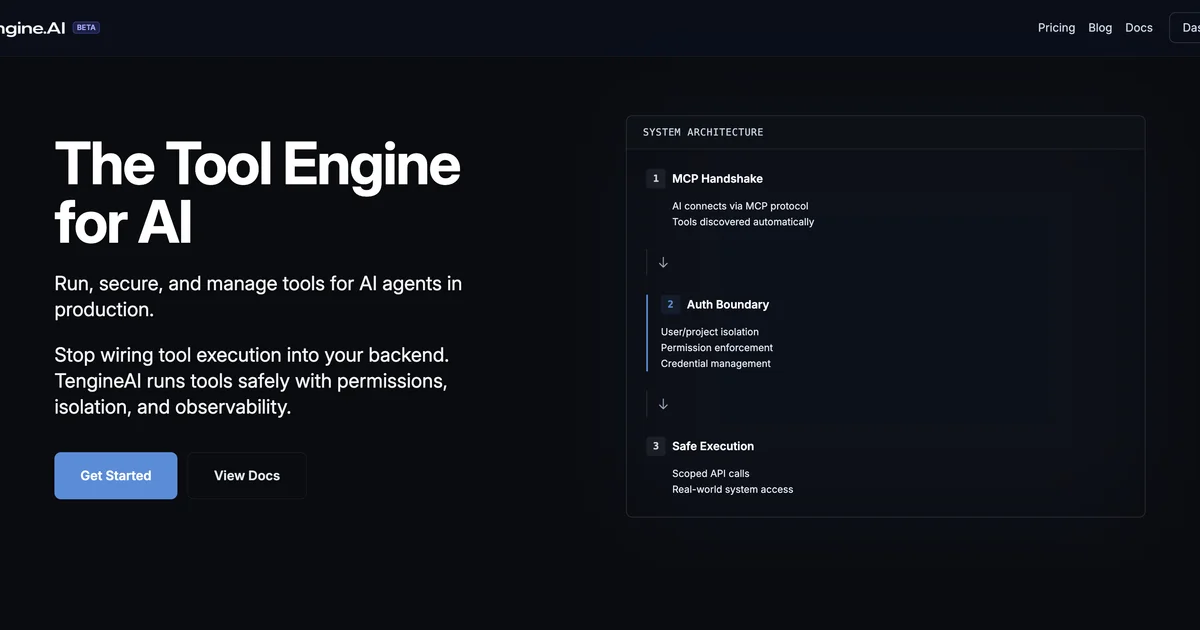
The architecture flows as follows:
- MCP Handshake — AI connects via the MCP protocol; tools are discovered automatically
- Auth Boundary — User or project-level isolation is enforced before any tool runs
- Scoped Execution — Tools execute with permissions, isolation, and full audit logging
- Structured Response — Results return to the model in a structured format
This decouples tool execution from your application backend entirely. The LLM calls tools through TengineAI, which handles everything downstream.
Authentication Options
TengineAI supports multiple auth patterns:
- API Key — Simple bearer token for internal tools
- HMAC Signing — Outbound requests to your APIs are signed, so you can verify the request came from TengineAI
- User-Scoped Sessions — Multi-tenant SaaS scenarios where each user’s tool calls are attributed to them
Pricing
From the official pricing page (verified 2026-06-29):
| Plan | Price | Tool Calls | Daily Limit |
|---|---|---|---|
| Free | $0/month | 600/month | 20/day |
| Starter | $9/month | 3,000/month | 100/day |
| Growth | $29/month | 10,000/month | No limit |
Overage on the Growth plan is charged per additional call. Free and Starter plans have a hard monthly cap.
Who It Is and Is Not For
The docs are explicit about fit:
Right fit:
- Multi-tenant AI SaaS needing per-user tool attribution
- Exposing internal or external APIs to a model without building MCP tooling
- Centralized control over available tools without redeploying
- Usage visibility across a project
- Authenticated outbound requests with HMAC or bearer token
Not the right fit:
- Single static endpoint use cases that would be better as a direct API call
- Prebuilt third-party integrations (TengineAI does not provide these — you define your own HTTP APIs)
Security Notes
TengineAI’s security model has three layers:
- Permission layer — Tool access is gated, not open like a direct function call
- Execution isolation — Each tool run is isolated and auditable
- Auth boundary — HMAC signing and user-scoped sessions prevent identity spoofing
The outbound request signing feature means your internal APIs can verify that tool calls originated from TengineAI, not from a rogue prompt injection.
FAQ
Q: Does TengineAI provide prebuilt tool integrations? A: No. TengineAI does not provide prebuilt third-party integrations. You define the HTTP APIs your model can call, and TengineAI handles authentication, execution, identity injection, and usage control.
Q: What MCP clients are supported? A: Any MCP-compatible client. The documentation uses Anthropic as the reference implementation and provides verified quickstarts for Python, Claude Desktop, and Cursor.
Q: How does it differ from direct function calling? A: Direct function calling couples tool execution to your app code with no permission layer, no isolation, and poor observability. TengineAI inserts a dedicated execution layer that enforces permissions, isolates runs, and provides audit logging.
Q: Is there a self-hosted option? A: The current offering is fully hosted (beta). Self-hosted options are not documented as of 2026-06-29.
Conclusion
TengineAI fills the gap between “it works in prototype” and “it runs safely in production” for AI tool calling. If you are building a product where AI agents call tools against real APIs — especially multi-tenant or production-facing products — the managed MCP runtime model removes a category of security and observability work you would otherwise have to build yourself.
The Free tier is generous enough to evaluate the full workflow without a credit card. Start at tengine.ai.
Related Posts
ai-setup
Recall – Persistent Memory for Claude Code via MCP Hooks
Recall gives Claude Code a permanent memory store that survives session restarts and context compaction. Four hooks capture and restore context automatically — with cloud SaaS or self-hosted options.
2/28/2026
dev-tools
Automotive Skills Suite for AI Engineering
Evaluate Automotive Skills Suite for APQP, ASPICE, HARA, safety-plan, and DIA workflows with setup notes, governance risks, and SME review guidance.
5/28/2026
dev-tools
awesome-agentic-ai-zh Roadmap Guide
Explore awesome-agentic-ai-zh as a Chinese agentic AI learning roadmap, with setup notes, track selection, study workflow, and evaluation guidance.
5/28/2026