Television: give your AI agent a screen instead of a log
Television gives your coding agent a screen to work on. It puts live cards, calendars, tables, and web pages on a persistent board you open in any browser.
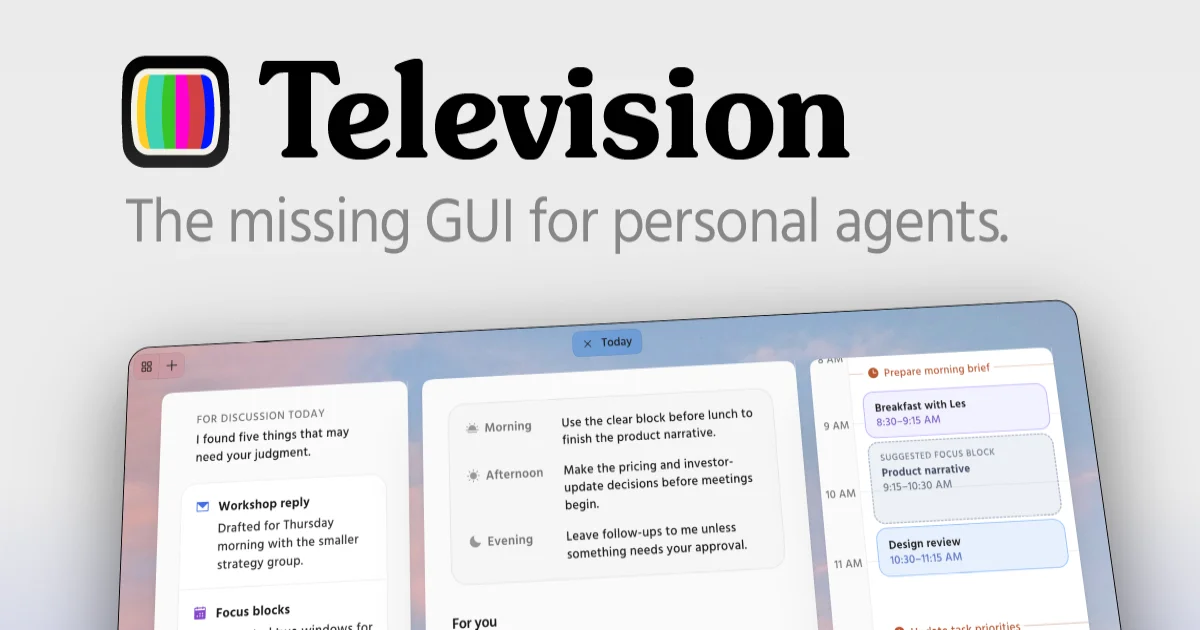
TL;DR: Television hands your coding agent a screen to work on. Instead of hunting back through a chat transcript for the calendar, table, or draft it produced, the agent places artifacts on a persistent board you open in a browser or a Mac app. It is MIT licensed, works with Claude Code, Codex, and other harnesses, and installs from npm as a single
tvcommand.
What Television actually is
Television is a display for personal agents, built by the team at Telepath. The premise is that chat transcripts are a poor place to keep anything you will want to look at twice. A week calendar, a record table, a draft post, a live web page. Those want a surface, not a scrollback.
Your agent keeps working where it already works. What changes is that it can also create artifacts and put them on a board.
Three pieces make that work:
| Piece | What it does |
|---|---|
| Server | Runs persistently on the same machine as your agent |
tv CLI | What the agent calls to install, check, and place content on the server |
| Viewer | The browser or the Mac desktop app you actually look at |
The viewer can sit on a different machine from the server and reach it over the network. That split is what makes the sidecar arrangement sensible: the agent runs on a Linux box under your desk, and you open the board from your laptop.
Artifacts come in a few shapes. Cards hold simple status, interactive views render live data, and URL artifacts embed external web pages. Everything persists, so you return to it later, and the agent modifies an existing artifact rather than generating a fresh copy each time. Artifacts get filed into channels, which are persistent spaces for whatever you happen to be working on.
Why a screen instead of a log
Ask an agent to build a calendar for next week and it hands you a markdown table in the chat. The content is right and the container is wrong. That table is now three screens up in a transcript that also holds three unrelated debugging threads, and by Friday nobody is going to scroll back for it.
Television splits the two concerns. The chat stays the place for conversation and reasoning. The board becomes the place for output you intend to use again. Once the agent knows a calendar belongs on a board, it stops pasting a table into the transcript and starts putting a calendar on the board, where you can open it later, rearrange it, or ask for changes without re-rolling the whole answer.
The second thing it buys you is a shared surface between you and the agent. Today, when a task needs your input mid-flight, the agent asks a question in the chat and waits. With a board, the agent can render the decision as an artifact, keep working on the parts that do not depend on you, and hand you something to click.
This is still a young project. The repository was created on October 1, 2026, and the npm package has been publishing steadily since, with version 1.5.5 out as of October 29. The GitHub repo has 247 stars and 17 forks. The npm registry recorded 2,976 downloads in the month through November 2, which tells you the scale of the audience honestly: small, and growing.
Getting it running
The npm package is @telepath-computer/television and it provides the tv command. It needs Node 22.12.0 or newer, and npm only warns rather than refuses when your Node is too old, so check it yourself before installing.
node --version
npm install -g @telepath-computer/television
tv --version
Next, install the skills that teach your agent how to use the board. The main television skill covers the basics, and several tv-* skills cover specific artifact types. The destination is wherever your harness loads skills from, and the common locations are ~/.agents/skills, ~/.openclaw/workspace/skills for OpenClaw, and ~/.hermes/skills for Hermes.
tv skills install ~/.agents/skillsThen start the server and install it as a service so it comes back after a reboot. On macOS this registers a launchd agent, on Linux a systemd user service, and the service is named com.television.server.
tv serve --persist
tv links
tv links prints the connect URLs for the running server, one per reachable address, including a localhost entry. If the server is not up it prints nothing and tells you why. Once it is running, the agent starts placing things on the board on its own, or you can just ask it to put something on your TV.
For the Mac app, grab the disk image and drag it into Applications. The desktop build is Apple Silicon only and needs macOS 12 or later. The real advantage over the browser is that it renders artifacts containing external web pages, which a plain browser tab cannot do.
If you are not on a Mac, the browser interface still works, though it is marked experimental. The intended path is to hand the setup to your agent and let it do the work:
Read the entire Television admin guide at https://television.run/install.md and help me get Television installed.The admin guide at that URL is unusually thorough. It covers the tv command surface, the config file, the home directory layout, and troubleshooting for the failure modes you will actually hit. Worth reading even if you install by hand, because the tv command surface is wide. Beyond the install and serve commands you get artifact and channel management (tv create-channel, tv create-url-artifact, tv list-artifacts, tv update-artifact), plus tv config show, tv status, and tv stop.
If you would rather build from source, the monorepo needs Node 24 with npm between 11.5 and 12.
git clone https://github.com/telepath-computer/television.git
cd television
npm install
npm run build
npm run link
tv serve
What the skills produce
Three skills ship alongside the main one, and they are the quickest way to see what an artifact actually looks like.
| Skill | What it builds |
|---|---|
tv-calendar | A week calendar built from your events, plans, and deadlines |
tv-tasks | A to-do list of tasks and plans that get checked off as work lands |
tv-table | A dense table of records, in the style of Airtable |
The point of the skills bundle is that the agent picks up the pattern rather than waiting for you to describe a layout. Ask for next week’s schedule and it may reach for tv-calendar on its own. Ask it to put a list on the board and you get a task list rather than a markdown bullet list.
Skills ship with the package and change between releases, so the admin guide tells you to reinstall them on every upgrade rather than trusting the copies already on disk.
Where it stops working
The agent has to run on Linux or macOS. An agent running on Windows is not supported, though the viewer can still be a browser anywhere, so the practical shape is a Linux or Mac machine running your agent and a phone or laptop pulling up the board.
Listening addresses are evaluated once at server start. If you bind to a specific Tailscale or LAN address and that address later disappears, the server logs the failure and exits with status 69 while the service manager keeps retrying. You fix the listen setting and rerun tv serve --persist. Binding to 0.0.0.0 avoids the problem but listens on anything that shows up later too.
Television sends anonymous, content-free usage data to the project, and it respects DO_NOT_TRACK. The admin guide includes a script for turning it off.
State lives in ~/.television by default, holding the config file, the access token, the log, and your channels and artifacts. Moving it means pointing ~/.tv-home at the new path and rerunning the service install, then repointing artifacts whose files moved with them.
The repository also says plainly that it uses a spec-driven development process that is not open to outside contributions yet. Bug reports and feedback are welcome; pull requests are not the current path.
Source and Accuracy Notes
- Project page: https://television.run, verified via direct visit on November 4, 2026
- Source repository:
telepath-computer/televisionon GitHub, 247 stars, MIT license - License: MIT, verified from the LICENSE file in the repository, copyright Unternet PBC
- npm package:
@telepath-computer/televisionv1.5.5, published October 29, 2026 - Admin guide: https://television.run/install.md
- HN launch thread: https://news.ycombinator.com/item?id=49939817, October 2, 2026
Related Posts
dev-tools
Automotive Skills Suite for AI Engineering
Evaluate Automotive Skills Suite for APQP, ASPICE, HARA, safety-plan, and DIA workflows with setup notes, governance risks, and SME review guidance.
5/28/2026
dev-tools
awesome-agentic-ai-zh Roadmap Guide
Explore awesome-agentic-ai-zh as a Chinese agentic AI learning roadmap, with setup notes, track selection, study workflow, and evaluation guidance.
5/28/2026
dev-tools
Baguette iOS Simulator Automation Guide
Set up Baguette for iOS Simulator automation, web dashboards, device farms, gesture input, streaming, and camera testing with Xcode caveats.
5/28/2026