Talanoa - Privacy-First Email Client with People-First Inbox
Talanoa rethinks desktop email with a people-first inbox that groups messages by sender, built-in Kanban task board, and 100% local storage. Free tier available.
TL;DR
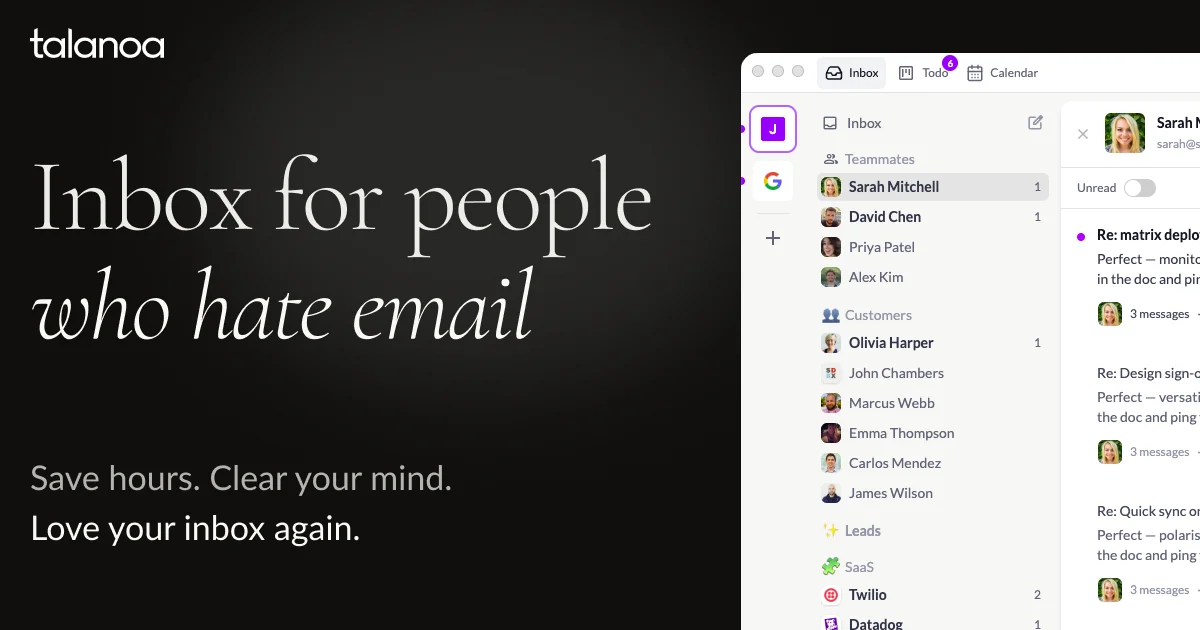
TL;DR: Talanoa is an open-source desktop email client for macOS, Windows, and Linux that replaces the traditional chronological inbox with a people-first view grouped by sender, includes a built-in Kanban board for task management, and stores everything locally — email never leaves your device.
Source and Accuracy Notes
- Project page: talanoa.email
- HN launch thread: news.ycombinator.com/item?id=43814802 — 28 points
- License: Cannot verify from public sources. The site states “open-source” but no public GitHub repository or LICENSE file was found at publication time. Verify before citing.
- Pricing: Free (Focus Mode, 1 account), Paid plans from $6/month (annual) to $249 lifetime
What Is Talanoa?
Most email clients organize your inbox chronologically — newest on top. Talanoa inverts that model: inbox organized by sender, so you see all emails from one person or company grouped together. The goal is to reduce context-switching and help you track conversations as coherent threads rather than scattered time-ordered messages.
The product ships with a built-in Kanban board for turning emails into tasks. You can create cards from emails, assign status columns (like To Do, In Progress, Done), and manage your workflow without a separate task app.
From Talanoa’s own feature list:
- People-first inbox organized by sender
- Built-in Kanban board for email tasks
- One-click email unsubscribe
- One-click sender blocking
- 100% local storage — email never leaves your device
- Zero tracking, zero telemetry
- Gmail, Outlook, Yahoo, iCloud, and IMAP support
- Multi-account inbox management
The security page claims CASA Tier 2 certified status, which is an independent security certification. The app never transmits your emails or OAuth tokens to Talanoa’s servers.
Setup Workflow
Step 1: Download
Talanoa supports macOS (Apple Silicon and Intel), Windows 10+, and Linux (Debian/Ubuntu .deb and Fedora/RHEL .rpm).
Head to talanoa.email/download and pick your platform.
Step 2: Connect an Email Account
On first launch, Talanoa walks you through account setup. Supported providers:
- Gmail / Google Workspace
- Microsoft Outlook / Hotmail
- Yahoo Mail
- iCloud Mail
- Any standard IMAP/SMTP server (including self-hosted)
The free Focus Mode plan supports one account. Paid Power Mode unlocks unlimited accounts.
Step 3: People-First Inbox
Once connected, Talanoa automatically groups incoming emails by sender. All emails from the same address collapse into a single conversation thread. This means:
- You see the full history with a person or service at a glance
- New messages from the same sender stay together regardless of when they arrived
- Promotional and notification emails also get grouped, making them easier to triage or block
Step 4: Kanban Task Board
From any email thread, you can create a Kanban card. Talanoa creates a default board with columns, or you can customize them. Cards link back to the original email thread, so context is always preserved.
Pricing
Talanoa offers two tiers:
| Plan | Price | Accounts | Blocks/month | Kanban Tasks |
|---|---|---|---|---|
| Focus Mode | Free | 1 | 2 | 5 |
| Power Mode | $10/month or $6/month (annual) | Unlimited | Unlimited | Unlimited |
| Power Mode Lifetime | $249 one-time | Unlimited | Unlimited | Unlimited |
The free tier is genuinely functional — no credit card required to start. Multi-account and unlimited blocks/tasks unlock on the paid plan.
Comparison
Talanoa sits in a space between a traditional email client and a lightweight CRM. Here’s how it compares to common alternatives:
| Feature | Talanoa | Thunderbird | Superhuman | Hey |
|---|---|---|---|---|
| People-first inbox | Yes | No | Yes | Yes |
| Kanban board | Yes | No | No | No |
| Local-only storage | Yes | Yes | No | No |
| Free tier | Yes | Yes | No (waitlist) | No |
| IMAP support | Yes | Yes | No | No |
| macOS/Windows/Linux | Yes | Yes | macOS only | Web + iOS |
The closest comparisons are Hey (people-first inbox) and Superhuman (speed-focused, but macOS-only and paid). Talanoa is the only option that combines people-first inbox, local-only storage, and a built-in Kanban board across all three desktop platforms.
Security Notes
Talanoa is CASA Tier 2 certified, which independently verifies that:
- Emails and OAuth tokens are stored only on-device
- No data is transmitted to Talanoa’s servers
- The app has zero telemetry or tracking
For teams handling sensitive communications, this local-first architecture means your email data never touches a third-party cloud. This is a meaningful distinction from Gmail/Outlook web clients or SaaS email tools that necessarily process your mail on their servers.
FAQ
Q: Is Talanoa actually open source?
A: The website states “open-source” and links to a GitHub org at github.com/talanoa-email. However, no public repository or LICENSE file was found at publication time. If you find the source code, please share the link.
Q: Does Talanoa work with my custom domain email? A: Yes, Talanoa supports any standard IMAP/SMTP server. You can connect a self-hosted mail server, custom domain provider, or any email service that exposes IMAP access.
Q: Can I use Talanoa without an internet connection? A: Once your emails are synced to the local app, you can read and compose messages offline. Outbound messages queue and send when connectivity is restored.
Q: Is there a mobile app? A: Not yet. Talanoa is currently desktop-only (macOS, Windows, Linux). A mobile app is listed on their public roadmap.
Q: How is Talanoa different from Gmail’s sender grouping? A: Gmail’s sender grouping is a display-layer feature that doesn’t change how emails are stored. Talanoa builds its entire inbox model around sender relationships, making it the primary organizational unit rather than a visual overlay on a chronological list.
Conclusion
Talanoa is worth trying if you’ve ever felt the traditional chronological inbox was working against you — especially if you manage multiple threads with clients, vendors, or teams. The people-first model and Kanban integration are genuinely different from what Thunderbird, Outlook, or Apple Mail offer.
The local-only storage and zero-telemetry stance is a strong selling point for privacy-conscious users or teams that handle sensitive data. The free tier is usable, not a trial, which lowers the cost of evaluation.
Try it: talanoa.email/download
Related Posts
ai-setup
Recall – Persistent Memory for Claude Code via MCP Hooks
Recall gives Claude Code a permanent memory store that survives session restarts and context compaction. Four hooks capture and restore context automatically — with cloud SaaS or self-hosted options.
2/28/2026
dev-tools
Automotive Skills Suite for AI Engineering
Evaluate Automotive Skills Suite for APQP, ASPICE, HARA, safety-plan, and DIA workflows with setup notes, governance risks, and SME review guidance.
5/28/2026
dev-tools
awesome-agentic-ai-zh Roadmap Guide
Explore awesome-agentic-ai-zh as a Chinese agentic AI learning roadmap, with setup notes, track selection, study workflow, and evaluation guidance.
5/28/2026