Tabularis – Open-Source Desktop DB Client with Built-In MCP
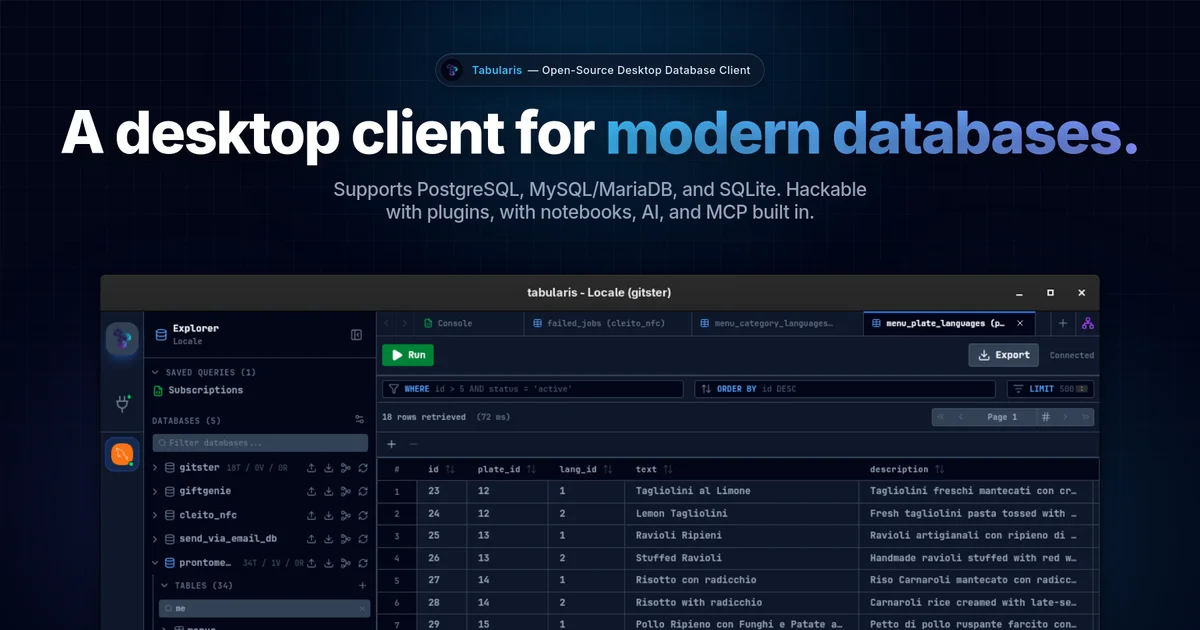
Tabularis is a free, open-source desktop SQL client for PostgreSQL, MySQL, SQLite, DuckDB, ClickHouse, Redis and more, with a built-in MCP server so AI coding tools can query your databases directly.
TL;DR
TL;DR: Tabularis is a free, open-source desktop SQL workspace for PostgreSQL, MySQL, SQLite, and 12-plus additional databases (DuckDB, ClickHouse, Redis, Firestore), with a built-in MCP server that lets AI coding tools like Claude, Cursor, and Devin read schemas and run queries directly from the app.
Source and Accuracy Notes
- Project page: tabularis.dev ← visited and verified
- Source repository: github.com/TabularisDB/tabularis ← read README
- License: Apache-2.0 (verified via GitHub API
license.spdx_id) - HN launch thread: news.ycombinator.com/item?id=46806752
What Is Tabularis?
Tabularis is a cross-platform (Windows, macOS, Linux) desktop SQL client built around three ideas: connect to every database you care about from one app, work with SQL in a modern notebook-style editor, and give AI agents a standardized way to inspect schemas and execute queries through the Model Context Protocol.
The product is developed by Debba on GitHub and sits at roughly 3,500 GitHub stars as of mid-2026. It ships as a standalone desktop binary (downloads available via GitHub releases, Homebrew, WinGet, Snap, and AUR) and does not require a cloud account or internet connection for normal use.
Supported databases
According to the site and the built-in plugin registry, drivers are available (or in progress) for:
- PostgreSQL — shipped
- MySQL / MariaDB — shipped
- SQLite — shipped
- DuckDB
- ClickHouse
- Redis
- Firestore
- MongoDB
- Cassandra (open bounty)
- ScyllaDB (open bounty)
- Trino / Presto (open bounty)
The plugin ecosystem uses a driver bounty board where community members can vote on, sponsor, or claim the next database driver to build.
Setup Workflow
Step 1: Install Tabularis
Download the binary for your platform from tabularis.dev/download. Installation options include:
# macOS via Homebrew
brew install --cask tabularis

# Windows via WinGet
winget install Tabularis

# Linux via Snap
snap install tabularis

# Or download .deb/.rpm/.AppImage from GitHub Releases
```bash

### Step 2: Connect a Database

1. Open Tabularis and click **New Connection**.
2. Choose your database type (PostgreSQL, MySQL, SQLite, etc.).
3. Fill in host, port, credentials, and database name.
4. Click **Test Connection** to verify, then **Save**.

Each connection gets a color label, which propagates to the tab bar — useful when you have dozens of connections open simultaneously.

### Step 3: Enable the MCP Server

Tabularis ships a built-in MCP server. To expose your database to AI coding tools:

1. Go to **Wiki → MCP Server** in the app.
2. Copy the MCP server configuration block.
3. Add it to your AI tool's MCP config (Claude Desktop, Cursor, Devin, etc.).

The configuration follows the standard MCP JSON schema and exposes:
- Connection list and schema inspection
- Query execution
- Result retrieval

### Step 4: Query from SQL Notebooks

Tabularis notebooks mix SQL cells, markdown cells, and chart visualizations in a single document. Variables can be defined in one cell and referenced in subsequent cells:

```sql
-- Cell 1: define a variable
{% set start_date = '2026-01-01' %}

-- Cell 2: use it across queries
SELECT * FROM orders
WHERE order_date >= '{{ start_date }}'
LIMIT 100;
Deeper Analysis
How Tabularis compares to DBeaver and DataGrip
Tabularis occupies a similar space to DBeaver and JetBrains DataGrip, but with a few notable differences:
| Feature | Tabularis | DBeaver | DataGrip |
|---|---|---|---|
| Price | Free, open-source | Free / paid tiers | Paid subscription |
| MCP server | Built-in | Plugin-based | No native MCP |
| SQL Notebooks | Yes | No | No |
| Visual EXPLAIN | Yes | Partial | Yes |
| Plugin ecosystem | Growing bounty board | Extensive | Limited |
| Supported DBs (core) | PostgreSQL, MySQL, SQLite, DuckDB, ClickHouse, Redis | 80+ via JDBC | PostgreSQL, MySQL, SQLite, Redshift, Oracle, SQL Server, and more |
The visual EXPLAIN feature turns raw EXPLAIN ANALYZE output into a navigable execution-plan graph, which is genuinely useful when debugging slow queries on complex joins.
The MCP integration angle
The MCP server is the feature that sets Tabularis apart from other database clients right now. Rather than using a proprietary agent API, it exposes database connections through the open Model Context Protocol, which is gaining adoption across AI coding tools. This means:
- Claude can read your schema without you exporting a dump
- Cursor can suggest query optimizations based on actual execution plans
- Devin can validate SQL changes against a live test database
The MCP server runs locally alongside Tabularis — no cloud relay, no additional server to provision.
Practical Evaluation Checklist
- Installs as a single desktop binary without requiring Java or other runtimes
- Connects to PostgreSQL, MySQL, and SQLite without configuration friction
- SQL editor supports tabs, history, keyboard shortcuts, and auto-complete
- Notebooks allow mixing SQL, markdown, and charts in reusable documents
- MCP server configuration is copy-paste from the app UI into an AI tool config
- Visual EXPLAIN turns query plans into clickable graphs
- Plugin bounty board lets you vote on or fund the next driver you need
- Community drivers (Redis Go, Informix) exist in the plugin registry
Security Notes
- Connections are stored locally; Tabularis does not require a cloud account
- MCP server communicates over local ports by default — no internet-facing exposure
- SSH tunneling is supported for remote database connections
- No telemetry or tracking disclosed in the README or documentation
- As with any database client, use least-privilege credentials and prefer SSH tunnels over plaintext authentication on remote hosts
FAQ
Q: Is Tabularis free to use? A: Yes. Tabularis is fully open-source under the Apache-2.0 license. All core database drivers are included at no cost.
Q: What is the Model Context Protocol? A: MCP is an open standard (modelcontextprotocol.io) for connecting AI coding tools to external data sources and tools. Tabularis implements an MCP server so AI agents can interact with your database without you building a custom integration.
Q: Does Tabularis require an internet connection? A: No. The desktop app and all core features work fully offline. The MCP server also runs locally.
Q: How does Tabularis compare to running psql or mysql from the terminal?
A: Tabularis adds a visual query builder, visual EXPLAIN, SQL notebooks, multi-connection tabs, and AI integration on top of raw CLI access. For developers who live in a terminal, psql is still faster for ad-hoc queries — Tabularis is better suited for exploratory analysis and working across multiple database types simultaneously.
Q: Can I extend Tabularis with custom plugins? A: Yes. The plugin API supports adding new database drivers and extending existing engines. The bounty board also lets the community fund development of drivers for databases not yet supported.
Conclusion
Tabularis is a well-scoped, genuinely useful open-source database client that hits a sweet spot between lightweight tools like TablePlus and full-featured suites like DBeaver. Its MCP server integration is the most interesting differentiator — it is one of the few database clients purpose-built for AI-assisted development workflows. If you work with multiple database types and want a free tool that AI coding tools can actually use, Tabularis is worth a look.
Install it from tabularis.dev/download or browse the plugin ecosystem at tabularis.dev/plugins.
Related Posts
ai-setup
Recall – Persistent Memory for Claude Code via MCP Hooks
Recall gives Claude Code a permanent memory store that survives session restarts and context compaction. Four hooks capture and restore context automatically — with cloud SaaS or self-hosted options.
2/28/2026
dev-tools
Automotive Skills Suite for AI Engineering
Evaluate Automotive Skills Suite for APQP, ASPICE, HARA, safety-plan, and DIA workflows with setup notes, governance risks, and SME review guidance.
5/28/2026
dev-tools
awesome-agentic-ai-zh Roadmap Guide
Explore awesome-agentic-ai-zh as a Chinese agentic AI learning roadmap, with setup notes, track selection, study workflow, and evaluation guidance.
5/28/2026