Survival LLM: an offline assistant with 1.5M articles
Survival LLM is a free, MIT-licensed app that answers emergency questions with a local LLM and 1.5 million offline articles, no internet needed.
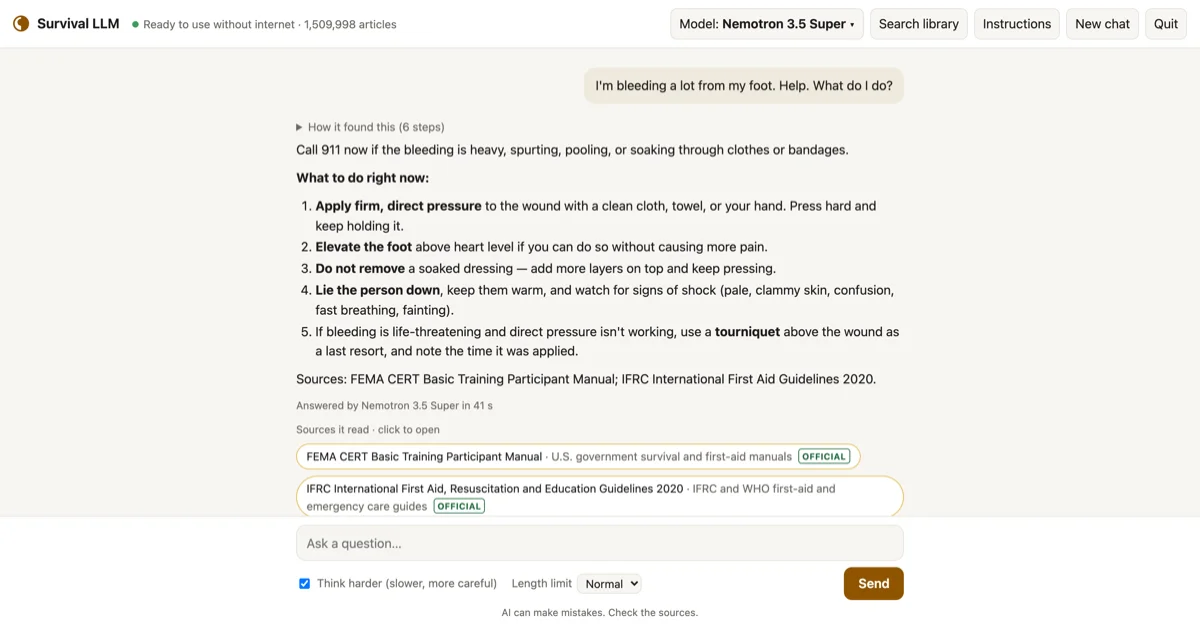
TL;DR: Survival LLM puts a language model and 1.5 million reference articles on your own Mac or PC, so it keeps answering when the internet goes down. Ask it how to treat a burn or keep food safe in a blackout and it answers from local medical and government guidance, then shows you the exact passage each claim came from. The app is free and MIT licensed, but the useful models need 32 GB of memory or more, and the small ones get emergency questions wrong in ways the developer caught before shipping.
What it is
Survival LLM is a desktop app that answers emergency and practical questions with a model running on your own machine. You install it, go through setup once while you still have internet, and after that it works with the network unplugged. The model is served by Ollama, and the reference material is a local index of roughly 1.5 million articles assembled from Wikipedia, WikiMed, WikEM, MedlinePlus, Ready.gov, CDC guidance, US military first-aid manuals, wikiHow, iFixit repair guides and Stack Exchange.
The part that makes it more than a local LLM wrapper is the citation layer. Every answer ends with the articles the model actually opened, and clicking one opens the source in place with the cited passage highlighted. The app also checks the model’s own trailing “Sources:” line against what it really retrieved, and replaces any fabricated citation with the real list. Ronny Fernandez, the author, measured this separately and found models naming sources they had never opened often enough to justify the extra step.
You can also feed it your own PDFs, Word documents, EPUB ebooks and text files, so it can search your generator’s manual or your family’s emergency plan alongside the built-in library. It keeps short memory notes about you, such as a household allergy, and shows you what it saved with an undo.
Why it matters
The usual local-model story is about privacy: your prompts do not reach a vendor’s servers. That is true here, and it is also the less interesting part.
What Survival LLM is actually for is the moment the network is gone. Hurricanes take out cell coverage and power, and a person cannot wait for a cloud API to come back. The offline copy has to be set up beforehand, which is the trade this project accepts. In exchange you get a reference library that covers the questions people genuinely cannot look up, and the source material is official guidance rather than whatever a search engine surfaces at 2 a.m.
The author also made a point of testing rather than assuming. Each model answered 22 blackout and first-aid questions using the real app, with its prompt, tools and library search, and independent AI judges graded every answer blind against guidance from USDA, CDC, FEMA, EPA, NHS, WHO and the Red Cross. Two models were dropped from the download for failing that test.
Getting it running
Grab the archive from the releases page and unzip it. On Mac, double-click Survival LLM. On Windows, right-click the zip, choose Extract All, and open the extracted folder and run Survival LLM.bat.
The first launch trips macOS Gatekeeper because the app is not sold through the App Store. Click Done, then open System Settings > Privacy & Security, scroll to “Survival LLM was blocked”, click Open Anyway and confirm with your password. On Windows, click More info and then Run anyway when SmartScreen appears. You do this once per machine.
Setup then does the heavy lifting in the background: it downloads the AI engine (bundled on Mac, a 1.6 GB Ollama download on Windows), picks a model that fits your memory, and pulls down the library. Expect 20 minutes to about two and a half hours on a fast connection, of which you spend roughly five minutes clicking. The library is either “Everything” at about 8.8 GB or “Essentials” at 1.3 GB, which drops Wikipedia and iFixit but keeps the medical and government material.
You can also run it straight from source, which is the better path if you want to read or change the code:
git clone https://github.com/anonnerdfrenzy/survival-llm
cd survival-llm
pip install pywebview pypdf truststore
python3 app/server.py --browser
The server binds to 127.0.0.1 only. If you have Ollama installed already, it uses that instead of downloading a bundled copy. There is also a plain terminal mode for quick questions:
python3 chat.py "How long is fridge food safe in a blackout?"
python3 chat.py --model granite4.2:8b "How do I start a generator safely?"
The library lookup order is $SURVIVAL_LLM_LIBRARY, then ~/Survival LLM Library, then library.noindex/ next to the code, so you can point the app at a library you built yourself.
Which model your computer gets
The app checks your RAM and suggests a model, and more memory buys a smarter answer:
| Your computer | Model | Download |
|---|---|---|
| Mac, 128 GB or more | NVIDIA Nemotron 3.5 Super | 80 GB |
| Mac, 32 to 96 GB | Qwen3.8 27B | 18 GB |
| Windows PC, 32 GB or more | NVIDIA Nemotron 3.5 Lightning | 25 GB |
| Mac or PC, 16 to 31 GB | IBM Granite 4.2 8B | 6 GB |
Nemotron Super needs 128 GB specifically because macOS only lets the graphics side use about three quarters of memory. Gemma 4 E4B is offered as a faster option for 16 GB machines. Computers with 8 GB can still search the library, though the developer found no model small enough for them that was also safe enough to recommend.
Free disk space needed is the model size plus 5 GB, plus roughly 27 GB while the full library installs (21 GB once installed), or about 10 GB for Essentials.
How the models actually did
Here are the results from the author’s blind grading of 22 questions per model. “Main point right” means the answer got the central guidance correct, and “harmful” means following it could hurt someone.
| Model | Accuracy | Main point right | Harmful | Seconds per answer |
|---|---|---|---|---|
| Nemotron 3.5 Super | 86% | 21 of 22 | 0 | 12 |
| Qwen3.8 27B | 80% | 21 of 22 | 0 | 40 |
| Nemotron 3.5 Lightning | 77% | 19 of 22 | 1 | 8 |
| Granite 4.2 8B | 55% | 14 of 22 | 0 | 29 |
| Gemma 4 E4B | 48% | 11 of 22 | 0 | 3 |
Two models were cut. Granite 4.2 3B, originally planned for 8 GB computers, told people not to use a tourniquet on an arm and to stay three feet from a downed power line when the guidance is thirty-five feet. Qwen 3.6 36B got stuck repeating itself on two questions, once for 94 minutes, which is part of why answers now carry a length limit.
The author’s own caveat is worth repeating: the tests ran on an earlier build of the library, before Wikipedia was added, and it held some material that is not in the public downloads. The instructions have also gained rules since. Treat the table as a comparison between models rather than a guarantee for the version you download.
What to watch for
The library is the thing to think hardest about, not the model. Several sources carry non-commercial terms, and the project’s own SOURCES.md flags that anyone wanting to use the library commercially has to rebuild it without wikiHow, iFixit, the IFRC and WHO material. Some material was deliberately left out because the rights are not clear: Hesperian books, MSF clinical guidelines, the Sphere Handbook and commercial survival manuals.
Size is the other real constraint. The full library is roughly 21 GB installed and the top model is an 80 GB download, so this is not something you fit on a small laptop with a tight disk budget.
On the safety side, the model can still be wrong, which is why the source highlighting exists. The app also blocks “if you must” exceptions for running cars and generators near the house, after tests caught models offering them. Memory notes are stored in a plain text file with the app’s settings, so anyone with access to your account can read them.
One rough edge in the latest release notes: the AI no longer saves your question as a memory note, and some answers no longer open with a made-up “Sources:” line that listed search commands instead of articles.
Source and Accuracy Notes
- Project page: https://www.brangus.io/survival-llm — verified via direct visit
- Source repository: https://github.com/anonnerdfrenzy/survival-llm — 587 stars, 49 forks, Python, MIT license, last pushed 2026-10-28
- License: MIT, copyright 2026 Ronny Fernandez — verified from the LICENSE file
- Library sources and per-source licenses: https://github.com/anonnerdfrenzy/survival-llm/blob/main/SOURCES.md
- HN launch thread: https://news.ycombinator.com/item?id=50264853 — “Survival LLM: AI assistant and emergency library that runs on your own computer”, 518 points and 71 comments, 2026-10-27
Related Posts
dev-tools
awesome-agentic-ai-zh Roadmap Guide
Explore awesome-agentic-ai-zh as a Chinese agentic AI learning roadmap, with setup notes, track selection, study workflow, and evaluation guidance.
5/28/2026
dev-tools
Dulus Terminal Agent Setup Guide
Set up Dulus as a terminal AI agent with native and Docker paths, installer profiles, WebChat ports, repo safety checks, and shell-access risks.
5/28/2026
dev-tools
humanize-text Rewriting Workflow Guide
Evaluate humanize-text for AI-text rewriting workflows, with setup notes, privacy checks, meaning preservation, detector caveats, and review steps.
5/28/2026