Superset – Run 10 Parallel Coding Agents on Your Machine
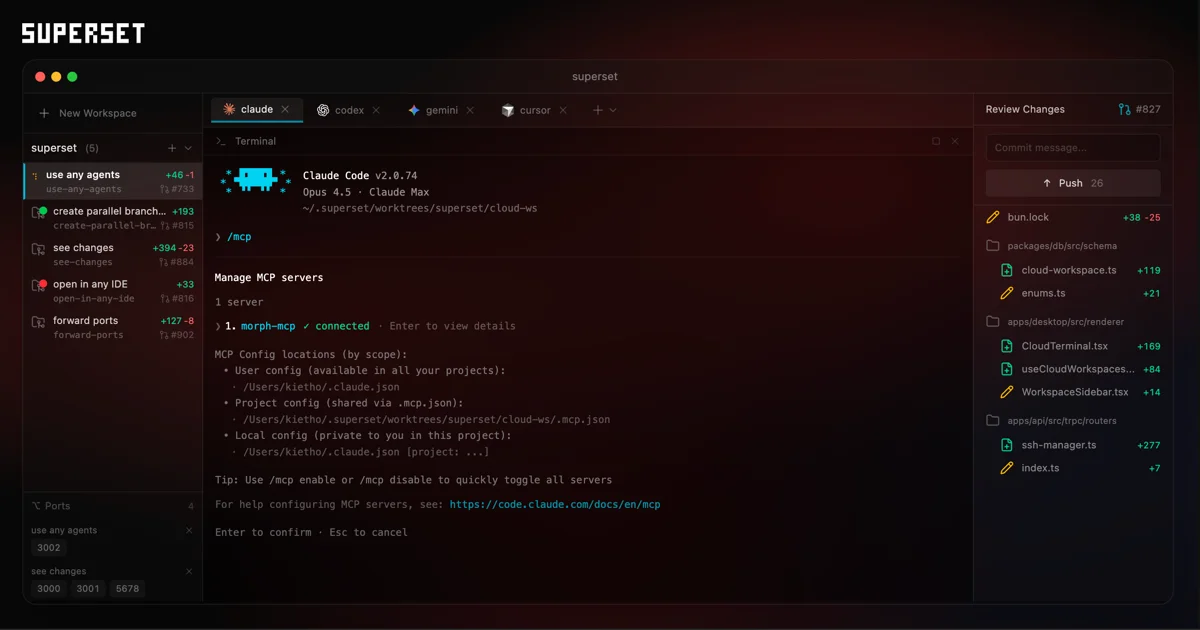
Superset orchestrates multiple AI coding agents in parallel using git worktrees, letting you monitor and switch between tasks without context-switching overhead.
TL;DR
TL;DR: Superset is a desktop app (macOS) that orchestrates multiple AI coding agents in parallel via git worktrees, so you can run Claude Code, Codex, Cursor, and others simultaneously without context conflicts.
Source and Accuracy Notes
- Project page: superset.sh ← verified
- Source repository: github.com/superset-sh/superset ← verified via README
- License: Elastic License 2.0 (ELv2) ← verified
- HN launch thread: news.ycombinator.com/item?id=46368739
What Is Superset?
Superset positions itself as “the code editor for the AI agents era.” Unlike traditional IDEs designed for a single developer, Superset manages a swarm of CLI-based coding agents running in parallel, each isolated in its own git worktree.
The core value proposition from the README:
“Orchestrate swarms of Claude Code, Codex, and more in parallel. Works with any CLI agent. Built for local worktree-based development.”
It is built on Electron (desktop app for macOS) and uses Bun as its runtime. The project has 12,298 GitHub stars at time of writing, making it one of the more visible launches in the coding-agent-tooling space.
Supported Agents
Superset works with any CLI-based coding agent. The README lists the following as fully supported:
- Claude Code (Anthropic)
- OpenAI Codex CLI (OpenAI)
- Cursor Agent (Cursor)
- Amp Code
- Droid (Factory AI)
- Gemini CLI (Google)
- GitHub Copilot (GitHub)
- Mastra Code
- OpenCode
- Polygraph
The README states it plainly: “If it runs in a terminal, it runs on Superset.”
How It Works
Worktree-Based Isolation
Each coding task runs in its own git worktree, which means:
- Agents cannot overwrite each other’s changes because each has a dedicated working directory
- Branch context is preserved — no accidental main-branch commits from an agent
- You can switch between agent workspaces mid-task without losing state
Parallel Execution
Superset can run more than 10 agents simultaneously. The app provides:
- A unified terminal view per agent
- Built-in diff viewer to inspect changes before accepting them
- Status tracking per agent (idle, running, waiting for input)
- Notification when an agent needs human attention
Workspace Presets
You can automate environment setup per workspace — dependency installation, env file provisioning, and other setup steps — so a new task bootstraps itself without manual intervention.
Setup
Prerequisites
| Requirement | Details |
|---|---|
| OS | macOS (Windows/Linux untested at this time) |
| Runtime | Bun v1.0+ |
| Version Control | Git 2.20+ |
| GitHub CLI | gh |
| Dev server | Caddy (for local development only) |
Install
The simplest route is to download the latest macOS release:
curl -L -o /tmp/superset.dmg https://github.com/superset-sh/superset/releases/latest/download/superset-macos.dmg
# Then open the .dmg and drag Superset to Applications
```bash

### Development Install

If you want to hack on Superset itself:

```bash
git clone https://github.com/superset-sh/superset.git
cd superset
./.superset/setup.local.sh
bun run dev
The setup.local.sh script sets up a local Postgres + Electric stack via Docker and seeds a dev account. Prereqs: bun, docker, jq, and caddy (brew install jq caddy && caddy trust).
You can sign in with the “Sign in as dev” button, or use [email protected] / supersetdev.
Key Features
| Feature | Description |
|---|---|
| Parallel Execution | Run 10+ coding agents simultaneously on your machine |
| Worktree Isolation | Each task gets its own branch and working directory |
| Agent Monitoring | Track agent status and get notified when changes are ready |
| Built-in Diff Viewer | Inspect and edit agent changes without leaving the app |
| Workspace Presets | Automate env setup, dependency installation, and more |
| Universal Compatibility | Works with any CLI agent that runs in a terminal |
| Quick Context Switching | Jump between tasks as they need your attention |
| IDE Integration | Open any workspace in your favorite editor with one click |
Keyboard Shortcuts
| Shortcut | Action |
|---|---|
⌘1-9 | Switch to workspace 1-9 |
⌘⌥↑/↓ | Previous/next workspace |
⌘N | New workspace |
⌘⇧N | Quick create workspace |
⌘⇧O | Open project |
All shortcuts are customizable via Settings > Keyboard Shortcuts (⌘/).
Practical Evaluation Checklist
- GitHub stars: 12,298+ (verified via GitHub API)
- License: Elastic License 2.0 (ELv2) — not open source in the traditional sense; check license terms for commercial use
- macOS desktop app (Electron + Bun)
- Works with Claude Code, Codex, Cursor, and 8+ other agents
- Git worktree-based isolation (prevents agent branch conflicts)
- Active HN launch (multiple Show HN and Launch HN posts)
- Windows/Linux support: not yet available
Security Notes
- Superset runs agents locally — code execution happens on your machine
- Each agent runs in an isolated worktree, limiting cross-contamination of git branches
- The Elastic License 2.0 restricts commercial use and cloud hosting of the service — do not confuse this with permissive open-source licenses like MIT or Apache 2.0
FAQ
Q: Does Superset work on Windows? A: Not yet. The current release targets macOS. Windows and Linux builds are listed as forthcoming.
Q: Is it open source? A: The source is on GitHub, but the project uses the Elastic License 2.0 (ELv2), which is a source-available license with commercial use restrictions. It is not traditional open source (e.g., not MIT or Apache 2.0).
Q: What makes it different from just running multiple terminal windows? A: Superset provides unified monitoring, diff viewing, and branch isolation via git worktrees. Running 10 terminal windows with 10 agents means managing overlapping output and risking branch conflicts — Superset’s worktree model prevents agents from overwriting each other’s commits.
Q: Do I need a separate API key for each agent? A: Yes. Superset manages the agents but does not provide API keys. Each agent (Claude Code, Codex, etc.) requires its own API credentials configured in your environment.
Conclusion
Superset addresses a real bottleneck with current coding agents: the single-agent context window and the difficulty of running multiple agents without branch conflicts. By building on git worktrees, it makes parallelism practical without filesystem or version-control chaos.
The Elastic License 2.0 is worth noting if you intend to use or fork the project commercially. For personal use and evaluation, the setup is straightforward — download the macOS app or run it via Bun in dev mode.
See the full documentation at docs.superset.sh and the GitHub repo at github.com/superset-sh/superset.
Related Posts
ai-setup
Recall – Persistent Memory for Claude Code via MCP Hooks
Recall gives Claude Code a permanent memory store that survives session restarts and context compaction. Four hooks capture and restore context automatically — with cloud SaaS or self-hosted options.
2/28/2026
dev-tools
Automotive Skills Suite for AI Engineering
Evaluate Automotive Skills Suite for APQP, ASPICE, HARA, safety-plan, and DIA workflows with setup notes, governance risks, and SME review guidance.
5/28/2026
dev-tools
awesome-agentic-ai-zh Roadmap Guide
Explore awesome-agentic-ai-zh as a Chinese agentic AI learning roadmap, with setup notes, track selection, study workflow, and evaluation guidance.
5/28/2026