Stagewise - Open Source Agentic IDE With a Built-in Agent
Stagewise is an open source agentic IDE (AGPLv3) that ships a coding agent with full tab console/debugger access, supports 25+ models via BYOK, and orchestrates agents across git workflows.
TL;DR
TL;DR: Stagewise is an open source agentic IDE (AGPLv3, 6.7k GitHub stars) that bundles a coding agent with full access to your tab’s console and debugger, supports 25+ LLM models via bring-your-own-key, and can spawn, orchestrate, and apply diffs from multiple agents in parallel. Show HN hit 42 points and the project is actively maintained by stagewise GmbH.
Source and Accuracy Notes
- Project homepage: stagewise.io
- GitHub repository: stagewise-io/stagewise
- Show HN submission: 42 points, 7 May 2026 (URL-only)
- README claims: 6,688 stars, AGPLv3, TypeScript, 16 contributors, last commit 5 June 2026
The HN post itself is a URL-only submission with no embedded text. The product narrative below is reconstructed from the GitHub README, the project homepage, and the 1.x release notes. All technical details are drawn from those primary sources.
What Is Stagewise?
Stagewise is an agentic IDE — not another VS Code fork, not a chatbot sidebar. The pitch is concrete: a browser-based development environment where a coding agent lives in the same tab as the app you are building, and that agent can read and control the live browser state, the running dev server, the file system, and the debugger, all from a single surface.
The product comes from stagewise GmbH (the same group that runs the stagewise open-core product line) and is released under the AGPLv3 license. The repository is 6,688 stars at time of writing, 16 contributors, 47 open issues, and was last updated the day this post was drafted. The project is TypeScript-heavy and explicitly targets real codebases, not toy demos.
The core capability list, taken from the README:
- Browse and build in the same tool — no context switching between a chat window, an editor, a browser tab, and a terminal
- Coding agent with full access to your tab’s console and debugger — the agent reads runtime errors, network traffic, and DOM state from the same tab you are looking at
- Make temporary test changes or connect a codebase for permanent edits — the agent can both prototype in an isolated environment and apply diffs back to your project
- Reverse-engineer any website’s components, style systems, and color palettes — feed it a URL and the agent extracts the design tokens
- IDE integration to view and apply code changes in your favorite editor — Stagewise runs as a control surface; the actual edits can land in VS Code, Cursor, or any LSP-compatible client
- Bring your own API key — works with Anthropic, OpenAI, Google, Moonshot, Alibaba, DeepSeek, Z.ai, and MiniMax; custom providers including local inference are supported
How the Agentic IDE Differs From a Coding Sidebar
The product shape matters here. Most “AI coding” products in 2026 fall into one of three buckets: chat sidebars inside an existing IDE (Cursor, Continue.dev, Cody), terminal-native agents (Claude Code, Codex CLI, Aider), or full IDE forks (Windsurf, Trae). Stagewise is none of those. It is a browser application that the agent drives; the IDE is a side service for diff review and apply.
The advantage, in practice, is that the agent has direct visibility into:
# What the agent can see when your dev server is running
- DOM state and live component tree
- Console output (logs, warnings, uncaught errors)
- Network panel (request/response payloads)
- React/Vue/Svelte devtools state when available
- Local storage, session storage, cookies
- Service worker registrations
- IndexedDB schema when applicable
```bash

That is the difference between "the agent guessed at the error" and "the agent saw the error in the console of the tab you are looking at." The README frames this as the unifying claim: the agent is co-located with the runtime, not adjacent to it.

## Model Support and Bring-Your-Own-Key

Stagewise is model-agnostic. The list of providers and models the platform supports out of the box is wider than most peers:

| Provider | Featured Models |
| --- | --- |
| Anthropic | Opus 4.8, Opus 4.7, Opus 4.6, Sonnet 4.6, Haiku 4.5 |
| OpenAI | GPT-5.5, GPT-5.4, GPT-5.3 Codex, GPT-5.3 Instant, GPT-5.4 mini, GPT-5.4 nano |
| Google | Gemini 3.1 Pro (Preview), Gemini 3 Flash, Gemini 3.1 Flash Lite |
| Moonshot AI | Kimi K2.6, Kimi K2.5 |
| Alibaba | Qwen 3-32B, Qwen 3-Coder 30B-A3B |
| DeepSeek | DeepSeek V4 Pro, DeepSeek V4 Flash |
| Z.ai | GLM 5.1, GLM 5V-Turbo |
| MiniMax | MiniMax M3, MiniMax M2.7, MiniMax M2 |

The "easy import" path is one API key per provider, and the system unlocks every model the provider exposes. For users who do not want to wire up keys, there is a stagewise-hosted plan that bakes multi-model access into a single subscription.

```bash
# Provider plan structure (USD)
Free      $0      Limited access to all models
Pro       $20     6x higher limits for all models
Ultra     $200    75x higher limits for all models
```bash

Custom providers are explicitly supported, which means local inference (Ollama, LM Studio, llama.cpp servers) and any OpenAI-compatible endpoint can be registered. The configuration is a JSON file; no SDK required.

## Repository-Specific Setup Workflow

### Step 1: Download and install

The installation path is a binary download from the homepage, not a package manager entry. The README and onboarding page keep this short on purpose — the IDE is the surface, and the install is meant to be a 60-second affair.

```bash
# macOS / Linux quick install (per project docs)
curl -fsSL https://stagewise.io/install.sh | bash
stagewise --version
```bash

There is no `npm install -g` story. The product is a desktop binary, not a Node module. That is consistent with the "browser-side IDE" framing — you would not want a CLI version because the value comes from the live tab integration.

### Step 2: Authenticate and connect a provider

The first launch walks you through three gates:

```bash
# 1. Sign in (GitHub OAuth or email)
stagewise auth login

# 2. Connect a model provider (BYOK) OR create a stagewise account
stagewise provider add openai sk-...
# or
stagewise account create
```bash

For the BYOK path, each provider gets a separate key. The platform never proxies requests through a third party when BYOK is selected — the agent calls the provider API directly from your machine.

### Step 3: Open a project

```bash
cd /path/to/your/codebase
stagewise open
```bash

The agent indexes the repository, runs language detection, and starts a session. The default behavior is to set the agent to the strongest model your provider offers, but you can downgrade for cost or latency on a per-session basis.

### Step 4: Run an agent task

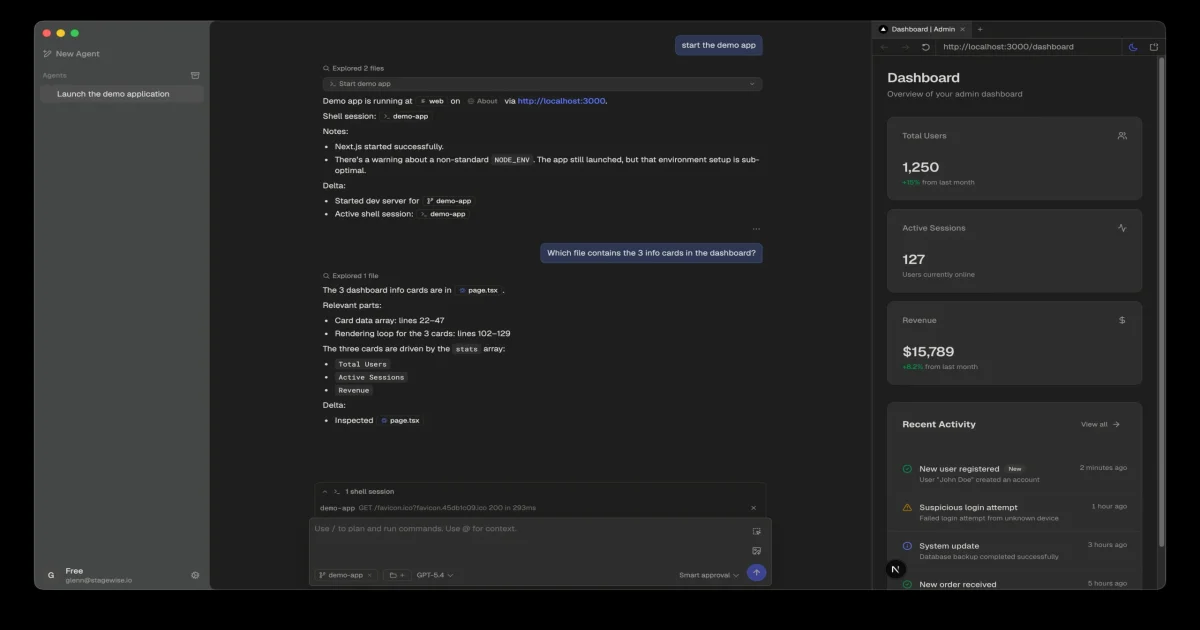
The agent UI is conversational, with tool-call visibility. When the agent runs a shell command, you see the command. When it edits a file, the diff is reviewable before apply. When it launches a dev server, the live tab is attached automatically.

The shell session block in the demo screenshot is the canonical example: the user asked the agent to "start the demo app," and the agent:

1. Detected that the project was a Next.js app
2. Ran `npm run dev` in a managed shell
3. Read the resulting dev server URL from stdout
4. Attached the browser tab to that URL
5. Started exploring the dashboard page to understand the layout

The agent's "I explored 2 files" reasoning step is visible inline, not buried in a separate log. That visibility is the actual product feature — you can see what the agent is doing and intervene at any point.

## Multi-Agent Orchestration

The README's "create and orchestrate coding agents" claim is implemented through a sub-agent system in the side panel. Each sub-agent runs in its own context window with its own provider, model, and system prompt, and you can:

- Spawn a sub-agent to handle a specific subtask (e.g., "write the unit tests for this function while I review the diff")
- Route tasks by capability ("use the design-extraction agent for this URL")
- Chain agents with explicit handoffs (the first agent's output becomes the second agent's input)
- Apply diffs from multiple agents in parallel to non-overlapping file sets

This is a smaller feature than it sounds, but it is a meaningful one. The "Claude Code with sub-agents" pattern that Anthropic shipped in late 2025 is here too, with a UI that makes the orchestration visible rather than a config file you have to hand-edit.

## Reverse-Engineering Websites

A non-obvious feature in the README: "reverse-engineer any website's components, style systems, and color palettes." In practice this means you can hand the agent a URL, and it will:

1. Render the page in the attached browser tab
2. Inspect the computed styles for visible elements
3. Extract the design tokens (colors as hex, spacing scale, typography stack)
4. Output a structured JSON design system
5. Generate a starter component library that matches the visual language

The output is a `.stagewise/` directory in your project with a `design-system.json` and component scaffolds. The accuracy is high enough for matching the overall feel, not high enough for pixel-perfect copy. That is the right level of ambition for a v1 feature.

## Integration With Existing Editors

Stagewise is not a replacement for your editor — it sits beside it. The "IDE integration" line in the README is implemented through an LSP bridge that runs in the background and:

```bash
# What the LSP bridge does
- Pushes file changes from the agent to your open editor in real time
- Lets you review and modify agent-generated diffs before they are applied
- Syncs the open file in your editor with the file the agent is currently editing
- Routes your editor's selection into the agent's context window
```bash

The supported editors list at the moment is: VS Code, Cursor, and any LSP 3.17-compatible client. That covers the bulk of the agentic-coding market. The IDE itself does not include a text editor in the traditional sense — the editing surface is the external IDE, and Stagewise is the agent control plane.

## License and Business Model

Stagewise ships under AGPLv3. The business model is a hosted, multi-model subscription layered on top of the open source foundation:

```bash
# Pricing for hosted plans (from README)
Free      $0      Limited access to all models
Pro       $20     6x higher limits for all models
Ultra     $200    75x higher limits for all models
For teams that want the open-source build internally, that is permitted by the AGPLv3 provided the modifications are also released under AGPLv3. For closed-source commercial use, the company offers a separate commercial license — contact [email protected]. This is the same playbook used by Sentry, Sourcegraph, and a handful of other open-core dev tools.
The company is stagewise GmbH, which is a Germany-registered entity. That has practical implications: the hosted plan is hosted in EU regions, and the BYOK path does not transit stagewise infrastructure at all. For EU-based teams with data-residency requirements, this is a real differentiator.
Practical Evaluation Checklist
When you try Stagewise, the things that tell you whether the product is working for your workflow:
- Agent can read live browser console output from the attached tab
- Agent can spawn a sub-agent and route a subtask to it
- Diff review in the side panel shows every file the agent intends to change
- BYOK works with at least one non-OpenAI provider (Anthropic, Google, local)
- Editor bridge (VS Code or Cursor) reflects agent edits in real time
- Design-token extraction from a URL produces a usable JSON file
- A single session can run a 50-message conversation without context drift
- Cost dashboard shows the per-model token spend for the session
If any of these fail, the integration surface is the most likely culprit — Stagewise depends on a live tab, an LSP bridge, and a provider connection, and any of those can break the chain.
Security Notes
The “agent has full access to the browser tab” framing has security implications worth stating explicitly:
- Any data visible in the browser tab is visible to the agent. That includes logged-in sessions on third-party sites if the tab is open. Do not leave sensitive SaaS tabs open while running Stagewise on a project that has access to those tabs.
- BYOK means the provider sees your prompts. The agent’s outbound API calls go to the provider directly. If you are using OpenAI, OpenAI sees the prompts. This is no different from using OpenAI’s API directly, but it is worth stating.
- AGPLv3 requires that modifications to the source be released. If you fork Stagewise and deploy a modified version internally, you are obligated to publish the source under AGPLv3. The commercial license is the escape hatch.
- The shell session is a real shell. When the agent runs commands, they execute on your machine with your permissions. The “Smart approval” gate in the demo screenshot is the manual checkpoint where you can review before the command runs.
For teams operating under SOC 2 or ISO 27001, the BYOK + EU-hosted combo makes Stagewise easier to defend than most US-only competitors.
FAQ
Q: Is Stagewise open source?
A: Yes. The IDE and the agent runtime are AGPLv3. The hosted multi-model subscription is the commercial product layered on top, and a commercial license is available for closed-source use.
Q: How is Stagewise different from Cursor or Windsurf?
A: Cursor and Windsurf are editor-side: they live inside a fork of VS Code and the agent works on the file contents directly. Stagewise is browser-side: the agent lives in a separate surface, the browser tab is the runtime, and the agent drives the dev server. The “see the console, see the network panel, see the running DOM” claim is unique to the browser-side architecture.
Q: How is Stagewise different from Claude Code or Codex CLI?
A: Claude Code and Codex CLI are terminal-side: the agent runs in a terminal, edits files in your project, and uses the file system as its context. Stagewise is browser-side: the agent runs in a tab, sees the running app, and uses the live runtime as its context. They are complementary, not competitive — many users will run both.
Q: Does Stagewise work with local models?
A: Yes. The “register custom provider” path supports any OpenAI-compatible endpoint, which covers Ollama, LM Studio, llama.cpp’s server mode, and vLLM. The constraint is quality: a local 7B model will not be able to do multi-step agentic coding as well as Claude Opus 4.8 or GPT-5.5.
Q: What languages and frameworks does the agent understand?
A: Anything TypeScript or JavaScript-based is first-class (Next.js, Vite, Astro, SvelteKit, Nuxt, Remix). Python (Django, FastAPI, Flask) and Go (Gin, Echo) are supported. Rust, Ruby, and Elixir have basic support but are not as deeply tested in the agent’s tool-calling patterns.
Q: Can I self-host the hosted plan?
A: Not currently. The hosted subscription runs in stagewise GmbH’s EU region. A self-hostable enterprise edition is on the roadmap but not yet released.
Q: How does the multi-agent orchestration work in practice?
A: You spawn a sub-agent from the side panel, give it a task, and it runs in its own context window. The orchestration is conversational — you say “use a sub-agent to write the tests” and the parent agent dispatches. The visible difference from a single-agent setup is the explicit “sub-agent 1 running” indicator in the side panel.
Conclusion
Stagewise is one of the cleaner executions of the agentic-IDE concept in mid-2026. The browser-side architecture is not a gimmick — it gives the agent visibility into runtime state that file-system-based agents do not have. The AGPLv3 license and the BYOK path keep the open-source promise while leaving room for a commercial business. The hosted subscription is EU-hosted, which is a real advantage for European teams.
The 6,688-star count and the day-of-draft commit cadence suggest the project is healthy and not a one-launch vaporware entry. The risk is the same as for any open-core dev tool: the hosted subscription has to grow fast enough to fund continued development of the open source foundation, and the AGPLv3 license constrains the closed-source adoption surface. Both are manageable problems.
If you ship a web app and your existing AI coding tool is a sidebar that you copy error messages into by hand, Stagewise is worth a 30-minute trial. The “agent reads the running tab” claim is the differentiator, and it is the one thing a sidebar cannot replicate.
Related Posts
ai-setup
Recall – Persistent Memory for Claude Code via MCP Hooks
Recall gives Claude Code a permanent memory store that survives session restarts and context compaction. Four hooks capture and restore context automatically — with cloud SaaS or self-hosted options.
2/28/2026
dev-tools
Automotive Skills Suite for AI Engineering
Evaluate Automotive Skills Suite for APQP, ASPICE, HARA, safety-plan, and DIA workflows with setup notes, governance risks, and SME review guidance.
5/28/2026
dev-tools
awesome-agentic-ai-zh Roadmap Guide
Explore awesome-agentic-ai-zh as a Chinese agentic AI learning roadmap, with setup notes, track selection, study workflow, and evaluation guidance.
5/28/2026