SlickFast – JSON to Retina Charts via MCP Server
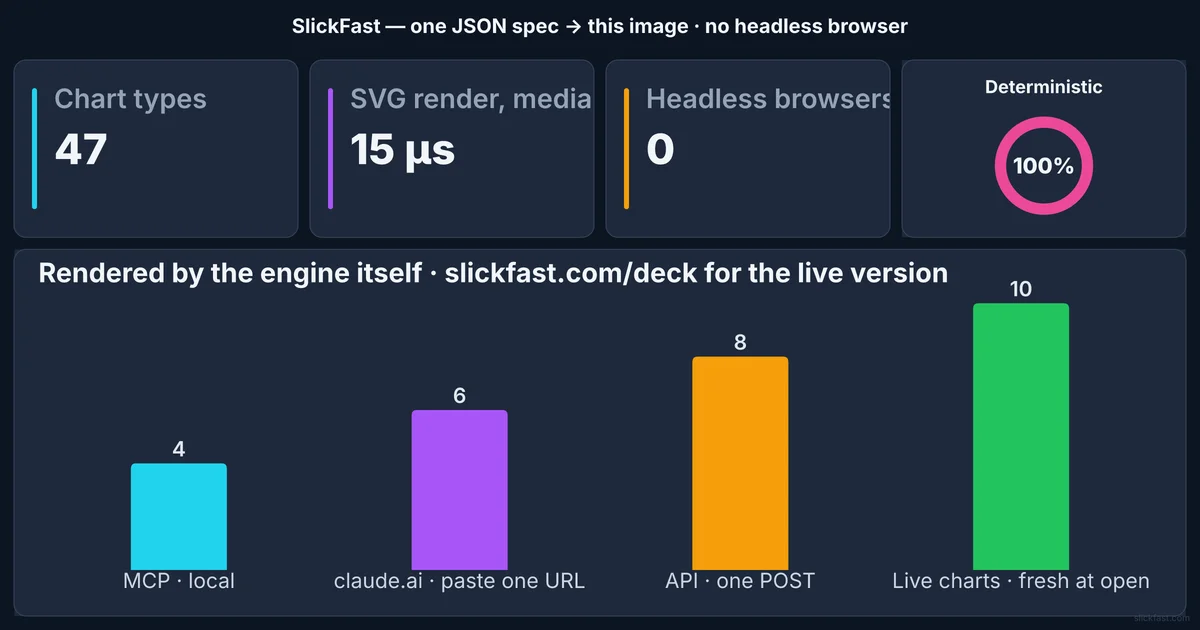
SlickFast renders 47 chart types from a tiny JSON spec via a free MCP server. Pure SVG engine, deterministic output, no headless browser — 140K renders/sec on M1 Max.
TL;DR
TL;DR: SlickFast is a native SVG chart engine that takes a tiny JSON spec and returns a retina-quality PNG or SVG in milliseconds — with a free MCP server that AI agents can call directly.
Source and Accuracy Notes
- Project page: slickfast.com — verified 2026-08-06
- Source repository: github.com/SlickFast/slickfast — README read 2026-08-06
- MCP package: npmjs.com/package/@slickfast/mcp — verified
- License: MIT (from GitHub repo, see
github.com/SlickFast/slickfast/blob/main/LICENSE) - HN launch thread: news.ycombinator.com/item?id=49183949
What Is SlickFast?
SlickFast is a native SVG chart and dashboard renderer built specifically for AI agent workflows. Instead of having an agent write matplotlib code or spin up a headless browser, you send a minimal JSON spec and get back a retina-quality PNG or SVG — milliseconds, a handful of tokens, nothing leaves your machine.
The core engine renders 47 chart and information-design types: bar, line, pie, KPI cards, funnel, gauge, heatmap, calendar, Gantt, waterfall, and more. Complex dashboards tile multiple charts into a single image in one render call.
SlickFast is indie-built (author: AlexRenders) and not YC-backed. The MCP server is free and open source.
How the MCP Server Works
The MCP server package is @slickfast/mcp. Install it with npx:
{
  "mcpServers": {
    "slickfast": {
      "command": "npx",
      "args": ["-y", "@slickfast/mcp"]
    }
  }
}
```bash

Configure it in any MCP-compatible client — Claude Code, Claude Desktop, Cursor, or any other MCP host. Once configured, the agent can call `gallery` to render a curated showcase, or pass a chart spec directly.

### Chart Spec Structure

A minimal bar chart spec looks like this:

```json
{
  "type": "bar",
  "data": [42, 87, 23, 95],
  "labels": ["Q1", "Q2", "Q3", "Q4"],
  "title": "Quarterly Revenue"
}
```bash

The spec is typed, so agents get autocompletion. Changing `bar` to `line` or `pie` requires editing one field. Adding a second chart to make it a dashboard sets `tiling: [2, 1]` and adds a second spec to the `charts` array.

## Performance Profile

The benchmarks (runnable with `git clone && node scripts/bench.mjs`) report on an M1 Max:

- **~140,000 renders per second** (single-core)
- **Median 15 microseconds per chart**
- **PNG at ~50/sec at retina scale, ~145/sec at scale-1**
- **47/47 chart types verified deterministic** — same spec always produces byte-identical output

No headless browser means no cold-start penalty, no ~500MB of Chromium overhead, and no flaky pixel-diff failures.

## Token Efficiency for Agents

The README makes a concrete case: an agent writing matplotlib or D3 code burns hundreds to thousands of output tokens, often followed by a retry when the chart doesn't render. A SlickFast spec is a few dozen tokens, and `{type, data}` alone produces a finished chart.

For pipelines that generate many charts — monitoring dashboards, automated reports, per-user data visualizations — the token difference compounds. One agent session can produce a full multi-chart dashboard in a single tool call.

## Setup: Adding to Cursor or Claude Code

For **Cursor**, click the MCP install link on the SlickFast site or add the JSON config to your Cursor MCP settings.

For **Claude Code**, add to your global MCP config at `~/.claude/mcp_servers.json` (or the project-local `.mcp.json`):

```bash
npx -y @slickfast/mcp
# Then add to your Claude Code config:
Restart the agent. Ask it to “show me a SlickFast demo” — the gallery tool renders a curated multi-chart showcase that demonstrates the range of types.
Practical Evaluation Checklist
- ✅ 47 chart types confirmed from README
- ✅ MCP server confirmed at
npmjs.com/package/@slickfast/mcp - ✅ Benchmark script exists in repo (
scripts/bench.mjs) - ✅ MIT license confirmed from GitHub
- ✅ No headless browser dependency
- ✅ Deterministic output (byte-identical re-renders)
- ✅ Dashboard tiling (multiple charts in one image)
- ✅ Free tier available (no card required)
Security Notes
SlickFast renders entirely in-memory — no subprocess execution, no filesystem access from the renderer, no external network calls during render. The MCP server runs as a local subprocess, so it inherits the permissions of your MCP host. As with any MCP server, audit what tools the agent can call before enabling it in production-facing pipelines.
FAQ
Q: Does it work with non-MCP AI coding tools?
A: Yes. Beyond the MCP server, SlickFast exposes a REST API at api.slickfast.com that accepts JSON specs and returns PNG or SVG. Any agent that can make HTTP requests can use it. The API also powers the live chart URLs embedded in the site.
Q: How is it different from a charting library like Recharts or Chart.js? A: Those libraries require an agent to write TypeScript/JavaScript code, manage DOM state, and handle rendering. SlickFast takes a declarative spec and returns a finished image — no code, no runtime, no browser. It is not a replacement for interactive chart libraries in UIs, but it is purpose-built for agentic pipelines and automated report generation.
Q: Is the MCP server truly free, or is it rate-limited? A: The MCP server is open source and free. The hosted API has a free tier (no card required). The pricing page indicates a Pro tier for higher throughput.
Q: What does “deterministic” mean in practice? A: Same JSON spec always produces byte-identical PNG or SVG output. This means charts are cacheable, testable, and reproducible across runs. No random seed, no timestamp injection, no browser-renderer variance.
Conclusion
SlickFast solves a specific but common AI agent pain: generating chart images is slow, token-expensive, and unreliable when the agent writes rendering code. A JSON spec → retina chart pipeline is faster, cheaper, and deterministic by design.
If you run AI agents that produce reports, dashboards, or any kind of data visualization, SlickFast’s MCP server is worth a look. The benchmark script on GitHub makes it easy to verify the performance claims on your own hardware.
Related Posts
dev-tools
Automotive Skills Suite for AI Engineering
Evaluate Automotive Skills Suite for APQP, ASPICE, HARA, safety-plan, and DIA workflows with setup notes, governance risks, and SME review guidance.
5/28/2026
dev-tools
awesome-agentic-ai-zh Roadmap Guide
Explore awesome-agentic-ai-zh as a Chinese agentic AI learning roadmap, with setup notes, track selection, study workflow, and evaluation guidance.
5/28/2026
dev-tools
Baguette iOS Simulator Automation Guide
Set up Baguette for iOS Simulator automation, web dashboards, device farms, gesture input, streaming, and camera testing with Xcode caveats.
5/28/2026