Site Spy - Watch Any Webpage for Changes with AI Smart
Site Spy monitors any webpage for changes and notifies you when it matters. AI smart filters ignore timestamps and ads, element-level tracking, visual diffs, RSS feeds. Free plan available.
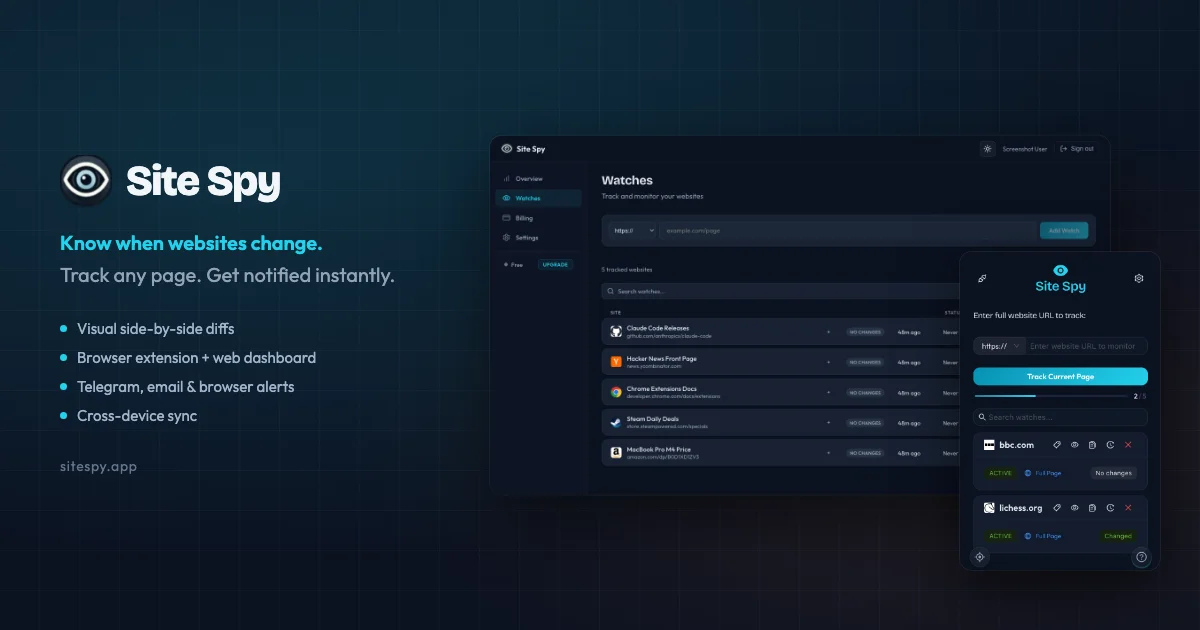
TL;DR
TL;DR: Site Spy watches any webpage for changes and notifies you — AI filters out noise like timestamps and ads so you only get alerts when something that matters actually changes.
Source and Accuracy Notes
- Project page: sitespy.app — verified June 27, 2026
- MCP server npm: @site-spy/mcp-server — v0.2.2, ISC license, verified via npm API
- Chrome extension: Chrome Web Store link — verified
- HN launch thread: news.ycombinator.com/item?id=47337607 — 320 points, Mar 11 2026
- License: ISC (verified via npm package metadata)
What Is Site Spy?
Site Spy is a website change monitoring tool that watches pages for updates and alerts you when content changes. Unlike basic “page changed” detectors that fire on every pixel shift, Site Spy uses AI smart filters to ignore noise like timestamps, dynamic ads, and boilerplate content — only notifying you when meaningful content actually changes.
The founder built it after missing a visa appointment slot because a government page changed and he didn’t notice for two weeks.
Core capabilities:
- Element-level tracking — pick a specific price, stock status, headline, or content block instead of watching an entire noisy page
- AI smart filters — describe what you care about (“price changes”, “new job listings”, “when tickets go on sale”) and the AI auto-configures filters
- Visual diff view — additions in green, removals in red, side-by-side snapshot comparison
- RSS feeds — expose any monitor as an RSS feed for integration with your existing tools
- AI chat setup — configure monitors through natural conversation instead of digging through menus
- Browser extensions — free Chrome and Firefox extensions for one-click tracking from your toolbar
- MCP server — official
@site-spy/mcp-servernpm package (v0.2.2) lets AI agents monitor websites programmatically
Setup Workflow
Step 1: Install the Browser Extension
Install the free Chrome or Firefox extension from the Site Spy website or the respective browser extension stores. Once installed, you’ll see a Site Spy icon in your toolbar.
Step 2: Add a Page to Watch
Navigate to any webpage you want to monitor. Click the Site Spy icon in your toolbar and select “Track this page.” You can immediately set a natural-language filter like “price changes” or “new listings.”
Step 3: Use Element Inspector for Precision
For more precise tracking, click “Element Inspector” and hover over the specific part of the page you want to watch — a price, a status indicator, a headline. Site Spy locks monitoring to just that element.
Step 4: Configure AI Smart Filters
In the monitor settings, type what you care about in plain English. For example:
"price drops below $50"
"new job listings"
"when reservations open"
```bash

The AI automatically configures noise filters so you won't be spammed by rotating banners or timestamp updates.

### Step 5: Subscribe via RSS

For each monitor, click "RSS Feed" to get an RSS URL. Paste this into any RSS reader — Feedbin, Miniflux, NetNewsWire, or your own server. Site Spy exposes changes as standard RSS items so you can integrate it into existing workflows without needing push notifications or email.

### Step 6: Integrate via MCP (for AI Agents)

If you're building AI agents or automation scripts, install the MCP server:

```bash
npm install @site-spy/mcp-server
The MCP server exposes website monitoring as a tool your AI agent can call directly. This is useful for agents that need to track competitor prices, job listings, government pages, or any dynamic content.
Deeper Analysis
RSS-first design: Many monitoring tools treat RSS as an afterthought. Site Spy bakes RSS into every monitor — each watch gets a shareable feed URL you can pipe into any aggregator. For power users already living in RSS, this is a significant ergonomic win.
Element-level precision: The killer feature is the element inspector. Most website monitors work at the page level, making them useless for pages with dynamic sidebars, rotating ads, or live tickers. Element-level tracking means you can watch just the price on an Amazon product page or just the “In Stock” badge — not the entire page.
AI filter configuration: Rather than asking users to configure regex patterns or CSS selectors, you describe what you want in plain English. “Ignore timestamps and ads” is a one-line description, not a multi-step filter configuration.
MCP integration: The @site-spy/mcp-server package (v0.2.2 on npm) is notable because it makes website monitoring a first-class tool for AI agents. Rather than hardcoding page-watching logic, agent developers can call the MCP server — same pattern as other MCP-based tools like filesystem access or database queries.
Practical Evaluation Checklist
- Installed Chrome or Firefox extension
- Added a page to watch with one click
- Used element inspector to target a specific page element
- Set an AI smart filter in plain English
- Generated an RSS feed for the monitor
- Tested the RSS feed in an aggregator
- Explored the MCP server package on npm (for agent integrations)
- Checked the community monitors (price monitoring, job tracking, competitor monitoring, stock alerts)
Security Notes
Site Spy runs as a browser extension and web dashboard. As with any tool that watches webpages on your behalf:
- Review the privacy policy before connecting work or sensitive accounts
- The element inspector requires page access — be mindful of what pages you grant access to
- RSS feeds are unique URLs — treat them like passwords if the monitored content is sensitive
FAQ
Q: Is there a free plan? A: Yes. Site Spy has a free plan that includes the browser extension, web dashboard, and core monitoring features. Pricing details are on their pricing page.
Q: How is this different from Visualping or Distill Networks? A: Site Spy’s AI smart filters automatically distinguish meaningful changes from noise (timestamps, ads, dynamic content) without manual configuration. It also exposes all monitors as RSS feeds and has an official MCP server for AI agent integrations.
Q: Does Site Spy work with JavaScript-rendered pages? A: Yes. The browser extension can monitor pages that require JavaScript, since it runs directly in your browser environment.
Q: Can I monitor multiple elements on the same page? A: Yes. You can set up multiple element-level monitors on a single page, watching different elements independently with different filter rules.
Q: What is the MCP server used for?
A: The @site-spy/mcp-server npm package exposes Site Spy’s monitoring capabilities as an MCP tool, letting AI agents programmatically check websites for changes — useful for agents that need to track dynamic content as part of their workflow.
Conclusion
Site Spy fills a specific niche: webpage monitoring that respects signal over noise. The element inspector and AI smart filters together solve the core problem with cheaper monitoring tools — getting spammed with alerts every time a rotating banner refreshes. The RSS-first design and official MCP server make it a natural fit for power users and AI agent developers alike.
If you’ve ever needed to watch a government page, competitor pricing, job board, or availability tracker — and dreaded the 3am alert for a meaningless timestamp change — Site Spy is worth a look.
Try it at sitespy.app or install the Chrome/Firefox extension from the links on their site.
Related Posts
ai-setup
Recall – Persistent Memory for Claude Code via MCP Hooks
Recall gives Claude Code a permanent memory store that survives session restarts and context compaction. Four hooks capture and restore context automatically — with cloud SaaS or self-hosted options.
2/28/2026
dev-tools
Automotive Skills Suite for AI Engineering
Evaluate Automotive Skills Suite for APQP, ASPICE, HARA, safety-plan, and DIA workflows with setup notes, governance risks, and SME review guidance.
5/28/2026
dev-tools
awesome-agentic-ai-zh Roadmap Guide
Explore awesome-agentic-ai-zh as a Chinese agentic AI learning roadmap, with setup notes, track selection, study workflow, and evaluation guidance.
5/28/2026