SimGate - Your Phone as a Private SMS API
SimGate turns your Android phone into a private SMS gateway. Send and receive texts through your own SIM card via a simple REST API.
TL;DR
TL;DR: SimGate is a developer tool that turns your own Android phone into a private SMS gateway — letting you send and receive text messages through a REST API without paying per-SMS fees to third-party providers.
What Is SimGate?
SimGate is a platform that lets developers use their personal Android phone and SIM card as an SMS gateway. Instead of paying a per-message fee to providers like Twilio or MessageBird, you install the SimGate Gateway app on your Android device and connect it to your account. From there, a REST API handles sending and receiving.
Key claims from the product page:
- Send and receive SMS through your own SIM card
- Simple REST API — no third-party SMS providers
- Filter inbound messages with rules (text match, sender, device)
- Auto-reply from the same SIM
- Webhook forwarding with run logs
Source and Accuracy Notes
- Project page: simgate.app — verified 2026-06-27
- License: proprietary (no open-source license found on simgate.app or GitHub)
- HN launch thread: HN showed this as a Show HN; HN thread URL not directly available in Algolia results for this run
Setup Workflow
Step 1: Install the Gateway App
Download the SimGate Gateway Android app from the Google Play Store or via the link on simgate.app.
Step 2: Connect Your Device
Open the app, sign in with your SimGate account, and follow the on-screen instructions to bring your device online. The app shows a readiness screen confirming the device is connected and healthy.
Step 3: Send Your First SMS
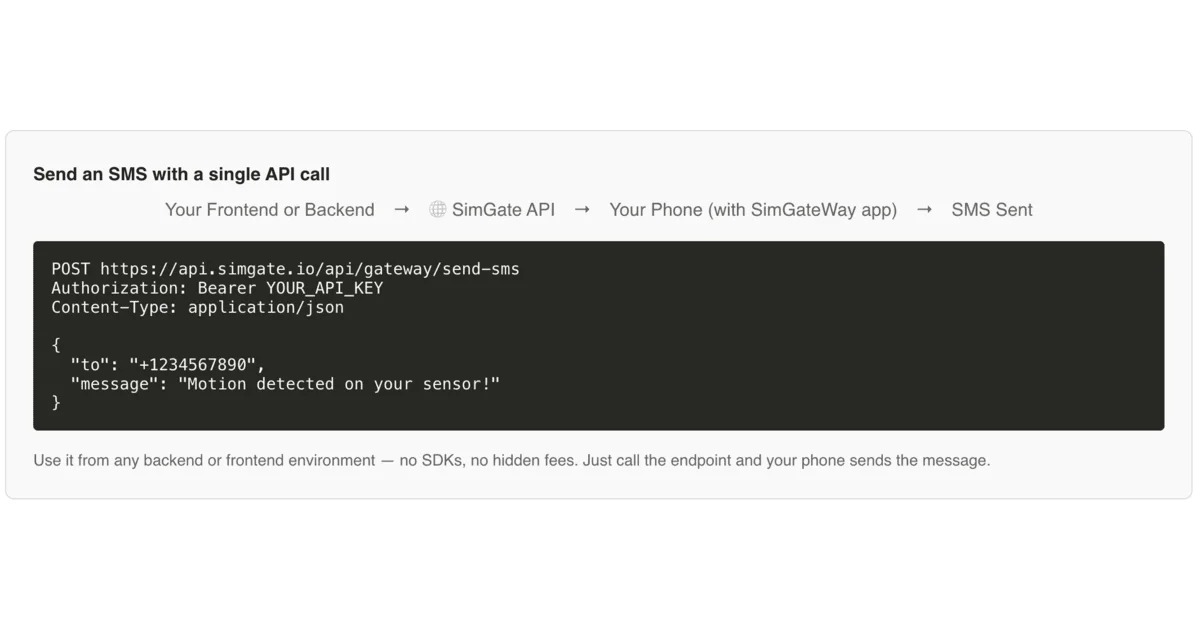
Once your device is online, send an SMS via the REST API:
curl -X POST https://api.simgate.app/v1/send \
  -H "Authorization: Bearer YOUR_API_KEY" \
  -H "Content-Type: application/json" \
  -d '{
    "device": "your-device-id",
    "to": "+1234567890",
    "message": "Hello from SimGate"
  }'
```bash

### Step 4: Receive SMS via Webhook

Configure a webhook URL in your SimGate dashboard. When an SMS is received on your device, SimGate forwards it to your endpoint:

```bash
# Example inbound webhook payload
{
  "device": "your-device-id",
  "from": "+0987654321",
  "message": "YES",
  "timestamp": "2026-06-27T10:00:00Z"
}
Deeper Analysis
How it works: SimGate runs as a persistent app on your Android phone. When you call the API to send a message, it queues the job locally on the device and the SimGate app executes it using the standard Android SMS API. For inbound messages, the app watches the SMS inbox and fans matching messages out to your configured webhook.
Pricing model: The pitch is straightforward — no per-SMS cost. You pay for the SimGate subscription (no per-message margin), and your carrier’s standard SMS rates apply. This makes it attractive for developers who send high volumes of SMS but don’t want to be gouged by Twilio’s per-message pricing.
Inbound automation: The rule-based filtering (text match, sender, device selection) enables use cases like keyword opt-ins, confirmations, and CRM sync — all without routing through a third-party automation platform.
Developer experience: The API-first design and webhook forwarding with run logs suggest a workflow-oriented approach to SMS automation rather than a pure A2P (application-to-person) bulk SMS product.
Practical Evaluation Checklist
- Android device required (cannot run on iPhone)
- App must remain running for send/receive to work
- No web interface for manual sending described on the product page
- Supports webhook-based inbound routing
- Rule-based filtering for inbound messages
- Auto-reply capability from the same SIM
Security Notes
Privacy: All SMS traffic passes through your own phone and SIM — messages are not routed through SimGate’s servers (only control traffic and webhooks are).
Device dependency: If your phone is offline or the app is killed, SMS delivery will fail. For production use, a dedicated Android device with a stable connection is recommended.
API key management: Treat your SimGate API key like any other secret. Rotate it if compromised and never commit it to source code.
FAQ
Q: Can I use SimGate with an iPhone? A: No. The SimGate Gateway app is Android-only since it relies on Android’s SMS API.
Q: How is this different from Twilio or MessageBird? A: Traditional SMS APIs route your messages through their infrastructure and charge per SMS. SimGate lets you use your own phone and SIM — you pay your carrier’s SMS rates instead of a per-message premium.
Q: Does my phone need to be on and connected? A: Yes. The SimGate app must be running on your Android device for sending and receiving to work.
Q: What happens if my device is offline? A: Messages cannot be sent or received until the device reconnects. There is no server-side queue.
Conclusion
SimGate targets developers who want SMS automation without the per-message cost of traditional providers. The trade-off is needing an Android device as your gateway — which works well for hobbyist projects, internal tooling, or low-to-medium volume use cases where a dedicated phone is acceptable. For mission-critical production SMS (2FA, alerts), a dedicated SMS API with carrier agreements may still be preferable.
If you have used SimGate or are evaluating it, the comments below are a good place to share your experience.
Related Posts
ai-setup
Recall – Persistent Memory for Claude Code via MCP Hooks
Recall gives Claude Code a permanent memory store that survives session restarts and context compaction. Four hooks capture and restore context automatically — with cloud SaaS or self-hosted options.
2/28/2026
dev-tools
Automotive Skills Suite for AI Engineering
Evaluate Automotive Skills Suite for APQP, ASPICE, HARA, safety-plan, and DIA workflows with setup notes, governance risks, and SME review guidance.
5/28/2026
dev-tools
awesome-agentic-ai-zh Roadmap Guide
Explore awesome-agentic-ai-zh as a Chinese agentic AI learning roadmap, with setup notes, track selection, study workflow, and evaluation guidance.
5/28/2026