Shellular – Run Claude Code From Your Phone
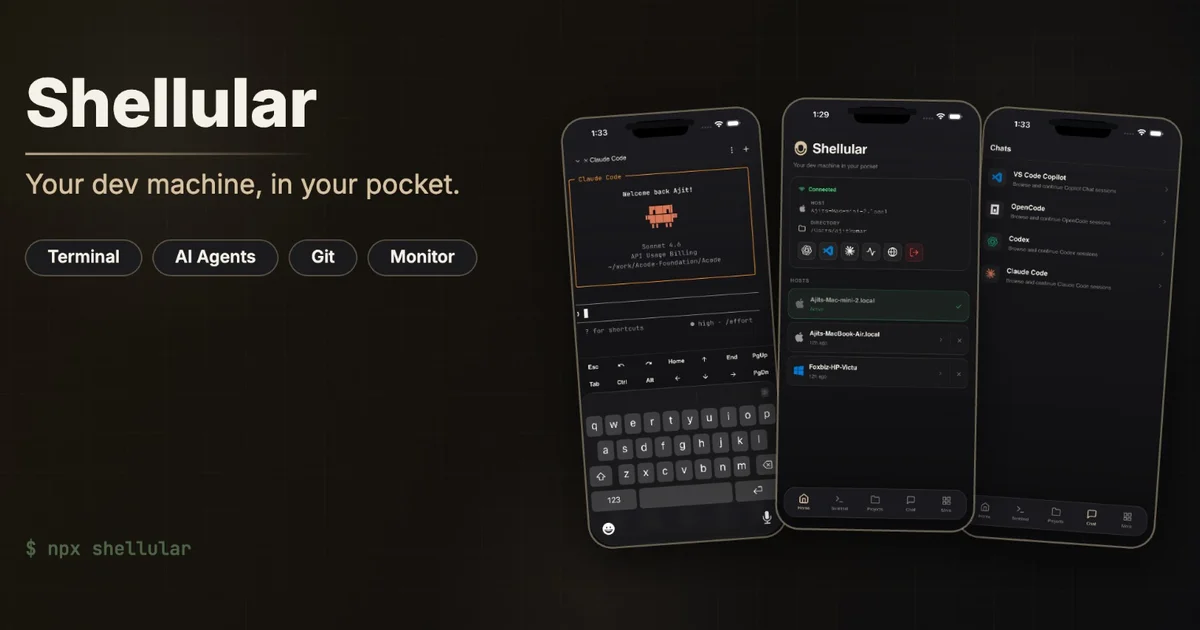
Shellular gives you a full agentic dev environment on your phone — Claude Code, Codex, Cursor, and OpenCode with a real UI, terminal, file browser, and browser DevTools.
TL;DR
TL;DR: Shellular connects your phone to your existing dev machine over a local WebSocket relay, letting you run and interact with Claude Code, Codex, Cursor, and OpenCode from iOS, Android, or the web — complete with a proper agent UI, terminal, file browser, and browser DevTools.
Source and Accuracy Notes
- Project page: shellular.dev
- Source repository: github.com/shellular-org (35 stars, 3 repos:
app,packages,server) - License: Noassertion (source not definitively licensed under a known OSS license — verify before using in production)
- HN launch thread: news.ycombinator.com/item?id=48818124 (28 points)
What Is Shellular?
Most “code from your phone” solutions are thin VNC mirrors — tiny text, no agent UI, frustrating to use. Shellular takes a different approach: it treats your phone as a first-class dev environment, not a display surface.
From the official README:
Remotely access agents, terminals, code editor, localhost ports and browser DevTools from your phone.
You don’t move your workflow to your phone. You bring your existing machine as-is — desktop, laptop, Mac Mini, VPS, whatever — and access it from iOS, Android, or the web.
The system has three moving parts:
| Repository | Role |
|---|---|
shellular-org/app | iOS / Android / web client |
shellular-org/packages | shellular CLI host agent + @shellular/protocol |
shellular-org/server | WebSocket relay server |
The relay server handles the connection between your phone client and your dev machine — so you can access a Mac Mini in your office from an Android phone on the go. The connection is WebSocket-based, not VNC, which keeps latency down.
Setup Workflow
Step 1: Install the host agent on your dev machine
# Requires Node.js 18+
npm install -g @shellular/cli

# Or via script (macOS/Linux)
curl -fsSL https://shellular.dev/install.sh | sh
```bash

### Step 2: Start the host agent

```bash
shellular agent start
# Starts a WebSocket relay agent on your dev machine
# Default port: 7890
```bash

### Step 3: Connect from your phone

Download Shellular from the App Store or Google Play, then pair it with your host agent by scanning a QR code or entering the relay URL. Once paired, you have full access to:

- **Agent UI** — Claude Code, Codex, Cursor, OpenCode, Pi in a proper chat interface
- **Terminal** — interactive shell with proper UTF-8 support
- **File browser** — navigate and edit files in your repos
- **Browser DevTools** — JS Console, Inspect, Network tab
- **Localhost tunnel** — access dev servers running on your machine

## Key Features

### Full agent interaction, not just terminal output

Shellular renders AI coding agents in a proper chat UI — you see the conversation, not just stdout scrolling by. This makes it practical to use Claude Code or Codex for code reviews, pair programming, or debugging sessions while away from your desk.

### Self-hosted relay

The WebSocket relay server is [open source](https://github.com/shellular-org/server). You can run your own relay, which means Shellular does not require you to trust a third-party server with your traffic. Self-hosting the relay is a single Docker command:

```bash
docker run -d -p 8080:8080 shelular/server:latest
Works with your existing workflow
No need to move repos or reconfigure tools. Shellular connects to your machine as-is, so uncommitted changes, local Git state, and existing node_modules are all accessible from your phone.
Cross-platform client
iOS, Android, and a web client mean you can jump into your dev environment from any device. The web client works in a browser without installing anything.
Practical Evaluation Checklist
- Works on iOS and Android without sideloading
- Self-hosted relay option — no mandatory cloud dependency
- Supports Claude Code, Codex, Cursor, OpenCode, Pi, GitHub Copilot CLI
- File browser and editor included
- Browser DevTools (Console, Network, Inspect) accessible from mobile
- Localhost tunneling for dev servers
- License is unstated — confirm with maintainers before commercial use
Security Notes
The host agent runs on your own machine and initiates the outbound WebSocket connection to the relay. Your code and credentials stay on your hardware. That said:
- The relay server (if you use the default public one) sees encrypted WebSocket traffic
- For sensitive work, run your own relay instance
- The CLI agent has full filesystem access — treat it like any other local dev tool
FAQ
Q: Is this different from VNC or screen sharing? A: Yes. Shellular is not a screen mirror. It renders a custom UI for AI agents, terminal, file browser, and DevTools — not a pixel-for-pixel display of your desktop. The result is usable text and controls, not a cramped remote desktop.
Q: Do I need to expose my dev machine to the internet?
A: No. The shellular host agent on your machine initiates an outbound WebSocket connection to the relay server. Your machine never has an open inbound port.
Q: What AI agents are supported? A: Claude Code, Codex, OpenCode, Pi, and GitHub Copilot CLI. The agent UI renders each differently rather than dumping all output into one terminal.
Q: Is this production-ready? A: The project is actively developed (last commit: 2026-07-02). The license is unstated in the README, so for enterprise or commercial use, confirm licensing terms with the maintainers first.
Conclusion
Shellular solves a real problem: developers who want mobile access to AI coding agents without settling for a pixel-mirrored desktop. The multi-repo structure (app, CLI host agent, relay server) is cleanly separated, and the self-hosted relay option keeps it aligned with runany.dev’s preference for tools that don’t require mandatory cloud hosting.
If you run AI coding agents on a persistent machine (Mac Mini, office desktop, VPS), Shellular gives you a practical way to check in from your phone without a full remote desktop session.
Try it at shellular.dev or self-host the relay from github.com/shellular-org/server.
Related Posts
ai-setup
Recall – Persistent Memory for Claude Code via MCP Hooks
Recall gives Claude Code a permanent memory store that survives session restarts and context compaction. Four hooks capture and restore context automatically — with cloud SaaS or self-hosted options.
2/28/2026
dev-tools
Automotive Skills Suite for AI Engineering
Evaluate Automotive Skills Suite for APQP, ASPICE, HARA, safety-plan, and DIA workflows with setup notes, governance risks, and SME review guidance.
5/28/2026
dev-tools
awesome-agentic-ai-zh Roadmap Guide
Explore awesome-agentic-ai-zh as a Chinese agentic AI learning roadmap, with setup notes, track selection, study workflow, and evaluation guidance.
5/28/2026