Sambee - Browser-Based File Manager for SMB Shares
Sambee is an open-source file manager that brings SMB shares and local drives into the browser with fast previews, a Markdown editor, and desktop app integration.
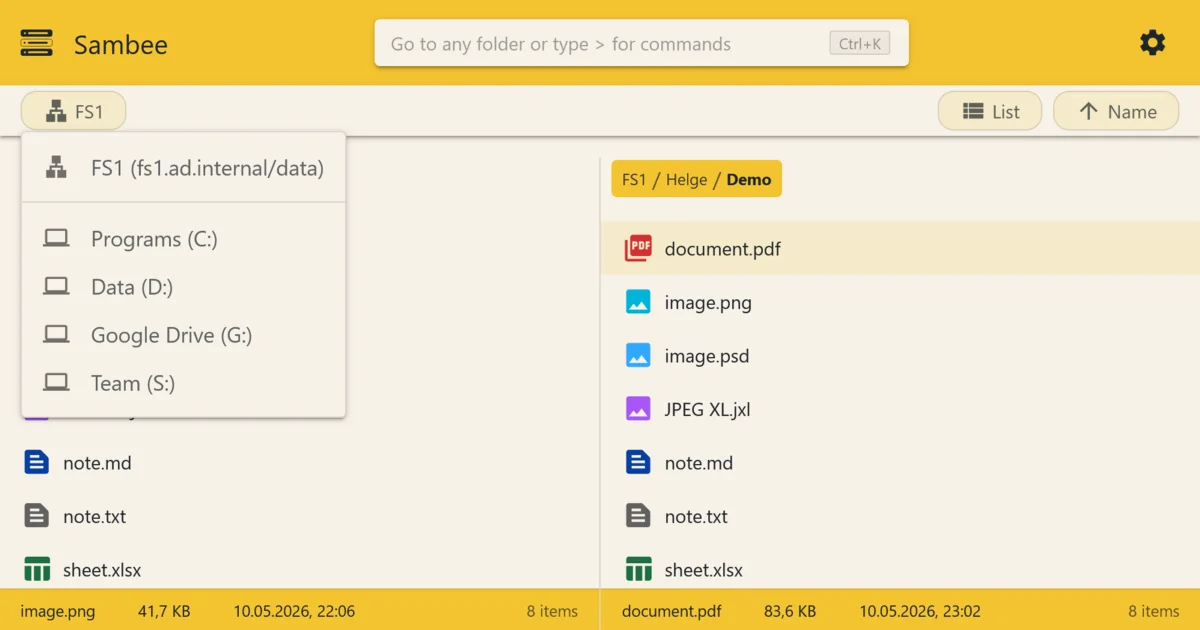
TL;DR
TL;DR: Sambee is an open-source, self-hosted file manager that gives you a browser-based interface for SMB shares and local drives, with image previews, PDF viewing, Markdown editing, and the ability to open files in desktop apps.
Source and Accuracy Notes
- Project page: sambee.net
- Source repository: github.com/helgeklein/sambee
- License: MIT (verified via README)
- HN launch thread: news.ycombinator.com/item?id=48706684
What Is Sambee?
Sambee is a browser-based file viewer and manager for SMB network shares and local drives. It is designed as an open-source, self-hosted alternative to tools like Total Commander — but running entirely in the browser, accessible from desktop and mobile.
The project was created by Helge Klein and announced on Hacker News in mid-2026.
Core Capabilities
From the official README:
- SMB and local drive access — Sambee’s server component translates between HTTP (which your browser speaks) and SMB (which file servers speak). Local drives are accessed via Sambee Companion, a small helper app installed on your machine.
- Dual-pane view — supports single-pane and dual-pane layouts.
- Fast image browser — broad file type support for previewing images directly.
- Markdown editor — edit
.mdfiles in the browser. - PDF viewer — open PDFs without downloading them.
- Desktop app integration — open a file in its native desktop app (Word, Excel, Photoshop, etc.), make your changes, and the updated file is automatically uploaded back to its original location on the share.
Setup Options
Option 1: Docker (recommended)
docker run -d \
  --name sambee \
  -p 8080:8080 \
  -v /path/to/config:/config \
  helgeklein/sambee:latest
Then open http://your-server:8080 in your browser.
Option 2: Sambee Companion (local drives)
For accessing your computer’s local files (rather than network shares), install Sambee Companion — a small background service that runs on macOS, Windows, or Linux and communicates with the Sambee server via HTTP.
Download from the Sambee downloads page.
Key Features
Preview Without Downloading
Images, PDFs, and Markdown files open directly in the browser. No need to download a file just to glance at its contents.
Open in Desktop Apps
When you need to edit a Word document or work in Photoshop, Sambee can launch the file in its native desktop application. After you save, changes sync back to the original file share automatically.
Mobile-Friendly
Because everything runs in a browser, Sambee works on phones and tablets — not just desktops. The interface adapts to smaller screens for file browsing on the go.
Self-Hosted
Sambee runs on your own infrastructure. No cloud service, no subscription, no data leaving your network. Deploy it on a NAS, a spare Linux machine, or any server that can run Docker.
Deeper Analysis
Architecture
Sambee consists of two parts:
- Sambee Server — the backend that handles SMB protocol translation and serves the web UI.
- Sambee Companion — an optional local helper app for accessing files on the machine running the Companion (as opposed to remote SMB shares).
For SMB shares, the server component talks directly to the file server. For local drives, the browser talks to Companion, which then accesses the filesystem.
Use Cases
- Home labs / NAS users — access files on a Synology, QNAP, or other NAS from any device without configuring VPN or exposing Samba ports directly.
- Small teams — replace a shared drive mapping with a browser interface that works on managed Windows PCs, Macs, and Linux machines.
- Remote work — access office file shares from home or on the road without VPN.
Limitations
- Requires SMB access from the server to the file share — not a truly cloud-native solution.
- Companion app must be installed on each local machine for local drive access.
- Not a full cloud sync solution (no conflict resolution, no offline mode).
Practical Evaluation Checklist
- Deploy Sambee via Docker on a server with network access to your SMB share
- Connect to an SMB share and browse files in the browser
- Preview an image and a PDF without downloading
- Edit a Markdown file using the built-in editor
- Install Companion for local drive access
- Try opening a file in its native desktop app and verify it saves back to the share
FAQ
Q: Does Sambee work with Windows file shares (SMB)? A: Yes. Sambee’s server component speaks SMB directly, so it can connect to Windows file shares, NAS devices, and Linux Samba servers.
Q: Is Sambee free for commercial use? A: Yes — it is MIT licensed. The trademark notice in the README restricts use of the Sambee name and logo, but the software itself can be used commercially.
Q: Does it work on mobile? A: Yes. The interface is browser-based and responsive, so it works on phones and tablets in addition to desktop browsers.
Q: How is Sambee different from a VPN + file share mapping? A: Sambee doesn’t require configuring VPN access on every device. You deploy one server and access it from any browser. It also adds preview, Markdown editing, and desktop app integration on top of raw file access.
Conclusion
Sambee fills a practical niche: self-hosted file management for SMB shares that works in any browser. If you have a NAS or Windows file server you want to access from anywhere without VPN complexity, Sambee is worth a look. The MIT license and Docker deployment make it easy to try on a home lab or small office server.
Project page: sambee.net GitHub: github.com/helgeklein/sambee
Related Posts
ai-setup
Recall – Persistent Memory for Claude Code via MCP Hooks
Recall gives Claude Code a permanent memory store that survives session restarts and context compaction. Four hooks capture and restore context automatically — with cloud SaaS or self-hosted options.
2/28/2026
dev-tools
Automotive Skills Suite for AI Engineering
Evaluate Automotive Skills Suite for APQP, ASPICE, HARA, safety-plan, and DIA workflows with setup notes, governance risks, and SME review guidance.
5/28/2026
dev-tools
awesome-agentic-ai-zh Roadmap Guide
Explore awesome-agentic-ai-zh as a Chinese agentic AI learning roadmap, with setup notes, track selection, study workflow, and evaluation guidance.
5/28/2026