Restfox - Open Source HTTP Client for Web & Desktop
A browser-based HTTP client that works offline, supports REST/WebSocket/GraphQL, and runs as a PWA, desktop app, or Docker container.
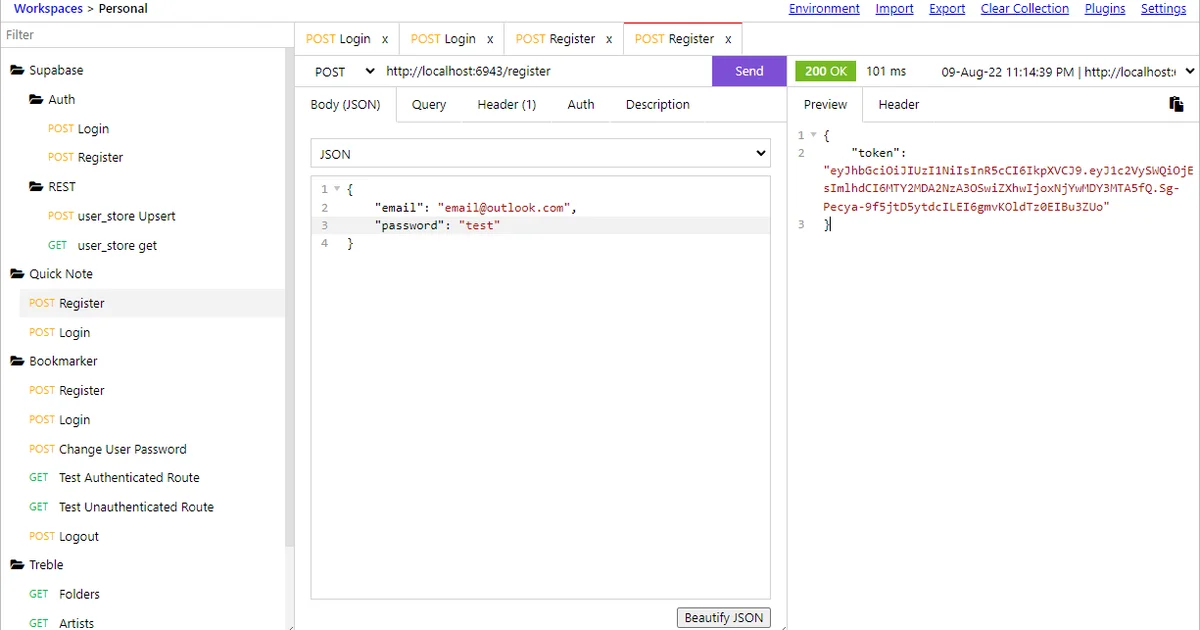
TL;DR
TL;DR: Restfox is an offline-first, open-source HTTP client that runs in the browser or as a desktop app, with native support for REST, WebSocket, and GraphQL — no account needed.
Source and Accuracy Notes
- Project page: restfox.dev ← verified
- Source repository: github.com/flawiddsouza/Restfox ← verified
- License: MIT ← verified via LICENSE file
- Latest release: v0.40.0 ← verified via GitHub API
- HN launch thread: news.ycombinator.com/item?id=33287137 ← verified via HN Algolia
What Is Restfox?
Restfox describes itself as an “Offline-First Minimalistic HTTP & Socket Testing Client for the Web & Desktop.” It is an open-source alternative to Postman, targeting developers who want a lightweight API client without the overhead of an Electron app or cloud sync.
The tool is built as a Progressive Web App (PWA), meaning it can be installed in a browser and work fully offline. It also ships as a native desktop app via Electron, and can be self-hosted via Docker.
Key capabilities confirmed from the README:
- HTTP/REST — full request builder with headers, params, body (JSON, form-data, raw)
- WebSocket — bidirectional socket communication
- GraphQL — native GraphQL query and mutation support
- Environment variables — set and switch between environments (dev, staging, prod)
- Response history — past responses stored locally
- Plugin system — extend functionality via custom scripts
- Workspace sync — optional file-based workspace (no cloud account required)
Installation
Restfox offers several installation options.
macOS
Install via Homebrew:
brew install restfox
```bash

### Ubuntu / snap

```bash
sudo snap install restfox
```bash

### Windows

Install via Scoop:

```bash
scoop bucket add extras
scoop install restfox
```bash

Or download precompiled binaries from the [Releases page](https://github.com/flawiddsouza/Restfox/releases).

### Docker

```bash
docker run --name Restfox -d -p 4004:4004 flawiddsouza/restfox:0.40.0
```bash

Then open `http://localhost:4004`.

For a persistent workspace with Docker Compose:

```yaml
services:
  restfox:
    image: flawiddsouza/restfox:0.40.0
    ports:
      - "4004:4004"
    volumes:
      - ./workspace:/workspace
```bash

### Web (no install)

Visit [restfox.dev](https://restfox.dev) — it runs entirely in the browser. No sign-up, no sync to external servers.

## Key Features in Practice

### Request Builder

Restfox's request panel covers the standard HTTP methods (GET, POST, PUT, PATCH, DELETE, OPTIONS). Body formats include raw JSON, form-data, and multipart file uploads.

### WebSocket Support

The WebSocket panel lets you connect to a socket endpoint, send messages, and see incoming messages in real time — useful when debugging real-time APIs without a separate tool like ws or a browser DevTools socket panel.

### GraphQL

The GraphQL tab provides a query editor with syntax highlighting. You can set the endpoint and pass headers separately, which is the same pattern Postman and Insomnia use.

### Environment Variables

Environments are defined as key-value pairs and can be referenced in requests using `[VARIABLE_NAME]` syntax. This is a standard pattern — variables are interpolated before the request is sent.

### Offline-First

Because Restfox stores everything locally (requests, responses, environments), it works without an internet connection after first load. This differs from cloud-synced tools like Postman or Insomnia's cloud plan, where offline use requires a paid license.

## How It Compares to Postman

Postman is the dominant commercial option, but it ships as a heavy Electron app and requires a free account for full feature access. Restfox differentiates on:

- **No account required** — no Postman account, no cloud sync, no telemetry
- **Runs in browser** — no install needed on any OS with a browser
- **Docker self-hosting** — run it on your own server or VPS
- **Plugin system** — custom scripts via `rf.setParentEnvVar` and other APIs
- **Open source** — MIT license, auditable source on GitHub

The trade-off is a smaller ecosystem. Postman has mock servers, API monitoring, and CI/CD integrations that Restfox does not offer. For individuals or small teams debugging APIs day-to-day, Restfox covers the core workflow.

## Docker Deployment Deep Dive

For self-hosting on a VPS, Docker is the recommended path. The official image is at `flawiddsouza/restfox` on Docker Hub.

Basic run:

```bash
docker run -d --name restfox -p 4004:4004 flawiddsouza/restfox:0.40.0
```bash

To persist your workspace (requests, environments, history) across container restarts, mount a volume:

```bash
docker run -d --name restfox \
  -p 4004:4004 \
  -v $(pwd)/restfox-workspace:/workspace \
  flawiddsouza/restfox:0.40.0
```bash

To build and run a specific version:

```bash
git clone https://github.com/flawiddsouza/Restfox
cd Restfox/packages/ui
npm install
npm run build-web-standalone
cd ../web-standalone
npm install
docker build -t restfox:custom .
docker run -d -p 4004:4004 restfox:custom
```bash

## Security Notes

- **No cloud sync** — all data stays on your machine or in your self-hosted Docker volume. No data leaves your infrastructure unless you explicitly configure outbound webhooks through a plugin script.
- **No telemetry** — confirmed by the project's minimal footprint and MIT license. For full certainty, the self-hosted Docker deployment is the right choice.
- **Docker network isolation** — if running in a multi-service environment, restrict Restfox's Docker network to `localhost` unless you need browser access from other machines.

## FAQ

**Q: Does it support collections and folder organization?**
**A:** Yes. Requests are organized into workspaces with folders, similar to how Postman uses collections.

**Q: Can I import Postman collections?**
**A:** Restfox has some import support. Check the [docs](https://docs.restfox.dev) for supported formats.

**Q: How does it handle authentication?**
**A:** Headers can be set per request or per environment. There is no built-in OAuth flow, but you can use environment variables and plugin scripts to handle token refresh logic.

**Q: Is there a dark mode?**
**A:** Yes, Restfox has a dark theme available in the UI settings.

## Conclusion

Restfox fills a specific niche: a lightweight, no-account API client that runs anywhere. Its PWA-first architecture means it works on Linux, macOS, Windows, and even a Raspberry Pi via the browser — or a single Docker command on a VPS. With v0.40.0 as the current release, it is actively maintained and provides enough features for day-to-day API debugging without the weight of a full-featured commercial tool.

If you want to try it with zero install, visit [restfox.dev](https://restfox.dev). For self-hosting, Docker is the fastest path:

```bash
docker run -d --name restfox -p 4004:4004 flawiddsouza/restfox:0.40.0
Related Posts
ai-setup
Recall – Persistent Memory for Claude Code via MCP Hooks
Recall gives Claude Code a permanent memory store that survives session restarts and context compaction. Four hooks capture and restore context automatically — with cloud SaaS or self-hosted options.
2/28/2026
dev-tools
Automotive Skills Suite for AI Engineering
Evaluate Automotive Skills Suite for APQP, ASPICE, HARA, safety-plan, and DIA workflows with setup notes, governance risks, and SME review guidance.
5/28/2026
dev-tools
awesome-agentic-ai-zh Roadmap Guide
Explore awesome-agentic-ai-zh as a Chinese agentic AI learning roadmap, with setup notes, track selection, study workflow, and evaluation guidance.
5/28/2026