RepoSquirrel - Git Analytics Dashboard
Self-hosted Git analytics dashboard for engineering teams: tracks contributions, subsystem ownership, and code evolution across multiple repos via Docker.
TL;DR
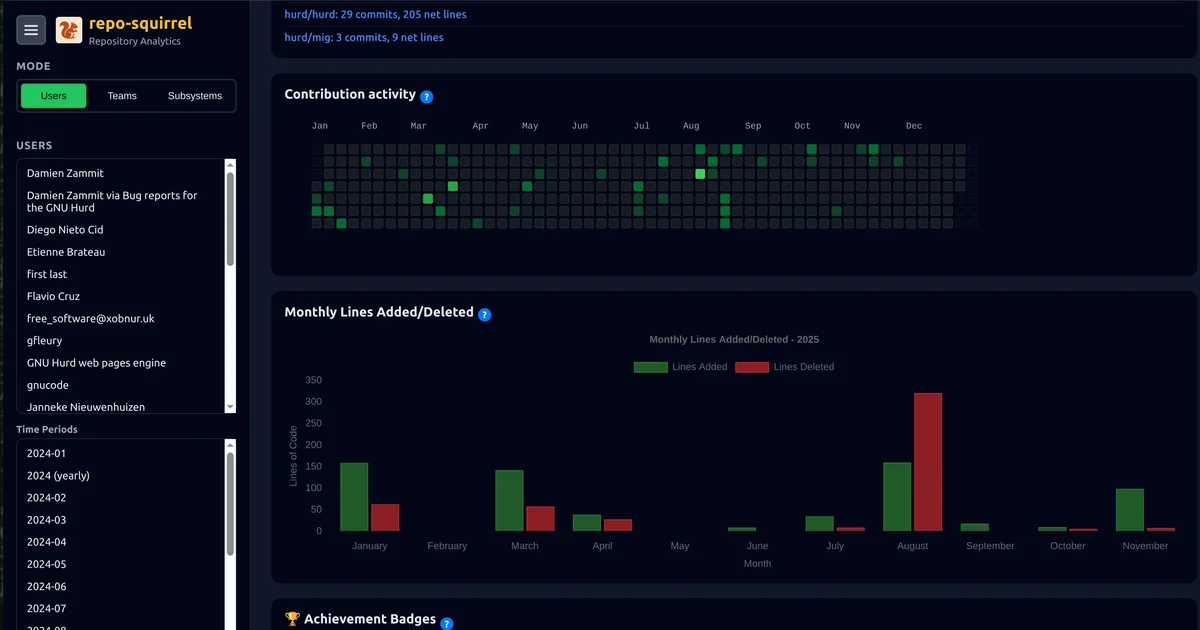
TL;DR: RepoSquirrel is an open-source, self-hosted web dashboard that visualizes developer contributions, subsystem ownership, and code evolution across multiple Git repositories — deploy it on any server with a single Docker command.
Source and Accuracy Notes
- Project page: reposquirrel.com
- Source repository: github.com/reposquirrel/reposquirrel
- License: AGPL-3.0 (verified via README)
- HN launch thread: news.ycombinator.com/item?id=46563585
What Is RepoSquirrel?
RepoSquirrel is an open-source, self-hosted Git analytics tool built for engineering teams that manage multiple repositories. It gives a bird’s-eye view of who owns what, where development effort is concentrated, and how codebases evolve over time — without sending data to a third-party SaaS.
The tool is particularly useful for large codebases or organizations where code ownership is distributed across many teams. It integrates with PagerDuty to correlate active incidents with development activity.
Setup Workflow
Prerequisites
- Docker installed on your server
- Python 3.9+ and Git (for manual setup)
- tokei for language statistics — install via
cargo install tokei --features allor your system package manager
Quick Start (Recommended)
The fastest path is a single Docker command:
docker run -p 5000:5000 -v repos:/app/repos -v stats:/app/stats -v configuration:/app/configuration ghcr.io/reposquirrel/reposquirrel:latest
```bash

Then open `http://localhost:5000` to configure your repositories, teams, subsystems, and aliases, and trigger the first analysis run.

### Manual Setup

```bash
git clone https://github.com/reposquirrel/reposquirrel.git
cd reposquirrel
python3 -m venv venv
source venv/bin/activate
pip install -r requirements.txt
python dashboard_server.py
Then visit http://localhost:5000.
Features
Developer Analytics
- Contribution tracking — lines added, removed, and modified per developer, with monthly and yearly historical trends
- Ownership metrics — current code ownership computed via
git blameanalysis - Team organization — group developers into teams for collective insights
- User aliases — consolidate statistics for users with multiple Git identities (e.g.,
[email protected]andjsmith@github)
Subsystem and Service Analysis
- Multi-repository support — analyze multiple repositories simultaneously from a single dashboard
- Path-based subsystem definitions — define services by directory paths and track contributions per subsystem
- Unified statistics — aggregate data across related subsystems
Code Evolution and Language Tracking
- Historical analysis — track how contribution patterns change over months and years
- Language detection — use tokei to break down contributions by programming language
PagerDuty Integration
RepoSquirrel has a dedicated Alerts dashboard tab that visualizes PagerDuty incidents alongside repo metrics:
- Automatic ingestion of the last 12 months of incidents using a configured API token
- Open incident history, opened vs. closed trends, and severity breakdown
- Responder leaderboard — match PagerDuty resolvers to developer profiles and drill into per-responder timelines
- Useful for correlating support load with development activity
Kiosk Mode
Loop curated repo metrics and PagerDuty responder boards on hallway displays via /kiosk. Designed for engineering room screens or management visibility.
Additional Capabilities
- Ignore lists — filter out bots and automated accounts from statistics
- Real-time updates — live progress tracking for long-running analysis jobs
- Interactive web UI — configure repositories, teams, subsystems, and aliases without editing config files
Practical Evaluation Checklist
- Can clone and run with one Docker command on a fresh Ubuntu VM
- Correctly attributes commits across multiple repositories
- Subsystem path-based filtering works as documented
- PagerDuty integration pulls incident data correctly with a valid API token
- Kiosk mode renders cleanly on a 1080p display
- Ignores bots and duplicate user identities when aliases are configured
Security Notes
RepoSquirrel is fully self-hosted. All data (Git repositories, statistics caches, PagerDuty credentials) stays on your own infrastructure. The PagerDuty integration requires a read-only API token, which is stored locally in the app’s configuration — not transmitted anywhere else.
Review the AGPL-3.0 license before deploying in commercial environments. A commercial license exception is available if AGPL obligations are a blocker — see COMMERCIAL_LICENSE_EXCEPTIONS.md in the repo.
FAQ
Q: How does RepoSquirrel track code ownership?
A: It runs git blame on the configured branches and tallies the number of lines each developer is responsible for per file and subsystem. It does not require any instrumentation or agents installed in the repositories themselves.
Q: Can it analyze private GitHub or GitLab repositories? A: Yes — give RepoSquirrel SSH or HTTPS access to your private repos the same way you would from a local machine (SSH key, deploy token, or credentials), and it will clone and analyze them locally.
Q: Does it work with GitHub Enterprise or GitLab self-hosted? A: RepoSquirrel works with any Git server accessible from the machine it runs on — GitHub, GitLab, Bitbucket, Gitea, or a custom Git server. The PagerDuty integration requires a standard PagerDuty account with API access.
Q: How often does it update statistics? A: You trigger updates manually via the “Run Update” button in the UI. Each update pulls fresh data from all configured repositories and PagerDuty. There is no automatic scheduled refresh built in — for that, you would need a simple cron job calling the update endpoint.
Q: What is the difference between Kiosk mode and the main dashboard? A: Kiosk mode loops a curated set of visualizations (repo metrics, PagerDuty responders) in fullscreen, suitable for a wall-mounted display. The main dashboard is interactive and lets you configure repositories, teams, and subsystems.
Conclusion
RepoSquirrel fills a specific gap for engineering teams running multiple Git repositories who want visibility into code ownership and contribution patterns without using a SaaS analytics product. Its PagerDuty integration is a practical touch for correlating on-call activity with development work. The one-line Docker deployment makes it genuinely easy to self-host.
If you need to understand who owns what across a large, fragmented codebase, RepoSquirrel is worth a Docker container on any server you already have running.
Project page: reposquirrel.com | Source: github.com/reposquirrel/reposquirrel
Related Posts
ai-setup
Recall – Persistent Memory for Claude Code via MCP Hooks
Recall gives Claude Code a permanent memory store that survives session restarts and context compaction. Four hooks capture and restore context automatically — with cloud SaaS or self-hosted options.
2/28/2026
dev-tools
Automotive Skills Suite for AI Engineering
Evaluate Automotive Skills Suite for APQP, ASPICE, HARA, safety-plan, and DIA workflows with setup notes, governance risks, and SME review guidance.
5/28/2026
dev-tools
awesome-agentic-ai-zh Roadmap Guide
Explore awesome-agentic-ai-zh as a Chinese agentic AI learning roadmap, with setup notes, track selection, study workflow, and evaluation guidance.
5/28/2026