TL;DR
TL;DR: Ratschn is a native macOS dictation app that runs OpenAI Whisper locally via CoreML on Apple Silicon — no cloud, no subscription, just press a global shortcut and dictation types directly into any app.
What Is Ratschn?
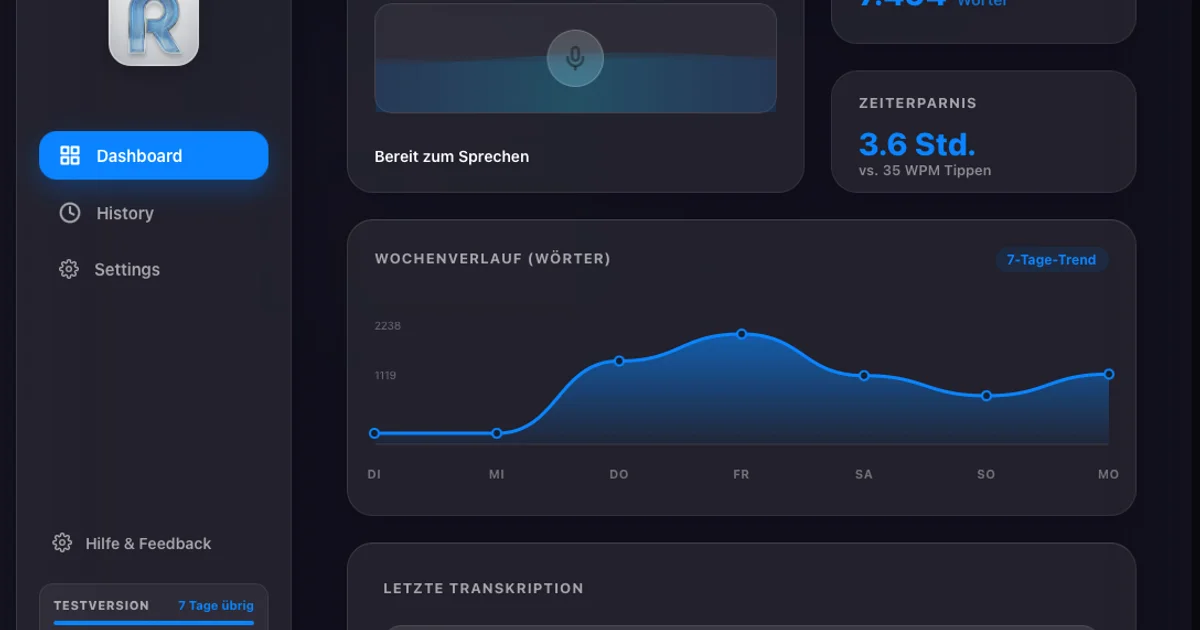
Ratschn is a local-first speech-to-text tool for macOS that transcribes your voice into text entirely on-device. Built by solo developer Edos8877, it targets users frustrated with heavy Electron-based dictation tools or cloud-dependent alternatives that send audio to third-party servers.
The project was born from a practical need: existing Mac dictation tools are either cloud-reliant, require subscriptions, or are built on bloated Electron wrappers. Ratschn aims to feel native, respect system resources, and stay completely offline.
Key technical decisions from the HN launch thread:
- Stack: Rust + Tauri (instead of Electron) + whisper.cpp
- Model: A ~490MB multi-language Whisper model is downloaded on first run — chosen as the sweet spot between footprint and accuracy, including for accents and technical jargon
- Hardware acceleration: The model is compiled via CoreML, enabling transcription directly on the Apple Neural Engine (ANE) and Metal on M-series chips, keeping the main CPU largely idle
- Memory footprint: Around 500MB RAM while active — mostly the AI model held in memory for instant transcription on global shortcut trigger
- Input method: Uses macOS accessibility APIs to type directly into whatever window is active
Pricing: No subscription. One-time purchase (exact price not specified on the landing page — check ratschn.com for current tiers).
Setup Workflow
Prerequisites
- macOS device (optimized for Apple Silicon M-series chips)
- Internet connection for initial ~490MB model download
Step 1: Download and Install
Visit ratschn.com and download the macOS app. The first launch triggers an automatic download of the Whisper model (~490MB).
Step 2: Grant Accessibility Permissions
Ratschn uses macOS accessibility APIs to type text into your active window. You will be prompted to grant Accessibility access in System Settings → Privacy & Security → Accessibility. This is required for the app to function.
Step 3: Configure the Global Shortcut
Once installed, set your preferred global hotkey. The app runs in the background and activates transcription the moment you press the shortcut — no need to switch windows or focus the Ratschn app first.
Step 4: Start Dictating
With the shortcut configured, switch to any text field (Notes, Slack, Terminal, Safari — any app) and speak. Ratschn transcribes in real time and inserts the text directly at your cursor.
Deeper Analysis
Why CoreML Matters on Apple Silicon
Whisper models running under plain CPU inference are power-hungry and slow. By compiling the model to CoreML format, Ratschn offloads inference to the Apple Neural Engine — a dedicated ML accelerator present on all M-series chips. This keeps the system responsive during transcription and avoids the thermal throttling that CPU-bound inference can cause on a laptop.
Tauri vs. Electron
Electron apps bundle a full Chromium instance, inflating RAM usage to hundreds of megabytes even for lightweight UIs. Tauri renders native WebViews, keeping the UI process near-invisible in Activity Monitor. Ratschn’s ~500MB RAM while active is almost entirely the Whisper model — not the framework overhead.
Privacy Model
Because transcription runs locally, no audio ever leaves the device. This makes Ratschn suitable for sensitive contexts (legal notes, medical dictation, credentials) where cloud-based alternatives carry data-retention risk.
Practical Evaluation Checklist
- Runs entirely offline after initial model download
- Uses macOS native accessibility APIs for text insertion
- CoreML/Metal acceleration on M-series Apple Silicon
- No subscription or recurring payment (from the launch thread description)
- Minimal UI overhead via Tauri (not Electron)
FAQ
Q: Does Ratschn require an internet connection after setup? A: No. After the ~490MB Whisper model is downloaded on first run, Ratschn works fully offline.
Q: Which macOS versions are supported? A: Check ratschn.com for the current system requirements, as compatibility updates with macOS releases.
Q: Does it work with any app? A: Yes — via macOS accessibility APIs, it types into whatever window is currently focused, including native macOS apps, Electron apps, web apps in browsers, and terminal emulators.
Q: Is there a trial version? A: Check ratschn.com for the current distribution model and trial options.
Source and Accuracy Notes
- Project page: ratschn.com — verified accessible, redirects to ratschn.app canonical URL
- Source repository: Not publicly available on GitHub (no repo link found in HN thread or project page)
- License: Not publicly specified
- HN launch thread: news.ycombinator.com/item?id=47313205
Note on verification: Pricing and GitHub availability could not be confirmed from publicly accessible pages at time of writing. Check the project page directly for the most current distribution and licensing details.
Related Posts
ai-setup
Recall – Persistent Memory for Claude Code via MCP Hooks
Recall gives Claude Code a permanent memory store that survives session restarts and context compaction. Four hooks capture and restore context automatically — with cloud SaaS or self-hosted options.
2/28/2026
ai-setup
Sentrial – Catch AI Agent Failures Before Your Users Do
YC W26-backed AI agent observability platform. Trace sessions, detect silent regressions, and A/B test prompts in production before failures reach users.
5/28/2026
ai-setup
IonRouter – Fast Low-Cost AI Inference API
IonRouter is a YC W26 inference API routing open-source and fine-tuned models via an OpenAI-compatible endpoint, built on a C++ runtime optimized for GH200.
5/28/2026