TL;DR
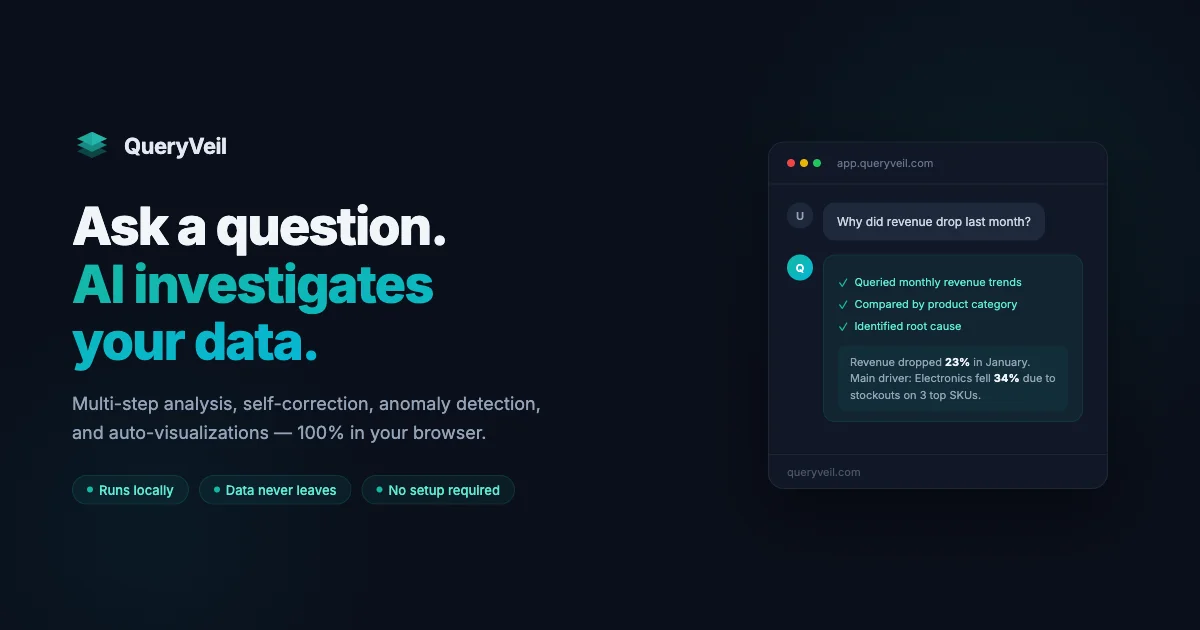
TL;DR: QueryVeil is a browser-based AI data analyst that processes CSV files locally using DuckDB — the AI sees only your schema, never your actual data.
What Is QueryVeil?
QueryVeil is a privacy-first AI data analyst that runs entirely in your browser. Drop in a CSV file and describe what you want to investigate. The AI plans the analysis, runs queries, follows unexpected findings, and delivers results — all without the data ever leaving your machine.
The key innovation: instead of uploading data to a server where an LLM processes it, QueryVeil uses DuckDB running directly in the browser via WebAssembly. The AI receives only your schema (column names, types, sample values) — not the raw data. This means sensitive datasets like healthcare records, financial reports, or proprietary business data can be analyzed without any server-side processing.
QueryVeil launched on Hacker News in July 2026.
Source and Accuracy Notes
- Project page: queryveil.com ← visited and verified
- HN launch thread: news.ycombinator.com/item?id=47141207 ← verified via HN Algolia API
- License: Proprietary free tier (no server component, no data transmission) ← verified on product page
Key Features
- Zero uploads — files never leave the browser. Verify with DevTools network tab
- No signup required — open the site and start analyzing immediately
- DuckDB in the browser — full SQL analytics engine compiled to WebAssembly, no server
- AI-powered investigation — describe your goal and the AI plans multi-step analysis automatically
- Anomaly detection — if the AI spots an outlier, it automatically adds follow-up investigation steps
- Sub-investigations — click any finding to launch a focused deep-dive with full context
- Free forever — no pricing tiers for the core browser product
How It Works
Step 1: Load Your Data
Open queryveil.com and either use the built-in demo dataset or drag and drop your own CSV file. There is no file size limit mentioned — DuckDB handles large datasets in-memory within the browser tab.
Step 2: Ask a Question
Type a natural language question about your data:
"What drove revenue growth in Q3 compared to Q2?"
"Calculate customer concentration by region"
"Find expenses that are significantly above budget"
```bash

The AI interprets your question and generates a multi-step analysis plan. You can watch it execute step-by-step in real time.

### Step 3: Review Findings

Each finding is presented as a discrete result. Click any finding to open a focused sub-investigation with the full context of how that result was derived. The AI marks steps as "running" or "completed" as it works through the analysis plan.

## Technical Architecture

```bash
Your Browser
├── DuckDB (WebAssembly) ← processes CSV locally, data never leaves
├── QueryVeil UI ← React SPA served from CDN
└── AI Layer (external LLM)
    ├── Receives: schema only (column names, types, sample values)
    └── Never sees: raw data rows
The AI model receives a description of your data structure — column headers, data types, and small sample values for context — but not the actual rows. This is the core privacy guarantee: even if the LLM provider’s servers were compromised, only schema metadata would be exposed, not your business data.
Practical Use Cases
| Scenario | Why QueryVeil Works |
|---|---|
| Healthcare records | HIPAA-sensitive patient data stays local |
| Financial reports | Revenue and cost data never touches a third-party server |
| Proprietary business data | No risk of data leakage to an AI provider |
| Rapid EDA | Drag-drop CSV, get multi-step analysis in seconds |
| Teaching analytics | Students analyze real datasets without data governance concerns |
FAQ
Q: How can the AI analyze data it never sees? A: The AI receives your schema — column names, data types, and small sample values. With this it can generate SQL queries that DuckDB executes locally in your browser. The AI’s role is planning and interpreting results, not storing the underlying data.
Q: Is this actually private or just marketing? A: You can verify it yourself. Open DevTools → Network tab, drop in a CSV, and watch the requests. There are no uploads. DuckDB runs entirely within the browser’s WebAssembly sandbox.
Q: What happens to my analysis history? A: Nothing is persisted server-side. Your analysis session exists only in your browser tab. Closing the tab erases all data.
Q: Does it work with large files? A: DuckDB handles large datasets within browser memory. Performance depends on your device, but DuckDB’s columnar execution engine is designed for analytical workloads.
Q: Can I self-host QueryVeil? A: QueryVeil is a hosted SaaS with no self-hosted option mentioned. The architecture is inherently client-side, so the “server” is just static file hosting for the HTML/JS/CSS — the actual data processing never touches any server.
Conclusion
QueryVeil solves a real problem that most data analysis tools ignore: your data is your data. By combining DuckDB’s browser-based SQL engine with an AI planning layer that only sees schema, it enables genuine private data analysis without the trust tradeoff most cloud AI tools require.
If you regularly work with sensitive datasets — customer records, financial reports, healthcare data — and want AI-assisted analysis without sending that data to a third party, QueryVeil is worth trying. The free, no-signup model makes it trivial to get started.
The tradeoff: because the AI only sees schema, it cannot perform certain inference-heavy tasks that require context from actual data values. For pure analytical SQL-driven investigation though, it is a clean solution to a growing privacy problem.
Related Posts
ai-setup
Recall – Persistent Memory for Claude Code via MCP Hooks
Recall gives Claude Code a permanent memory store that survives session restarts and context compaction. Four hooks capture and restore context automatically — with cloud SaaS or self-hosted options.
2/28/2026
dev-tools
Automotive Skills Suite for AI Engineering
Evaluate Automotive Skills Suite for APQP, ASPICE, HARA, safety-plan, and DIA workflows with setup notes, governance risks, and SME review guidance.
5/28/2026
dev-tools
awesome-agentic-ai-zh Roadmap Guide
Explore awesome-agentic-ai-zh as a Chinese agentic AI learning roadmap, with setup notes, track selection, study workflow, and evaluation guidance.
5/28/2026