PrettyMux - GPU-accelerated Linux terminal multiplexer
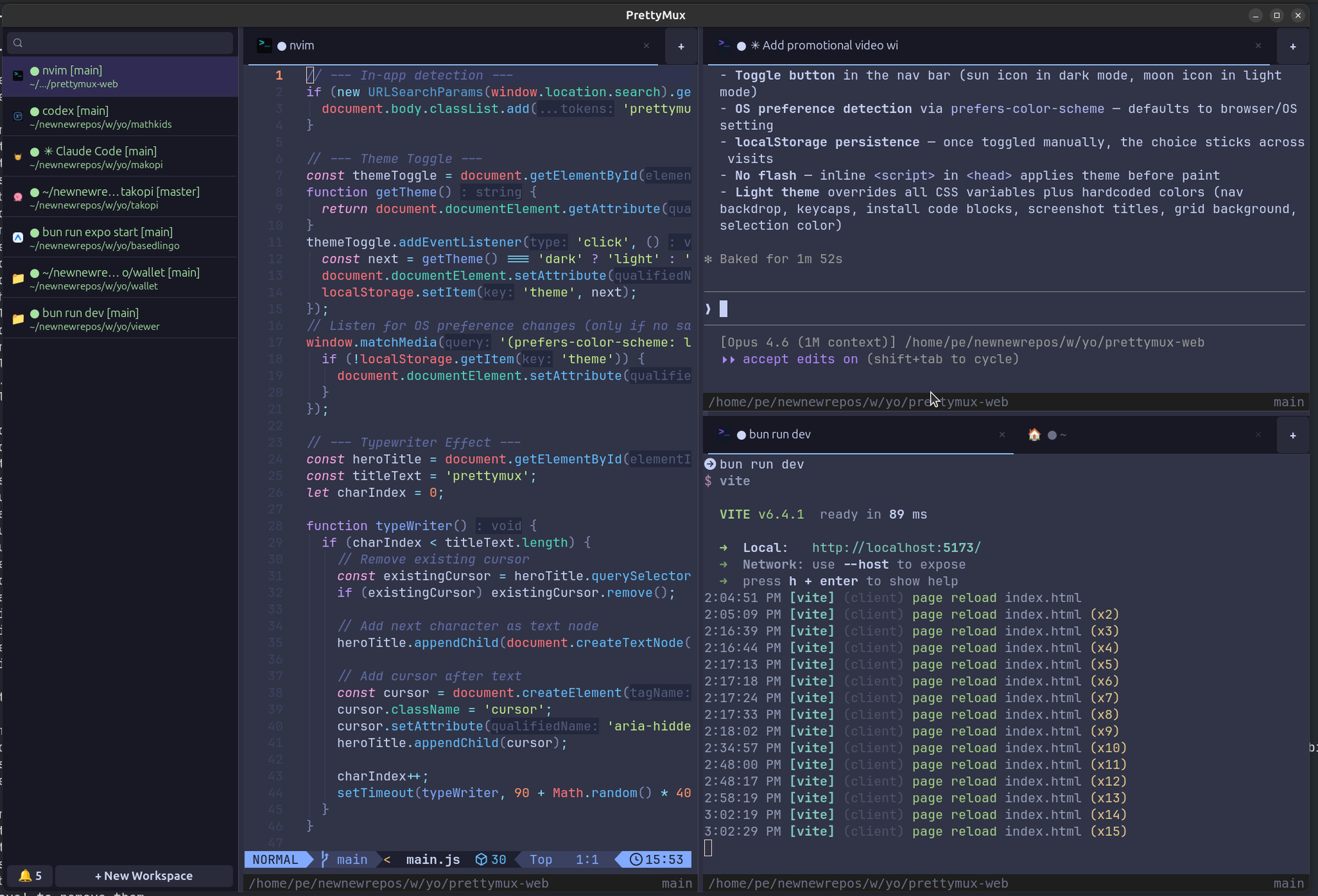
PrettyMux is a native Linux terminal multiplexer built with GTK4 and libadwaita — GPU-accelerated with AI agent-friendly notifications, split panes, workspaces, and prettymux-open CLI.
TL;DR
TL;DR: PrettyMux is a native GPU-accelerated Linux terminal multiplexer built with GTK4 and libadwaita, combining split panes, workspaces, and AI agent status notifications in one GUI app controllable via the
prettymux-openCLI.
Source and Accuracy Notes
- Project page: prettymux.com — visited and verified
- Source repository: github.com/patcito/prettymux — README read in full
- License: GPLv3 — verified from LICENSE file
- HN launch thread: not available (3 points, Show HN from 2025)
What Is PrettyMux?
PrettyMux is a native Linux terminal multiplexer that runs as a GUI application rather than a server-daemon model. It combines vertical tabs, split panes, workspaces, and agent-friendly notifications in one GPU-accelerated window.
The project was inspired by cmux, a similar tool currently available only on macOS.
Key differentiators from tmux/screen:
- Native GUI — runs as a GTK4 window, not a server inside a terminal
- GPU-accelerated rendering — leverages libadwaita for smooth performance
- Agent status entries — attach structured metadata to workspaces that surface in the sidebar with optional desktop notifications
prettymux-openCLI — full programmatic control of a running PrettyMux instance from any shell script or agent loop
Setup
Ubuntu 24.04
sudo apt update
sudo apt install -y ca-certificates lsb-release
echo "deb [trusted=yes arch=amd64] https://prettymux.com/apt/ubuntu $(lsb_release -cs 2>/dev/null) main" | sudo tee /etc/apt/sources.list.d/prettymux.list
sudo apt update
sudo apt install prettymux
```bash

### Debian (Bookworm)

```bash
sudo apt update
sudo apt install -y ca-certificates
echo 'deb [trusted=yes arch=amd64] https://prettymux.com/apt/debian bookworm main' | sudo tee /etc/apt/sources.list.d/prettymux.list
sudo apt update
sudo apt install prettymux
```bash

### Fedora

```bash
sudo dnf config-manager addrepo --from-repofile=https://prettymux.com/rpm/fedora/prettymux.repo
sudo dnf install prettymux
```bash

### Arch Linux

```bash
yay -S prettymux
# or for the prebuilt binary:
yay -S prettymux-bin
```bash

### macOS (beta)

```bash
curl -L -o PrettyMux-macos-arm64.dmg \
  https://github.com/patcito/prettymux/releases/latest/download/PrettyMux-macos-arm64.dmg
open PrettyMux-macos-arm64.dmg
```bash

### Windows (beta)

```powershell
Invoke-WebRequest https://github.com/patcito/prettymux/releases/latest/download/PrettyMux-Installer-x64.msi -OutFile PrettyMux-Installer-x64.msi
Start-Process msiexec.exe -Wait -ArgumentList '/i', 'PrettyMux-Installer-x64.msi'
```bash

### Build from source

```bash
git clone https://github.com/patcito/prettymux
cd prettymux
meson setup builddir
ninja -C builddir
```bash

## prettymux-open CLI

`prettymux-open` is a companion CLI tool that drives a running PrettyMux instance over a JSON-over-socket protocol. It ships with the main package and works from any shell script or AI agent loop.

```bash
# Open a URL in PrettyMux
prettymux-open https://prettymux.com

# Trigger a built-in action
prettymux-open --action split.vertical

# Create a workspace and run a command in a specific tab
prettymux-open --new-workspace api
prettymux-open --exec "bun run dev" -w 0 -p 0 -t 0

# Move a tab between panes
prettymux-open --move-tab --from-w 0 --from-p 0 --from-t 1 --to-w 1 --to-p 0
```bash

### Agent status entries

Agents can attach structured status metadata to a workspace, which surfaces in the PrettyMux sidebar and optionally as a desktop notification:

```bash
prettymux-open --set-workspace-status \
  --id deploy:main \
  --provider ci \
  --state running \
  --summary "Deploying main" \
  --notify -w 0
Supported states include running, success, error, and warning. The full socket protocol surface — transport details, targeting options, every command, and the agent-notification API — is documented in docs/socket-protocol.md.
Practical Evaluation Checklist
- GPU-accelerated rendering with GTK4 and libadwaita
- Vertical tabs, split panes (horizontal and vertical), and named workspaces
- Broadcast mode — send the same input to multiple panes simultaneously
- Search palette across all terminal output
- Theme cycling (light and dark, with system preference detection)
- Quick notes panel
prettymux-openfor full programmatic control from scripts and AI agents- Agent status entries with desktop notification support
- Keyboard shortcuts overlay
- Cross-platform: Linux (primary), macOS beta, Windows beta
FAQ
Q: How does this differ from tmux or screen? A: tmux and screen run as server-daemon processes inside a terminal. PrettyMux is a native GUI application that embeds terminal emulators directly. It is not a replacement for tmux if you need remote/server workflows — it is a local, GPU-accelerated workspace tool.
Q: Does it support GPU acceleration? A: Yes. PrettyMux uses GTK4 and libadwaita for GPU-accelerated rendering. The performance benefit is most noticeable when managing many split panes or running high-frequency output.
Q: Can AI agents interact with it?
A: Yes — prettymux-open exposes a complete JSON-over-socket command surface for scripting a running instance. Agents can open URLs, create workspaces, run commands in specific tabs, and attach structured status entries that surface in the UI.
Q: What package formats are available? A: Debian (APT), Fedora (RPM), Arch Linux (PKGbuild), macOS (DMG), and Windows (MSI). Building from source requires Meson and Ninja.
Conclusion
PrettyMux fills a gap between the server-side workflow of tmux/screen and the GUI ergonomics developers want on a modern Linux desktop. Its prettymux-open CLI makes it unusually agent-friendly — a running instance becomes a scriptable workspace that AI loops can monitor and control directly, without intermediate wrapper scripts.
The agent status entry system is the most distinctive feature: structured metadata attached to workspaces with optional desktop notifications gives AI agents a native UI surface for surfacing real-time signals (CI progress, deployment state, task completions) without leaving the terminal.
Linux users who want a GPU-accelerated, visually polished multiplexer with modern UX should find PrettyMux ready for daily use. The macOS and Windows betas cover the occasional cross-platform need.
Related Posts
ai-setup
Recall – Persistent Memory for Claude Code via MCP Hooks
Recall gives Claude Code a permanent memory store that survives session restarts and context compaction. Four hooks capture and restore context automatically — with cloud SaaS or self-hosted options.
2/28/2026
dev-tools
Automotive Skills Suite for AI Engineering
Evaluate Automotive Skills Suite for APQP, ASPICE, HARA, safety-plan, and DIA workflows with setup notes, governance risks, and SME review guidance.
5/28/2026
dev-tools
awesome-agentic-ai-zh Roadmap Guide
Explore awesome-agentic-ai-zh as a Chinese agentic AI learning roadmap, with setup notes, track selection, study workflow, and evaluation guidance.
5/28/2026