Pluely - Invisible AI Overlay for Meetings and Interviews
A privacy-first AI overlay that floats over any app, transcribes meetings live, and answers questions on-screen without switching tabs. Built with Tauri, just 10MB.
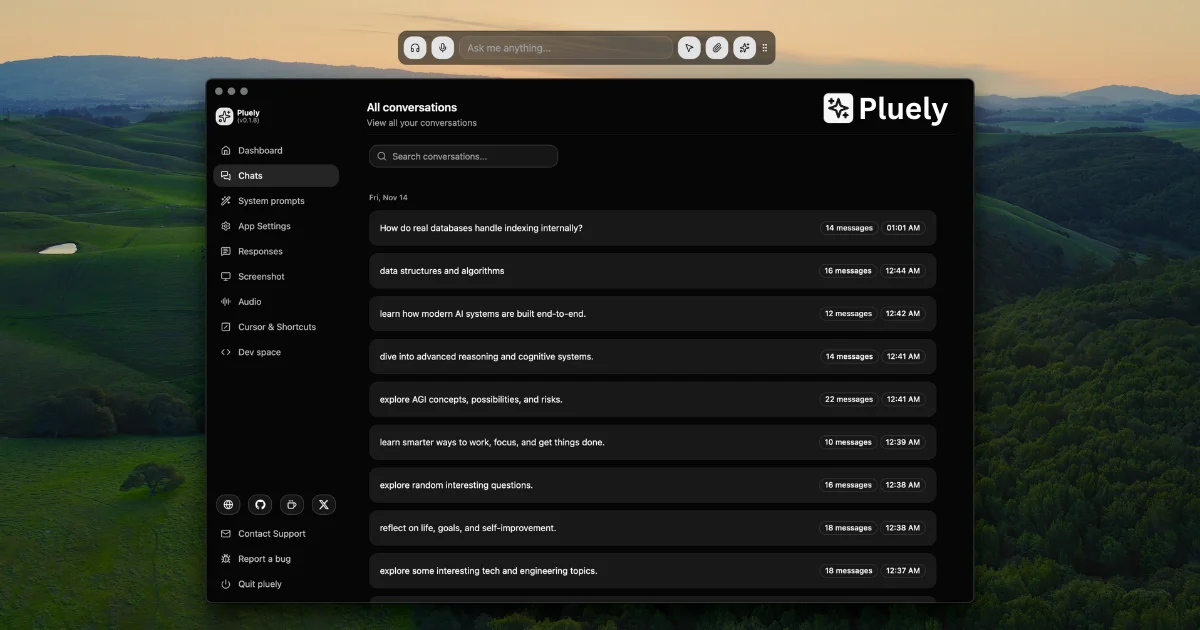
TL;DR
TL;DR: Pluely is a lightweight Tauri desktop app (10MB) that puts a floating AI overlay on top of any app — transcribing meetings, answering on-screen questions, and staying invisible on screen shares. Free plan forever, no account needed.
Source and Accuracy Notes
- Project page: pluely.com — verified live on 2026-08-23
- Source repository: github.com/iamsrikanthnani/pluely — verified README read
- License: GPL-3.0 (verified via GitHub API
license.spdx_id). Note: v1 source is closed (signed binaries only); the GPL-3.0 license applies to the older open-source code still available in the repo history. - GitHub stars: 2,465 (verified via GitHub API)
- Downloads: 48K+ (verified from product page stat badge)
- HN launch thread: not available (Show HN had 7 points — low-traffic launch, no confirmed thread URL)
What Is Pluely?
Pluely is a desktop AI assistant that runs as a floating overlay on your screen. Unlike browser-based AI tools, it lives in a thin translucent window you can summon with a global hotkey from inside any application. The core product is built with Tauri — giving it a native feel at a fraction of the size of Electron alternatives.
The project describes itself as:
“Your invisible AI, over everything you do. Ask about anything on your screen. Listen to any conversation and have the right answer before you need it. One overlay, no tab, no trace.”
Pluely ships in two modes:
- Ask mode — capture a screenshot, select a region, or attach a file; Pluely answers using a selected LLM with full OCR and follow-up context
- Listen mode — live microphone and system audio transcription with speaker labels; automatic response suggestions fire when a question is detected
Key design goals from the README:
- Excluded from screen capture and recordings (stealth mode)
- No meeting bot joins your call — it is purely local and invisible to others
- Chats, meetings, and transcripts stored in a local SQLite database
- 258 hosted models available on Pro plans; free plan works with your own API keys
The product positions itself as a lightweight, privacy-first alternative to heavier AI assistant tools.
Setup Workflow
Step 1: Download and Install
Pluely is available for macOS, Windows, and Linux. Download installers from the official site:
Alternatively, the GitHub Releases page at github.com/iamsrikanthnani/pluely/releases lists all download formats.
The installer is 9–16 MB depending on platform.
Step 2: Grant Permissions
On first launch, Pluely requests screen and microphone permissions. The docs cover per-platform permission guides:
Linux users additionally need WebKitGTK — see Tauri’s prerequisites page for your distribution.
Step 3: Configure Your AI Provider
Free plan (bring your own keys):
Open Settings → Providers and enter your API key for any supported LLM. You can also connect CLI tools directly (Claude Code, Gemini CLI, Codex, Qwen Code, Ollama) via a curl template.
Pro plan (hosted models):
The Pro plan includes access to 258 hosted models including GPT, Gemini, Claude, Llama, DeepSeek, and Qwen variants. No API key management required.
Step 4: Start Using Pluely
Summon the overlay with the global hotkey (customizable in settings). From there:
- Ask mode — capture your screen or a region, type or dictate your question, get a streamed Markdown answer
- Listen mode — click Start to begin live transcription; automatic response suggestions appear when a question is detected
All sessions are saved locally as meetings with full transcripts.
Practical Evaluation Checklist
- Installer downloads and runs without admin rights on each OS
- Global hotkey summons overlay from inside a full-screen app
- Screen capture and region selection work correctly
- Live transcription starts and stops cleanly
- Stealth mode hides the overlay from macOS screenshot / OBS recording
- Free plan works with a self-supplied API key
- Local SQLite database stores chat history at the expected path
- Keyboard shortcuts work for summon, capture, and scroll
Security Notes
Pluely’s security model is architecture-first: all data stays on-device.
- Chats, meetings, transcripts, and files are stored in a local SQLite database on the user’s machine
- API keys supplied in the free plan never leave the device
- The stealth mode excludes the overlay from screen capture and system recordings
- The product’s own privacy policy is at pluely.com/privacy-policy
Note: v1 ships as closed-source signed binaries. The older GPL-3.0 code remains available in the repository history. See the README’s “Why Pluely v1 is closed source” section for the author’s rationale.
FAQ
Q: Is Pluely open source? A: The underlying code was open source under GPL-3.0 through v0.x. From v1, the product ships as closed-source signed binaries. The old GPL-3.0 code is still available in the repository’s commit history.
Q: How does it stay invisible on screen shares? A: On macOS and Windows, Pluely marks its window to be excluded from screen capture APIs. This means it does not appear in screen recordings, screen shares, or screenshots taken by other apps. The Dock/taskbar icon can also be hidden for additional stealth.
Q: What models does the free plan support? A: The free plan lets you connect any LLM or speech-to-text provider through a configurable curl template. You can also connect local AI CLIs you already have installed.
Q: Is there a mobile version? A: No. Pluely is currently a desktop-only application for macOS, Windows, and Linux.
Q: How much does it cost? A: A free plan is available forever with no account required. Paid plans start at $9/month (as of the current pricing page) and include hosted model access, higher usage limits, and file upload quotas.
Conclusion
Pluely solves a specific problem: you need AI assistance in real time — during a meeting, an interview, or a debugging session — without switching context to a browser tab. The overlay approach is elegant, the 10MB Tauri footprint is refreshingly small, and the local-first data model addresses the privacy concerns that come with sending meeting transcripts to third-party APIs.
If you want a self-contained, stealth-capable AI overlay for live conversations, Pluely is worth installing. The free plan is genuinely free with no credit card required, so the barrier to try it is low.
Related Posts
ai-setup
Recall – Persistent Memory for Claude Code via MCP Hooks
Recall gives Claude Code a permanent memory store that survives session restarts and context compaction. Four hooks capture and restore context automatically — with cloud SaaS or self-hosted options.
2/28/2026
dev-tools
Automotive Skills Suite for AI Engineering
Evaluate Automotive Skills Suite for APQP, ASPICE, HARA, safety-plan, and DIA workflows with setup notes, governance risks, and SME review guidance.
5/28/2026
dev-tools
awesome-agentic-ai-zh Roadmap Guide
Explore awesome-agentic-ai-zh as a Chinese agentic AI learning roadmap, with setup notes, track selection, study workflow, and evaluation guidance.
5/28/2026