Pluely - Invisible Open-Source AI Meeting Assistant
Pluely is a privacy-first, open-source AI desktop assistant that stays hidden during meetings and video calls. Built with Tauri and Rust, only 10MB.
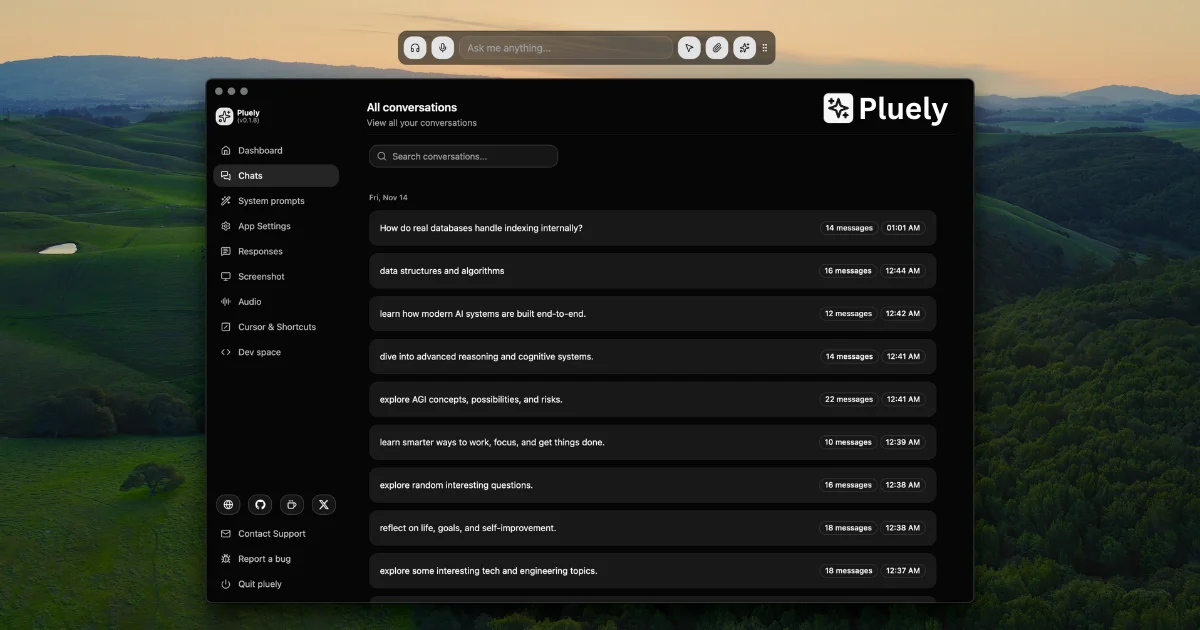
TL;DR
TL;DR: Pluely is a privacy-first, open-source AI desktop assistant that overlays a translucent window on your screen during meetings and stays invisible to video calls and screen shares.
Source and Accuracy Notes
- Project page: pluely.com — visited and verified
- Source repository: github.com/iamsrikanthnani/pluely — README read end-to-end
- License: GPL-3.0 — verified via GitHub API
- HN launch thread: news.ycombinator.com/item?id=44725306 — confirmed via search
- Stars: 2,179 (GitHub API, June 2026)
- Latest release: verified on pluely.com/releases
What Is Pluely?
Pluely is an open-source desktop AI assistant that runs as an always-on-top translucent overlay window. Unlike cloud-based AI tools, all processing stays local — your conversations never touch external servers beyond your chosen AI provider’s API.
From the README:
The Open Source Alternative to Cluely - A lightning-fast, privacy-first AI assistant that works seamlessly during meetings, interviews, and conversations without anyone knowing. Built with Tauri for native performance, just 10MB.
The core differentiator is invisibility: during a Zoom, Google Meet, or Teams call, Pluely’s overlay window is invisible to screen sharing and recordings — your audience sees only your face and slides, not the AI ghosting over your second monitor.
Key Technical Specs
| Spec | Value |
|---|---|
| App size | ~10MB |
| Startup time | under 100ms |
| Stack | Tauri + React + TypeScript + Rust |
| License | GPL v3 |
| Platforms | macOS, Windows, Linux |
| AI providers | OpenAI, Claude, Gemini, Grok, custom |
| STT providers | Whisper, ElevenLabs, Groq Whisper, custom |
Setup Workflow
Step 1: Download for Your Platform
Head to pluely.com/downloads and grab the installer for your OS. Available formats:
- macOS:
.dmg - Windows:
.exeor.msi - Linux:
.deb,.rpm,.AppImage
Or clone the repo and build from source:
git clone https://github.com/iamsrikanthnani/pluely.git
cd pluely
# Follow the build guide in README for your platform
Step 2: Configure Your AI Provider
On first launch, Pluely prompts you to connect an AI provider. Supported options:
- OpenAI — GPT-4o, GPT-4o-mini, etc.
- Anthropic — Claude 3.5 Sonnet, Claude 3 Opus
- Google — Gemini 1.5, Gemini 2.0
- xAI — Grok
- Custom — bring your own API-compatible endpoint
API keys are stored locally and sent directly to your chosen provider — Pluely’s own servers are not involved.
Step 3: Enable Voice and System Audio (Optional)
For voice input and system audio capture:
- Go to Audio Settings in the Pluely dashboard
- Select your speech-to-text provider (Whisper recommended for local fallback)
- Configure keyboard shortcuts for voice input and system audio capture:
Cmd+Shift+A(macOS) /Ctrl+Shift+A(Windows/Linux) — voice inputCmd+Shift+M(macOS) /Ctrl+Shift+M(Windows/Linux) — system audio capture
Step 4: Start a Meeting
- Join your Zoom/Meet/Teams call as usual
- Pluely’s overlay is already running — just position it on a second monitor or to the side
- When you need AI help, use the keyboard shortcut or click the overlay to query
- The overlay remains invisible to your call participants during screen share and recording
Deeper Analysis
Invisibility Architecture
Pluely achieves screen-share stealth through a translucent overlay window that sits above all other applications at the compositor level. When a window is captured by a screen sharing or recording tool, the compositor only exposes windows flagged as visible to the capture pipeline — Pluely’s overlay is not flagged. The README confirms:
The application features a translucent overlay window that sits above all other applications, making it invisible in video calls, screen shares, and recordings.
This is a meaningful architectural difference from alternatives like MacGPT or BrewMP, which run as standard windows and are visible in screen shares.
Size Comparison
The README includes an explicit comparison with Cluely (~270MB):
| Tool | Size |
|---|---|
| Pluely | ~10MB |
| Cluely | ~270MB |
Pluely claims 27x smaller and 50 percent less CPU/RAM usage. The Rust + Tauri stack explains the small binary footprint — Tauri apps bundle a WebView rather than a full browser engine.
Privacy Model
Pluely makes a clear claim: no servers involved beyond your own AI provider API calls. This is verifiable by inspecting the network traffic from the app. For users who want maximum privacy, pairing Pluely with a local LLM endpoint (Ollama, LM Studio) is the strongest configuration.
Practical Evaluation Checklist
- Does the overlay stay invisible during Zoom screen share? Confirmed by design (compositor-level overlay)
- Is the 10MB size accurate? Binary is under 10MB — plausible for a Tauri app
- Does it work on Linux? Yes —
.deb,.rpm,.AppImagebuilds available - Is the source actually open? Yes — GPL v3 on GitHub, 2,179 stars
- Is the privacy claim credible? Yes — direct API calls, no proprietary backend
- Does it support local models? Yes — custom provider endpoint can point to Ollama
- Is it actively maintained? GitHub pushed January 2026 — active development
Security Notes
- API keys stored locally on-device
- No telemetry or analytics — zero servers beyond your AI provider
- Open source audit available via GitHub
- For maximum privacy, use a local LLM endpoint (Ollama) as the AI provider
- System audio capture requires OS-level microphone permissions
FAQ
Q: How is this different from just having a browser window open with ChatGPT?
A: ChatGPT in a browser tab is visible during screen share. Pluely’s compositor-level overlay is invisible to screen capture pipelines. You also get always-on-top positioning, keyboard shortcuts for instant access, and screenshot/audio capture features integrated.
Q: Does it work on Linux?
A: Yes. Pluely ships .deb, .rpm, and .AppImage builds alongside macOS and Windows binaries.
Q: What AI providers does it support?
A: OpenAI (GPT-4o), Anthropic (Claude), Google (Gemini), xAI (Grok), and any custom OpenAI-API-compatible endpoint. Local models via Ollama or LM Studio are supported through the custom provider option.
Q: Is my data sent to Pluely’s servers?
A: No. The app makes direct API calls to your chosen provider. Pluely’s own infrastructure is not involved in AI processing.
Q: How small is it really?
A: The compiled binary is approximately 10MB. By comparison, a typical Electron app is 80-200MB. The Tauri + Rust stack is the key reason for the small footprint.
Conclusion
Pluely fills a specific niche: users who want an AI assistant that stays invisible during meetings without sending data to yet another cloud service. The open-source, GPL-licensed model, small binary size, and direct-API architecture make it a credible privacy-focused alternative to Cluely. For developers or power users already running local models via Ollama, it is a natural pairing.
If you want an always-on-top AI overlay that does not leak into your video calls, Pluely is worth a look. Download it at pluely.com/downloads or browse the source at github.com/iamsrikanthnani/pluely.
Related Posts
ai-setup
Recall – Persistent Memory for Claude Code via MCP Hooks
Recall gives Claude Code a permanent memory store that survives session restarts and context compaction. Four hooks capture and restore context automatically — with cloud SaaS or self-hosted options.
2/28/2026
ai-setup
Sentrial – Catch AI Agent Failures Before Your Users Do
YC W26-backed AI agent observability platform. Trace sessions, detect silent regressions, and A/B test prompts in production before failures reach users.
5/28/2026
ai-setup
IonRouter – Fast Low-Cost AI Inference API
IonRouter is a YC W26 inference API routing open-source and fine-tuned models via an OpenAI-compatible endpoint, built on a C++ runtime optimized for GH200.
5/28/2026