Plandex v2 – Open-Source AI Coding Agent for Large Projects
Plandex v2 is an open-source AI coding agent designed for long-running, multi-file tasks. It沙盒diff预览、2M上下文、本地Docker部署,适合大型代码库。HN 257pts热榜。
TL;DR
TL;DR: Plandex v2 is an open-source AI coding agent that handles long multi-step coding tasks across large codebases, with a diff-based sandbox, 2M context window, and self-hosted Docker option.
Source and Accuracy Notes
- Project page: plandex.ai ← verified accessible
- Source repository: github.com/plandex-ai/plandex ← README read end-to-end
- License: MIT ← confirmed
- HN launch thread: news.ycombinator.com/item?id=43710576 ← 257 pts, v2 launch
What Is Plandex?
Plandex is an open-source AI coding agent built for real-world, large-scale software projects. Unlike single-file chat assistants, Plandex manages long-running tasks that span dozens of files across a codebase — things like refactoring a module, adding a feature across multiple packages, or updating an API contract everywhere it appears.
The v2 release introduced a diff-based sandbox so you can review every AI-generated change before applying it, a 2M token context window for massive codebases, and a fully containerized local mode.
From the README:
An AI coding agent designed for large tasks and real world projects.
Setup Workflow
Prerequisites
- macOS/Linux (or Windows via WSL)
- Docker (for local/self-hosted mode)
- An OpenRouter.ai API key (or another supported provider key)
Step 1: Install the CLI
curl -sL https://plandex.ai/install.sh | bash
```bash

This installs the `plandex` binary. After installation, run `plandex` in any project directory to enter REPL mode.

Windows users must use **WSL** — Plandex does not work in CMD or PowerShell.

### Step 2: Start the Server (Local Mode with Docker)

```bash
plandex server start
```bash

This starts the Plandex server via Docker on `localhost:7777`. The server handles LLM communication, file operations, and task state.

### Step 3: Connect with Your API Key

```bash
export OPENROUTER_API_KEY=your_key_here
plandex chat
```bash

Or set it persistently:

```bash
plandex config set OPENROUTER_API_KEY your_key_here
```bash

### Step 4: Start a Task

```bash
plandex new "Refactor the auth module to use JWT"
```bash

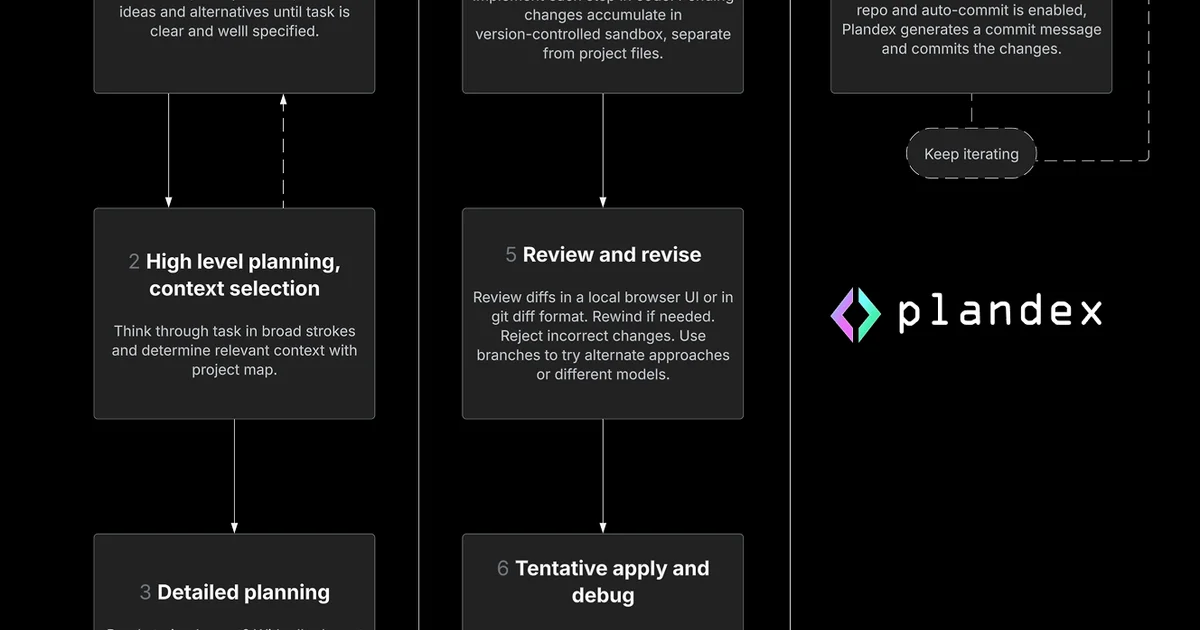
Plandex will break the task into steps, apply changes in its sandbox, and show you a diff. You approve or reject each step.

### Step 5: Review Diffs Before Applying

The diff sandbox is one of v2's key features. Instead of blindly applying changes:

```bash
plandex diff        # view pending changes
plandex apply       # approve and apply all
plandex apply -n 3  # approve and apply only the first 3 steps
Deeper Analysis
Architecture
Plandex separates task planning from execution. The agent plans changes, applies them in a sandbox, and presents diffs — never touching your actual files until you approve.
The server component (plandex server) runs as a Docker container and manages:
- Context window management (up to 2M tokens)
- File indexing and retrieval
- Task state and step history
- Model provider communication (OpenRouter, OpenAI, Anthropic, etc.)
Context Management
Plandex builds a project-aware context from your entire codebase, not just open files. It uses intelligent chunking and relevance scoring to keep the most relevant code in context even for very large projects.
Diff Sandbox
Each step produces a git diff-style output showing exactly what changed, where. This makes it safe to run Plandex on production code — you always see what will happen before it happens.
Practical Evaluation Checklist
- Self-hosted: ✅ Docker container, no cloud dependency
- Context window: ✅ 2M tokens
- API key flexibility: ✅ OpenRouter, OpenAI, Anthropic, and others
- Diff sandbox: ✅ Review changes before applying
- REPL mode: ✅
plandexin any project directory - Windows support: ⚠️ WSL only (no native Windows support)
- Free to self-host: ✅ Yes, MIT licensed
- Automated debugging: ✅ Terminal command debugging (Chrome for browser apps)
Security Notes
- Your code never leaves your infrastructure when using local mode
- API keys are stored locally via
plandex config - The Docker container runs in isolated network mode by default
- No telemetry or phone-home in self-hosted deployments
FAQ
Q: How is Plandex different from Copilot or Cursor? A: Copilot and Cursor work at the editor level (inline completions, chat panels). Plandex operates at the task level — you give it a multi-step goal and it plans, sandboxes, and executes changes across multiple files autonomously.
Q: Does it work with any language? A: Yes. Plandex is language-agnostic — it works with any codebase the LLM can read. Language-specific intelligence depends on the underlying model.
Q: What if the diff looks wrong?
A: You can reject individual steps with plandex reject -n <step> or plandex reject --all to start over. Nothing is applied without your approval.
Q: Can I use my own model? A: Yes. Plandex supports OpenRouter, OpenAI, Anthropic, and other providers via their API keys.
Q: Does it require an internet connection? A: The CLI needs internet to call the LLM API (unless you self-host an API-compatible backend). The server runs locally, so code never leaves your machine.
Conclusion
Plandex v2 fills a gap that single-file AI assistants leave open: real engineering tasks that span dozens of files and take dozens of steps. The diff sandbox makes it safe to use on production code, the 2M context window handles large repos, and Docker-based self-hosting keeps everything in your infrastructure.
If you’re working on a codebase where AI suggestions keep getting lost because the task is too big for one prompt, Plandex is worth a look.
- Website: plandex.ai
- Docs: docs.plandex.ai
- GitHub: github.com/plandex-ai/plandex
Related Posts
ai-setup
Recall – Persistent Memory for Claude Code via MCP Hooks
Recall gives Claude Code a permanent memory store that survives session restarts and context compaction. Four hooks capture and restore context automatically — with cloud SaaS or self-hosted options.
2/28/2026
dev-tools
Automotive Skills Suite for AI Engineering
Evaluate Automotive Skills Suite for APQP, ASPICE, HARA, safety-plan, and DIA workflows with setup notes, governance risks, and SME review guidance.
5/28/2026
dev-tools
awesome-agentic-ai-zh Roadmap Guide
Explore awesome-agentic-ai-zh as a Chinese agentic AI learning roadmap, with setup notes, track selection, study workflow, and evaluation guidance.
5/28/2026