Palmier Pro – AI-Powered macOS Video Editor Built In Swift
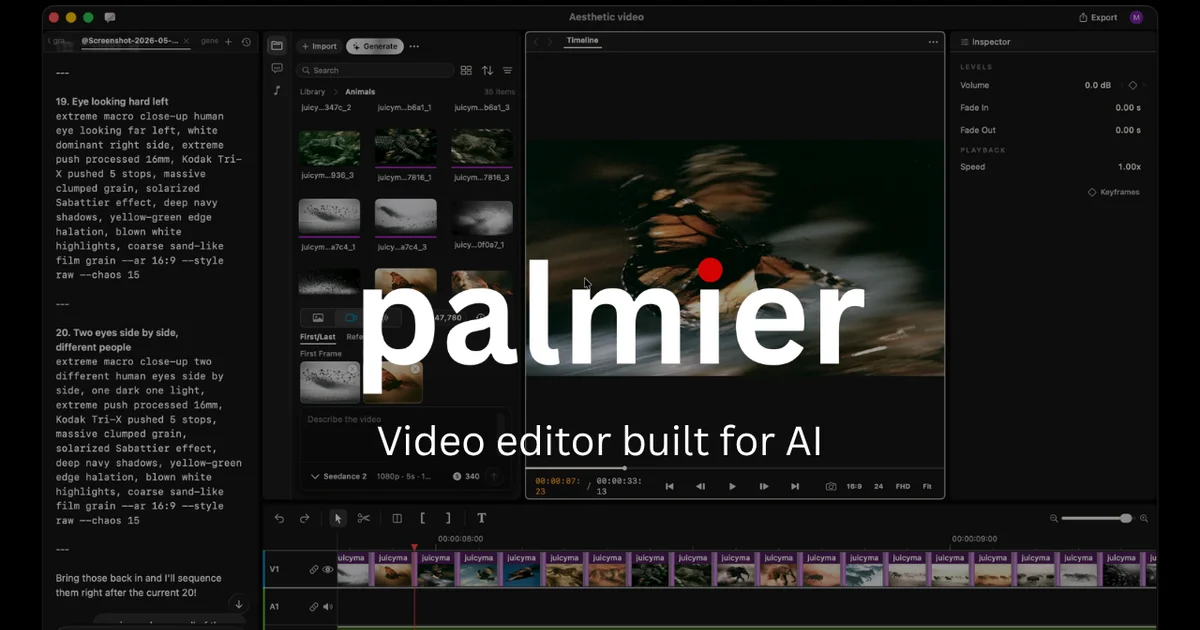
Palmier Pro is an open-source macOS video editor with AI generation in the timeline. Generate videos with Seedance and Kling, connect Claude or Codex via MCP, and edit with an AI agent.
TL;DR
TL;DR: Palmier Pro is an open-source macOS video editor that lets you generate videos with Seedance, Kling, and other SOTA models directly in the timeline, and connect AI agents like Claude and Codex via MCP for collaborative editing.
What Is Palmier Pro?
Palmier Pro is an open-source video editor for macOS built from scratch in Swift. The project positions itself as “the video editor built for AI” — combining a native editing workflow with generative AI and agent integration.
From the official README:
Palmier Pro is an open source video editor for Mac. You and your agent can generate and edit videos together inside the timeline.
Key capabilities:
- Swift-native timeline editor — built from scratch with Premiere Pro as the north star
- Built-in generative AI — Seedance, Kling, Nano Banana Pro available inside the timeline
- MCP server — exposes a local HTTP MCP server at
http://127.0.0.1:19789/mcpwhen the app is running - Multi-agent collaboration — connect Claude Code, Codex, or Cursor to work on the same project as the editor
Setup
Prerequisites
- macOS 26 (Tahoe) or later
- Apple Silicon (M-series chip)
- Git (to clone the repo and install updates)
Installation
Download the latest .dmg from the GitHub releases page:
https://github.com/palmier-io/palmier-pro/releases/latest/download/PalmierPro.dmg
```bash

Open the `.dmg`, drag Palmier Pro into your Applications folder, and launch it. On first run, macOS may ask you to confirm opening an app downloaded from the internet.

### Connecting an AI Agent via MCP

When Palmier Pro is running, it exposes an MCP server at `http://127.0.0.1:19789/mcp`. You can connect Claude Code, Codex, or Cursor to it.

**Claude Code:**
```bash
claude mcp add --transport http palmier-pro http://127.0.0.1:19789/mcp
```bash

**Codex:**
```bash
codex mcp add palmier-pro --url http://127.0.0.1:19789/mcp
```bash

**Cursor:**
Add this to `~/.cursor/mcp.json`:
```json
{
  "mcpServers": {
    "palmier-pro": {
      "type": "http",
      "url": "http://127.0.0.1:19789/mcp"
    }
  }
}
Or use the in-app guide: Help → MCP Instructions → Install in Cursor.
Built-in Generative AI Models
Palmier Pro ships with integrations for several SOTA generation models accessible directly from the timeline:
- Seedance — video generation
- Kling — video generation
- Nano Banana Pro — image/video generation
These models are invoked from within the editor’s timeline, allowing you to layer AI-generated content with manually edited clips in a single project.
Source and Accuracy Notes
- Project page: github.com/palmier-io/palmier-pro
- Official site: www.palmier.io (redirects to GitHub)
- License: GPL-3.0 (verified)
- HN launch thread: Show HN: Palmier Pro – Open-source macOS video editor built for AI — 191 points
- Y Combinator: YC S24 batch (ycombinator.com/companies/palmier)
Practical Evaluation Checklist
- Download and install the
.dmgon a compatible Mac - Open the app and confirm it launches without errors
- Start a new project and import a video clip
- Connect Claude Code via the MCP command and verify the connection
- Try generating an image or video clip using the in-app AI panel
- Confirm the MCP server is responding at
http://127.0.0.1:19789/mcp
FAQ
Q: Does Palmier Pro require an internet connection? A: The editor itself works offline for local editing. The built-in generative AI features (Seedance, Kling, Nano Banana Pro) require an internet connection to call the respective model APIs.
Q: Is the MCP server available when the app is in the background? A: The MCP server runs as long as the Palmier Pro window is open. Closing the app will stop the server.
Q: Can I use Palmier Pro for commercial projects? A: Palmier Pro is licensed under GPL-3.0. You can use it for commercial projects as long as you comply with the license terms, including disclosing source code for any modifications.
Q: What macOS version is required? A: macOS 26 (Tahoe) or later, on Apple Silicon.
Q: How does Palmier Pro differ from a traditional NLE like Premiere Pro? A: Palmier Pro is designed from the ground up with AI agent integration as a first-class feature. Rather than treating AI as a plug-in, the editor exposes an MCP interface that allows AI agents to read and modify the timeline programmatically.
Conclusion
Palmier Pro is a fresh take on desktop video editing — one that treats AI as a core part of the workflow rather than an add-on. The MCP server integration is particularly interesting for developers building AI-powered content pipelines, as it allows Claude Code, Codex, or Cursor to programmatically drive editing tasks. If you have a compatible Mac and want to experiment with an AI-native editor, the .dmg is a direct download with no build step required.
Related Posts
ai-setup
Recall – Persistent Memory for Claude Code via MCP Hooks
Recall gives Claude Code a permanent memory store that survives session restarts and context compaction. Four hooks capture and restore context automatically — with cloud SaaS or self-hosted options.
2/28/2026
dev-tools
Automotive Skills Suite for AI Engineering
Evaluate Automotive Skills Suite for APQP, ASPICE, HARA, safety-plan, and DIA workflows with setup notes, governance risks, and SME review guidance.
5/28/2026
dev-tools
awesome-agentic-ai-zh Roadmap Guide
Explore awesome-agentic-ai-zh as a Chinese agentic AI learning roadmap, with setup notes, track selection, study workflow, and evaluation guidance.
5/28/2026