Orchestra - Visual Browser Automation That Exports Plain
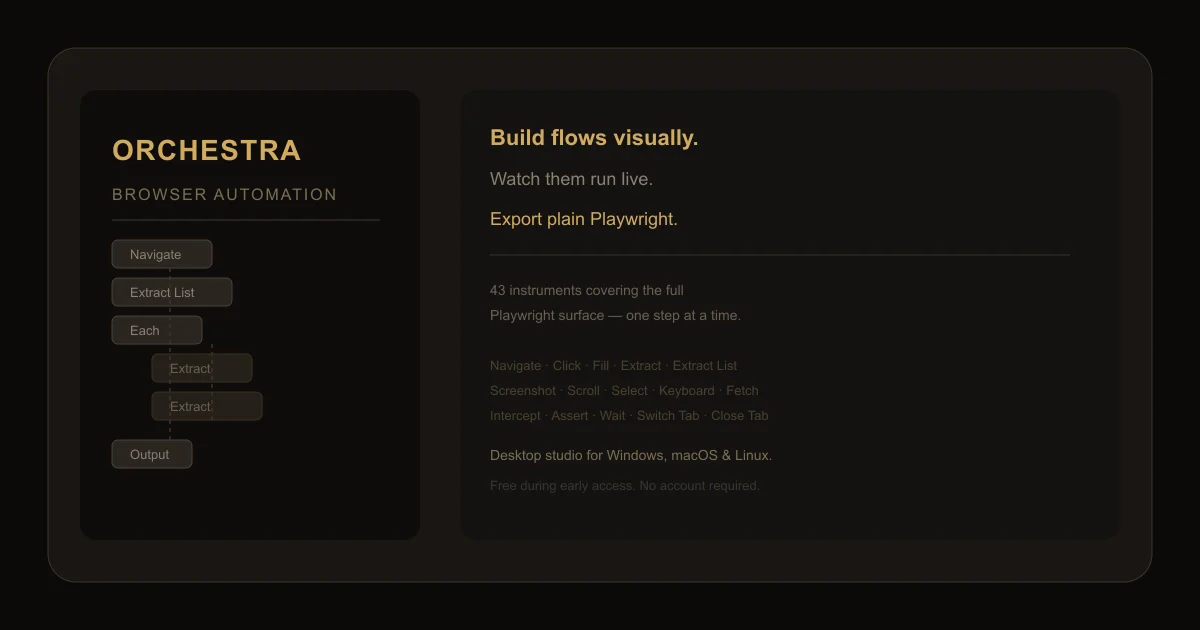
A desktop studio for browser automation and web scraping. Build flows visually, watch them run live, and export plain Playwright code you own forever.
TL;DR
TL;DR: Orchestra is a desktop browser automation tool that lets you build scrapers and bots visually, then exports the result as plain Playwright code you can run anywhere without Orchestra installed.
Source and Accuracy Notes
- Project page: orchestra-automation.com — visited and verified
- HN launch thread: news.ycombinator.com/item?id=48816094 — confirmed via HN Algolia API
- License: Proprietary free-to-use during early access (no public repo)
- Source verified: 2026-07-09 from live website content
What Is Orchestra?
Orchestra is a desktop application for Windows, macOS, and Linux that sits between you and the websites you need to automate. Instead of writing Playwright scripts from scratch, you assemble a flow from visual building blocks called instruments — 43 of them covering the full Playwright surface.
From the product description on the website:
Orchestra is a desktop studio for browser automation, web scraping and web RPA. Build flows visually, watch them run live, and export plain Playwright you own forever. No account, no cloud, no lock-in.
The core pitch: you get the speed of a no-code scraper with the portability of hand-written Playwright. You build the flow in Orchestra’s visual editor, watch it execute step-by-step in a real browser, and at the end you export the equivalent TypeScript/JavaScript you can run anywhere Playwright runs.
Setup Workflow
Step 1: Download and Install
Head to orchestra-automation.com/downloads and pick your platform. During early access, claiming a free license requires only an email — no credit card, no GitHub sign-in.
# After install, launch Orchestra
# Linux: ./orchestra
# macOS: open Orchestra.app
# Windows: Orchestra.exe
```bash

### Step 2: Create Your First Flow

The interface has three panels:

1. **Flow editor** — the visual sequence of instruments (left sidebar)
2. **Browser preview** — a live Chromium instance showing the page being automated (center)
3. **Variables panel** — tracks all data variables as they are extracted and transformed (right sidebar)

### Step 3: Add Instruments

Click **Add instrument** in the flow editor. The 43 instruments are grouped into categories:

| Category | Instruments |
|---|---|
| Navigation | Navigate, Go Back, Reload, Switch Tab, Close Tab |
| Interaction | Click, Fill, Select, Upload, Keyboard, Mouse Move |
| Data | Extract, Extract List, Fetch, Intercept |
| Control | Condition, Each, While, Try/Catch, Cue |
| Output | Screenshot, Wait, Wait Network, Dialog Handler |
| Advanced | Script, Evaluate, Transform, Stealth, Set Headers |

### Step 4: Run and Watch

Hit the **Run** button. Orchestra executes each instrument in sequence, with the browser preview showing every step in real time. If a step fails, it auto-screenshots the page state and logs what went wrong.

### Step 5: Export Playwright

When the flow runs cleanly, click **Export**. Orchestra generates a plain `.ts` or `.js` file using the official Playwright SDK — no custom runtime, no proprietary hooks. You own the code.

```typescript
// orchestra-export.ts — plain Playwright, no dependencies on Orchestra
import { chromium } from '@playwright/test';

(async () => {
  const browser = await chromium.launch();
  const page = await browser.newPage();
  await page.goto('https://books.toscrape.com/');
  const titles = await page.locator('.product_pod h3 a').allTextContents();
  console.log(titles);
  await browser.close();
})();
Deeper Analysis
What Makes It Different
Most browser automation tools are either no-code SaaS (works in a browser tab, but you can’t export the code and you’re locked into their infrastructure) or code-first frameworks (Playwright/Puppeteer require you to write every line).
Orchestra splits the difference. The visual editor handles the boilerplate — waiting for elements, looping over lists, handling dialogs — while the export gives you readable Playwright at the end. If the site changes, you open the flow, tweak a step, re-export, done.
The Cue System
One stand-out instrument is Cue. A Cue watches the page and fires the moment a condition is met — useful for cookie banners, login modals, or late-loading content. You attach steps to the Cue so the chaos gets handled without cluttering the main flow.
Stealth Mode
Orchestra includes a Stealth instrument that applies randomized mouse movements, human-like timing delays, and other countermeasures to avoid bot detection on sites that block automation.
Practical Evaluation Checklist
- ✅ Runs on Windows, macOS, Linux as a native desktop app
- ✅ No account or cloud required — data stays on your machine
- ✅ Exports standard Playwright code you own outright
- ✅ Visual flow editor with real browser preview
- ✅ 43 instruments covering the full Playwright surface
- ✅ Cue system for handling dynamic page elements
- ✅ Stealth mode for bot-hostile sites
- ✅ Auto-screenshot on failure for debugging
- ✅ Free during early access (email only)
Security Notes
- Orchestra runs a local Chromium instance — all browser traffic is direct between your machine and the target site
- No cloud proxying or tunneled requests
- Exported Playwright code has no dependency on Orchestra binaries
- As with any browser automation tool, respect robots.txt and the target site’s Terms of Service
FAQ
Q: Do I need Playwright installed to run exported scripts?
A: Yes. The export produces standard Playwright code. You will need @playwright/test or playwright installed in your project (npm install -D @playwright/test && npx playwright install).
Q: Can Orchestra handle JavaScript-rendered pages (SPAs)? A: Yes. It uses a real Chromium instance under the hood, so single-page applications and sites with heavy client-side rendering work without extra configuration.
Q: Is there a cloud or hosted version? A: No. Orchestra is a desktop-only application. There is no SaaS tier, no browser-in-the-cloud, and no account required.
Q: How is this different from Playwright Codegen? A: Playwright Codegen generates code from your manual browser actions, but the output is a rough draft you clean up afterward. Orchestra’s flow is designed for repeatability — you can loop over lists, handle conditional UI (via Cues), add error recovery, and run the same flow on a schedule. The export is a byproduct of a well-structured flow, not a starting point to be edited.
Q: Does the free early access license expire? A: According to the website, early adopters get a free lifetime license. There is a limited window — the page currently shows “37 of 50 licenses left.”
Conclusion
Orchestra is a pragmatic tool for anyone who needs browser automation without committing to a full code-first framework. The visual editor lowers the barrier to entry, and the plain Playwright export means you never hit a ceiling where “the tool can’t do X, so I guess I’m stuck.” If you regularly scrape or automate web interactions, it is worth downloading while early access is still open.
Related Posts
ai-setup
Recall – Persistent Memory for Claude Code via MCP Hooks
Recall gives Claude Code a permanent memory store that survives session restarts and context compaction. Four hooks capture and restore context automatically — with cloud SaaS or self-hosted options.
2/28/2026
dev-tools
Automotive Skills Suite for AI Engineering
Evaluate Automotive Skills Suite for APQP, ASPICE, HARA, safety-plan, and DIA workflows with setup notes, governance risks, and SME review guidance.
5/28/2026
dev-tools
awesome-agentic-ai-zh Roadmap Guide
Explore awesome-agentic-ai-zh as a Chinese agentic AI learning roadmap, with setup notes, track selection, study workflow, and evaluation guidance.
5/28/2026