Notte – Browser Automation via Demonstration
Record browser workflows in a cloud browser and compile them into deterministic automation code—no AI needed at runtime. Built for reliability over LLM unpredictability.
TL;DR
TL;DR: Notte lets you record browser workflows in a cloud browser and compiles them into deterministic automation code—no AI needed at runtime.
Source and Accuracy Notes
- Product: https://www.notte.cc
- Launch HN: https://news.ycombinator.com/item?id=46779864
- Demonstrate Mode: https://www.notte.cc/launch-week-i/demonstrate-mode
What Is Notte?
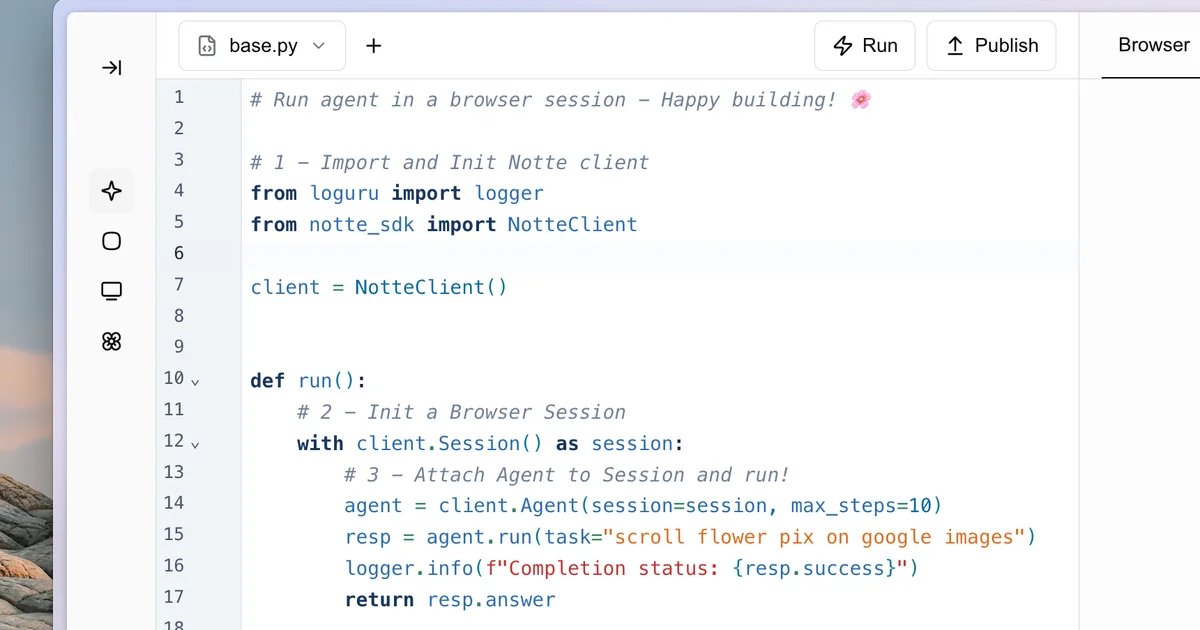
Notte is a browser automation platform built around a simple observation: for most workflows, deterministic scripts work reliably, and AI agents should only handle edge cases. Instead of relying on an AI agent to navigate and make decisions at runtime, you perform the workflow once in a remote browser. Notte records every click, input, and navigation, then compiles them into deterministic automation code you can run without any LLM involvement.
The platform targets developers and teams who need reliable browser automation for repetitive web tasks—data extraction, form filling, UI testing, and similar workflows—without the unpredictability of generative AI agents.
Setup Workflow
Step 1: Sign Up and Access the Platform
Visit https://www.notte.cc and create an account. The platform offers a cloud browser you interact with directly—no local installation required for the core workflow.
Step 2: Record Your Workflow
Open the browser and perform the workflow you want to automate. Notte captures every interaction: clicks, text inputs, navigations, waits, and more. You are essentially demonstrating the workflow step by step.
Step 3: Review and Edit the Generated Code
After recording, Notte shows you the compiled automation code. You can review it, make manual edits, or add conditional logic before finalizing.
Step 4: Run Your Automation
Execute the automation on Notte’s infrastructure or export the code to run on your own runner. The compiled scripts are deterministic—they run the same way every time without calling an LLM at runtime.
Deeper Analysis
The Demonstrate Mode Approach
The key insight behind Notte is separating the recording phase from the execution phase. In the recording phase, you (or an AI) perform the workflow using a real browser. In the execution phase, the compiled script runs deterministically without any AI involved. This trades flexibility for reliability—if the happy path is well-defined, you get consistent results every time.
This contrasts with pure agent-based approaches like browser-use or Skyvern, which make decisions at runtime. Those systems handle more complex, adaptive scenarios but introduce unpredictability. Notte is purpose-built for workflows where the path is known in advance.
Infrastructure
Notte runs automation on cloud browsers. This means you do not need to manage browser instances or handle anti-detection measures yourself—the platform abstracts that away.
Use Cases
- Repetitive web form submissions
- Data scraping from dynamic web pages
- UI regression testing
- Automated report generation from web dashboards
Practical Evaluation Checklist
- Can record a multi-step browser workflow without code
- Generated automation code is editable before execution
- Runs deterministically without LLM calls at runtime
- Cloud browser handles anti-detection automatically
- Export options available for self-hosted runners
Security Notes
Since automation runs on Notte’s cloud infrastructure, be mindful of what credentials and data you expose during recording sessions. Use separate test accounts for sensitive workflows, and review the compiled code before running anything that touches production systems.
FAQ
Q: How does this differ from Playwright or Puppeteer automation? A: Playwright and Puppeteer require you to write code explicitly. Notte lets you record interactions visually and generates that code for you—lower barrier to entry for non-engineers, faster iteration for engineers.
Q: Can I handle dynamic content like pop-ups or loading states? A: Notte lets you add waits and conditional logic after recording. For complex dynamic content, you may still need to refine the compiled script.
Q: Is there a self-hosted option? A: Notte runs on cloud infrastructure by default. Export options for self-hosted runners exist but may require additional configuration.
Q: How does it compare to AI agent-based browser tools? A: Notte prioritizes reliability over flexibility. If the workflow is well-defined, deterministic execution eliminates the unpredictability that comes with LLM-based agents making decisions at runtime.
Conclusion
Notte is a practical browser automation tool that trades AI flexibility for deterministic reliability. The Demonstrate Mode workflow is intuitive—record once, run forever—and the compiled code approach eliminates runtime AI costs and unpredictability. If your browser automation needs are well-defined and repetitive, Notte is worth evaluating over pure agent-based alternatives.
Related Posts
ai-setup
Recall – Persistent Memory for Claude Code via MCP Hooks
Recall gives Claude Code a permanent memory store that survives session restarts and context compaction. Four hooks capture and restore context automatically — with cloud SaaS or self-hosted options.
2/28/2026
dev-tools
Automotive Skills Suite for AI Engineering
Evaluate Automotive Skills Suite for APQP, ASPICE, HARA, safety-plan, and DIA workflows with setup notes, governance risks, and SME review guidance.
5/28/2026
dev-tools
awesome-agentic-ai-zh Roadmap Guide
Explore awesome-agentic-ai-zh as a Chinese agentic AI learning roadmap, with setup notes, track selection, study workflow, and evaluation guidance.
5/28/2026