Nelly – Build Your Own Team of AI Agents
Nelly is a cross-platform AI agent builder that lets you create, test, and deploy teams of agents using natural language — no coding required. Currently in beta for macOS, Windows, and Linux.
TL;DR
TL;DR: Nelly is a cross-platform desktop app that lets you build, test, and run teams of AI agents using natural language — no code required. In open beta on macOS, Windows, and Linux.
Source and Accuracy Notes
- Project page: nelly.is — verified, returned HTTP 200 on 2026-06-30
- HN launch thread: news.ycombinator.com/item?id=43914754 — 54 points
- Company: Pine Enterprises AB (Sweden)
- License: Proprietary (closed source, no public license found)
What Is Nelly?
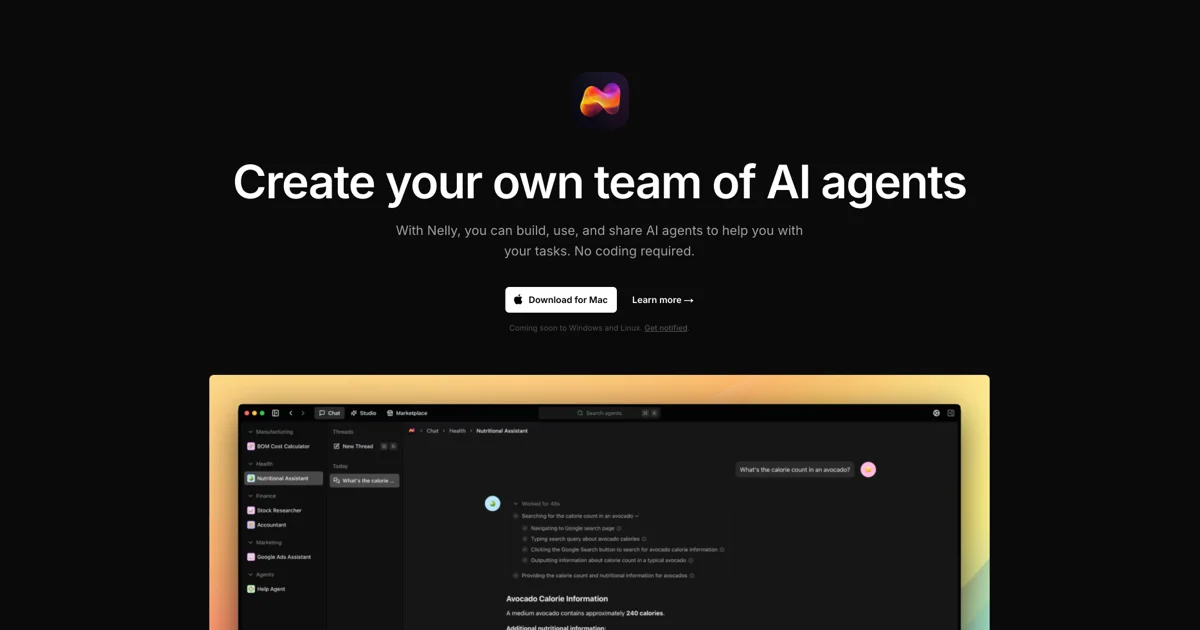
Nelly is a desktop AI agent platform that lets you build, test, distribute, and use custom AI agents without writing code. Instead of prompting a single chat interface, you compose a team of specialized agents that can delegate tasks to each other and work together on complex workflows.
The product is structured around three core concepts:
- Studio — build agents using natural language instructions. Describe what you want the agent to do, format it with headings and lists, and assign it tools.
- Chat — have natural conversations with your agents. Threads keep conversations organized and improve agent context over time.
- Marketplace — share and monetize agents (coming soon).
Nelly also supports Sub-Agents: break a complex task into smaller problems and delegate them to specialized agents, so a single team can handle multi-step workflows autonomously.
Platform Support
Nelly is currently in open beta across three desktop platforms:
| Platform | Download |
|---|---|
| macOS (Apple Silicon) | .dmg via nelly.is/download |
| macOS (Intel) | .dmg via nelly.is/download |
| Windows 10+ | .exe via nelly.is/download |
| Linux 64-bit | .AppImage/.deb via nelly.is/download |
The company behind Nelly is Pine Enterprises AB, based in Sweden.
Setup Workflow
Step 1: Download and Install
Visit nelly.is/download and pick the installer for your OS. Nelly is currently in beta — if demand is high you may be placed on a waitlist, but downloads are available for all three platforms.
Step 2: Build Your First Agent in Studio
Open Nelly and navigate to Studio. Describe your agent in natural language:
You are a research assistant. Your job is to find the most
relevant articles on a given topic, summarize the key points,
and present them in bullet format.
Format your instructions using headings, bullet lists, and numbered steps — Nelly reads these as structural cues for how your agent should behave.
Step 3: Assign Tools
In Studio, attach tools to your agent. Available tool categories include:
- Browser — give your agent web access
- Database — connect to structured data sources
- More tool integrations are listed as “coming soon” on the product site
Step 4: Test in Chat
Switch to Chat and start a conversation with your agent. Use threads to organize different projects. The activity panel shows what tools your agent used, browser screenshots, and step-by-step progress.
Step 5: Use Sub-Agents for Complex Tasks
For multi-step workflows, open the Sub-Agents panel and define specialized agents. For example, a “product research” team might include:
- A web search agent to gather competitor info
- A summarizer agent to condense findings
- A writer agent to format the final report
The orchestrator agent delegates to sub-agents and aggregates their outputs.
Deeper Analysis
What Makes Nelly Different
Most AI agent platforms focus on a single agent interacting via chat. Nelly’s team model mirrors how you would organize a real workplace — specialists handle specific domains, and a lead agent coordinates. The Sub-Agent feature is the key differentiator: it lets one agent break down a problem and farm out pieces without human intervention in the loop.
The platform is also genuinely cross-platform from day one (macOS, Windows, Linux), which is rare for desktop AI agent tools that often start macOS-only.
Limitations
- Closed source — no public codebase to audit. Nelly is a proprietary product from Pine Enterprises AB.
- Beta stage — the product is still in active development. Features like the Marketplace are listed as “coming soon.”
- No self-hosted option — agents run on Nelly’s infrastructure. There is no mention of an on-premises or self-hosted deployment model.
- Custom LLM providers are a paid feature — if you want to connect your own model providers rather than using Nelly’s defaults, that requires a paid plan.
Practical Evaluation Checklist
- Download the beta for your OS from nelly.is/download
- Build an agent in Studio using natural language
- Attach a tool (browser or database) and test it in Chat
- Try a multi-step task with Sub-Agents
- Organize a project using threads in Chat
- Review the Activity panel to see tool usage and screenshots
Security Notes
- Nelly agents have access to tools like browsers and databases — grant access mindfully, especially when connecting to live data sources.
- There is no mention of data retention policies, agent audit logs, or sandboxing in the publicly available documentation.
- As a proprietary closed-source product, the backend cannot be independently audited.
FAQ
Q: Is Nelly open source? A: No. Nelly is a closed-source proprietary product from Pine Enterprises AB. There is no public source repository.
Q: Can I connect my own LLM provider? A: Yes, but only on a paid plan. Custom LLM provider integration is listed as a paid feature.
Q: Is there a self-hosted option? A: No. Nelly runs as a desktop application with a cloud backend. There is no on-premises deployment option documented.
Q: What operating systems are supported? A: macOS (Apple Silicon and Intel), Windows 10+, and Linux 64-bit. All currently in open beta.
Q: Is there a waitlist? A: Possibly, depending on beta demand. The download page notes you might be placed on a waitlist during the beta period.
Q: How does Nelly compare to building agents with LangChain or CrewAI? A: Nelly targets non-technical users — no code, natural language only. LangChain and CrewAI are code-first developer frameworks. If you want to prototype agent workflows without writing Python, Nelly is faster; if you need full customization and self-hosting, code-first frameworks offer more control.
Conclusion
Nelly fills a gap for non-technical users who want the power of multi-agent AI teams without touching code. The natural-language Studio, Sub-Agent delegation, and cross-platform availability make it distinctive among AI agent platforms. The closed-source, cloud-dependent model is the main limitation — there is no self-hosted path and no public codebase to audit.
If you want to explore team-based AI agents and prefer a polished desktop app over writing orchestration code, Nelly is worth a try during its open beta. Watch the Marketplace feature closely if you are interested in sharing or monetizing agents.
Try it: nelly.is/download
Related Posts
ai-setup
Recall – Persistent Memory for Claude Code via MCP Hooks
Recall gives Claude Code a permanent memory store that survives session restarts and context compaction. Four hooks capture and restore context automatically — with cloud SaaS or self-hosted options.
2/28/2026
dev-tools
AgentMesh – Define AI Agent Teams in YAML
Define multi-agent AI workflows in YAML and run them locally with one command. AgentMesh brings Docker Compose patterns to AI agent orchestration.
5/28/2026
ai-setup
Sentrial – Catch AI Agent Failures Before Your Users Do
YC W26-backed AI agent observability platform. Trace sessions, detect silent regressions, and A/B test prompts in production before failures reach users.
5/28/2026