TL;DR
TL;DR: MySigner is a CLI tool that walks your mobile app through the entire release pipeline — framework detection, build, code signing, App Store/Play Store upload, and submission — with a single
mysigner shipcommand.
Source and Accuracy Notes
- Project page: mysigner.dev — verified via direct fetch
- Documentation: mysigner.dev/docs — verified via direct fetch
- Pricing page: mysigner.dev/pricing — verified via direct fetch
- HN launch thread: news.ycombinator.com/item?id=48050060 — 3 points, 3pts
- License: Proprietary SaaS (no open-source license; free tier available, paid plans from $12/month)
What Is MySigner?
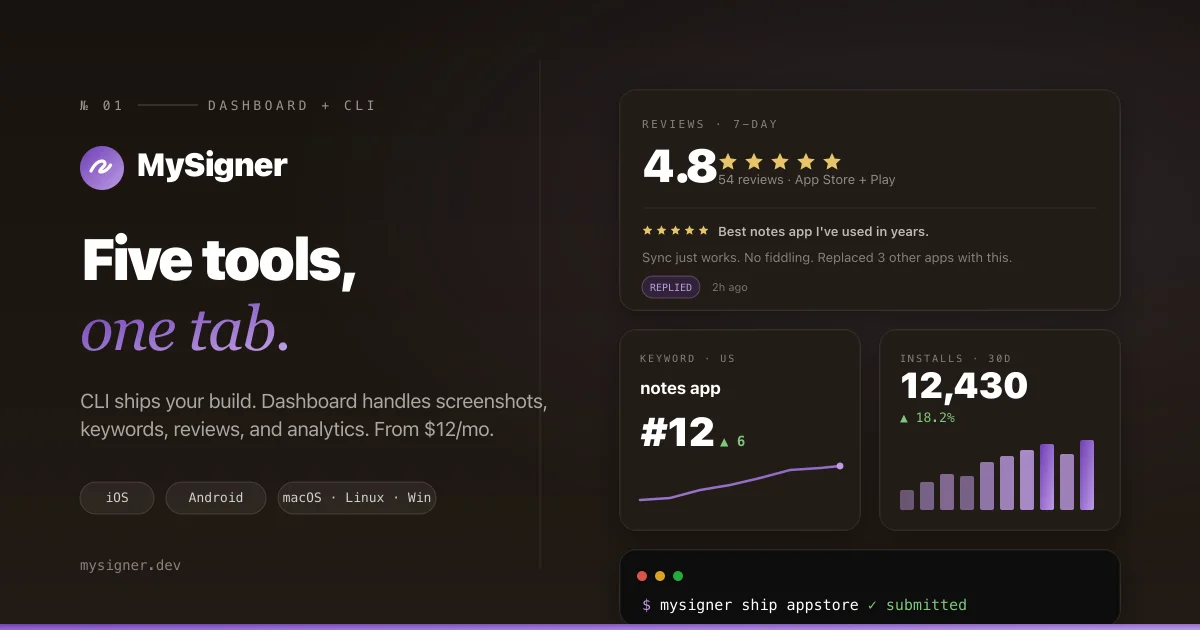
MySigner is a commercial SaaS CLI aimed at indie mobile developers and small teams. It replaces the manual choreography across App Store Connect, Google Play Console, Xcode, Gradle, Fastlane, and third-party ASO tools with one unified command: mysigner ship <track>.
The tool auto-detects your framework — native Swift/Kotlin, React Native, Flutter, Ionic/Capacitor, Expo, or .NET MAUI — from your project root. There is no config file to write for basic usage.
From the official docs:
Go from source code to App Store review or Google Play — in a single command. This guide walks you through installing the CLI, connecting your Apple and Google accounts, and shipping your first build.
What the pipeline does
Every mysigner ship <track> run executes six steps in order:
- Detect framework — reads your project to determine build system
- Build — runs
xcodebuild(iOS) or Gradle (Android) on your machine - Sign — pulls certificates and provisioning profiles from MySigner’s vault, or your local Keychain/keystore
- Upload — resumable upload to App Store Connect or Google Play Console
- Poll — checks processing status every 3 minutes until Apple or Google finishes
- Submit — optionally auto-submits for App Review, including phased rollout
Supported frameworks
- Native iOS (Swift/Kotlin)
- React Native
- Expo
- Flutter
- Capacitor / Ionic
- .NET MAUI
Supported CI/CD systems
- GitHub Actions
- GitLab CI
- Bitrise
- Local terminal
Setup Workflow
Step 1: Install the CLI
MySigner is distributed as a Ruby gem:
gem install mysigner
```bash

Verify the installation:

```bash
mysigner version
```bash

If you use `rbenv`, run `rbenv rehash` after installing to make the `mysigner` command available in your shell.

### Step 2: Create an account and organization

1. Visit the [MySigner Dashboard](https://app.mysigner.dev) and sign up (email, Google, GitHub, or Apple).
2. After login, click **New Organization** in the sidebar, enter a name (for example, "Acme Inc"), and click **Create Organization**.
3. Every new account starts with a **14-day Pro trial** automatically — no credit card required.

### Step 3: Generate an API token

```bash
mysigner onboard
```bash

The wizard walks you through account confirmation, organization setup, and API token generation. Alternatively, you can generate a token directly from the dashboard at **API Tokens → Create Token**.

The CLI stores your token encrypted at rest (`~/.mysigner/config.yml`, AES-256-GCM):
- **macOS** — encryption key stored in the system Keychain (`com.mysigner.cli config_encryption_key`)
- **Linux/Windows** — falls back to a file at `~/.mysigner/.encryption_key` (mode `0600`)

In CI/CD, pass the token as an environment variable instead:

```bash
MYSIGNER_API_TOKEN=your_token_here MYSIGNER_ORG_ID=your_org_id mysigner ship testflight
```bash

### Step 4: Connect your store accounts

#### iOS — App Store Connect

1. In App Store Connect, go to **Users and Access → Integrations → App Store Connect API**.
2. Click **Generate a new key**. Give it a name (for example, "MySigner") and select **Admin** access.
3. Download the `.p8` file — it can only be downloaded once. Note the **Key ID** and **Issuer ID**.
4. In the MySigner CLI, run: `mysigner stores add apple`
5. Paste the Key ID, Issuer ID, and upload the `.p8` file when prompted.

#### Android — Google Play Console

1. In Google Cloud Console, create a service account with **Release Manager** and **Store Analyst** roles.
2. Download the JSON key file.
3. In the MySigner CLI, run: `mysigner stores add google`
4. Paste the JSON when prompted.

### Step 5: Ship your first app

From your project root:

```bash
# Ship to TestFlight (iOS)
mysigner ship testflight

# Ship to App Store (iOS)
mysigner ship appstore

# Ship to internal testing track (Android)
mysigner ship internal

# Ship to production (Android)
mysigner ship production
```bash

The CLI auto-detects your framework, runs the build, signs the artifacts, uploads, polls until processing completes, and submits to the store. A typical successful run looks like:

```bash
mysigner ship appstore
01 · Detect Framework        React Native detected
02 · Build                   ✓ Xcode archive created (84.2 MB)
03 · Sign                     ✓ Cert + profile validated
04 · Upload                  ✓ ASC processing › 02:17 left
05 · Poll                    ✓ Processing complete
06 · Submit                  ✓ Submitted for review
```bash

### Useful commands

```bash
# Pull store metadata, reviews, and keyword rankings on demand
mysigner sync

# Diagnose signing setup, certificates, profiles, and ASC connectivity
mysigner doctor

# View build and review history from the terminal
mysigner builds list
Pricing
MySigner has a free tier and three paid plans:
| Plan | Price | Store uploads/day | Screenshot projects | AI translations |
|---|---|---|---|---|
| Free | $0/mo | — | 1 project, 5 scenes | — |
| Pro | $12/mo (or $96/yr) | 60/day | 10 projects | 100/mo |
| Team | $49/mo (or $390/yr) | 300/day | Unlimited | 500/mo |
All paid plans include a 14-day free trial. The free plan is time-limited during the 14-day Pro trial period; after that, accounts without a subscription revert to the free tier with no data loss.
Practical Evaluation Checklist
Setup
-
gem install mysignersucceeds -
mysigner versionreturns a version number -
mysigner onboardcompletes without errors - Store credentials added (
mysigner stores listshows Apple/Google) -
mysigner doctorreports no errors
Basic workflow
-
mysigner ship testflightcompletes end-to-end - Build appears in App Store Connect
-
mysigner syncpulls store data without error - CI environment variable (
MYSIGNER_API_TOKEN) works in a GitHub Actions workflow
Security
- API token is NOT stored in plaintext on disk (verify
~/.mysigner/config.ymlis encrypted) -
.p8private key and service account JSON are not stored locally — they are brokered through MySigner’s server - Android keystores cached locally have
0600permissions and a 24-hour TTL
Security Notes
MySigner takes a vault-and-broker approach to credentials:
- App Store Connect
.p8keys and Google Play service account JSON are stored on MySigner’s servers, encrypted at rest, and fetched on demand during uploads. They are never written to your local disk. - API tokens stored in
~/.mysigner/config.ymlare encrypted with AES-256-GCM. On macOS the encryption key lives in the system Keychain. - Android keystore files are cached locally at
~/.mysigner/keystores/*.jkswith a 24-hour TTL and0600permissions. They are wiped onmysigner logout. - CI/CD use should rely on the
MYSIGNER_API_TOKENenvironment variable, stored as an encrypted secret in your CI platform.
The tool itself is proprietary SaaS — the CLI is a client that communicates with MySigner’s servers. The source code is not publicly available.
Comparison: MySigner vs Fastlane
Fastlane is the established open-source standard for mobile release automation. MySigner differs in a few ways:
| MySigner | Fastlane | |
|---|---|---|
| License | Proprietary SaaS | Open source (MIT) |
| Hosting | Cloud-brokered credentials | Self-hosted |
| Framework detection | Automatic | Manual Fastfile config |
| ASO / analytics | Built-in dashboard | Requires third-party plugins |
| Pricing | $0–$49/mo | Free (self-hosted) |
MySigner’s advantage is minimal config — no Fastfile needed. Fastlane’s advantage is transparency and self-hosting. If you need open-source and are comfortable writing Fastfile lanes, Fastlane remains the standard. If you want a zero-config CLI that bundles ASO and store analytics in one dashboard, MySigner is worth evaluating.
FAQ
Q: Does MySigner run the builds on their servers?
A: No. Builds run on your own machine (macOS for iOS, any OS with Android SDK for Android). MySigner orchestrates the pipeline — signing, uploading, polling — but does not execute xcodebuild or Gradle on remote servers.
Q: Can I self-host MySigner? A: No. MySigner is a hosted SaaS. There is no self-hosted or open-source option.
Q: What happens to my credentials if I cancel?
A: Your API tokens and store credentials remain in MySigner’s vault. You can export App Store Connect .p8 keys and Google Play service account JSON from the dashboard at any time.
Q: Does the free plan expire? A: The 14-day Pro trial is free. After 14 days, accounts without a paid subscription revert to the free plan. No data is deleted.
Q: Does MySigner work with CI/CD?
A: Yes. Set MYSIGNER_API_TOKEN, MYSIGNER_ORG_ID, and optionally MYSIGNER_EMAIL as encrypted secrets in GitHub Actions, GitLab CI, or Bitrise. The CLI reads them from the environment without touching config.yml.
Conclusion
MySigner targets indie mobile developers who want a zero-config alternative to maintaining a Fastlane setup. The single-command mysigner ship pipeline covers the full release chain — framework detection, build, signing, upload, polling, and submission — without requiring a Fastfile or plugin configuration.
The built-in ASO dashboard (keyword tracking, reviews, analytics, screenshot studio) at $12/month is competitive with Sensor Tower, AppFollow, and Asodesk combined. The 14-day Pro trial with no credit card makes it easy to evaluate against your existing workflow.
If you ship mobile apps regularly and find Fastlane maintenance tedious, MySigner is worth the price. The trade-off is vendor lock-in — credentials are brokered through MySigner’s servers — which may not suit teams with strict data residency or compliance requirements.
Key links:
- Homepage: mysigner.dev
- Docs: mysigner.dev/docs
- Pricing: mysigner.dev/pricing
Related Posts
ai-setup
Recall – Persistent Memory for Claude Code via MCP Hooks
Recall gives Claude Code a permanent memory store that survives session restarts and context compaction. Four hooks capture and restore context automatically — with cloud SaaS or self-hosted options.
2/28/2026
dev-tools
Automotive Skills Suite for AI Engineering
Evaluate Automotive Skills Suite for APQP, ASPICE, HARA, safety-plan, and DIA workflows with setup notes, governance risks, and SME review guidance.
5/28/2026
dev-tools
awesome-agentic-ai-zh Roadmap Guide
Explore awesome-agentic-ai-zh as a Chinese agentic AI learning roadmap, with setup notes, track selection, study workflow, and evaluation guidance.
5/28/2026