MLJAR Studio – Local AI Data Analyst That Saves Notebooks
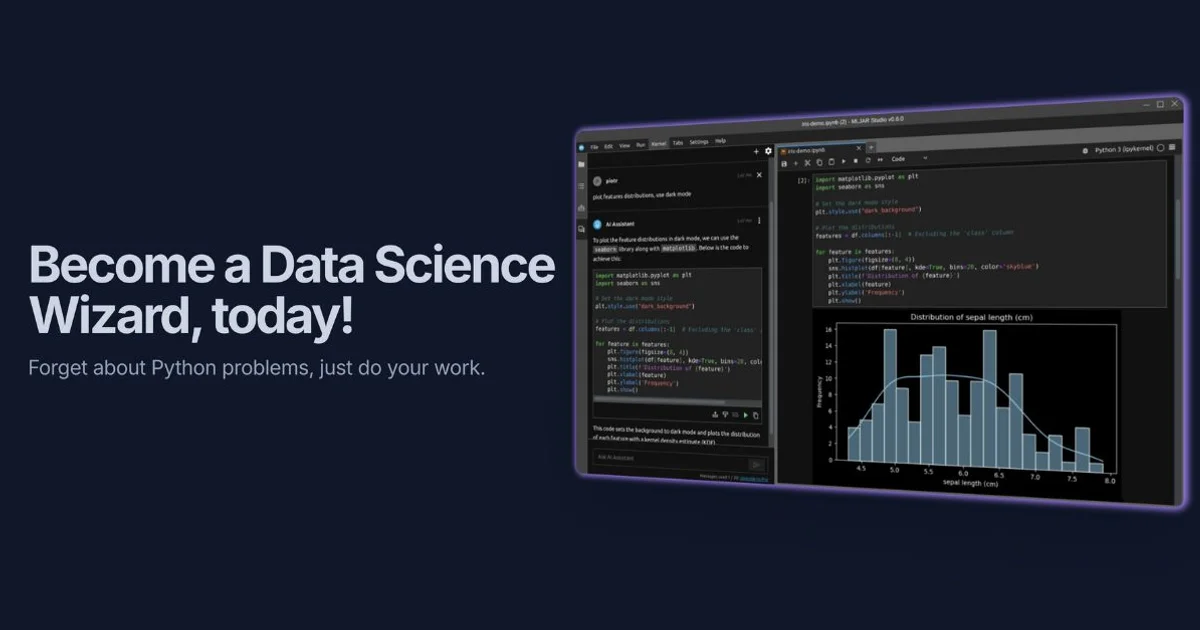
MLJAR Studio is a desktop app where you chat with your data in natural language and get reproducible Python notebooks. AutoML, pandas, and database connectors included.
TL;DR
TL;DR: MLJAR Studio is a cross-platform desktop app that turns natural-language data questions into executable Python notebooks — combining conversational AI with AutoML while keeping every analysis reproducible.
Source and Accuracy Notes
- Project page: mljar.com — verified by direct fetch
- Source repository: github.com/mljar/mljar-supervised — verified README, MIT license
- License: MIT — verified via GitHub API
license.spdx_id - HN launch thread: news.ycombinator.com/item?id=47985077 — 73 points, author
pplonski86, 2026-05-02
What Is MLJAR Studio?
MLJAR Studio is a desktop application built around the open-source mljar-supervised AutoML package. The core idea: you talk to your data in plain English, the AI generates and executes Python code locally, and the entire conversation is saved as a reproducible .ipynb notebook.
Unlike AI chat interfaces that vanish when you close the tab, every step in MLJAR Studio is a cell you can inspect, edit, and re-run. It sits between Jupyter Notebook (fully manual, flexible) and fully cloud-based AI tools (ephemeral, no artifacts).
The product comes from pplonski86, who has maintained mljar-supervised (MIT, ~3,275 GitHub stars) for several years. MLJAR Studio is the desktop frontend built on top of that library.
Pricing: $199 one-time purchase with a 7-day free trial.
Setup Workflow
Step 1: Download and Install
Download the installer for your OS from mljar.com. MLJAR Studio runs on macOS, Windows, and Linux.
Step 2: Local AI Backend (Optional)
By default MLJAR Studio can use:
- Ollama (zero data egress — all inference stays local)
- OpenAI API key (bring your own)
- MLJAR AI add-on (managed service)
To use Ollama locally:
# Install Ollama
curl -fsSL https://ollama.com/install.sh | sh

# Pull a model (e.g. Llama 3)
ollama pull llama3

# Ensure Ollama is running
ollama serve
MLJAR Studio will auto-detect a running Ollama instance.
Step 3: Connect Your Data
MLJAR Studio works with:
- Files: CSV, Excel, Stata, Parquet
- Databases: PostgreSQL, MySQL, SQL Server, Snowflake, Databricks, Supabase
Step 4: Start a Conversation
- Launch MLJAR Studio
- Select a data source (file or database)
- Type your question in natural language, e.g. “Build a classification model to predict churn, and show me feature importance”
- MLJAR Studio generates Python code, executes it locally, and writes the result to a
.ipynbnotebook
The built-in AutoML handles algorithm selection and hyperparameter tuning for tabular data (classification, regression, multiclass).
Deeper Analysis
Reproducible Notebooks
The key differentiator is the .ipynb output. Each AI-assisted step produces a notebook cell — not just a chat message. You can:
- Re-run the full analysis with fresh data
- Modify individual cells
- Export to Mercury for sharing as a web app (Mercury is also from the same MLJAR org)
AutoML Modes
mljar-supervised (the underlying library) has four modes:
| Mode | Use Case |
|---|---|
Explain | Understanding data — SHAP, permutation importance, decision trees |
Perform | Production-ready ML pipelines |
Compete | Competition-grade ensembles and stacking |
Optuna | Maximum-tuned models when compute time is not limited |
Database Connectivity
Connecting to Snowflake, Databricks, or Supabase means you can query live warehouse data without extracting it first — useful for recurring reporting workflows.
Practical Evaluation Checklist
- Runs fully offline (Ollama backend)
- Produces
.ipynbartifacts, not ephemeral chat messages - Built-in AutoML with four modes
- Database connectors for live queries
- Uses standard Python libraries (pandas, matplotlib, scikit-learn)
- One-time pricing ($199) vs subscription competitors
Security Notes
- Ollama backend: All inference stays on your machine. No data leaves your network.
- Cloud AI options: If using OpenAI or MLJAR’s own AI add-on, data may be transmitted. Review MLJAR’s privacy policy for the managed service.
- Local code execution: MLJAR Studio runs Python code locally. As with any tool that executes AI-generated code, use a sandboxed environment for untrusted data.
FAQ
Q: Is the mljar-supervised Python package itself free? A: Yes. The underlying mljar-supervised package is open source (MIT). MLJAR Studio is the commercial desktop product built on top of it.
Q: What operating systems are supported? A: macOS, Windows, and Linux.
Q: How does it compare to Jupyter Notebook + AI assistants? A: Jupyter gives you full control but requires manual coding. AI assistants (Cursor, Copilot in Jupyter) produce ephemeral chat messages. MLJAR Studio auto-generates notebook cells from natural language and tracks the full analysis as a reproducible file.
Q: Does it require a powerful machine? A: It runs inference locally via Ollama. For large AutoML searches (Compete/Optuna modes), a machine with decent CPU/GPU helps. The demo videos on YouTube show it running on a MacBook.
Q: Can I share the generated notebooks?
A: Yes — they are standard .ipynb files. You can also convert them to a web app using Mercury (from the same org) for non-technical stakeholders.
Conclusion
MLJAR Studio targets data scientists and analysts who want the speed of conversational AI but the reproducibility of manual notebooks. The $199 one-time price is reasonable compared to cloud AutoML subscriptions, and the Ollama integration keeps data local. If you regularly build classification or regression models on tabular data and want a traceable artifact after every AI-assisted session, this is worth trying.
The 7-day trial gives you enough time to run one real analysis end-to-end and decide if the notebook-as-output workflow fits your process.
Try MLJAR Studio | GitHub (mljar-supervised)
Related Posts
ai-setup
Recall – Persistent Memory for Claude Code via MCP Hooks
Recall gives Claude Code a permanent memory store that survives session restarts and context compaction. Four hooks capture and restore context automatically — with cloud SaaS or self-hosted options.
2/28/2026
dev-tools
Automotive Skills Suite for AI Engineering
Evaluate Automotive Skills Suite for APQP, ASPICE, HARA, safety-plan, and DIA workflows with setup notes, governance risks, and SME review guidance.
5/28/2026
dev-tools
awesome-agentic-ai-zh Roadmap Guide
Explore awesome-agentic-ai-zh as a Chinese agentic AI learning roadmap, with setup notes, track selection, study workflow, and evaluation guidance.
5/28/2026