Mirdel – Local-First AI Workspace for the Desktop
A local-first desktop AI workspace that keeps data in SQLite, supports cloud and local models, and organizes long-running AI workflows with branching sessions, knowledge bases, and extensible applets.
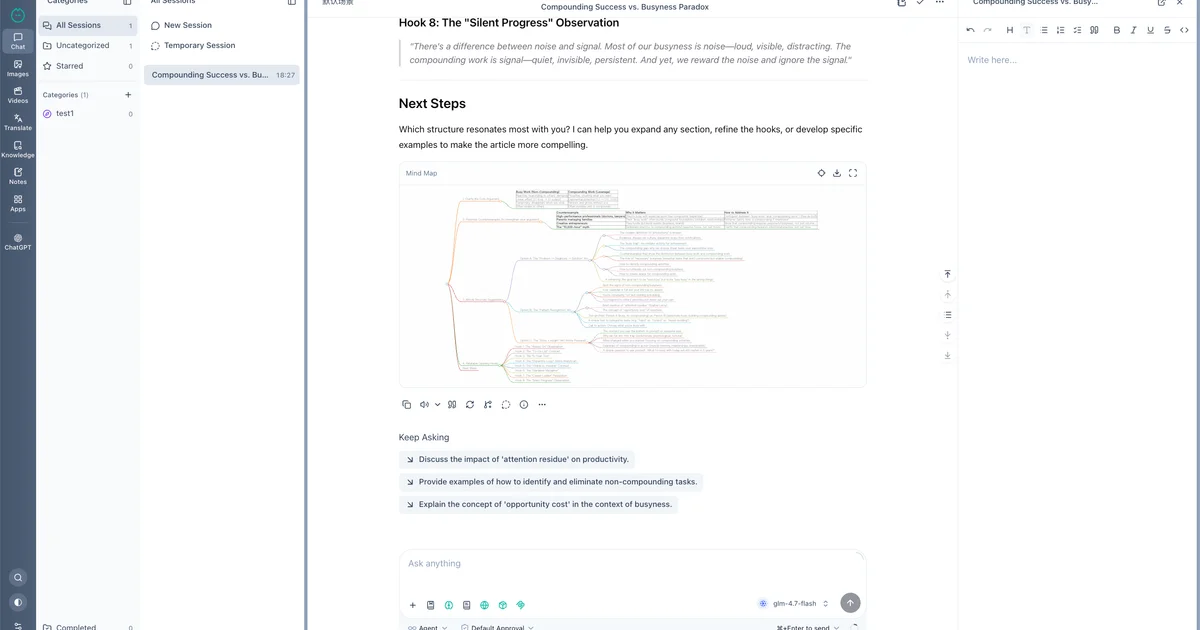
TL;DR
TL;DR: Mirdel is an open-source, local-first desktop AI workspace that stores all conversations and data in SQLite, supports cloud and local models, and organizes long-running AI work with branching sessions, knowledge bases, and extensible applets.
Source and Accuracy Notes
- Project page: mirdel.ai — verified via direct fetch
- Source repository: github.com/mirdel/mirdel — README read end-to-end
- License: MIT (verified via GitHub API
license.spdx_id) - HN launch thread: news.ycombinator.com/item?id=48290691
What Is Mirdel?
Mirdel is an open-source, local-first desktop AI workspace for macOS and Windows. It brings conversations, knowledge bases, notes, translation, image and video work, local models, and extensible workflows into one long-lived native app, so AI becomes a personal workspace you can organize, preserve, and reuse instead of a series of one-off chats.
From the README:
A local-first desktop AI workspace for conversations, knowledge, notes, translation, images/videos, local models, and extensible workflows.
Key differentiators:
- Local-first: all data stays in local SQLite databases; API keys are encrypted at rest
- Bundled local model runtime: embedded
llama-serverdownloads and runs local models with an OpenAI-compatible endpoint - Branching sessions: fork any conversation to compare models, prompts, or reasoning paths
- Layered memory: current context, session state, cross-session memory, and long-term user preferences
- Extensible: Applets (clickable mini-apps), Skills (procedural knowledge), and MCP (filesystem, shell, external tools)
Setup Workflow
Step 1: Download and Install
Download the matching package for your platform from the releases page:
# macOS Apple Silicon
# Download from https://github.com/mirdel/mirdel/releases/latest

# macOS Intel
# Download from https://github.com/mirdel/mirdel/releases/latest

# Windows x64
# Download from https://github.com/mirdel/mirdel/releases/latest
```bash

After downloading, open the `.dmg` (macOS) or `.exe` (Windows) installer.

### Step 2: Configure a Model Provider

On first launch, Mirdel prompts you to configure a model provider. Options include:

- **Cloud providers**: OpenAI, Anthropic, Google, xAI, DeepSeek, ByteDance Doubao, Zhipu, Minimax, Alibaba DashScope
- **Custom endpoints**: any OpenAI-compatible, Anthropic-compatible, or Google-compatible endpoint
- **Local models**: use the bundled `llama-server` (downloads models automatically)

```text
Settings → Model Providers → Add Provider
```bash

### Step 3: Explore the Workspace Modules

Mirdel organizes AI work into distinct modules accessible from the sidebar:

- **Chat**: branching conversations, session notes, session map visualization
- **Knowledge Base**: import files, folders, or webpages to build local RAG indexes with SQLite and `sqlite-vec`
- **Notes**: Tiptap or Markdown editor with AI diff proposals
- **Translation**: document and text translation with configurable models
- **Image**: text-to-image, image-to-image, outpainting, super-resolution
- **Video**: provider-specific video generation settings

### Step 4: Install an Applet or MCP Tool

Mirdel's extension system has three layers:

**Applets** turn frequent workflows into clickable mini-apps. Built-in applets handle `docx`, `pdf`, `pptx`, `xlsx`, and more — no prompt rewriting required.

**Skills** inject procedural knowledge into agents. Mirdel is compatible with the `SKILL.md` organization format.

**MCP** connects external tools. Supported transports include `stdio`, `Streamable HTTP`, and `SSE`, with per-message policy control.

```text
Settings → Extensions → Applets / Skills / MCP
Deeper Analysis
Local-First Architecture
Every session, note, knowledge base, and index lives in a local SQLite database. API keys and other sensitive fields are encrypted at rest using the OS keychain. Mirdel can run entirely offline — the bundled SearXNG instance and llama-server require no external network access after installation.
Model Flexibility
Mirdel ships with an embedded llama-server that can download, load, and unload local GGUF models. It exposes an OpenAI-compatible endpoint with an auto-generated API key, so other local apps on the same machine can call it directly. For cloud use, Mirdel supports mainstream providers and any compatible custom endpoint.
Session Branching
Unlike a traditional chat app where threads are linear, Mirdel lets you fork from any message into parallel branches. This is useful for:
- Comparing outputs from different models side by side
- Exploring alternative reasoning paths without losing the original
- Testing prompt variations against the same context
Knowledge Base and RAG
Files, folders, and webpages can be imported into a local knowledge base. Mirdel builds sqlite-vec vector indexes for semantic search and uses SQLite for structured storage. The retrieval pipeline runs entirely locally — no data leaves your machine.
Practical Evaluation Checklist
- Installs cleanly on macOS or Windows
- Connects to at least one cloud model provider
- Successfully runs the bundled
llama-serverfor local inference - Creates a branching session and switches between branches
- Imports a PDF or text file into the knowledge base and queries it
- Sends a message through the Quick Ask surface
- Configures an MCP tool (e.g., filesystem access)
- Creates a Scenario preset with a specific model and knowledge base
Security Notes
- All conversation data, notes, and indexes are stored locally in SQLite — no mandatory cloud sync
- API keys are encrypted at rest via the OS keychain
- MCP tool calls and sensitive Shell commands require explicit human approval before execution
- The local
llama-serverexposes an OpenAI-compatible endpoint onlocalhostonly — not exposed externally by default
FAQ
Q: Is Mirdel free? A: Yes. Mirdel is open-source under the MIT license. You pay only for the API keys you use with cloud model providers.
Q: Can I use it completely offline?
A: Yes. After installation, the bundled SearXNG and llama-server require no external network. Knowledge base imports and all inference can run on-device.
Q: What local models does it support?
A: The bundled llama-server supports any GGUF-format model. Models are downloaded on demand through the Mirdel UI.
Q: How does Mirdel compare to Jan or LibreChat? A: Mirdel’s standout features are local-first by default (not a toggle), native Applet system for workflow automation, and a session branching visualization called the Session Map. Jan and LibreChat are primarily API routing layers with more limited workspace organization.
Q: What is the current release version? A: The latest release as of July 2026 is v0.1.1, available on GitHub releases.
Q: Is there a Linux version? A: Currently Mirdel supports macOS and Windows. Linux is on the roadmap per the README feature list.
Conclusion
Mirdel fills the gap between a one-off AI chat and a full agentic workspace. Its local-first SQLite storage, bundled local model runtime, and Applet-based workflow system make it a compelling option for developers and power users who want persistent, organized AI work without surrendering data to the cloud. If you want AI that remembers, organizes, and runs locally, Mirdel is worth trying — especially at the v0.1.1 beta price of free.
Project page: mirdel.ai GitHub: github.com/mirdel/mirdel
Related Posts
ai-setup
Recall – Persistent Memory for Claude Code via MCP Hooks
Recall gives Claude Code a permanent memory store that survives session restarts and context compaction. Four hooks capture and restore context automatically — with cloud SaaS or self-hosted options.
2/28/2026
ai-setup
Sentrial – Catch AI Agent Failures Before Your Users Do
YC W26-backed AI agent observability platform. Trace sessions, detect silent regressions, and A/B test prompts in production before failures reach users.
5/28/2026
ai-setup
IonRouter – Fast Low-Cost AI Inference API
IonRouter is a YC W26 inference API routing open-source and fine-tuned models via an OpenAI-compatible endpoint, built on a C++ runtime optimized for GH200.
5/28/2026