mdto.page: Turn Markdown into a Shareable Page
mdto.page renders Markdown into a themed web page or PDF you can share by URL, with local image uploads, seven themes and a documented API. No account needed to start.
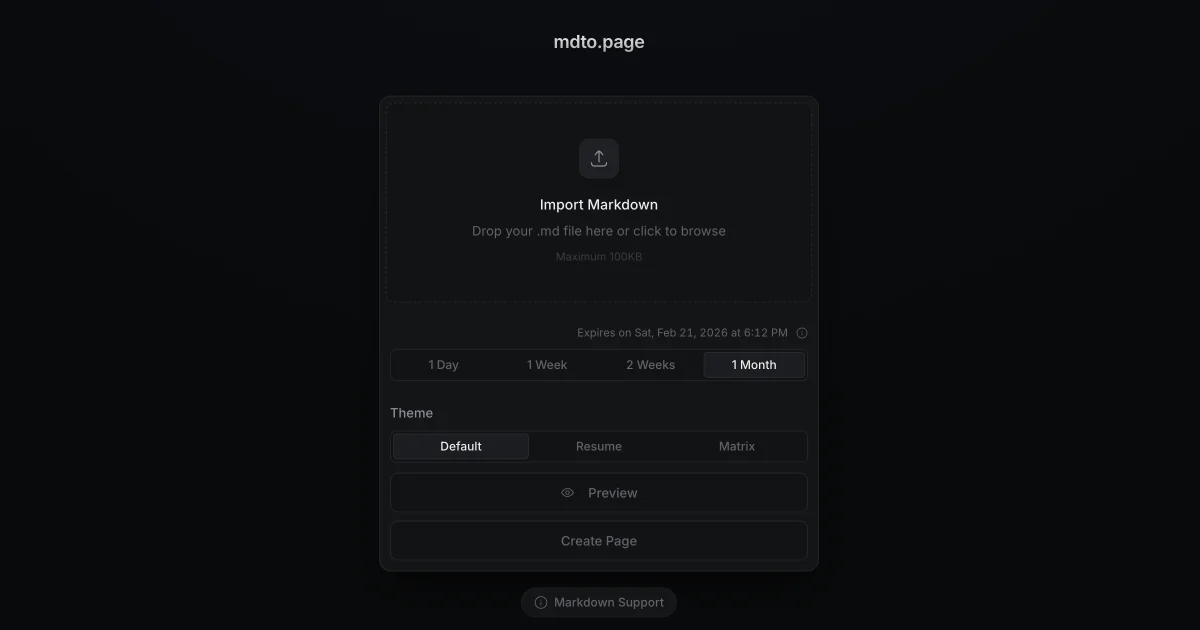
TL;DR: mdto.page takes a Markdown file and gives you back a public URL. Drop in a
.mdfile, pick a theme, set an expiry, and you get a rendered HTML page you can send to anyone, plus a PDF of the same thing. Local images can be attached from your disk, and the whole service is Apache-2.0 licensed on GitHub if you would rather run it yourself.
What it is
mdto.page is a small web app that converts Markdown into a shareable web page. You upload a .md, .markdown or .txt file, choose a visual theme, decide how long the page should live, and the service renders it into a standalone HTML document served from a URL. The same source also exports to PDF.
It is a one-person project. The repository is hjinco/mdto on GitHub, with 129 stars and 12 forks, and it carries an Apache-2.0 license, so the code is readable, forkable and self-hostable. The author describes it plainly as something built for personal needs.
The engineering is unremarkable in the best way. The frontend is React 19 on Vite with TailwindCSS 4, the backend is a Cloudflare Worker, and the rendered HTML lands in Cloudflare R2 object storage. Markdown runs through unified, remark and rehype, with highlight.js colouring fenced code blocks. Cloudflare Turnstile guards uploads against bots. The interface ships in English, Korean, Simplified Chinese and Japanese.
Why it matters
Sharing a Markdown file usually comes with a compromise attached. Paste it into a paste site and the formatting flattens. Commit it to a repo and people have to clone. Build a static site pipeline for a single document and you spend an afternoon on config you will never reuse.
mdto.page is the third option with the ceremony removed. There is no build step, no config file and no account for the basic flow. What comes back is a self-contained HTML page with the theme applied, sitting at a URL under the service’s domain.
Two details earn their keep. Local image uploads let you attach pictures that are still on your disk, so you do not need to push them to a bucket before publishing. Expiration is the other: a page can be given a life of a day, a week, a month or no limit at all, and a cleanup job removes expired pages. That makes the service reasonable for circulating a draft spec or a set of meeting notes without leaving them parked on a stranger’s infrastructure indefinitely.
Getting it running
The hosted service needs no setup. You paste Markdown or drop a file onto the page, choose a theme, and the preview updates as you type.
To publish from a script or automate page creation, the API is the path in. The base URL is https://mdto.page/api/v1/pages and every request carries an API key in the x-api-key header. The key comes from the dashboard, so this path does need a signed-in account.
curl https://mdto.page/api/v1/pages \
  -X POST \
  -H "content-type: application/json" \
  -H "x-api-key: YOUR_API_KEY" \
  -d '{
    "markdown": "# Release notes\n\nShipped on Friday.",
    "slug": "release-notes",
    "theme": "github",
    "expiresAtMs": null
  }'
A successful create answers 201 Created with the stored page, including its id, slug, path, title, description, theme and timestamps. The path field is the public URL, and title and description are extracted from the Markdown itself rather than supplied by you.
For the full set of endpoints:
| Method | Path | What it does |
|---|---|---|
GET | /api/v1/pages | Lists active pages owned by the key |
POST | /api/v1/pages | Creates a page |
PUT | /api/v1/pages/PAGE_ID | Updates content, and optionally the slug, theme or expiry |
DELETE | /api/v1/pages/PAGE_ID | Soft-deletes a page |
An update always needs the full markdown field, so send the whole document rather than a patch. Renaming uses newSlug and leaving expiresAtMs as null removes the expiry entirely.
Running your own copy takes a Cloudflare account and a recent Node:
git clone https://github.com/hjinco/mdto.git
cd mdto
pnpm install
cp .env.example .env
pnpm dev
Node 24 or newer and pnpm 10 or newer are the stated prerequisites. pnpm dev starts Vite for the client and Wrangler for the Worker side by side, so the whole app runs locally against local R2 bindings. The repo also ships Playwright smoke tests behind pnpm test:e2e.
The themes
Seven themes ship with the service, and the API accepts the same names as the theme field:
| Theme | Good for |
|---|---|
default | General documents and notes |
resume | CVs and personal landing pages |
github | README-style content |
matrix | Terminal green on black |
catppuccin | Soft pastel palette |
everforest | Muted green and brown |
dracula | Purple and pink |
The naming is not just decoration for developers. A resume theme makes a personal page look finished without any styling work, and github renders a README the way a reader expects to see it.
What to watch for
The privacy policy treats guests and signed-in users differently, and the difference matters. Guest uploads are considered temporary, deleted when they hit their expiry, and the policy explicitly does not guarantee permanent storage for them. Content uploaded while logged in is kept indefinitely in your dashboard until you delete it yourself. Signing in goes through GitHub OAuth, so the service collects your email address and basic profile information, and the policy also mentions anonymous usage metrics for understanding usage patterns.
Pages are public by default. The terms state that making a page publicly viewable is the default nature of the service, and while you keep ownership of your material you grant others the right to view it. For anything confidential, use a short expiry or keep it off the service.
There is a small mismatch between the two documented expiry schemes. The web interface exposes 1 day, 1 week, 1 month and unlimited, while the README and the API reference describe windows of roughly 1, 7, 14 or 30 days or permanent. The API rejects a timestamp outside those windows with 400 Bad Request, so an expiry you can pick in the UI is not always one the API will accept.
Plan for the limits. Markdown above 100KB comes back as 413 Payload Too Large, an account tops out at 10 active pages and receives 429 Too Many Requests past that, a duplicate slug returns 409 Conflict, and a missing or invalid key gets 401 Unauthorized. Errors arrive in a single shape:
{
  "message": "Human readable error"
}
The author is direct about the trajectory: “This project was built for my own needs, so I don’t plan to add features unless there’s a request.” The hosted service comes with no SLA, which is the practical reason to run your own copy when the pages matter.
Source and Accuracy Notes
- Product page: https://mdto.page , verified via direct visit on 2026-11-02
- Source repository: https://github.com/hjinco/mdto , Apache-2.0, TypeScript, 129 stars and 12 forks, last pushed 2026-09-05
- API reference: https://github.com/hjinco/mdto/blob/main/docs/api-v1.en.md , API v1 endpoints, themes and error codes
- Privacy policy: https://mdto.page/privacy , last updated 2026-01-25
- Terms of service: https://mdto.page/terms , last updated 2026-01-25
- Thumbnail source: the product’s own
og:imageat https://mdto.page/og-image.png , a 2400x1260 PNG - HN launch thread: https://news.ycombinator.com/item?id=46645942 , Show HN: mdto.page, 58 points on 2026-01-16

Related Posts
ai-setup
Recall – Persistent Memory for Claude Code via MCP Hooks
Recall gives Claude Code a permanent memory store that survives session restarts and context compaction. Four hooks capture and restore context automatically — with cloud SaaS or self-hosted options.
2/28/2026
dev-tools
Automotive Skills Suite for AI Engineering
Evaluate Automotive Skills Suite for APQP, ASPICE, HARA, safety-plan, and DIA workflows with setup notes, governance risks, and SME review guidance.
5/28/2026
dev-tools
awesome-agentic-ai-zh Roadmap Guide
Explore awesome-agentic-ai-zh as a Chinese agentic AI learning roadmap, with setup notes, track selection, study workflow, and evaluation guidance.
5/28/2026