MCPJam - A Visual Inspector for MCP Servers With Skills
Open-source MCP testing platform: Playground, OAuth conformance, evals across models, and a Skills tab that teaches agents how to use your MCP tools.
TL;DR
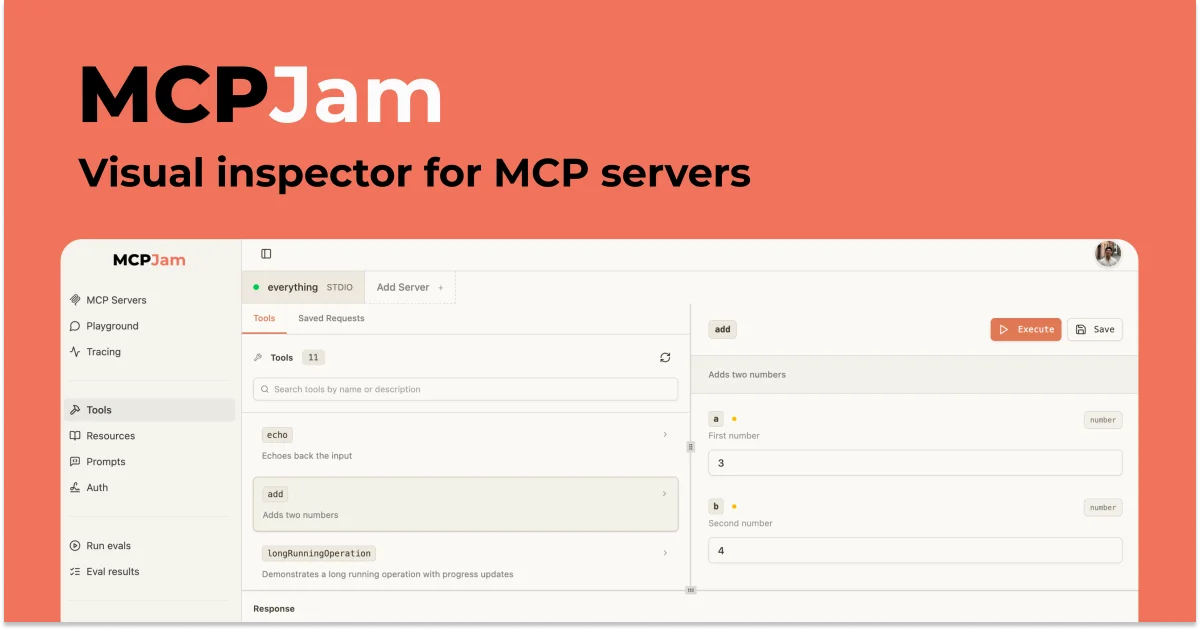
TL;DR: MCPJam is an open-source development platform for MCP servers. The Inspector ships a Playground (chat + manual tool calls + widget emulator + JSON-RPC logger), an OAuth Debugger that walks the auth flow, an Evals engine for running test cases across frontier models, and a Skills tab for pairing your MCP tools with reusable agent skills.
Source and Accuracy Notes
- Product page: mcpjam.com
- Documentation: docs.mcpjam.com (and the machine-readable index at docs.mcpjam.com/llms.txt)
- HN launch: Show HN: Playground to Test Skills and MCP (6 pts, Jan 2026)
- Open source: github.com/MCPJam/inspector
- The HN launch announces the Skills + MCP pairing features. The broader platform (CLI, OAuth conformance, Evals, XAA debugger) is documented on the docs site.
What Is MCPJam?
Model Context Protocol is the JSON-RPC transport that lets AI agents call tools exposed by an MCP server. Once you move past the SDK examples, the next question is always the same: is the server actually working the way I think it is, in the way real models will use it? That question usually fragments across three different tools — a wire inspector, an OAuth tester, and a notebook full of LLM-as-judge scripts.
MCPJam consolidates all of that into one platform. The docs open with a one-liner that captures the scope:
“MCPJam is the fastest way to test, debug, and evaluate MCP servers, MCP apps, and ChatGPT apps.”
The product has three surfaces that share the same primitives:
- Hosted web app at
app.mcpjam.com— no install, HTTPS servers, shareable links. - Desktop and CLI (
npx -y @mcpjam/cli@latest) — HTTP or local STDIO servers, the same Inspector, plus headless commands for CI. @mcpjam/sdk— a TypeScript SDK for unit tests, end-to-end tests, and server evals that you can run in Jest or Vitest.
The thing that ties them together is that all three speak the same JSON-RPC dialect, so a tool call you debug in the Playground is the same call that the SDK will exercise in CI.
The Inspector Playground
The Playground is the workhorse. It is an IDE-style workspace that combines chat, manual tool invocation, widget rendering, traces, and a live JSON-RPC logger in one tab. The full feature list from the docs is worth quoting because every line corresponds to a real developer pain point:
- Chat with frontier models — Claude, GPT, Gemini, DeepSeek, and more, with no API key. Bring your own key for custom providers.
- Manual tool invocation — Run any tool from the Tools rail with your own inputs, useful for iterating on a widget without prompting a model.
- Widget emulator — Render widgets exposed via
openai/outputTemplate(ChatGPT Apps) orui.resourceUri(MCP Apps) the same way a real host would, with Inline, Picture-in-Picture, and Fullscreen modes. - Chat / Trace / Raw views — Switch between the conversation, a timestamped timeline (with per-step latency and tokens), and the exact JSON payload sent to the model.
- Multi-model compare — Send one prompt to up to three models at once and watch responses side by side.
- Multi-host compare — Render the same tool call under multiple host configurations (ChatGPT vs Claude, different device sizes, different capability sets).
- Display context controls — Viewport, light/dark theme, host style, locale, timezone, CSP mode, device capabilities, and safe area insets, all live in the toolbar.
- JSON-RPC logger — Real-time, filterable feed of every message between the inspector and your servers.
For someone shipping a ChatGPT App, the widget emulator alone is the differentiator: you can validate ui:// resource wiring and CSP behavior before submitting to a review queue, and you can do it locally without subscribing to ChatGPT Plus.
Skills + MCP: The New Pairing
The January 2026 Show HN post introduced the second axis of the platform: skills. The docs frame it as a standalone format:
“Skills are an open format that provide instructions on how to use MCP tools and complete workflows.”
The pitch is that MCP tools and skills complement each other. The MCP server exposes raw capability (search, add, delete), and the skill teaches the agent how and when to use them, including the order, the arguments, and the failure modes to watch for. The Anthropic Figma connector plus a paired Figma skill is the example the founder cites — the skill knows to call the Figma MCP connector with the right arguments to set up design system rules.
MCPJam’s implementation of this pairing has three pieces:
- Skills tab in the Inspector — Lists every skill on your filesystem. The defaults are
~/.claude/skills/,~/.mcpjam/skills/, and~/.agents/skills/, plus a project-local./.claude/skills/,./.mcpjam/skills/, and./.agents/skills/. Each subdirectory is expected to contain aSKILL.md. - Upload flow — Drag a folder into the Skills tab, MCPJam validates the
SKILL.mdfrontmatter in real time, and stores it under~/.mcpjam/skills/. - Playground integration — The LLM in the Playground discovers skills automatically, and you can also inject them deterministically with the
/slash command in the chat input.
The CLI installs the same skill in one command:
npx skills add mcpjam/inspector --skill mcp-inspector
```bash

That skill tells your coding agent when to run `mcpjam probe`, `mcpjam doctor`, `mcpjam oauth conformance`, and the rest of the CLI surface, which closes the loop between agent-driven development and the inspector.

## OAuth Conformance Across Protocol Versions

MCP's authorization spec has been moving quickly. The same server can be hit by clients that speak the 2025-03-26 spec, the 2025-06-18 spec, or the 2025-11-25 spec, and they differ in ways that break naive implementations: Dynamic Client Registration (DCR), client pre-registration, CIMD, and the metadata document format all shifted.

MCPJam ships a guided OAuth Debugger that walks you through every step of the handshake and tells you which step failed, plus a CLI conformance suite that runs the same checks headless. The Inspector can pin to a specific protocol version, including the 2026-07-28 stateless release candidate, so you can see how your server behaves across the matrix.

In CI this is the same workflow:

```bash
# One-shot conformance check against your live server
mcpjam oauth conformance https://your-mcp-server.example.com/mcp

# Run the full suite across DCR, pre-registration, and CIMD
mcpjam oauth conformance-suite https://your-mcp-server.example.com/mcp
```bash

If you are an SDK author, the OAuth Conformance SDK wraps the same checks so you can drop them into a Vitest suite and gate releases on the result.

## Evals Across Frontier Models

Benchmark scores are not enough. The Evals engine lets you pin down the behaviors that matter to your server: which tools fire, with what arguments, and what the final answer looks like. Each test case has a scenario label, one or more prompt turns, the expected tool calls per turn (with optional typed placeholders like `"number"` instead of brittle literals), and a free-text expected output for the judge.

A run executes a suite across the frontier models you select. The output is a deterministic pass/fail per iteration, with tokens, duration, and the full transcript available for review. Negative cases work the same way: declare that a tool should not fire on a given prompt, and the suite tells you when a model is over-eager.

The same logic lives in the SDK:

```typescript
import { MCPClientManager, TestAgent, EvalTest } from "@mcpjam/sdk";

const manager = new MCPClientManager({
  myServer: {
    command: "npx",
    args: ["-y", "@modelcontextprotocol/server-everything"],
  },
});

const agent = new TestAgent({
  tools: await manager.getTools(),
  model: "anthropic/claude-sonnet-4-20250514",
  apiKey: process.env.ANTHROPIC_API_KEY,
});

const result = await agent.prompt("Add 2 and 3");
console.log(result.toolsCalled());     // ["add"]
console.log(result.e2eLatencyMs());    // 1234
```bash

## Setup Workflow

### Step 1: Open MCPJam

Pick the surface that matches the server you want to test:

```bash
# Web app (HTTPS servers, no install)
open https://app.mcpjam.com

# Terminal — same Inspector over HTTP or local STDIO
npx -y @mcpjam/cli@latest

# Desktop app — Mac or Windows, supports STDIO servers
```bash

On first launch the web app connects the Excalidraw sample server and opens the Playground with the prompt `Draw me an MCP architecture diagram`. Press **Send** and the diagram renders in the app. No API key, ngrok, or ChatGPT subscription is required.

### Step 2: Connect Your Server

Open the **Servers** tab in the left sidebar and click **Add server**.

```bash
# STDIO server (Desktop and Terminal only)
npx -y @modelcontextprotocol/server-everything

# HTTP server — paste a URL ending in /mcp
https://your-mcp-server.example.com/mcp
```bash

For servers that require auth, paste a bearer token, or open the **OAuth Debugger** to walk the flow. Each connected server shows up in the Playground, Tools, Prompts, and Resources views.

### Step 3: Run a Skill in the Playground

```bash
# Install the MCPJam skill for your coding agent
npx skills add mcpjam/inspector --skill mcp-inspector
```bash

Open the **Skills** tab in the Inspector, verify your skills are discovered, then open the Playground and type `/` to inject a skill into the chat, or let the model discover it automatically.

### Step 4: Run Conformance and Evals in CI

```bash
# Protocol and OAuth conformance from your terminal
mcpjam probe https://your-mcp-server.example.com/mcp
mcpjam oauth conformance-suite https://your-mcp-server.example.com/mcp

# Programmatic evals via the SDK
npm install @mcpjam/sdk
For GitHub Actions, the same commands run headless and emit JUnit XML via renderConformanceReportJUnitXml(...).
Deeper Analysis
MCPJam is one of the more complete implementations of the MCP testing stack I have seen shipped as an open-source project. The interesting design choices are:
- Stateless CLI plus stateful web app. The CLI is purpose-built for CI, and the web app is purpose-built for humans. They share the same wire format and OAuth conformance, so a CI failure maps to a Playground session.
- The widget emulator is the right abstraction. A ChatGPT App’s
ui://resource is meaningless without a host that can render it. MCPJam ships an iframe-based emulator with device frames and CSP mode so you can validate behavior locally, which is something ChatGPT’s own playground does not expose. - Skills are local-first. The Skills tab reads from a fixed set of well-known directories, which is what every agent framework eventually converges on. Pairing this with
npx skillsmakes onboarding a copy-paste command. - Protocol version pinning. Pinning the Inspector to the 2026-07-28 stateless RC, rather than just “latest”, is exactly the affordance a server author needs to know which behavior the test reflects.
The pieces that are still rough:
- The web app is HTTPS-only. STDIO servers only work in the Desktop and Terminal surfaces, which is a real limitation if you want to share a local session with a teammate.
- The host-style emulation (ChatGPT vs Claude) is a feature flag today, not a default. If you are shipping a ChatGPT App, you have to remember to switch the host style before testing.
- The Skills tab writes to
~/.mcpjam/skills/, which is fine for a personal machine but does not solve the team sync problem that Projects in the Inspector is meant to address.
Practical Evaluation Checklist
Before adopting MCPJam in a serious MCP project, run through these checks:
- Wire compatibility — Does
mcpjam probereturn the same tools/resources/prompts that your SDK sees? Discrepancies usually mean a metadata or transport bug. - OAuth matrix — Does
mcpjam oauth conformance-suitepass for every (protocol version, client registration mode) your clients will use? DCR, pre-registration, and CIMD behave differently. - Widget behavior — Does your
ui://resource render in the widget emulator with the same CSP and device frame your real host uses? Open the CSP tab in the widget debug view. - Eval stability — Re-run your suite three times. Tool calls with literal-string arguments tend to be flaky. Use typed placeholders (
"number","uuid") when the value is not deterministic. - CI integration — Convert the conformance report to JUnit XML and gate PR merges on it. The
@mcpjam/sdkshipstoConformanceReport(...)andrenderConformanceReportJUnitXml(...)for this. - Skill round-trip — After pairing a skill with an MCP tool, prompt the model in the Playground and confirm it picks up the skill automatically. If not, use the
/command to inject it deterministically.
Security Notes
- Tokens in the Playground. The web app stores bearer tokens in your browser session. Do not paste long-lived production tokens. Use the OAuth Debugger to walk the flow with a short-lived token instead.
- STDIO command execution. When you add a STDIO server, the Inspector executes the command directly on your machine. Treat the command field the same way you would treat a shell command: only point it at packages you trust (
npx -y @vendor/known-server). - Evals on production data. The Evals engine sends prompts to the models you select. If your test cases include sensitive payloads, use a custom provider with your own key and audit the upstream model provider’s data retention terms.
- Skills tab and
SKILL.md. MCPJam validates the frontmatter in real time, but the body of aSKILL.mdis plain markdown that gets injected into the chat. Treat uploaded skills like you would treat a prompt template from a third party.
FAQ
Q: Is MCPJam a replacement for the official MCP Inspector?
A: No. The official MCP Inspector is a minimal wire-debugging tool. MCPJam wraps the same wire format with a Playground, OAuth debugger, evals, and a Skills tab, so it is more of a superset than a replacement.
Q: Does the web app support STDIO servers?
A: Not today. The web app is HTTPS-only because browsers cannot spawn local processes. STDIO servers are supported in the Desktop app and the CLI.
Q: How is this different from Postman for MCP?
A: Postman is request-composer-first. MCPJam is a workspace that combines chat, manual tool calls, widget rendering, JSON-RPC logging, and eval runs in one tab. If you spend most of your time iterating on what the model sees, MCPJam is a better fit. If you spend most of your time scripting collections for a backend, Postman is still the better tool.
Q: Can I run MCPJam in CI?
A: Yes. The CLI is stateless, supports every command the Inspector exposes, and emits JUnit XML via the SDK. The recommended workflow is to gate PRs on mcpjam oauth conformance and mcpjam protocol conformance and let the SDK run the eval suites.
Q: Does MCPJam support the latest protocol draft?
A: Yes. The Inspector can pin to a specific protocol version, including the 2026-07-28 stateless release candidate. Pin it explicitly when you want to test a future spec against your server today.
Q: Is it open source?
A: Yes, under the MCPJam GitHub org. The repo is github.com/MCPJam/inspector. The hosted app, the CLI, the desktop app, and the SDK are all tracked there.
Conclusion
MCPJam is the most complete MCP testing platform I have seen that is also open source. The Inspector Playground is a real IDE for MCP work — manual tool calls, widget rendering, multi-model compare, and JSON-RPC logging in one tab. The OAuth conformance suite is the only practical way I know of to validate an MCP server against the current matrix of protocol versions and client registration modes. The Evals engine is what you reach for when a benchmark score is not enough. And the new Skills tab makes the case that the next step for MCP is pairing tools with reusable agent skills, which is the right direction.
If you ship an MCP server, install the CLI, run mcpjam probe against your live URL, and walk through the OAuth Debugger. If you are building a ChatGPT App, open the widget emulator and confirm your ui:// resource renders the way you think it does. Both take under five minutes and they will surface a class of bugs that a unit test never will.
Related Posts
ai-setup
Recall – Persistent Memory for Claude Code via MCP Hooks
Recall gives Claude Code a permanent memory store that survives session restarts and context compaction. Four hooks capture and restore context automatically — with cloud SaaS or self-hosted options.
2/28/2026
dev-tools
Automotive Skills Suite for AI Engineering
Evaluate Automotive Skills Suite for APQP, ASPICE, HARA, safety-plan, and DIA workflows with setup notes, governance risks, and SME review guidance.
5/28/2026
dev-tools
awesome-agentic-ai-zh Roadmap Guide
Explore awesome-agentic-ai-zh as a Chinese agentic AI learning roadmap, with setup notes, track selection, study workflow, and evaluation guidance.
5/28/2026