Margeux: a small Lisp that runs natively and in the browser
Margeux is a Lisp-inspired language with a compiler, VM, language server, and stdlib in a single binary. The same VM runs as WebAssembly in the browser.
TL;DR: Margeux packs a compiler, virtual machine, language server, standard library, and test runner into one Go binary that installs with a single script. The same VM is also compiled to WebAssembly, so one
.mgxfile can run as a native app, a terminal program, or a browser app. It is a very young project (0.1.0) with no published license and no public source repository yet.
What it is
Margeux is a small general-purpose programming language with Lisp-shaped syntax. The author describes it as inspired by Python and Nim, and source files carry a .mgx extension. Calls are prefix expressions, indentation does most of the grouping, and parentheses are only needed when a nested expression has to stay on one line.
The whole distribution is one static binary. margeux version reports version 0.1.0 on bytecode 1.64 with the engine named margeux-go-vm. That single file is the compiler, the VM, the language server, the REPL, and the test runner. The SDK archive adds the standard library source, the language specs, and a large set of runnable examples.
Why it matters
The interesting part is not the syntax, it is that one language target crosses the native/browser line without a separate transpiler or a rewrite. Most languages make you choose: a runtime for the server, and something else entirely for the browser. Margeux ships a native build and a WebAssembly build of the same VM, and a program written against it does not know which one it landed in.
There is also a practical appeal for people who like small, movable tools. A single 12 MB binary covers checking, running, compiling, serving, GUI windows, and editor integration, and it runs on Linux, macOS, Windows, and the browser from the same source.
The language
Here is the core of the shipped language tour, trimmed to the parts that show the shape of the thing:
record Model
  name: String
  count: Int
  details: Bool

variant Message
  Increment
  Reset
  ToggleDetails

# Types are inferred by default. A bare function name is a first-class value.
def doubled [value: Int] -> Int
  * value 2

def positive? [value]
  > value 0

# Updates return a new model. The old model is never mutated.
def update [model message]
  match message
    Increment
      with model
        :count (+ model.count 1)
    Reset
      with model
        :count 0
    ToggleDetails
      with model
        :details (not model.details)

app LanguageTour
  gui
    init initial
    update update
    view view
Two grouping rules cover most of it. Parentheses handle a nested expression on one line, and indentation handles everything larger:
# Parentheses group a nested expression on the same line.
:count (+ model.count 1)

# Indentation groups larger expressions.
let display-name
  pipe model.name
    trim
    upper
Records hold immutable application data, variants enumerate events, and update is a pure function from state plus message to new state. with produces the updated model instead of mutating the old one. A function that returns a view value is an ordinary reusable component, so reduce, map, and filter take plain function values including anonymous ones.
Getting it running
The build page hosts archives for Linux x64 and ARM64, macOS on Intel and Apple Silicon, Windows x64, and a browser build. Each one carries a SHA-256 checksum on the same page.
# macOS on Apple Silicon
curl -sLO https://margeux.com/build/margeux-sdk-0.1.0-darwin-arm64.tar.gz
shasum -a 256 margeux-sdk-0.1.0-darwin-arm64.tar.gz
# 0c803bcb444f99ce7d46cbffbacadf96bef9558cd16b58b34776218092b8623b

tar xzf margeux-sdk-0.1.0-darwin-arm64.tar.gz
cd margeux-sdk-0.1.0-darwin-arm64
./install.sh
The installer drops the binary into ${HOME}/.local/bin unless you set PREFIX, and prints the PATH line you need. Windows uses install.ps1 from PowerShell. After that a project is three commands:
margeux new hello
cd hello
margeux check main.mgx
margeux run main.mgx
margeux new scaffolds main.mgx, a margeux.json config, and a lock file. margeux check type-checks without running, and margeux run compiles and executes on the native VM.
What the binary does
| Command | What it does |
|---|---|
margeux check FILE | Type-checks source without running it |
margeux run FILE | Compiles and runs on the native VM |
margeux gui FILE | Opens a native desktop window through the OS Tcl/Tk |
margeux repl | Starts the native REPL |
margeux lsp | Serves a language server over stdio for editors |
margeux compile FILE | Emits portable .mgxc bytecode |
margeux exec FILE.mgxc | Runs portable bytecode |
margeux serve FILE | Runs a server application |
margeux render FILE | Renders a GUI or TUI app to standalone HTML |
margeux test DIR | Runs the test suite, with --filter and --json |
margeux package pack DIR | Builds a distributable archive that verify can check |
The language server provides diagnostics, completion, hover, definitions, references, rename, document symbols, semantic tokens, and formatting, which is enough to point any generic LSP client at margeux lsp and get a working .mgx editing setup.
The browser runtime
Opening https://margeux.com/studio.html gives you a split editor with a live application pane and no install required:
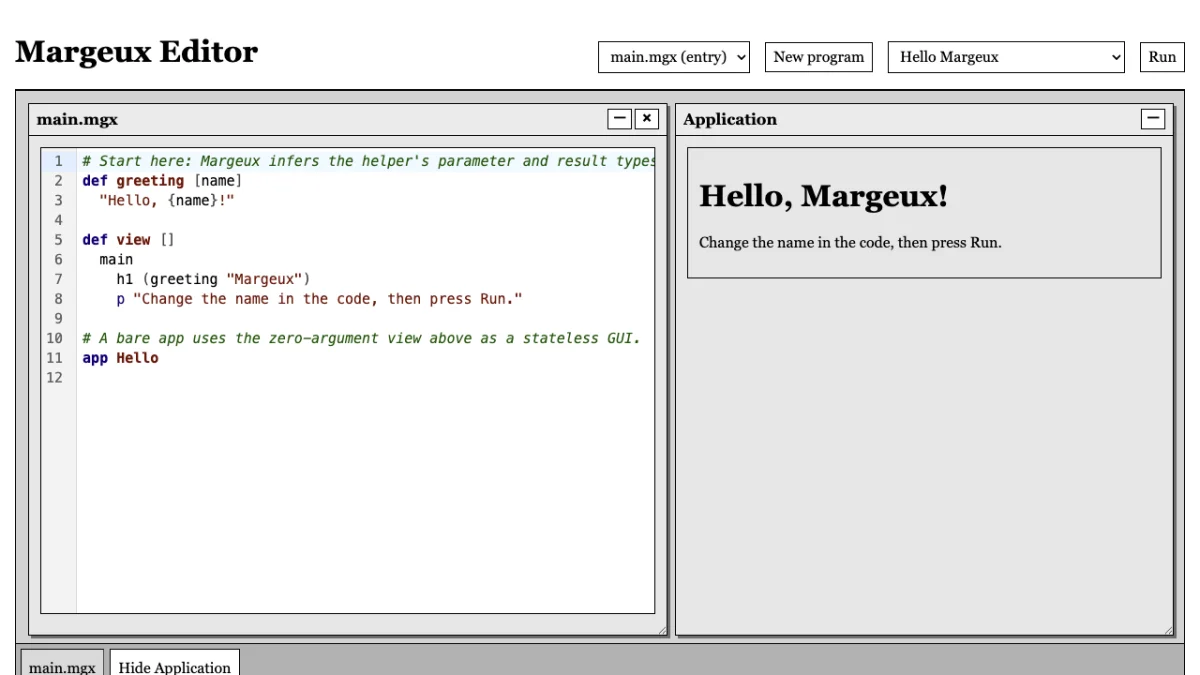
The browser build is the same Go VM compiled to WebAssembly, so the preview in that screenshot runs the identical engine you get from the tarball. The same site hosts a Snake clone, a guitar booklet, GridMaster 5000, and a demo that runs the original Windows release of ReBirth 338 through Wine compiled to WebAssembly.
Outside the browser, margeux render turns any GUI or TUI program into a single HTML file with the markup inlined. Rendering the starter hello.mgx produced a 267-byte document, which is the point: the output is small enough to email.
The standard library
Twenty-nine modules ship with the language, all readable as Margeux source under stdlib/:
serverfor HTTP routing, responses, cookies, and middlewaredatabaseandstoragefor SQLite-backed persistencellmfor calling language modelsanimation,grid,ui,tui, andfontsfor interface workray3dandvec3for three-dimensional mathaudio,archive,cli,process, andsourcefor media, archives, and toolingmath,random,sort,strings,dicts,vectors, andtimefor everyday work
What to watch for
The biggest gap has nothing to do with the language. There is no license file anywhere in the SDK and no public source repository, so the terms for using Margeux in anything commercial are simply unstated. If you are picking it up to build on, that is the first thing to raise with the author.
The docs are also slightly out of sync with the binary. The SDK README header says version 0.1.1 while the build page, the archive name, and margeux version all report 0.1.0. The language tour points at two documents, PHASE0_SYNTAX.md and TYPE_SYSTEM_BOUNDARIES.md, that are not in the archive, and its own run instructions assume a Go checkout that the SDK does not ship.
Native desktop apps depend on the Tcl/Tk that comes with the operating system, which on Linux means installing a separate tk package. Terminal programs and the browser runtime do not need it, but “no dependencies” has an asterisk if you want desktop windows.
Finally, the traction is small. The language launch thread on Hacker News in October got 5 points, the GridMaster 5000 game got 2, and this week’s ReBirth 338 browser demo got 17. The code itself is in better shape than those numbers suggest. The shipped example suite runs 124 tests and all of them pass, but with a version number this low and no published license, expect the details to move.
Source and Accuracy Notes
- Project page: https://margeux.com (verified via direct visit)
- SDK downloads and SHA-256 checksums: https://margeux.com/build/
- Browser editor: https://margeux.com/studio.html (verified via direct visit)
- Language tour and specs ship inside the SDK under
docs/ - HN thread for the ReBirth 338 browser demo: https://news.ycombinator.com/item?id=50348740 (posted November 3, 2026, 17 points)
- HN thread for the language itself: https://news.ycombinator.com/item?id=50007837 (posted October 8, 2026, 5 points)
- No public source repository and no license file at time of writing
- Verified locally on macOS (Apple Silicon): downloaded the darwin-arm64 archive, matched its SHA-256 against the published checksum, then ran
margeux check,margeux run,margeux new,margeux render, and the example test suite
Related Posts
ai-setup
Recall – Persistent Memory for Claude Code via MCP Hooks
Recall gives Claude Code a permanent memory store that survives session restarts and context compaction. Four hooks capture and restore context automatically — with cloud SaaS or self-hosted options.
2/28/2026
dev-tools
Automotive Skills Suite for AI Engineering
Evaluate Automotive Skills Suite for APQP, ASPICE, HARA, safety-plan, and DIA workflows with setup notes, governance risks, and SME review guidance.
5/28/2026
dev-tools
awesome-agentic-ai-zh Roadmap Guide
Explore awesome-agentic-ai-zh as a Chinese agentic AI learning roadmap, with setup notes, track selection, study workflow, and evaluation guidance.
5/28/2026