MarbleOS: a desktop board for AI agent work
MarbleOS runs AI agents as cards on a desktop board instead of chat threads: visible tools, parallel jobs, and finished spreadsheets or decks you can open.

TL;DR: MarbleOS is a desktop app that runs AI agents as cards on a board rather than chat threads. Each card states the plan in plain language, lists the tools it expects to use, and several jobs can run side by side. The finished work arrives as a real file, and the MarbleOS preview lets you click through a demo workspace without installing anything.
What it is
MarbleOS is a desktop app for macOS and Windows, built by Akilan and Miguel, who post as the creators of MarbleOS. The demo page calls it “A GUI for AI Agents” and sums up the pitch as “A workspace with visible files, tools, tasks, and outputs, not buried in chat threads”.
The main surface is a workspace rather than a transcript. Every job you delegate becomes a card, cards sit next to each other and run at the same time, and each card carries a plain-language statement of what the agent intends to do along with the icons of the tools it expects to reach for. Two panels sit to the right of the board: a TOOLS palette showing the services the agent can call, and a FILES list showing what it has produced.
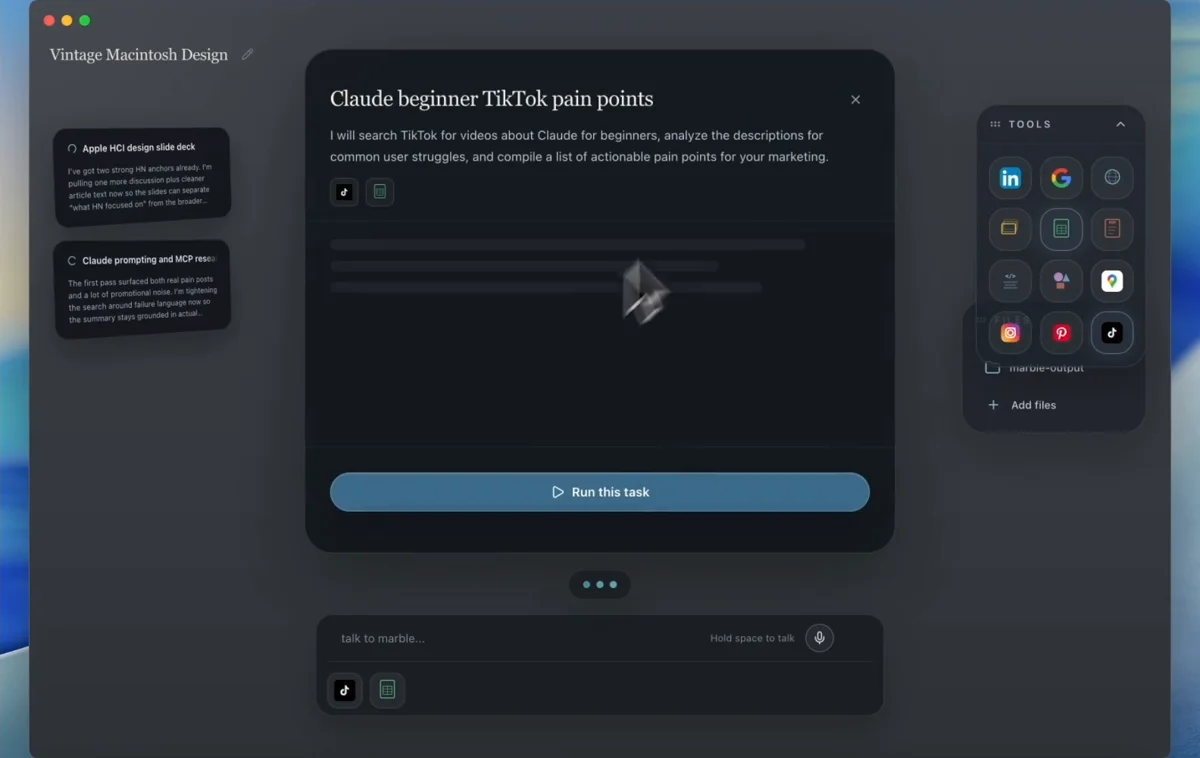
Underneath the board is still a text box. You type a request, and holding a key switches it to voice. The point is not to replace the prompt, it is to get rid of the chat scrollback.
Why it matters
The design argument starts at Xerox PARC. Before the 1984 Macintosh, driving a computer meant remembering commands, paths and parameter order. The GUI did not create new capabilities so much as make the existing ones visible, which meant you could point at things instead of recalling them. Akilan and Miguel make the case that AI is still sitting at that command-line stage. The syntax has moved from strict grammar to natural language, but the shape has not: a tool call like /skill-name [param1] [param2] still depends on recall, because you have to know which capabilities exist and how to spell them. Command-line flags became tools, skills and context, and the discovery problem moved rather than disappeared.
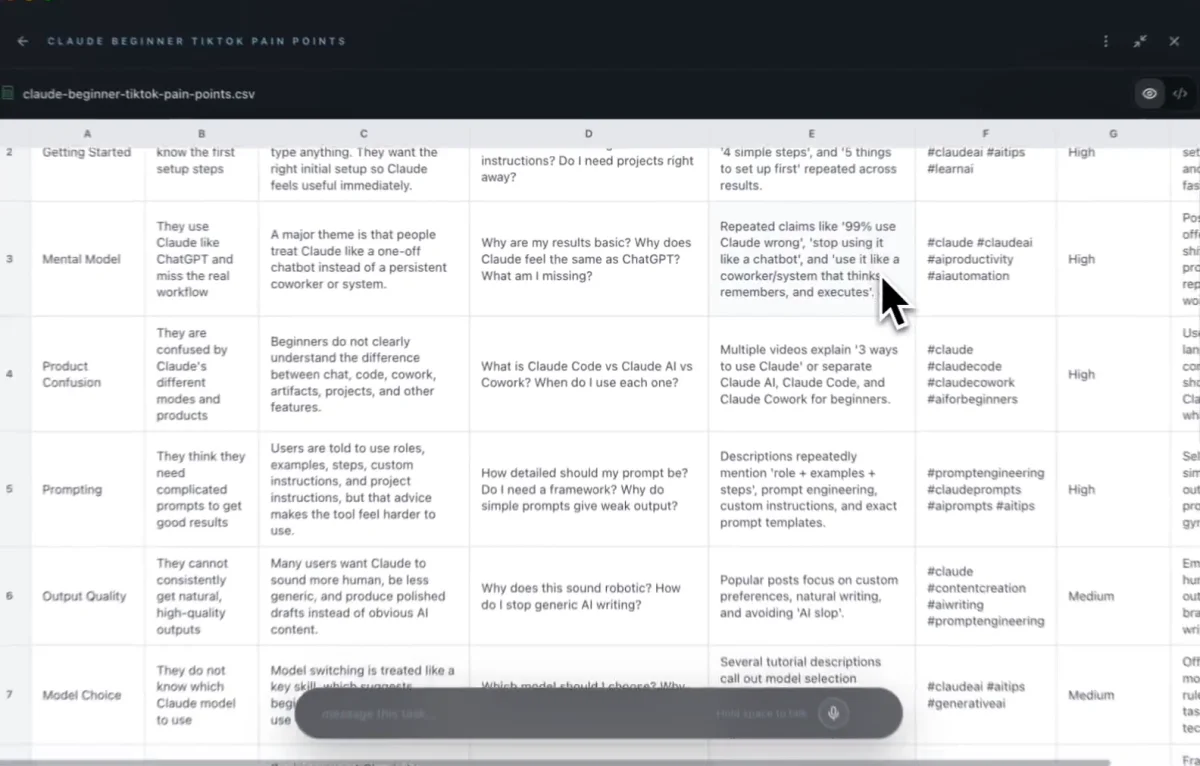
The second half of the argument is about output. A chat reply is a transcript, and a transcript has to be reread, copied and pasted somewhere else before it becomes useful. MarbleOS pushes toward a file instead. In the launch demo, a research task about Claude beginners on TikTok lands as a CSV with columns for category, pain point, what beginners struggle with, common questions, recurring TikTok signals, sample hashtags and frequency.
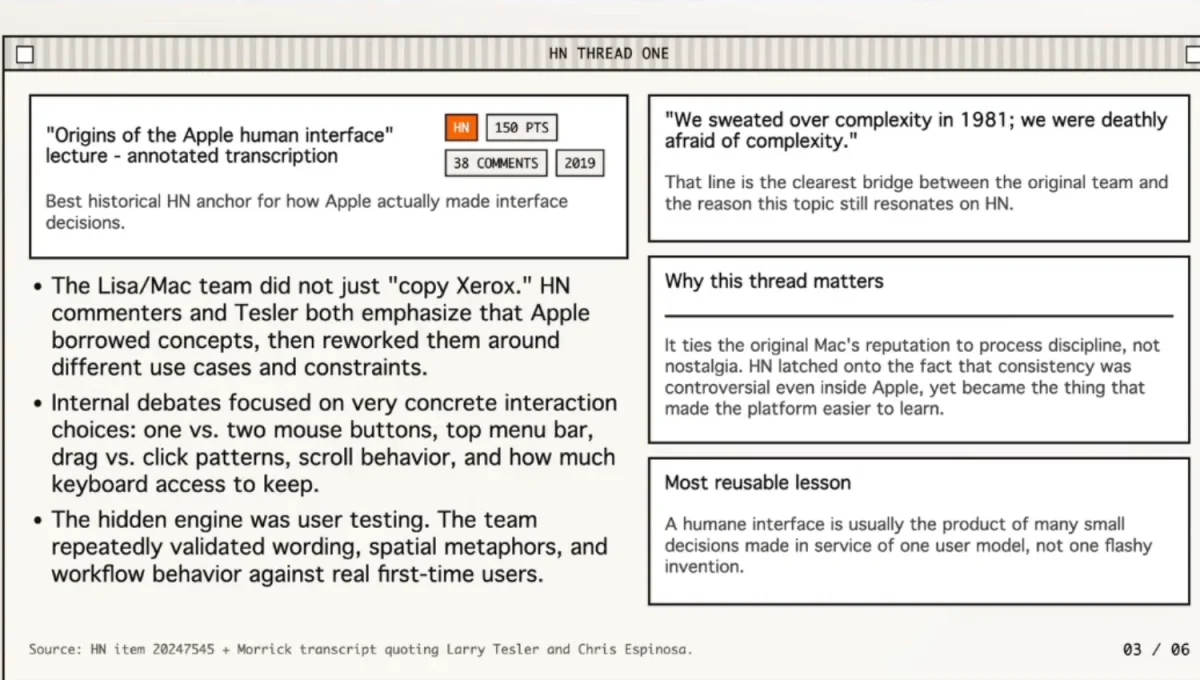
A third task produces a deck whose page 03 annotates a real Hacker News thread, including why that thread matters and the most reusable lesson from it. That is a working document, not a summary of one.
Miguel’s follow-up post, The Discovery Problem, published on September 3, 2026, puts the commercial framing on it. The bottleneck to AI adoption is not intelligence, it is discovery: you cannot write a prompt for a capability you have never seen. His metaphor is an ant at the bottom of the Grand Canyon, where the whole sky is a thin sliver of blue between two walls. Marble’s answer is a catalogue of 16 short demo clips on the learn page, plus suggested tasks offered in the composer. A representative selection:
- Find 18 leads from LinkedIn
- Research a competitor in 90 seconds
- Turn messy notes into today’s task list
- Prepare for tomorrow’s client meeting
- Find people talking about a problem you solve
- Schedule a daily standup brief
- Create a weekly follow-up reminder
- Personalize a pitch deck for a new audience
Getting it running
The install is a plain desktop download.
open https://marbleos.com/downloadsThe page serves a file called MarbleOS-latest.dmg and gives three instructions: open your Downloads folder, double-click the disk image, and wait for it to launch. Windows is supported too, and the pricing page states that MarbleOS is available on macOS and Windows.
You sign in with an email address. The privacy policy, last updated on April 26, 2026, says an account stores your email, authentication credentials and preferences. The app sends anonymous crash reports and basic usage metrics such as version, operating system and feature events, and says explicitly that these do not include the contents of your files. The service providers are Supabase for database and authentication, Google Cloud Storage for installer downloads, and Vercel for the website. There are no ads, no sale of personal data, and no cross-site advertising trackers.
If you would rather not install anything, there is an interactive preview in the browser at marbleos.com/try. It runs a demo workspace with three tasks and the files each one produced:
Research nearby coffee shop competitors
Turn customer interviews into priorities
Find 25 local partnership leads

coffee-shop-landscape.md
customer-priorities.md
partnership-leads.csv
Cards narrate as they run. One from the launch demo reads:
Apple HCI design slide deck

I've got two strong HN anchors already. I'm pulling one more discussion plus clearer
article text now so the slides can separate "what HN focused on" from the browser
design history I read from the brief.
What it costs
| Plan | Price | Messages per month | Premium tool uses per month |
|---|---|---|---|
| Free | $0 | 15 | 3 |
| Pro | $20 per month, 14-day free trial | 275 | 75 |
The gap between the two tiers is wide enough that the free plan reads as a demo rather than a working tier. If you want to run the kind of multi-step research task shown in the launch video, you will run out of premium tool uses on day one.
What to watch for
The interface bet is unresolved, and the HN thread is worth reading in full because the objections are sharp. One commenter argued that the terminal and the Mac GUI are deterministic, since clicking an icon does exactly what the icon says, while agent workflows differ from person to person, which makes a fixed desktop metaphor a poor fit. Another compared the approach to Microsoft’s OLE and OpenDoc, noting that composite-document ideas had been tried before. The founders answered that the workspace already shows every card at a glance and that a graph view, where tasks interact with one another, is a direction they want to explore.
The product has also shifted since launch. The HN thread from July 31, 2026 argues the case for a GUI for AI agents. The page you land on today sells something closer to a board of widgets that pull from LinkedIn, Reddit, Shopify and email, with example boards for finding clients, running a small shop and planning a trip. Both are the same app, but the agent-workspace argument lives in the linked article and the demo video rather than on the homepage.
There is no public repository and no self-hosting path. Third-party integrations run through Composio, and the TOOLS palette shows the services the agent can reach: Google, Reddit, LinkedIn, TikTok, Pinterest and Instagram alongside Google Docs, Google Sheets, a browser and a code runner. Your requests and results leave the machine by design.
Smaller things worth knowing. The demo videos on the learn page were reported as broken in Safari and Chrome, and as unplayable on iPhone. Akilan replied that some had been fixed, so the page may still be inconsistent depending on when you load it. The pricing page lists only Free and Pro, with no documented API or CLI, and the account is tied to a waiting list for anything beyond the free tier.
Source and Accuracy Notes
- Product site: https://marbleos.com (verified via direct visit)
- Interactive preview: https://marbleos.com/try (verified via direct visit)
- Demo catalogue: https://marbleos.com/learn (verified via direct visit)
- Launch article: https://marbleos.com/blog/what-should-the-gui-for-ai-agents-look-like (Akilan and Miguel, July 31, 2026)
- Follow-up article: https://marbleos.com/blog/the-discovery-problem (Miguel, September 3, 2026)
- Pricing: https://marbleos.com/pricing (Free and Pro limits, verified via direct visit)
- Privacy policy: https://marbleos.com/privacy (last updated April 26, 2026)
- Launch video: https://marbleos.com/videos/marble-demo-hn.mp4 (source of the screenshots above)
- HN launch thread: https://news.ycombinator.com/item?id=49119274 (139 points, 85 comments, July 31, 2026)
Related Posts
dev-tools
awesome-agentic-ai-zh Roadmap Guide
Explore awesome-agentic-ai-zh as a Chinese agentic AI learning roadmap, with setup notes, track selection, study workflow, and evaluation guidance.
5/28/2026
dev-tools
Photo-agents Setup and Privacy Guide
Evaluate Photo-agents for image-agent workflows, including license keys, Python isolation, sample-image testing, metadata checks, and batch safety.
5/28/2026
dev-tools
AgentMesh – Define AI Agent Teams in YAML
Define multi-agent AI workflows in YAML and run them locally with one command. AgentMesh brings Docker Compose patterns to AI agent orchestration.
5/28/2026