TL;DR
TL;DR: Mainline is a project management tool that replaces backlogs and story points with a shared story map, flow metrics, and a pairing matrix — plus a free GitHub CI monitor app.
Source and Accuracy Notes
- Project page: mainline.dev ← visited and verified
- Live demo: mainline.dev/demo ← no sign-up required
- GitHub App: github.com/apps/mainline-ci-monitor
- HN launch thread: news.ycombinator.com/item?id=48122837
What Is Mainline?
Most project management tools are built for any team. Mainline is built specifically for software teams that ship continuously.
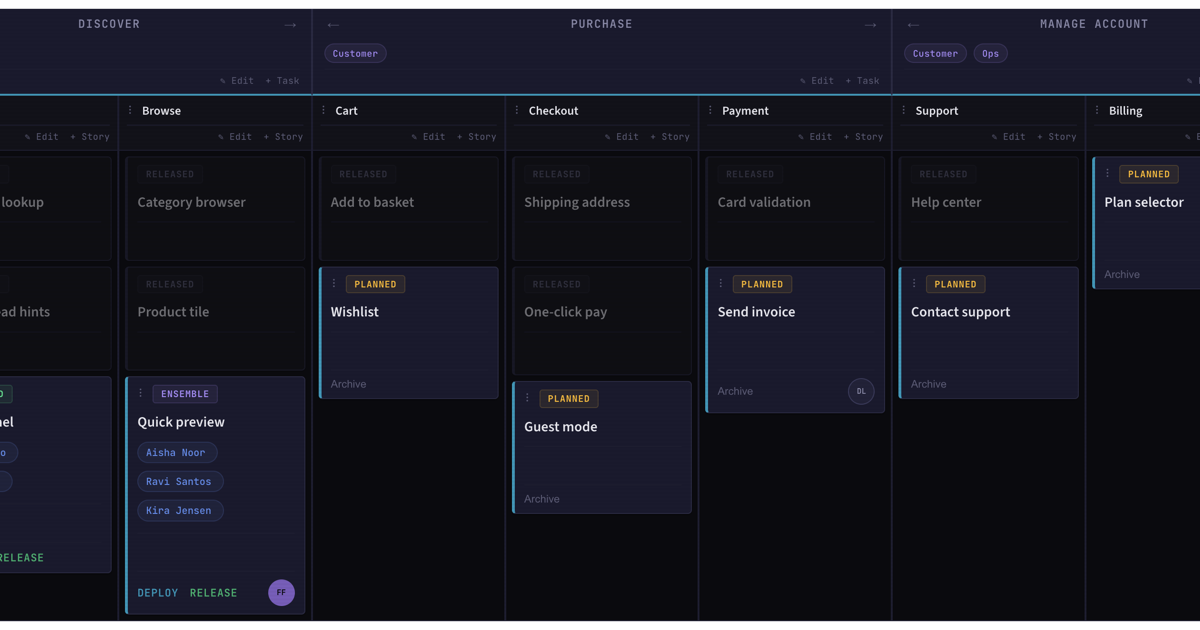
Instead of a backlog, you get a story map — a shared visual board where work is organised by user goals rather than individual tasks. Instead of story points, you get flow metrics that measure how work moves through the team, not how fast individual engineers complete tickets.
The core differentiating features:
- Story map — horizontal axis is the user journey/goal, vertical axis is priority. Work is mapped geographically, not filed in a list.
- Flow metrics — tracks cycle time and work-in-progress across the whole team. No per-person velocity charts.
- Pairing matrix — shows which engineers have collaborated recently and where pairs are getting stale. Designed to surface knowledge silos before they become crises.
- CI Monitor (free GitHub App) — installs in minutes, shows branch age and CI status across all repos without any paid plan required.
The tagline on the site:
“No backlog, no story points, no individual metrics.”
Pricing is straightforward:
- Free forever for one person
- Teams: 14 days free, no credit card required
- No lock-in mentioned on the landing page
Setup Workflow
Step 1: Try the Demo
No account needed. Head to mainline.dev/demo and explore a working story map, flow metrics, and pairing data immediately.
Step 2: Install the CI Monitor (Free)
The CI Monitor is a free GitHub App available without a paid plan:
- Visit github.com/apps/mainline-ci-monitor
- Click Install
- Select which repositories to monitor
- The app posts branch age and CI status directly into your Mainline workspace
This is the most accessible entry point — teams can start using it today without changing how they plan work.
Step 3: Create Your Workspace
- Sign up at mainline.dev
- Build your first story map by adding rows for user goals and columns for delivery stages
- Import existing issues from GitHub if you have a working project there
Step 4: Invite Your Team
Team plans come with a 14-day trial. Invite engineers to the workspace and start mapping work collaboratively.
How It Compares
| Feature | Mainline | Jira | Linear |
|---|---|---|---|
| Backlog | No | Yes | Yes |
| Story points | No | Optional | Yes |
| Individual velocity | No | Yes | Yes |
| Story map | Yes | No | No |
| Pairing matrix | Yes | No | No |
| Free CI monitor | Yes | No | No |
| Per person cost | Free / TBD | varies | $8/mo |
The positioning is explicit on the site: “The best sprint tool. Mainline is for teams who chose not to run sprints.”
Deeper Analysis
What Mainline Gets Right
The pairing matrix is the most interesting feature. Knowledge silos in engineering teams are usually discovered reactively — someone leaves and their code becomes unreadable. Mainline makes this visible in a heatmap: days since each engineer last paired with each other. Teams with high WIP and low pairing get flagged before the incident happens.
Flow metrics over velocity is the right philosophical bet. Story points are notoriously inconsistent across teams and tend to reward individuals who sandbag estimates. Flow metrics (cycle time, WIP, throughput) measure the system, not the person.
The CI Monitor Alone Is Worth It
Most teams cobble together branch age visibility with custom scripts or paid tools. Mainline’s CI Monitor GitHub App is genuinely free and gives you this out of the box. For that reason alone, installing it is a low-risk experiment even if you keep your current tool for everything else.
Limitations
- No mobile app visible on the landing page — likely web-only for now
- Story map approach requires team buy-in; it is not a drop-in Jira replacement
- Pricing for teams beyond the trial is not publicly listed (need to request a demo)
Practical Evaluation Checklist
- Open mainline.dev/demo — no account needed
- Install the Mainline CI Monitor on one repo
- Map one existing feature as a row on the story map
- Check the pairing matrix after a sprint — look for cold cells
- Compare flow metrics to your current velocity chart
Security Notes
The CI Monitor GitHub App requires read access to repository code and commit metadata. It does not require write access. Review the permissions before installing on private repos.
FAQ
Q: Does Mainline replace Jira or Linear? A: Partially. It replaces the sprint planning and backlog views, but is designed to complement CI/CD workflows rather than replace issue tracking entirely. Teams keep GitHub Issues or Jira for bug tracking while using Mainline for roadmap-level visibility.
Q: Is the CI Monitor really free? A: Yes. The GitHub App is free and does not require a paid Mainline subscription to function.
Q: How does the story map work? A: Rows represent user goals or features; columns represent delivery stages. Work items live in the grid cells rather than in a flat list. Moving left-to-right tracks progress toward a goal rather than individual task completion.
Q: Can I import existing projects? A: The site does not specify import integrations. GitHub integration is confirmed; other tools would need verification from the team directly.
Conclusion
Mainline makes a specific bet: that the backlog-and-sprint model is the wrong abstraction for continuous-delivery teams. The story map + flow metrics + pairing matrix trio targets a real pain — invisible knowledge silos and metrics that incentivise individual heroics over sustainable team flow.
The free CI Monitor GitHub App is the best on-ramp: install it today, get branch age visibility across your repos, and decide later whether the story map fits your team.
Try it: mainline.dev/demo (no sign-up required) Install CI Monitor: github.com/apps/mainline-ci-monitor
Related Posts
ai-setup
Recall – Persistent Memory for Claude Code via MCP Hooks
Recall gives Claude Code a permanent memory store that survives session restarts and context compaction. Four hooks capture and restore context automatically — with cloud SaaS or self-hosted options.
2/28/2026
dev-tools
Automotive Skills Suite for AI Engineering
Evaluate Automotive Skills Suite for APQP, ASPICE, HARA, safety-plan, and DIA workflows with setup notes, governance risks, and SME review guidance.
5/28/2026
dev-tools
awesome-agentic-ai-zh Roadmap Guide
Explore awesome-agentic-ai-zh as a Chinese agentic AI learning roadmap, with setup notes, track selection, study workflow, and evaluation guidance.
5/28/2026