TL;DR
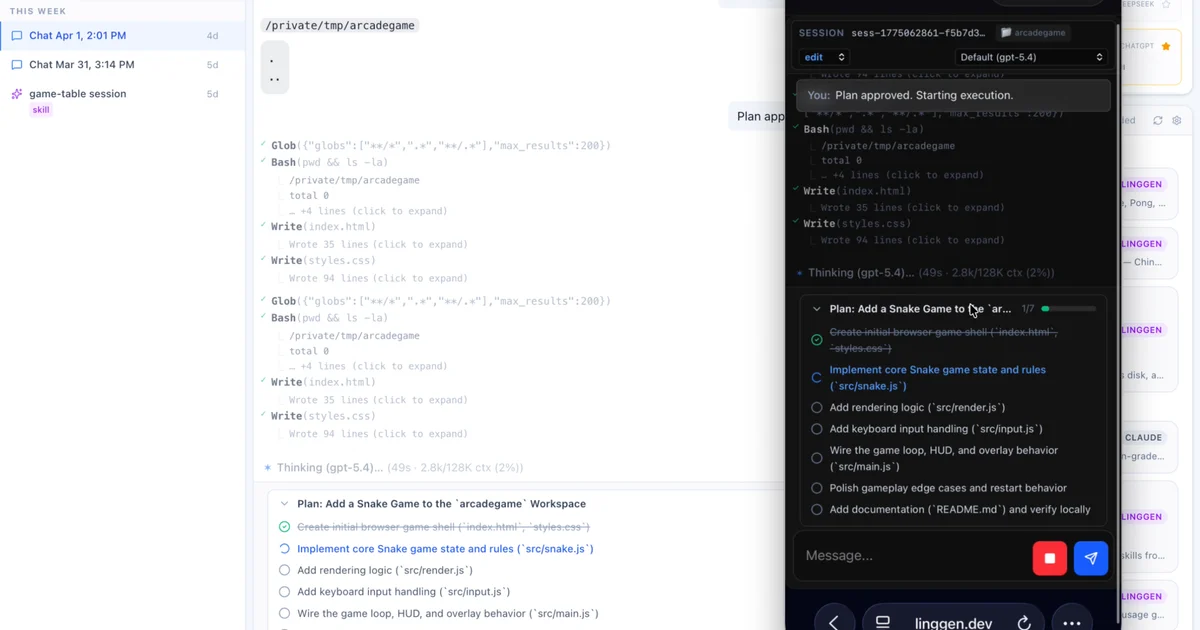
TL;DR: Linggen is an open-source local-first AI agent runtime for macOS and Linux that ships with productivity apps (personal CFO, Mac health checker, DJ) and lets you add new agents by dropping markdown files into a folder.
Source and Accuracy Notes
- Project page: linggen.dev — visited and verified
- Source repository: github.com/linggen/linggen — README read end-to-end
- License: Apache 2.0 (verified via
LICENSEfile onmainbranch) - HN launch thread: news.ycombinator.com/item?id=47696666
What Is Linggen?
Linggen is an open-source agent runtime built with Rust that runs entirely on your machine. Instead of a single chatbot, it ships as a platform — a core engine that manages agent processes, memory, and communication, with productivity apps (called “apps” or “agents”) layered on top as markdown + scripts.
The core runtime gives every app:
- A dedicated process and execution loop
- Built-in syscall-like tools (file read/write, browser control, X/Twitter reads)
- A memory store (markdown + LanceDB RAG via
ling-mem) - Permission modes (chat / read / edit / admin) and path scoping
- P2P networking for remote access and model sharing
New apps are added by dropping a markdown file into ~/.linggen/ — no restart, no code changes. Skills follow the open Agent Skills standard and are also compatible with Claude Code and Codex.
Setup Workflow
Prerequisites
- macOS or Linux -curl for the install script
- Optional: Ollama, Claude, GPT, Gemini, DeepSeek, or any OpenAI-compatible API key for model access
Step 1: Install the Engine
The engine ships as a CLI + web UI. Install with:
curl -fsSL https://linggen.dev/install.sh | bash
ling
```bash

This opens the web UI at `http://localhost:9527`.

### Step 2: Install the Mac App (Optional)

For a full macOS launcher with a menubar companion:

```bash
curl -fsSL https://linggen.dev/install-app.sh | bash
```bash

### Step 3: Configure a Model Provider

Linggen is model-agnostic. On first launch, connect your preferred provider:

- **Local:** Ollama (default on first run)
- **Cloud:** Claude, GPT, Gemini, DeepSeek, Groq, OpenRouter

Routing policies (`local-first`, `cloud-first`, or custom) control which model handles each request.

### Step 4: Try a Built-in App

The platform ships with several ready-to-run apps:

- **CFO** — personal finance tracker. Drop in bank CSV or PDF exports; the AI reviews them locally, flags duplicate charges, and builds a spend report. Account numbers are stripped before the model sees any data.
- **Mac Shifu** — AI health analyst for your Mac. Checks disk, security, performance, and dormant apps.
- **DJ** — mood-based music curator. Builds a local library, syncs to your phone, and runs karaoke with synced translated lyrics.
- **Pulse** — GTM assistant for solo founders. Reads configured trends and drafts posts for X and Reddit.
- **Memory** — cross-agent semantic memory via `ling-mem`, accessible from Linggen, Claude Code, or Codex.

### Step 5: Add a Custom Agent

Drop a markdown file into `~/.linggen/`:

```markdown
---
name: reviewer
description: Code review specialist.
tools: ["Read", "Glob", "Grep"]
model: claude-sonnet-5
---

You review code for bugs, style issues, and security vulnerabilities.
```bash

The agent is available immediately with no restart needed.

## MCP Server

Linggen exposes an MCP server at `http://127.0.0.1:9527/mcp` with 22 tools across four groups:

- `memory_*` — cross-host RAG memory via `ling-mem`
- `browser_*` — drives one visible Chrome tab with per-site permission prompts
- `x_*` — structured reads from your logged-in X session
- `agent_run` — hands a task to a local Linggen agent and retrieves its answer

For Claude Code or Codex, install the plugin:

```bash
claude plugin marketplace add linggen/linggen-memory
claude plugin install linggen@linggen-memory
```bash

## Remote Access

```bash
ling login
```bash

Then open `linggen.dev/app` from any browser. A P2P-encrypted tunnel connects back to your machine — no VPN or port forwarding required. The `linggen.dev` relay only handles signaling; chat content does not pass through it.

## Deeper Analysis

**Architecture comparison:**

| OS concept | Linggen equivalent |
|:---|:---|
| Process | One running agent loop |
| Interrupt | User message queue, checked each iteration |
| Thread / Fork | Subagent delegation with concurrent execution |
| Syscall | Built-in tool calls (the kernel API) |
| Dynamic library | Skill — loaded at runtime, no code changes |
| Cron job | Mission — scheduled agent or script |
| Driver | Model provider (Ollama, Claude, GPT, Gemini, etc.) |
| Filesystem | Memory store — markdown + LanceDB RAG |
| Network share | Rooms — P2P WebRTC model sharing |

**P2P model sharing** is a notable differentiator. Instead of routing model traffic through a cloud service, you can open a "room" and let peers use your locally-running models over WebRTC data channels. The room owner controls budget and available tools.

**Skills compatibility** with Agent Skills standard means a skill written for Linggen also works in Claude Code and Codex, reducing lock-in.

## Practical Evaluation Checklist

- [ ] Engine starts with `ling` and web UI loads at localhost:9527
- [ ] Built-in CFO app parses a CSV bank statement without uploading it
- [ ] Custom agent drops into `~/.linggen/` and appears without restart
- [ ] MCP server responds to a probe at `http://127.0.0.1:9527/mcp`
- [ ] `ling login` creates a remote access link at `linggen.dev/app`
- [ ] Routing policy switch changes which model handles a request

## Security Notes

- Data stays local by default — CFO strips account numbers before the model sees any figures
- P2P traffic is end-to-end encrypted via WebRTC data channels
- The `linggen.dev` relay acts only as a signaling server; it does not see message content
- Permission modes (`chat`, `read`, `edit`, `admin`) and path scoping limit what each agent can access
- Remote access requires explicit `ling login` — no open ports by default

## FAQ

**Q: Does Linggen require an internet connection?**
**A:** No. The engine, all bundled apps, and local models (via Ollama) run entirely offline. Internet is only needed for cloud model API calls and the optional P2P signaling relay.

**Q: Which models does it support?**
**A:** Any OpenAI-compatible API — Ollama, Claude, GPT, Gemini, DeepSeek, Groq, OpenRouter. Routing policies let you prefer local or cloud per-request.

**Q: How is this different from a single AI assistant?**
**A:** Linggen is a platform that runs multiple concurrent agents with different permissions and tool access. A "CFO agent" with file read access and a "DJ agent" with music library access are separate processes with separate privileges, not a single chatbot with a system prompt.

**Q: Can I use Linggen from Claude Code?**
**A:** Yes. The `linggen-memory` plugin for Claude Code bundles per-turn memory recall and installs both binaries on first session start.

**Q: What is Yinyue?**
**A:** Yinyue is a VRM avatar and conversational companion built into the runtime. She acts as a relay between agents and the user — heralding agent completions, carrying "approve" commands back from the user, and enabling inter-agent messaging through a chat interface.

## Conclusion

Linggen fills a gap between single-purpose AI tools and full cloud agent platforms. By running entirely on your machine with a drop-in app model, it makes local AI agents practical for everyday workflows — personal finance review, Mac health monitoring, music curation — without sending data to the cloud. The MCP server and Agent Skills compatibility make it a solid back-end for developers who want local inference with cross-tool reach.

If you want a local AI runtime that grows with your needs and keeps data on your machine, Linggen is worth a weekend experiment.
Related Posts
ai-setup
Recall – Persistent Memory for Claude Code via MCP Hooks
Recall gives Claude Code a permanent memory store that survives session restarts and context compaction. Four hooks capture and restore context automatically — with cloud SaaS or self-hosted options.
2/28/2026
dev-tools
Baguette iOS Simulator Automation Guide
Set up Baguette for iOS Simulator automation, web dashboards, device farms, gesture input, streaming, and camera testing with Xcode caveats.
5/28/2026
dev-tools
Dulus Terminal Agent Setup Guide
Set up Dulus as a terminal AI agent with native and Docker paths, installer profiles, WebChat ports, repo safety checks, and shell-access risks.
5/28/2026