Line9 – Mermaid Rendering Engine With Its Own Layout
Line9 is a rendering engine for Mermaid diagrams that keeps the same syntax but replaces the layout algorithm with one built for readability. Free web editor and CLI.
TL;DR
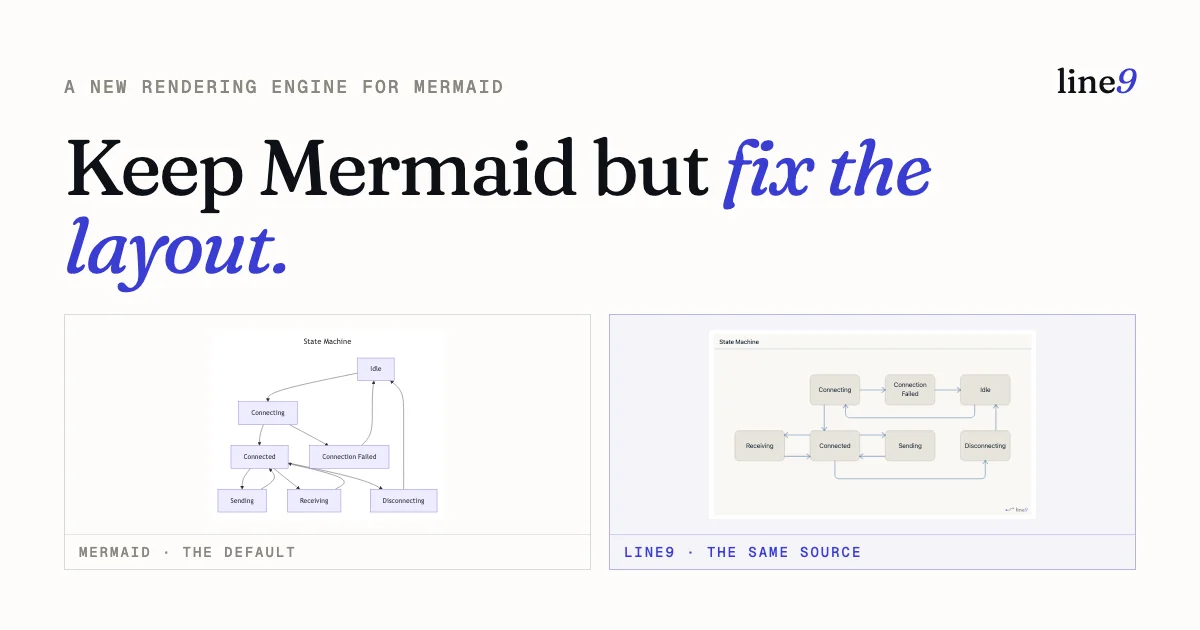
TL;DR: Line9 renders Mermaid diagrams with a purpose-built layout engine instead of Mermaid’s default — same source syntax, dramatically cleaner output, with a free web editor and CLI.
Source and Accuracy Notes
- Project page: line9.ai ← verified live, HTTP 200
- Source repository: github.com/line9-ai/line9-cli ← verified, README read in full
- License: Proprietary (commercial product; no open-source license file in the repo; free tier available)
- HN launch thread: news.ycombinator.com/item?id=44725306 ← 87 points, Show HN
What Is Line9?
Line9 is a rendering engine for Mermaid diagrams. It accepts the same Mermaid syntax — flowchart, sequence, state, and other diagram types — but runs them through a layout engine built from scratch instead of Mermaid’s default pipeline. The result is diagrams that fit on a page, stay readable, and do not require hand-tuning in a GUI editor.
The project launched on Hacker News in August 2026 as a Show HN post and ships as a free web editor at line9.ai/diagram plus a CLI for local rendering and CI integration.
Core product claims (verified from source)
- Same Mermaid syntax — no migration or markup changes required
- Layout engine — uses Mermaid’s own parser to read the source, then discards Mermaid’s rendering pipeline and lays the diagram out from scratch
- Supported types — flowcharts (full Line9 layout engine today); sequence diagrams next; other valid Mermaid types render via Mermaid’s own output with a badge
- Free tier — web viewer requires no account; CLI is free for personal use with watermarked exports
- Pro tier — $24/seat/month (or $12 for early adopters); adds commercial-use CLI, watermark removal, private workspace, permanent share URLs
- Local-first CLI — renders through a transient local server; nothing is uploaded unless you explicitly publish
- AI agent integration —
line9 bootstrapwires the CLI into Claude Code and Codex so an agent can callline9 renderand open the diagram in a browser tab
Setup Workflow
Option 1 — Web editor (no install)
Open line9.ai/diagram, paste your Mermaid, and the render appears in seconds. No account required.
Option 2 — CLI install
macOS and Linux via Homebrew:
brew install line9-ai/line9/line9
```bash

**One-liner install (macOS, Linux, Windows):**

```bash
curl -fsSL https://line9.ai/install.sh | sh
```bash

**Manual download:**

Pre-built binaries for all platforms are on the [GitHub releases page](https://github.com/line9-ai/line9-cli/releases/latest):

| Platform | Asset |
|---|---|
| macOS Apple Silicon | `line9-<tag>-aarch64-apple-darwin.tar.gz` |
| macOS Intel | `line9-<tag>-x86_64-apple-darwin.tar.gz` |
| Linux x86_64 | `line9-<tag>-x86_64-unknown-linux-musl.tar.gz` |
| Linux arm64 | `line9-<tag>-aarch64-unknown-linux-musl.tar.gz` |
| Windows | `line9-<tag>-x86_64-pc-windows-msvc.zip` |

Verify the release tag is `cli-v1.0.0` (the initial release as of this writing).

### Step 1: Render a local diagram

```bash
# Render a .mmd file and open in browser
line9 render my-diagram.mmd
```bash

The CLI starts a transient local server and opens the rendered diagram in your default browser. Nothing is uploaded to Line9's cloud unless you explicitly publish.

### Step 2: Wire into Claude Code or Codex

```bash
line9 bootstrap
```bash

This wires the `line9 render` command into Claude Code and Codex so your AI agent knows to use it when writing Mermaid diagrams. The agent writes Mermaid as usual, calls `line9 render`, and the diagram opens in a browser tab, updating live as the agent iterates.

### Step 3: Publish a diagram (optional)

```bash
line9 publish my-diagram.mmd
Published diagrams get a shareable URL. Free tier includes URL-hash sharing; Pro tier adds permanent share URLs and watermark removal.
Deeper Analysis
Why Line9 exists
Mermaid is the de facto standard for AI-generated diagrams. Every major LLM can output it, and tools like Claude Code, Codex, and Cursor use it as their native diagram language. The problem is Mermaid’s layout algorithm — it produces diagrams that are technically correct but practically unusable: long spaghetti flows, excessive whitespace, nodes crammed into corners.
Line9 solves this by treating Mermaid as a parsed AST rather than a rendering target. It uses Mermaid’s own parser to read the diagram, then applies its own layout engine for placement, edge routing, and typography. The output looks like something designed by a human who cared about the reader.
What you actually get
The free tier is genuinely useful:
- Full web editor with live preview — paste Mermaid, get a rendered diagram immediately
- CLI with local rendering — nothing leaves your machine on free
- SVG and PNG export — watermarked on free, clean on Pro
- No account required for the web editor
The Pro tier at $24/seat/month is aimed at teams that want the CLI in CI pipelines or commercial workflows, plus workspace features for sharing diagrams across a team.
Limitations to know
- Sequence diagrams are not yet supported with the Line9 layout engine (they render via Mermaid’s own output with a badge noting the fallback)
- Other Mermaid types (Gantt, ER diagrams, etc.) also fall back to Mermaid’s renderer
- Only flowcharts get the full Line9 treatment today
- The CLI is a thin wrapper around a local web renderer — it is not a static renderer, you need a browser tab open to see output
- No self-hosted option; everything runs through Line9’s infrastructure for published diagrams
Practical Evaluation Checklist
- Same Mermaid source renders with visibly better layout than mermaid.live
- Web editor loads in under 3 seconds with a moderate diagram
- CLI
line9 renderopens a browser tab locally with no network call line9 bootstrapcorrectly modifies Claude Code config- SVG export produces clean, scalable output
- Published share URLs work without authentication
Security Notes
- Local rendering is truly local — the CLI starts a local server, renders client-side, and sends nothing to Line9’s cloud unless you explicitly call
line9 publish - No telemetry on free tier — confirmed on the product site: no usage data sent
- Published diagrams are stored in Line9’s cloud and can be removed by the user
- SBOM available — each release includes a CycloneDX SBOM and SHA256 checksums for the binaries
FAQ
Q: Do I have to change my Mermaid at all?
A: No. Line9 reads the exact same Mermaid syntax you already write. You paste your .mmd into the editor or point the CLI at it and get a better render.
Q: Is this just a different color scheme, or is the layout actually different? A: It is a different layout engine. Line9 uses Mermaid’s parser to read your source, then discards Mermaid’s rendering pipeline entirely and lays the diagram out from scratch — placement, edge routing, and typography. Re-styling cannot fix a bad layout; re-laying it out can.
Q: Is Line9 free? A: The web viewer is free with no signup, and the CLI is free for personal use (watermarked exports). Pro is $24/seat/month (or $12 for early adopters) and adds commercial-use CLI, watermark removal, private workspace, and permanent share URLs.
Q: Does my diagram leave my machine?
A: Not when rendering locally. The CLI renders through a transient local server — nothing is uploaded unless you explicitly call line9 publish. The cloud only ever holds diagrams you choose to publish.
Q: Which diagram types are supported? A: Flowcharts get the full Line9 layout engine today. Sequence diagrams are next. Any other valid Mermaid diagram still renders through Mermaid’s own output with a clear badge, so every diagram you already have works from day one.
Q: How does it work with AI agents?
A: Your agent writes Mermaid as usual, then calls line9 render; the diagram opens in a browser tab and updates live as the agent iterates. line9 bootstrap wires it into Claude Code and Codex so the agent knows to use it without any additional configuration.
Conclusion
Line9 solves the most practical problem with Mermaid-generated diagrams: the output looks like it was laid out by a 2012 algorithm. It keeps Mermaid’s ecosystem advantage — every AI tool speaks it, no migration needed — while replacing the renderer with something that produces shareable, readable diagrams.
The free tier is sufficient for individual use: the web editor needs no account, the CLI renders locally with no telemetry, and SVG export works. Pro at $24/seat is reasonable for teams using the CLI in agent and CI workflows.
If your agent produces Mermaid diagrams and you find yourself constantly hand-fixing them in draw.io, Line9 is worth 60 seconds of install time.
Project page: line9.ai CLI releases: github.com/line9-ai/line9-cli/releases
Related Posts
ai-setup
Recall – Persistent Memory for Claude Code via MCP Hooks
Recall gives Claude Code a permanent memory store that survives session restarts and context compaction. Four hooks capture and restore context automatically — with cloud SaaS or self-hosted options.
2/28/2026
dev-tools
Automotive Skills Suite for AI Engineering
Evaluate Automotive Skills Suite for APQP, ASPICE, HARA, safety-plan, and DIA workflows with setup notes, governance risks, and SME review guidance.
5/28/2026
dev-tools
awesome-agentic-ai-zh Roadmap Guide
Explore awesome-agentic-ai-zh as a Chinese agentic AI learning roadmap, with setup notes, track selection, study workflow, and evaluation guidance.
5/28/2026