Keel Studio – Prompt to production backend in 2 minutes
Define data models, actions, and permissions in a schema. Keel generates REST and GraphQL APIs, manages the database, and produces an internal ops Console — no backend code to write.
TL;DR
TL;DR: Keel Studio lets you define your entire backend schema — models, actions, permissions, and workflows — then automatically generates REST/GraphQL APIs, manages the database, and produces an internal operations Console for your team.
Source and Accuracy Notes
- Project page: keel.so/studio
- Documentation: docs.keel.so
- HN launch thread: news.ycombinator.com/item?id=40644384
What Is Keel Studio?
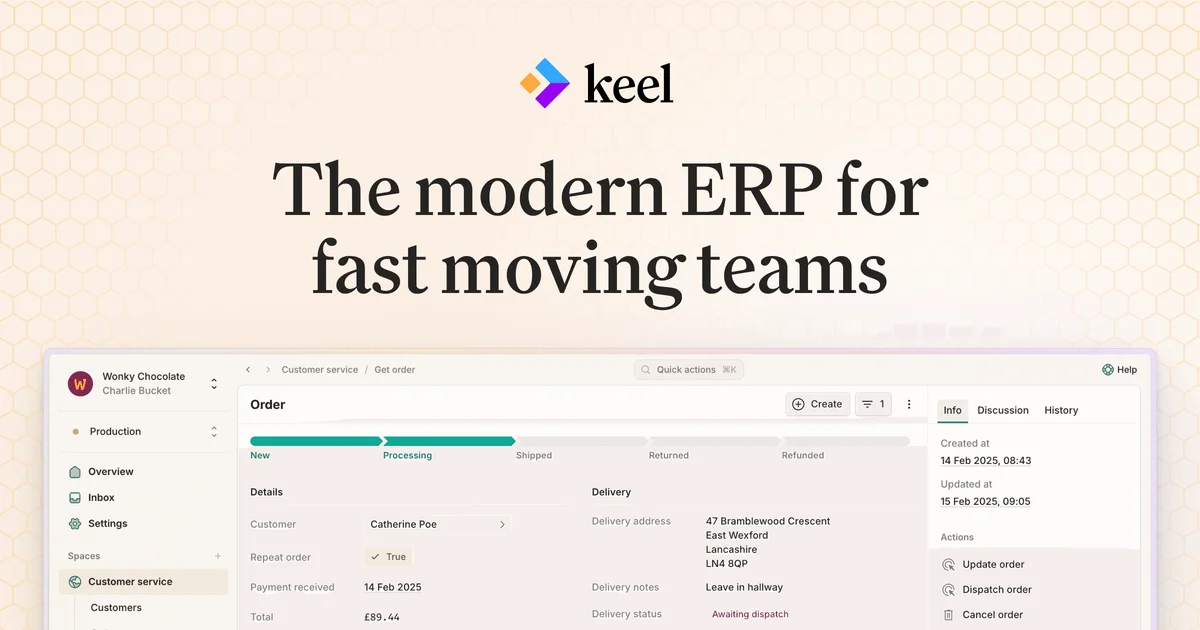
Keel Studio is a backend platform that treats your schema as the single source of truth. Instead of writing separate API endpoints, database migrations, auth handlers, and internal tools, you define everything in one declarative schema file. Keel then generates the full stack underneath.
The product sits at the intersection of a backend framework and an internal tools platform. The schema generates both the public API (consumed by your frontend or external integrations) and the internal Console that your ops team uses day-to-day.
From the official docs:
“Keel is a modern ERP platform for building flexible operational systems. Define your data models, business logic, and permissions in a schema. Keel generates APIs, manages your database, and provides powerful internal tools for your whole team to use every day.”
Core primitives
Models — define your data structure with typed fields.
model Order {
  fields {
    customer Customer
    items OrderItem[]
    total Decimal @computed(SUM(order.items.price))
    status Status @default(Status.Pending)
  }
}
```bash

**Actions** — each action becomes a REST and GraphQL endpoint automatically. The built-in set covers the standard CRUD pattern:

```keel
actions {
  get getOrder(id)
  list listOrders(customer.id?, status?) @orderBy(createdAt: desc)
  create createOrder() with (customer.id, items.product.id, items.quantity)
  update updateOrderStatus(id) with (status)
  delete deleteOrder(id)
}
```bash

**Permissions** — attach role-based or expression-based rules directly to actions. A customer can only see their own orders; staff can see everything.

```keel
@permission(roles: [Staff], actions: [get, list, create, update, delete])
@permission(expression: order.customer.identity == ctx.identity, actions: [get, list])
```bash

**Console** — Keel auto-generates an internal web UI from your schema. Your customer support team gets a read-to-use Order lookup. Warehouse staff gets shipment processing tools. No separate admin panel to build.

**Flows** — for multi-step workflows that combine human input with background processing (goods receiving, returns, approval chains).

## Setup Workflow

### Step 1: Define your schema

Create a `schema.keel` file in your project. The [Quickstart guide](https://docs.keel.so/quickstart) walks through building a minimal working app in 10 minutes.

### Step 2: Generate and deploy

Keel CLI deploys the schema and provisions the database, API gateway, and Console. The deployment target is serverless infrastructure managed by Keel.

### Step 3: Use the generated client

Keel generates type-safe client libraries from the schema. Use them in your frontend or integrations:

```typescript
// Auto-generated from schema
const orders = await client.orders.list({ status: 'Pending' });
Deeper Analysis
What it does differently
The typical pattern for internal tooling is to build a backend API first, then bolt on an admin UI. Keel inverts this — the schema drives both simultaneously. This means:
- The API and the internal Console always stay in sync. Add a field to the model, it appears in the API and in the Console automatically.
- Permissions are enforced at the schema level, so the API and the Console share the same access rules.
- No ORM migrations to manage separately — the schema is the migration.
What it does not do
Keel is not a general-purpose backend framework for arbitrary business logic. Complex custom code goes into Functions (Keel’s custom code hooks), but the platform is optimized for data-driven ops workflows rather than compute-heavy processing.
Workflow vs. traditional backend
| Concern | Traditional approach | Keel Studio |
|---|---|---|
| API endpoints | Hand-written | Auto-generated from schema |
| Database | Manual migrations | Managed by schema |
| Internal tools | Separate admin panel project | Auto-generated Console |
| Permissions | Code-based | Declarative in schema |
| Type-safe client | Manually maintained | Auto-generated |
Practical Evaluation Checklist
- Define a model with fields, actions, and permissions in
schema.keel - Run
keel deployand verify the API is live - Confirm the Console reflects the schema accurately
- Test permission enforcement — a customer-scoped token should not access other customers’ records
- Check Flow execution for a multi-step workflow
- Review generated GraphQL and REST endpoints in the API explorer
Security Notes
Permissions in Keel are enforced at the API layer, not in application code. The schema-based model means permission rules are auditable in one place — no scattered if (user.isAdmin()) checks. However, as with any BaaS platform, review the generated permission rules carefully and test boundary conditions (edge cases in row-level security expressions) before going to production.
FAQ
Q: Is there a self-hosted option? A: The current product is cloud-hosted (Keel manages the infrastructure). For self-hosted needs, the documentation does not currently describe an on-premises deployment path.
Q: What languages can I use on the frontend? A: Keel generates type-safe clients for TypeScript/JavaScript. Other languages can consume the raw REST or GraphQL endpoints directly.
Q: How does Keel handle database migrations? A: The schema is the source of truth. Changing the schema triggers a managed migration in Keel’s infrastructure — you do not write raw SQL migration files.
Q: Does Keel support custom business logic? A: Yes, through Functions — custom code hooks that can run before/after actions or as standalone serverless functions. These are defined in the schema alongside models and actions.
Q: What is the pricing model? A: Pricing details are available at keel.so/pricing. The product targets operations teams (e-commerce, logistics, wholesale), not hobbyist projects.
Conclusion
Keel Studio addresses the double-write problem in internal tooling — where your API and your admin panel drift over time. By making the schema the single source of truth, it keeps both in sync automatically. For teams building operational systems (orders, inventory, fulfillment) without a separate admin panel budget, it is worth evaluating against the traditional stack of Express + React Admin or similar combinations.
The workflow is particularly strong for teams that need both a public API and an internal Console backed by the same data model and permissions. The trade-off is locking into Keel’s managed infrastructure and schema DSL rather than a general-purpose backend framework.
Related Posts
ai-setup
Recall – Persistent Memory for Claude Code via MCP Hooks
Recall gives Claude Code a permanent memory store that survives session restarts and context compaction. Four hooks capture and restore context automatically — with cloud SaaS or self-hosted options.
2/28/2026
dev-tools
Automotive Skills Suite for AI Engineering
Evaluate Automotive Skills Suite for APQP, ASPICE, HARA, safety-plan, and DIA workflows with setup notes, governance risks, and SME review guidance.
5/28/2026
dev-tools
awesome-agentic-ai-zh Roadmap Guide
Explore awesome-agentic-ai-zh as a Chinese agentic AI learning roadmap, with setup notes, track selection, study workflow, and evaluation guidance.
5/28/2026