KaibanJS - JavaScript Framework for Multi-Agent Systems
KaibanJS is an MIT-licensed JavaScript framework for building and orchestrating multi-agent AI systems with a Kanban-style visual board. 1.4k stars on GitHub.
TL;DR
TL;DR: KaibanJS brings Kanban-style task management to AI agents — define agents, tasks, and teams in plain JavaScript, then watch them collaborate on a real-time visual board.
What Is KaibanJS?
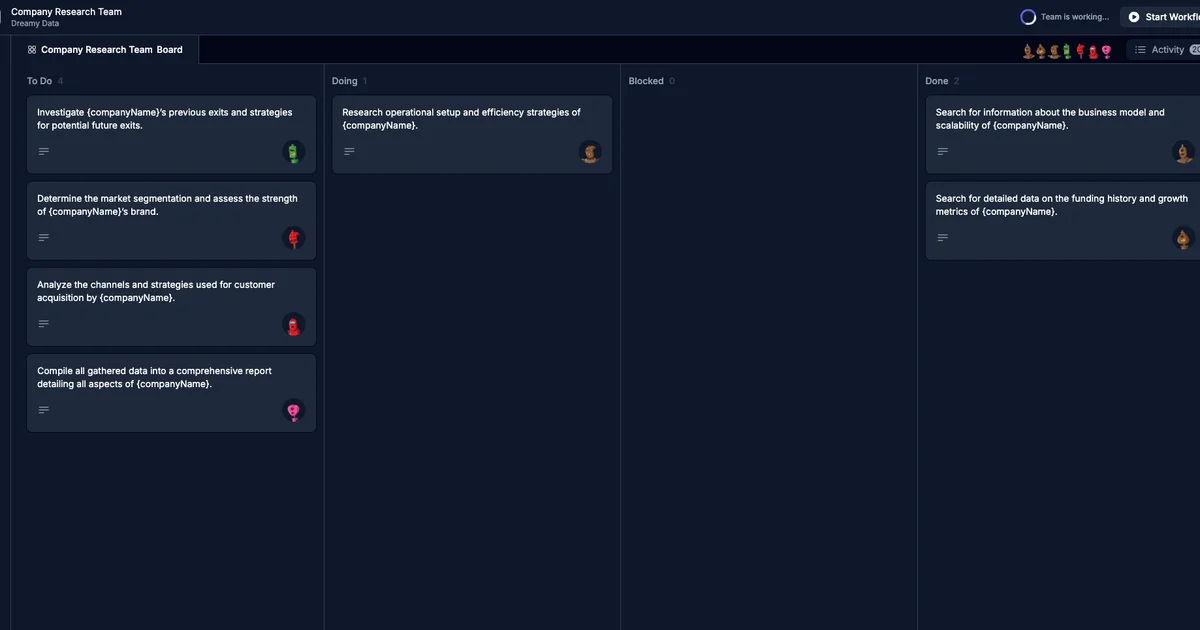
KaibanJS is a JavaScript-native framework for building multi-agent systems. Inspired by the Kanban methodology (think Trello or Jira), it maps AI agent workflows onto a board where tasks move through stages as agents work on them.
The framework is open-source under the MIT license and sits at approximately 1,465 GitHub stars. It integrates with OpenAI via environment variables and runs entirely in-process — no external database or backend required.
Source and Accuracy Notes
- Project page: kaibanjs.com
- Source repository: github.com/kaiban-ai/kaibanjs
- License: MIT (verified via GitHub API
license.spdx_id) - HN launch thread: news.ycombinator.com/item?id=41776476
- npm: npmjs.com/package/kaibanjs
Setup Workflow
Step 1: Install
npm install kaibanjs
```bash

Or use the project initializer:

```bash
npx kaibanjs@latest init
```bash

### Step 2: Configure your API key

Add your OpenAI key to a `.env` file:

```bash
VITE_OPENAI_API_KEY=your-openai-api-key
```bash

### Step 3: Define agents, tasks, and a team

```js
import { Agent, Task, Team } from 'kaibanjs';

// Define an agent
const researchAgent = new Agent({
  name: 'Researcher',
  role: 'Information Gatherer',
  goal: 'Find relevant information on a given topic',
});

// Create a task
const researchTask = new Task({
  description: 'Research recent AI developments',
  agent: researchAgent,
});

// Set up a team
const team = new Team({
  name: 'AI Research Team',
  agents: [researchAgent],
  tasks: [researchTask],
  env: { OPENAI_API_KEY: process.env.OPENAI_API_KEY },
});

// Start the workflow
team.start().then((output) => {
  console.log('Workflow completed:', output.result);
});
```bash

### Step 4: Run and visualize

```bash
npm run kaiban
This opens a visual board showing agents and their tasks moving through stages in real time.
Key Concepts
Agent — A named AI worker with a role and goal. Agents are the actors in your workflow.
Task — A unit of work assigned to an agent. Tasks progress through Kanban columns (To Do, In Progress, Done).
Team — A collection of agents and tasks with shared configuration including the API key.
Kanban Board — The built-in UI for visualizing agent progress. Available at localhost:3000 when running via npm run kaiban, or embeddable in React and Node.js projects.
Integration Options
The framework supports three usage modes:
- Standalone board — run
npx kaibanjs@latest initfor a full browser-based board with no custom code required - React integration — import the board component into an existing React app
- Node.js script — use Agent, Task, and Team classes directly in a backend script with no UI
Practical Evaluation Checklist
- Install via npm: yes
- OpenAI API key required: yes
- Self-hostable: yes (runs locally, no external backend)
- MIT license: confirmed
- Visual board included: yes
- Multi-agent orchestration: yes
- Real-time task tracking: yes
FAQ
Q: Does KaibanJS support models other than OpenAI?
A: The current version targets OpenAI models. The env config on the Team class accepts any OPENAI_API_KEY compatible endpoint.
Q: Is a database required? A: No. KaibanJS runs entirely in-process. State lives in memory during execution.
Q: Can I use this in an existing React project? A: Yes. Install via npm and import the Team and Agent classes directly, or use the included board component.
Q: How does it compare to LangChain.js? A: KaibanJS is narrower in scope — focused specifically on multi-agent task orchestration with a visual Kanban interface. LangChain.js is a broader LLM application framework. The two are complementary rather than interchangeable.
Conclusion
KaibanJS offers a clean, JavaScript-native way to build multi-agent workflows with real-time visualization. Its Kanban-inspired model makes agent pipelines easy to reason about, and the MIT license means you can embed it freely in commercial projects. If you want to prototype or run multi-agent systems without wiring up LangChain from scratch, it is worth a look.
Install it with npx kaibanjs@latest init or npm install kaibanjs and explore the board in under five minutes.
Related Posts
ai-setup
Recall – Persistent Memory for Claude Code via MCP Hooks
Recall gives Claude Code a permanent memory store that survives session restarts and context compaction. Four hooks capture and restore context automatically — with cloud SaaS or self-hosted options.
2/28/2026
dev-tools
Automotive Skills Suite for AI Engineering
Evaluate Automotive Skills Suite for APQP, ASPICE, HARA, safety-plan, and DIA workflows with setup notes, governance risks, and SME review guidance.
5/28/2026
dev-tools
awesome-agentic-ai-zh Roadmap Guide
Explore awesome-agentic-ai-zh as a Chinese agentic AI learning roadmap, with setup notes, track selection, study workflow, and evaluation guidance.
5/28/2026