HyprMCP Jetski – MCP Analytics Gateway
HyprMCP Jetski adds prompt analytics, auto-generated setup instructions, and OAuth2 auth to any MCP server with zero code changes. Open source, Go-based, Kubernetes-ready.
TL;DR
TL;DR: Jetski is an open-source MCP analytics and auth platform that sits in front of any MCP server — capturing prompt-level usage data, generating client setup instructions automatically, and adding OAuth2 authentication without touching your server code.
Source and Accuracy Notes
All claims verified against the actual project repository and documentation.
- Project page: hyprmcp.com
- Source repository: github.com/hyprmcp/jetski
- License: MIT (verified via README license badge)
- HN launch thread: news.ycombinator.com/item?id=45521788
- Docs: hyprmcp.com/docs
What Is Jetski?
Jetski is part of the HyprMCP platform — a suite of open-source MCP infrastructure tools. The Jetski component specifically handles the analytics and authentication layer for MCP servers.
The core problem it solves: when you ship an MCP server to other developers, you have no visibility into which prompts trigger which tools, you write auth from scratch every time, and your onboarding instructions become stale or incomplete. Jetski addresses all three by deploying an mcp-gateway proxy in front of your server.
MCP Client → Jetski/mcp-gateway → Your MCP Server
                ↓
         [Prompt analytics captured]
         [Auth handled here]
         [Setup instructions auto-generated]
```bash

The README frames it around three core problems:

1. **Installation and setup** — users churn trying to configure MCP clients manually
2. **Authentication** — every team re-implements the same auth patterns
3. **Analytics** — no insight into prompt flows, tool usage, or errors in production

## Architecture

Jetski is a split platform:

- **Go backend** — serves the API and gateway core
- **Angular frontend** — dashboard for analytics and configuration
- **Dex** — open-source identity platform (OAuth2 provider) for the auth flow
- **PostgreSQL** — primary data store
- **Redis** — caching layer
- **Docker Compose** — local development setup

A companion project, [`mcp-gateway`](https://github.com/hyprmcp/mcp-gateway), is the actual proxy that routes MCP traffic and emits the analytics events Jetski consumes.

## Setup Workflow

### Prerequisites

- [mise](https://mise.jdx.dev/) for dev environment management
- Docker and Docker Compose
- A running MCP server you want to instrument

### Step 1: Clone and Install

```bash
git clone https://github.com/hyprmcp/jetski.git
cd jetski
mise trust
mise install
pnpm i
cp .dex.secret.env.example .dex.secret.env
docker compose up -d
```bash

### Step 2: Add Host Entry

```bash
echo -e "\n127.0.0.1    host.minikube.internal\n" | sudo tee -a /etc/hosts
```bash

### Step 3: Start the Platform

In one terminal, start the backend:

```bash
mise run serve
```bash

In a second terminal, start the frontend:

```bash
pnpm run start
```bash

### Step 4: Generate Demo Data (Optional)

```bash
mise run generate
Production Deployment
For Kubernetes deployments, the HyprMCP stack is designed around metacontroller and can be deployed via Helm charts. The managed cloud option at app.hyprmcp.com handles this automatically.
Key Features
Prompt-Level Analytics
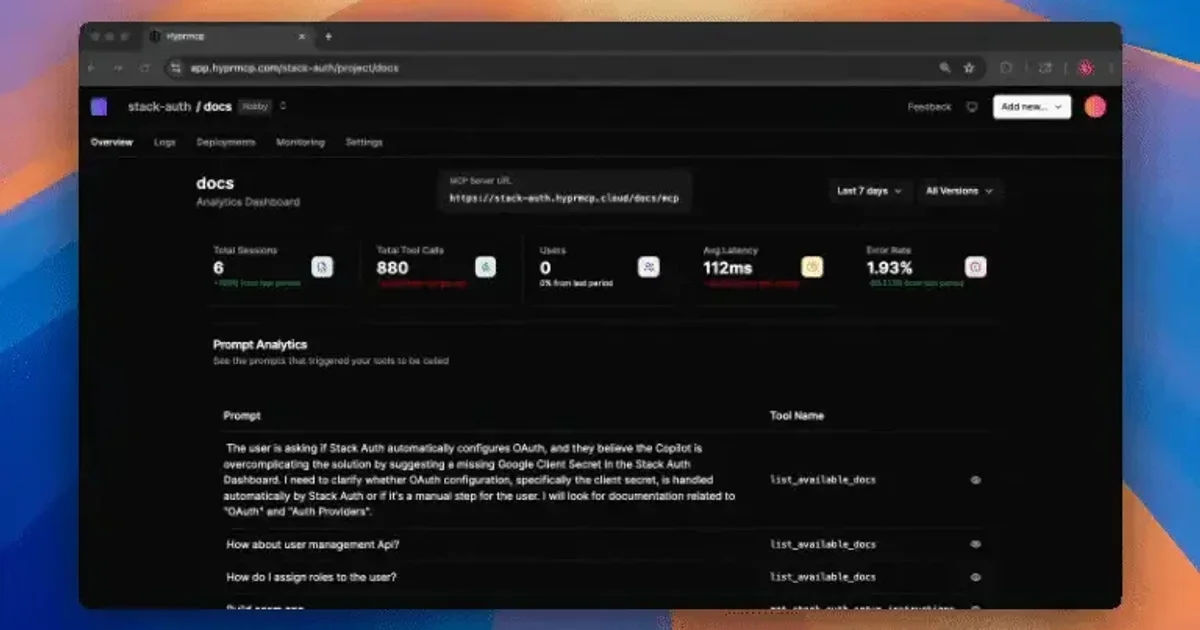
Every request that flows through the gateway is instrumented: which prompt triggered which tool, which client sent it, what the response was, and whether errors occurred. The dashboard gives you per-prompt visibility that the base MCP protocol does not provide.
Auto-Generated Setup Instructions
Jetski automatically generates step-by-step instructions for every supported MCP client. Instead of writing “here is how to configure Cursor / Claude Desktop / Claude Code to use your server,” you point users to a Jetski-generated page that knows what your server accepts.
Zero-Code Authentication
The gateway handles all OAuth2.1 and Dynamic Client Registration (DCR) logic. You get user identity and scoped tool access without adding a single auth function to your MCP server implementation.
Real-Time Debug Logs
Live request/response/error logs are streamed through the dashboard, making it straightforward to reproduce issues that users report.
Deeper Analysis
Jetski occupies an interesting niche: it is not an MCP server itself, nor a hosted AI platform — it is pure infrastructure for teams that build and distribute MCP servers. The 210 GitHub stars on a relatively young project suggests early-stage adoption among MCP server developers.
The tech stack (Go + Angular + Dex) is a deliberate choice: Go for the gateway because MCP servers are often written in Go, and Angular because the enterprise identity management space (where Dex lives) is heavily Angular-skewed. The Kubernetes-first deployment story reflects the target audience: platform engineering teams, not individual developers.
FAQ
Q: Does Jetski work with any MCP server? A: Yes, in principle. The gateway proxies the MCP protocol without requiring changes to the upstream server.
Q: Is this tied to a specific MCP client? A: No. Jetski generates setup instructions for multiple clients and the underlying gateway is client-agnostic.
Q: Does Jetski require Kubernetes? A: Not for local development — Docker Compose works fine. For production at scale, Kubernetes is the intended target.
Conclusion
Jetski solves the unsexy but critical problems around MCP server distribution: getting users connected, knowing whether they use what you built, and not re-implementing auth for the hundredth time. If you are building MCP servers for external users, the analytics alone justify the integration.
The project is actively developed (latest commit April 2026) and contributions are welcome via GitHub.
Related Posts
ai-setup
Recall – Persistent Memory for Claude Code via MCP Hooks
Recall gives Claude Code a permanent memory store that survives session restarts and context compaction. Four hooks capture and restore context automatically — with cloud SaaS or self-hosted options.
2/28/2026
dev-tools
Automotive Skills Suite for AI Engineering
Evaluate Automotive Skills Suite for APQP, ASPICE, HARA, safety-plan, and DIA workflows with setup notes, governance risks, and SME review guidance.
5/28/2026
dev-tools
awesome-agentic-ai-zh Roadmap Guide
Explore awesome-agentic-ai-zh as a Chinese agentic AI learning roadmap, with setup notes, track selection, study workflow, and evaluation guidance.
5/28/2026